
1. ഉൽപ്പന്നം കഴിഞ്ഞുview
The Optoma X400LVe is a professional XGA projector designed for classrooms, meeting rooms, and training spaces. It delivers bright, clear images with 4,000 ANSI lumens and a 25,000:1 contrast ratio. Key features include flexible installation options, an integrated speaker, and a long lamp ജീവിതം.
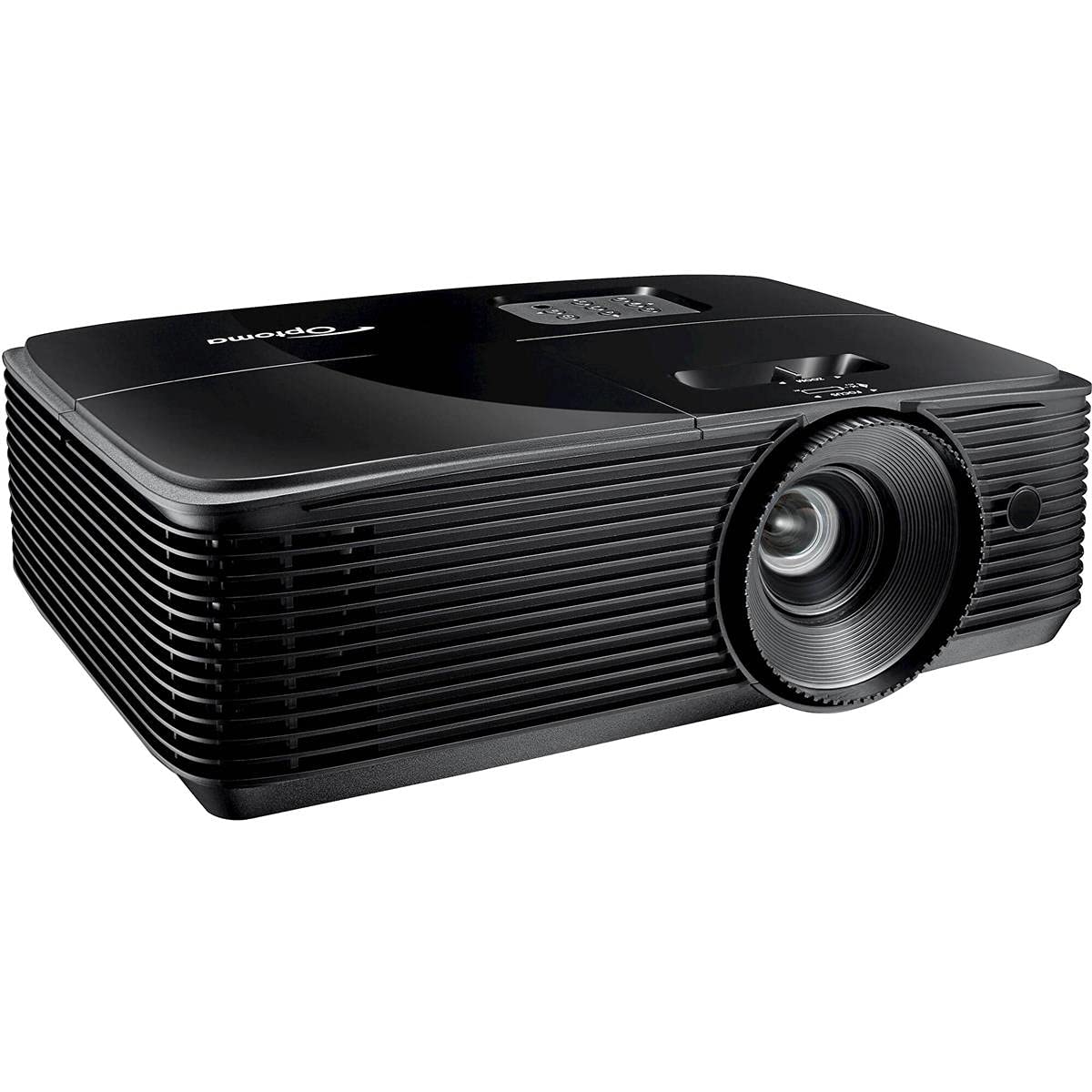
ചിത്രം 1: മുൻഭാഗം view of the Optoma X400LVe Projector.
പ്രധാന സവിശേഷതകൾ:
- ഉയർന്ന തെളിച്ചം: 4,000 ANSI lumens for clear images in well-lit environments.
- XGA റെസല്യൂഷൻ: Native 1024 x 768 resolution for sharp text and graphics.
- ഉയർന്ന ദൃശ്യതീവ്രത അനുപാതം: 25,000:1 for vibrant colors and deep blacks.
- ഫ്ലെക്സിബിൾ കണക്റ്റിവിറ്റി: HDMI v1.4a, VGA, Composite, Audio-in/out, USB-A, RS232.
- നീണ്ട എൽamp ജീവിതം: Up to 15,000 hours in Eco+ mode.
- ഇന്റഗ്രേറ്റഡ് സ്പീക്കർ: 10-watt speaker for audio without external equipment.
- എളുപ്പമുള്ള സജ്ജീകരണം: Vertical keystone correction (±40°) and 1.1x zoom for flexible placement.
2. സജ്ജീകരണവും ഇൻസ്റ്റാളേഷനും
2.1 Unpacking the Projector
Carefully remove the projector and all accessories from the packaging. Ensure all components listed in the packing list are present.
2.2 പ്രൊജക്ടർ പ്ലേസ്മെന്റ്
The Optoma X400LVe can be placed on a tabletop, mounted on the ceiling (front or rear projection), or used for front or rear projection. Consider the projection distance and screen size for optimal viewing.
- പ്രൊജക്ഷൻ ദൂരം: 3.9 feet to 46.9 feet.
- പ്രൊജക്ഷൻ സ്ക്രീൻ വലിപ്പം: 27.7 ഇഞ്ച് മുതൽ 304.4 ഇഞ്ച് വരെ.

Figure 2: Optoma X400LVe dimensions and connectivity ports.
2.3 ഉപകരണങ്ങൾ ബന്ധിപ്പിക്കുന്നു
Connect your source devices (laptops, media players, gaming consoles) to the projector using the appropriate ports. The projector offers a variety of input options:
- HDMI v1.4a: ഡിജിറ്റൽ വീഡിയോയ്ക്കും ഓഡിയോയ്ക്കും വേണ്ടി.
- VGA (Input & Output): അനലോഗ് വീഡിയോയ്ക്ക്.
- സംയോജിത വീഡിയോ: സ്റ്റാൻഡേർഡ് ഡെഫനിഷൻ വീഡിയോയ്ക്ക്.
- ഓഡിയോ-ഇൻ (3.5 മിമി): For external audio input.
- ഓഡിയോ-ഔട്ട് (3.5 മിമി): For connecting to external speakers.
- USB-A (5V / 1.0 Amp): For powering devices like streaming sticks.
- RS232: ഒരു കമ്പ്യൂട്ടർ അല്ലെങ്കിൽ നിയന്ത്രണ സംവിധാനം വഴിയുള്ള പ്രൊജക്ടർ നിയന്ത്രണത്തിനായി.

ചിത്രം 3: കണക്റ്റിവിറ്റി പോർട്ടുകളുള്ള പിൻ പാനൽ.
2.4 പവർ കണക്ഷൻ
Connect the power cord to the projector's AC input and then to a power outlet (AC input 100-240V, 50-60Hz).
3. പ്രൊജക്ടർ പ്രവർത്തിപ്പിക്കൽ
3.1 പവർ ഓൺ/ഓഫ്
- പവർ ഓൺ: Press the power button on the projector's control panel or the remote control.
- പവർ ഓഫ്: Press the power button twice. The projector will enter cooling mode before shutting down completely.

Figure 4: Projector control panel and lens adjustments.
3.2 ഇമേജ് അഡ്ജസ്റ്റ്മെന്റ്
- ഫോക്കസ്: ചിത്രം മൂർച്ചയുള്ളതാകുന്നതുവരെ ലെൻസിലെ ഫോക്കസ് റിംഗ് തിരിക്കുക.
- സൂം: ചിത്രത്തിന്റെ വലുപ്പം മാറ്റാൻ ലെൻസിലെ സൂം റിംഗ് ക്രമീകരിക്കുക.
- കീസ്റ്റോൺ തിരുത്തൽ: Use the 'Keystone+' and 'Keystone-' buttons on the remote control or the projector's control panel to correct vertical image distortion (±40°).
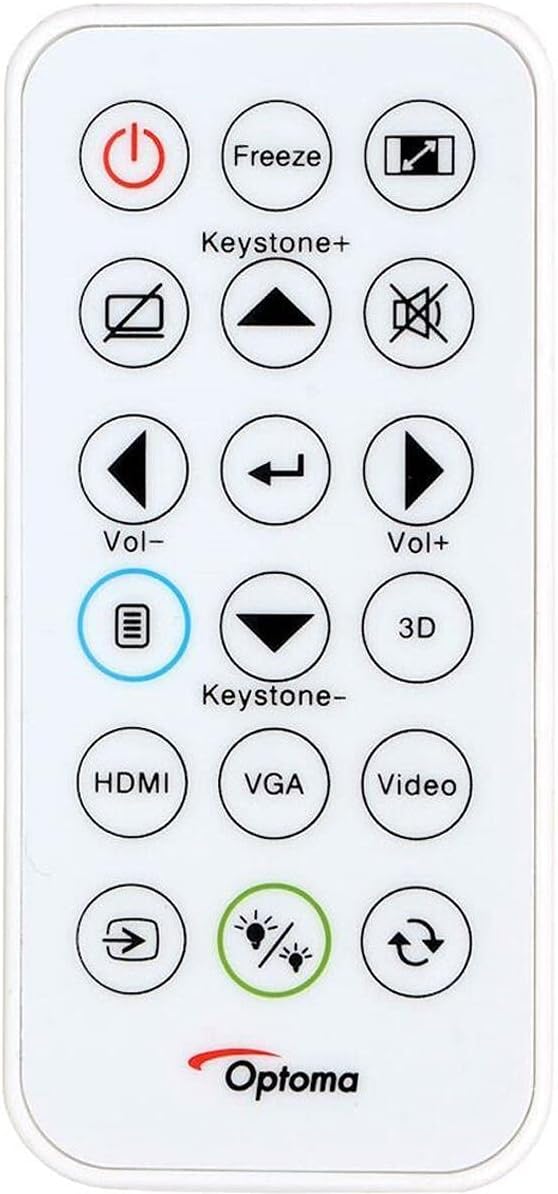
Figure 5: Remote control for the Optoma X400LVe Projector.
3.3 ഇൻപുട്ട് ഉറവിട തിരഞ്ഞെടുപ്പ്
Press the 'Source' button on the remote control or projector to cycle through available input sources (HDMI, VGA, Composite). Dedicated input buttons may also be available on the remote.
3.4 ഓഡിയോ നിയന്ത്രണം
Adjust the volume using the 'Vol+' and 'Vol-' buttons on the remote control. The integrated 10-watt speaker provides sufficient audio for most environments.
4. പരിപാലനം
4.1 എൽamp ജീവിതം
പ്രൊജക്ടർ എൽamp has an estimated life of up to 15,000 hours in Eco+ mode. Actual lamp life may vary depending on usage and environmental conditions. Replace the lamp when its brightness significantly diminishes or if the lamp ഇൻഡിക്കേറ്റർ ലൈറ്റ് പ്രകാശിക്കുന്നു.

Figure 6: Eco+ mode for extended lamp ജീവിതം.
4.2 വൃത്തിയാക്കൽ
- ലെൻസ്: Use a soft, lint-free cloth and lens cleaning solution. Avoid abrasive materials.
- Casing: പ്രൊജക്ടർ തുടയ്ക്കുക casinഗ്രാം വിത്ത് എ സോഫ്റ്റ്, ഡിamp തുണി. കഠിനമായ രാസവസ്തുക്കൾ ഉപയോഗിക്കരുത്.
- എയർ വെൻ്റുകൾ: ശരിയായ വായുസഞ്ചാരം ഉറപ്പാക്കാനും അമിതമായി ചൂടാകുന്നത് തടയാനും എയർ വെന്റുകൾ പതിവായി വൃത്തിയാക്കുക.
5. പ്രശ്നപരിഹാരം
5.1 ഇമേജ് പ്രദർശിപ്പിച്ചിട്ടില്ല
- പ്രൊജക്ടർ ഓണാക്കിയിട്ടുണ്ടെന്ന് ഉറപ്പാക്കുക, കൂടാതെ lamp കത്തിക്കുന്നു.
- ഇൻപുട്ട് ഉറവിടം ശരിയായി തിരഞ്ഞെടുത്തിട്ടുണ്ടെന്നും ഉറവിട ഉപകരണം സജീവമാണെന്നും ഉറപ്പാക്കുക.
- Check all cable connections between the projector and the source device.
- Adjust focus and zoom settings.
5.2 Image is Distorted or Blurry
- ലെൻസിലെ ഫോക്കസ് റിംഗ് ക്രമീകരിക്കുക.
- Use keystone correction to fix trapezoidal distortion.
- Ensure the projector is placed on a stable, flat surface or securely mounted.
5.3 Projector Overheating
- Ensure air vents are clear and not obstructed.
- നന്നായി വായുസഞ്ചാരമുള്ള സ്ഥലത്ത് പ്രൊജക്ടർ പ്രവർത്തിപ്പിക്കുക.
- If operating above 5,000 feet, manually switch to high-altitude mode (refer to the on-screen display menu).
5.4 ഓഡിയോ ഇല്ല
- പ്രൊജക്ടറിലും സോഴ്സ് ഉപകരണത്തിലും വോളിയം ലെവൽ പരിശോധിക്കുക.
- Ensure audio cables are correctly connected (if using analog audio-in).
- If using HDMI, verify the source device is sending audio through HDMI.
6 സാങ്കേതിക സവിശേഷതകൾ
| ഫീച്ചർ | സ്പെസിഫിക്കേഷൻ |
|---|---|
| ബ്രാൻഡ് | ഒപ്റ്റോമ |
| മോഡലിൻ്റെ പേര് | X400LV |
| ഡിസ്പ്ലേ ടെക്നോളജി | ഡി.എൽ.പി |
| നേറ്റീവ് റെസല്യൂഷൻ | XGA (1024 x 768) |
| പരമാവധി മിഴിവ് | UXGA (1600 x 1200) |
| തെളിച്ചം | 4000 ആൻസി ലുമെൻസ് |
| കോൺട്രാസ്റ്റ് റേഷ്യോ | 25,000:1 |
| വീക്ഷണാനുപാതം | 4:3 (Native), 16:9 Compatible |
| പ്രകാശ സ്രോതസ്സ് തരം | 203W എൽamp |
| ലൈറ്റ് സോഴ്സ് ലൈഫ് | 15,000/12,000/10,000/6,000 hours (Eco+/Dynamic/Eco/Bright) |
| ത്രോ അനുപാതം | 1.94 - 2.15:1 |
| സൂം ചെയ്യുക | 1.1x മാനുവൽ |
| കീസ്റ്റോൺ തിരുത്തൽ | ±40° ലംബം |
| ഇന്റഗ്രേറ്റഡ് സ്പീക്കർ | 10W |
| കണക്റ്റിവിറ്റി | HDMI v1.4a, VGA (in/out), Composite, Audio-in/out, USB-A (5V/1A), RS232 |
| ശബ്ദ നില | 27dB |
| അളവുകൾ (W x H x D) | 12.4″ x 3.9″ x 9.6″ |
| ഭാരം | 6.7 പൗണ്ട് |
| വൈദ്യുതി വിതരണം | AC input 100-240V, 50-60Hz |
| സുരക്ഷാ സവിശേഷതകൾ | സുരക്ഷാ ബാർ, കെൻസിംഗ്ടൺ ലോക്ക്, പാസ്വേഡ് പരിരക്ഷണം, കീപാഡ് ലോക്ക് |
7. വാറൻ്റിയും പിന്തുണയും
7.1 വാറൻ്റി വിവരങ്ങൾ
The Optoma X400LVe projector comes with a 1-year limited parts and labor warrantyപ്രൊജക്ടർ lamp is covered by a separate 90-day lamp വാറൻ്റിവാറന്റി ക്ലെയിമുകൾക്കായി നിങ്ങളുടെ വാങ്ങിയതിന്റെ തെളിവ് സൂക്ഷിക്കുക.
7.2 ഉപഭോക്തൃ പിന്തുണ
For technical assistance, troubleshooting, or warranty inquiries, please contact Optoma customer support. Visit the official Optoma webബന്ധപ്പെടാനുള്ള വിശദാംശങ്ങൾക്കും അധിക ഉറവിടങ്ങൾക്കുമായി സൈറ്റ്.