
ആമുഖം
Thank you for choosing the BONTEC GDM01 Single Monitor Arm. This manual provides essential information for the safe and correct installation, operation, and maintenance of your monitor arm. Please read these instructions carefully before assembly and keep them for future reference.
The BONTEC GDM01 is designed to support LCD LED screens ranging from 13 to 27 inches, with a maximum weight capacity of 6.5 kg (14.3 lbs). It features a gas spring for smooth height adjustment and offers full motion flexibility, including tilt, swivel, and rotation, to achieve an ergonomic viewസ്ഥാനം.
സുരക്ഷാ വിവരങ്ങൾ
- Ensure all components are present and undamaged before assembly. Do not use damaged parts.
- പരമാവധി ഭാര ശേഷി 6.5 കിലോഗ്രാം (14.3 പൗണ്ട്) കവിയരുത്.
- Ensure the mounting surface (desk) is strong enough to support the combined weight of the monitor arm and your monitor.
- Tighten all screws firmly but do not overtighten. Overtightening can damage the product.
- Always use two people for heavy lifting or when attaching the monitor to the arm.
- Keep children away from small parts that could be swallowed.
- If you have any questions or encounter difficulties, contact customer support.
പാക്കേജ് ഉള്ളടക്കം
നിങ്ങളുടെ പാക്കേജിൽ എല്ലാ ഭാഗങ്ങളും ഉൾപ്പെടുത്തിയിട്ടുണ്ടെന്ന് ദയവായി പരിശോധിക്കുക:
- മോണിറ്റർ ആം അസംബ്ലി
- ഡെസ്ക് Clamp ഘടകം
- Grommet Mount Component
- വെസ പ്ലേറ്റ്
- Hardware Kit (screws, washers, Allen keys)
- ഇൻസ്ട്രക്ഷൻ മാനുവൽ
സജ്ജീകരണവും ഇൻസ്റ്റാളേഷനും
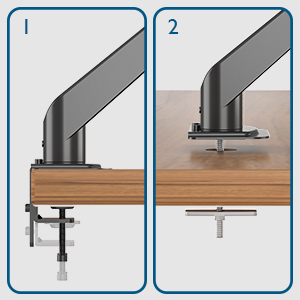
The BONTEC GDM01 monitor arm offers two installation methods: desk clamp ഗ്രോമെറ്റ് മൗണ്ട്.
Method 1: Desk Clamp ഇൻസ്റ്റലേഷൻ
- Cl അറ്റാച്ചുചെയ്യുകamp അടിസ്ഥാനം: C-cl സുരക്ഷിതമാക്കുകamp to the edge of your desk. Ensure the desk thickness is between 10mm and 83mm. Tighten the clamp screw until the base is firmly attached to the desk.
- കൈ അറ്റാച്ചുചെയ്യുക: Slide the monitor arm assembly onto the pole of the clamp base. Secure it with the provided screws or locking mechanism.
- മോണിറ്ററിലേക്ക് VESA പ്ലേറ്റ് അറ്റാച്ചുചെയ്യുക: Align the VESA plate with the mounting holes on the back of your monitor (75x75mm or 100x100mm). Use the appropriate screws from the hardware kit to secure the plate to the monitor.
- മോണിറ്റർ കൈയിലേക്ക് മൌണ്ട് ചെയ്യുക: Carefully slide the monitor (with VESA plate attached) onto the arm's mounting head. The open top slots on the VESA plate make this process easier. Ensure it clicks into place or is secured with the locking screw.


രീതി 2: ഗ്രോമെറ്റ് മൗണ്ട് ഇൻസ്റ്റാളേഷൻ
- Prepare Grommet Hole: Ensure your desk has a grommet hole. If not, you may need to drill one (consult a professional if unsure).
- Insert Grommet Base: Place the grommet base through the hole. Secure it from underneath the desk with the provided plate and nut.
- കൈ അറ്റാച്ചുചെയ്യുക: Slide the monitor arm assembly onto the pole of the grommet base. Secure it with the provided screws or locking mechanism.
- മോണിറ്ററിലേക്ക് VESA പ്ലേറ്റ് അറ്റാച്ചുചെയ്യുക: Align the VESA plate with the mounting holes on the back of your monitor (75x75mm or 100x100mm). Use the appropriate screws from the hardware kit to secure the plate to the monitor.
- മോണിറ്റർ കൈയിലേക്ക് മൌണ്ട് ചെയ്യുക: Carefully slide the monitor (with VESA plate attached) onto the arm's mounting head. Ensure it clicks into place or is secured with the locking screw.
Operating and Adjusting the Monitor Arm
The BONTEC GDM01 monitor arm offers extensive adjustability for optimal viewing comfort and ergonomics.
Tension Adjustment (Gas Spring)
The built-in gas spring allows for smooth and effortless height adjustment. The tension needs to be adjusted according to the weight of your monitor.
- If the monitor arm sags or cannot hold the monitor's weight, turn the bolt clockwise to increase gas spring tension.
- If the monitor arm is too stiff or difficult to move downwards, turn the bolt counter-clockwise to decrease tension.

ഉയരം ക്രമീകരിക്കൽ
Once the gas spring tension is correctly set, you can easily raise or lower your monitor to the desired height. The arm allows for a height adjustment range from 155mm to 400mm.

ടിൽറ്റ്, സ്വിവൽ, റൊട്ടേഷൻ
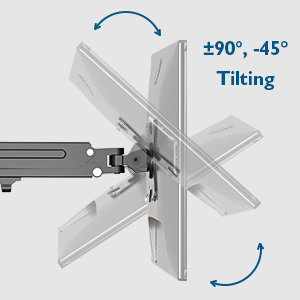
- ടിൽറ്റ്: Adjust the monitor tilt from -45° to +90° to reduce glare and find your preferred viewing ആംഗിൾ.
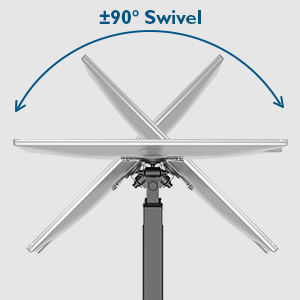
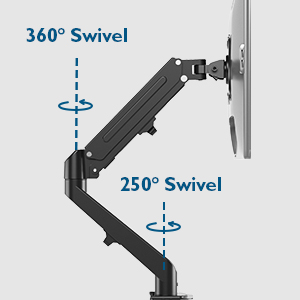
- സ്വിവൽ: The arm allows for 180° swivel at the base and 250° swivel at the joint, enabling you to share your screen or change viewദിശ.
- റൊട്ടേഷൻ: Rotate your monitor 360° for landscape or portrait orientation.
കേബിൾ മാനേജ്മെൻ്റ്
The integrated cable management system helps keep your workspace tidy. Route your monitor cables along the arm and through the designated clips or channels to conceal them.

മെയിൻ്റനൻസ്
- എല്ലാ സ്ക്രൂകളും കണക്ഷനുകളും ഇറുകിയതായി ഉറപ്പാക്കാൻ പതിവായി പരിശോധിക്കുക.
- Clean the monitor arm with a soft, damp തുണി. ഉരച്ചിലുകൾ ഉണ്ടാക്കുന്ന ക്ലീനറുകളോ ലായകങ്ങളോ ഒഴിവാക്കുക.
- Do not attempt to disassemble the gas spring mechanism.
ട്രബിൾഷൂട്ടിംഗ്
| പ്രശ്നം | സാധ്യമായ കാരണം | പരിഹാരം |
|---|---|---|
| Monitor arm sags or won't stay up. | Gas spring tension is too low for the monitor's weight. | Increase gas spring tension by turning the adjustment bolt clockwise with the provided Allen key. |
| Monitor arm is too stiff to move. | Gas spring tension is too high. | Decrease gas spring tension by turning the adjustment bolt counter-clockwise with the provided Allen key. |
| മോണിറ്ററിന്റെ കൈയിൽ ആടൽ അനുഭവപ്പെടുന്നു. | VESA plate screws or arm connection screws are loose. | Ensure all VESA plate screws and arm connection screws are securely tightened. |
| ഡെസ്ക് clamp സ്ഥിരതയില്ല. | Clamp not tightened sufficiently or desk surface is uneven. | Retighten the desk clamp. Ensure the desk surface is flat and stable. Consider using the grommet mount if the clamp അനുയോജ്യമല്ല. |
സ്പെസിഫിക്കേഷനുകൾ
- മോഡൽ: GDM01
- മെറ്റീരിയൽ: അലോയ് സ്റ്റീൽ
- സ്ക്രീൻ വലിപ്പം അനുയോജ്യത: 13 - 27 ഇഞ്ച്
- ഭാരം ശേഷി: 6.5 കി.ഗ്രാം (14.3 പൗണ്ട്)
- VESA അനുയോജ്യത: 75x75mm, 100x100mm
- ഉയരം ക്രമീകരിക്കൽ ശ്രേണി: 155mm - 400mm
- കൈ നീട്ടൽ: 525 മില്ലിമീറ്റർ വരെ
- ടിൽറ്റ് റേഞ്ച്: -45 ° മുതൽ +90 ° വരെ
- സ്വിവൽ ശ്രേണി: 180° (base), 250° (joint)
- റൊട്ടേഷൻ: 360°
- ഡെസ്ക് Clamp കനം: 10mm - 83mm
വാറൻ്റിയും പിന്തുണയും
BONTEC products are designed for durability and performance. For warranty information or technical support, please refer to the contact details provided with your purchase or visit the official BONTEC website. Please have your model number (GDM01) and purchase details ready when contacting support.
നിർമ്മാതാവ്: BONTEC


