
1. ആമുഖം
The AVMATRIX SE1217 is a compact and versatile SDI Streaming Encoder designed for professional video and audio streaming applications. It supports H.265/H.264 stream encoding up to 1080p60hz and offers a wide range of streaming protocols including RTSP, RTP, RTMPS, RTMP, HTTP, UDP, and SRT. This device facilitates live streaming without requiring a computer, making it suitable for various broadcasting and recording scenarios.
പ്രധാന സവിശേഷതകളിൽ ഇവ ഉൾപ്പെടുന്നു:
- 1x HDMI input and 1x HDMI loop out for monitoring.
- 1x Analog audio input for external audio sources.
- Support for both video and audio streaming, or single audio streaming.
- Advanced features like image and text overlay, mirror image, and upside-down image functionality.

ചിത്രം 1: ഫ്രണ്ട്-ടോപ്പ് view of the AVMATRIX SE1217 SDI Streaming Encoder, showcasing its compact design and primary branding.
2. സജ്ജീകരണം
2.1 പാക്കേജ് ഉള്ളടക്കം
പാക്കേജിൽ എല്ലാ ഇനങ്ങളും ഉണ്ടെന്ന് ദയവായി പരിശോധിക്കുക:
- AVMATRIX SE1217 SDI Streaming Encoder Unit
- പവർ അഡാപ്റ്റർ
- Mounting Brackets (if included)
- ഉപയോക്തൃ മാനുവൽ (ഈ പ്രമാണം)
2.2 ഭൗതിക ബന്ധങ്ങൾ
Follow these steps to connect your SE1217 encoder:
- വീഡിയോ ഉറവിടം ബന്ധിപ്പിക്കുക: Plug your HDMI video source (e.g., camera, gaming console) into the HDMI-IN port on the encoder.
- കണക്റ്റ് ഡിസ്പ്ലേ (ഓപ്ഷണൽ): If you need to monitor the video signal, connect an HDMI cable from the HDMI ലൂപ്പ് ഔട്ട് port on the encoder to an HDMI display (e.g., monitor, television).
- ഓഡിയോ ഉറവിടം ബന്ധിപ്പിക്കുക (ഓപ്ഷണൽ): For external audio, connect your analog audio device to the ഓഡിയോ IN തുറമുഖം.
- നെറ്റ്വർക്കിലേക്ക് കണക്റ്റ് ചെയ്യുക: എന്നതിൽ നിന്ന് ഒരു ഇഥർനെറ്റ് കേബിൾ ബന്ധിപ്പിക്കുക ലാൻ port on the encoder to your network router or switch. This is essential for streaming.
- പവർ ബന്ധിപ്പിക്കുക: Plug the provided power adapter into the പവർ input on the encoder, then connect it to a power outlet. The device will power on automatically.
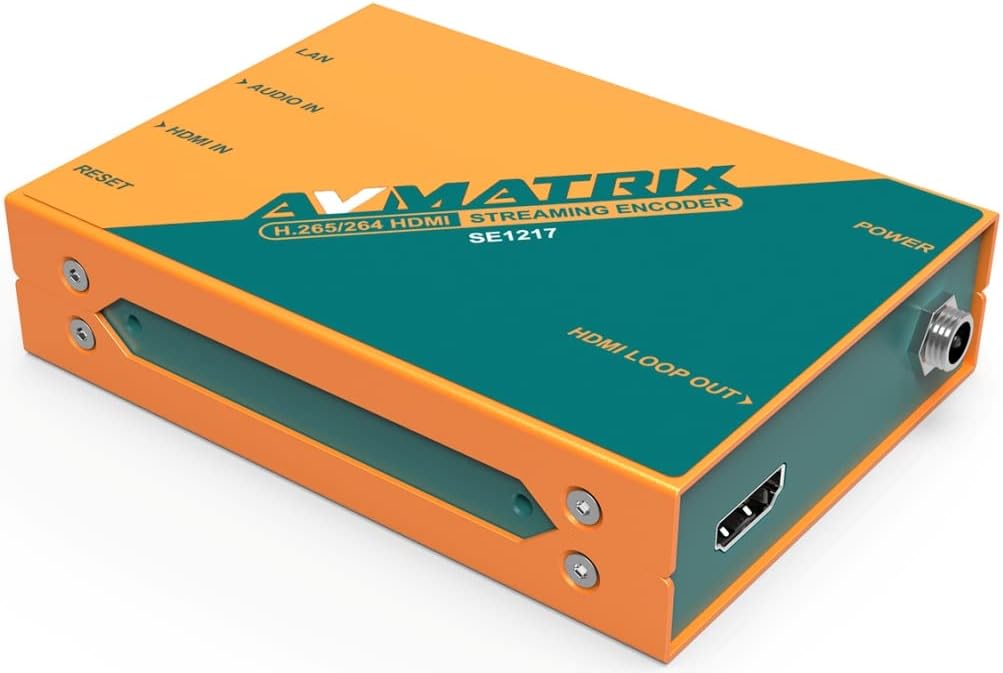
ചിത്രം 2: ഇടതുവശം view of the encoder, highlighting the HDMI IN, Audio IN, LAN, and Reset ports.
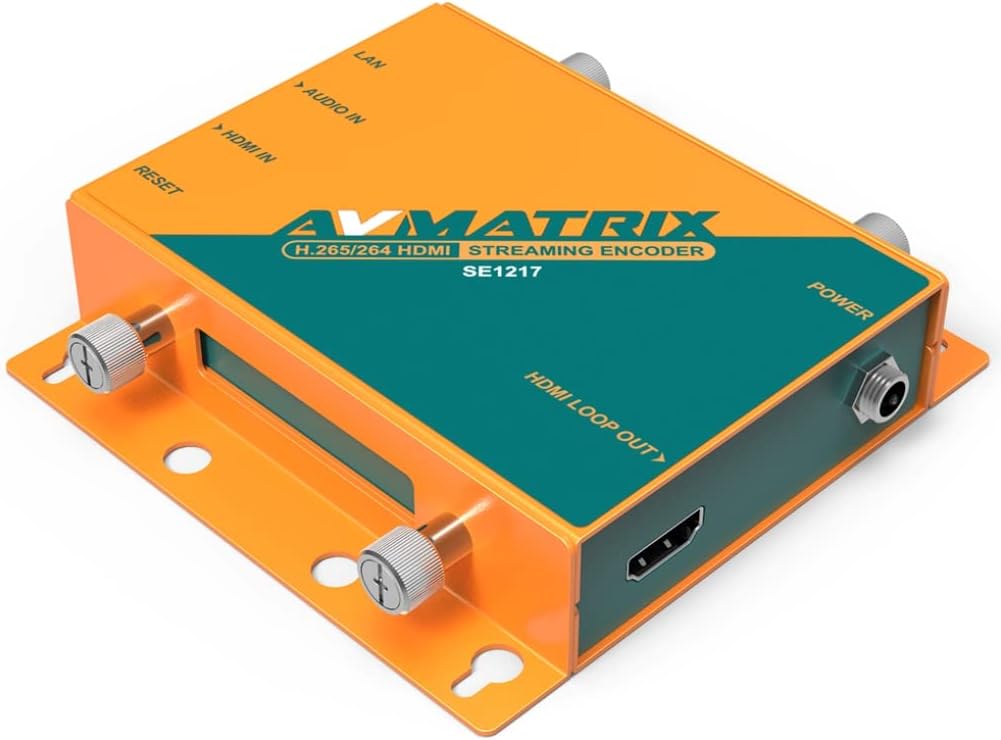
ചിത്രം 3: വലതുവശം view of the encoder, highlighting the HDMI LOOP OUT and Power ports.
3. പ്രവർത്തന നിർദ്ദേശങ്ങൾ
3.1 പ്രാരംഭ കോൺഫിഗറേഷൻ
After connecting the device and powering it on, you will need to access its web-based interface for detailed configuration. Refer to the network settings provided with your device or use a network scanner to find the encoder's IP address. Enter this IP address into a web ഒരേ നെറ്റ്വർക്കിലേക്ക് കണക്റ്റുചെയ്തിരിക്കുന്ന കമ്പ്യൂട്ടറിലെ ബ്രൗസർ.
3.2 Streaming Protocols
The SE1217 supports various streaming protocols. You can configure these settings within the web ഇൻ്റർഫേസ്:
- RTMP/RTMPS: Commonly used for live streaming to platforms like YouTube, Twitch, and Facebook Live.
- RTSP/RTP: Standard protocols for streaming media over IP networks.
- HTTP/UDP: Basic protocols for various network applications.
- SRT (Secure Reliable Transport): Provides high-quality, low-latency video transport over unreliable networks.
3.3 Video and Audio Settings
ഉള്ളിൽ web interface, you can adjust:
- എൻകോഡിംഗ് ഫോർമാറ്റ്: Select between H.265 or H.264.
- റെസല്യൂഷനും ഫ്രെയിം റേറ്റും: Up to 1080p60hz.
- ബിറ്റ്റേറ്റ്: Adjust for desired quality and bandwidth.
- ഓഡിയോ എൻകോഡിംഗ്: Configure audio codecs and bitrates.
- സ്ട്രീമിംഗ് മോഡ്: Choose between video and audio streaming, or audio-only streaming.
3.4 വിപുലമായ സവിശേഷതകൾ
The encoder includes advanced image processing capabilities:
- Image and Text Overlay: Add custom graphics or text to your video stream.
- പ്രതിബിംബം: വീഡിയോ തിരശ്ചീനമായി ഫ്ലിപ്പുചെയ്യുക.
- Upside-Down Image: Rotate the video 180 degrees.
These settings are accessible and configurable through the device's web ഇൻ്റർഫേസ്.
4. പരിപാലനം
4.1 വൃത്തിയാക്കൽ
To maintain optimal performance, keep the device clean. Use a soft, dry cloth to wipe the exterior. Avoid using liquid cleaners or solvents, as these can damage the unit.
4.2 ഫേംവെയർ അപ്ഡേറ്റുകൾ
AVMATRIX ഉദ്യോഗസ്ഥനെ ഇടയ്ക്കിടെ പരിശോധിക്കുക webഫേംവെയർ അപ്ഡേറ്റുകൾക്കായുള്ള സൈറ്റ്. ഫേംവെയർ അപ്ഡേറ്റുകൾക്ക് പുതിയ സവിശേഷതകൾ, പ്രകടന മെച്ചപ്പെടുത്തലുകൾ, ബഗ് പരിഹാരങ്ങൾ എന്നിവ നൽകാൻ കഴിയും. ഉപകരണത്തിന് കേടുപാടുകൾ സംഭവിക്കാതിരിക്കാൻ ഫേംവെയർ അപ്ഡേറ്റ് പാക്കേജിനൊപ്പം നൽകിയിരിക്കുന്ന നിർദ്ദേശങ്ങൾ ശ്രദ്ധാപൂർവ്വം പാലിക്കുക.
4.3 സംഭരണം
When not in use for extended periods, store the encoder in a cool, dry place away from direct sunlight and extreme temperatures. Ensure it is disconnected from power and all cables.
5. പ്രശ്നപരിഹാരം
This section addresses common issues you might encounter with the AVMATRIX SE1217 encoder.
- ശക്തിയില്ല:
- Ensure the power adapter is securely connected to both the encoder and a working power outlet.
- പവർ ഔട്ട്ലെറ്റ് പ്രവർത്തനക്ഷമമാണോയെന്ന് പരിശോധിക്കുക.
- വീഡിയോ സിഗ്നൽ ഇല്ല:
- Check that the HDMI input cable is securely connected to both the source and the encoder's HDMI-IN തുറമുഖം.
- Confirm the video source is powered on and outputting a signal.
- If using the HDMI loop out, ensure the display is correctly connected and set to the correct input.
- നെറ്റ്വർക്ക് കണക്ഷൻ ഇല്ല:
- Verify the Ethernet cable is properly connected to the ലാൻ port and your network router/switch.
- Check your network router/switch for proper operation.
- Ensure the encoder's IP address settings are correct (DHCP or static IP).
- No Stream Output:
- Confirm network connectivity.
- Check streaming protocol settings (RTMP URL, stream key, etc.) in the web ഇൻ്റർഫേസ്.
- Ensure the streaming platform is active and ready to receive the stream.
- ഓഡിയോ ഇല്ല:
- If using the analog audio input, ensure the cable is connected correctly and the audio source is active.
- Check audio settings in the web interface to ensure audio encoding is enabled and levels are appropriate.
- ഉപകരണം പ്രതികരിക്കുന്നില്ല:
- അമർത്തുക പുനഃസജ്ജമാക്കുക button briefly to restart the device.
- If a soft reset does not work, disconnect and reconnect the power adapter.
6 സ്പെസിഫിക്കേഷനുകൾ
The following table details the technical specifications of the AVMATRIX SE1217 SDI Streaming Encoder:
| ഫീച്ചർ | വിവരണം |
|---|---|
| മോഡൽ | SE1217 |
| വീഡിയോ ഇൻപുട്ട് | 1x HDMI |
| വീഡിയോ ഔട്ട്പുട്ട് | 1x HDMI Loop Out |
| ഓഡിയോ ഇൻപുട്ട് | 1x Analog Audio |
| നെറ്റ്വർക്ക് ഇന്റർഫേസ് | 1x LAN (Ethernet) |
| വീഡിയോ എൻകോഡിംഗ് | H.265 / H.264 |
| പരമാവധി മിഴിവ് | 1080p60hz |
| സ്ട്രീമിംഗ് പ്രോട്ടോക്കോളുകൾ | RTSP, RTP, RTMPS, RTMP, HTTP, UDP, SRT |
| പ്രത്യേക സവിശേഷതകൾ | Image & Text Overlay, Mirror Image, Upside-Down Image |
| നിറം | ഓറഞ്ച് |
| അനുയോജ്യമായ ഉപകരണങ്ങൾ | Gaming Console, Monitor, Television |
7. വാറൻ്റിയും പിന്തുണയും
For detailed warranty information and technical support, please refer to the official AVMATRIX webസൈറ്റിൽ ബന്ധപ്പെടുക അല്ലെങ്കിൽ നിങ്ങളുടെ അംഗീകൃത ഡീലറെ ബന്ധപ്പെടുക. വാറന്റി ക്ലെയിമുകൾക്കുള്ള വാങ്ങലിന്റെ തെളിവായി നിങ്ങളുടെ വാങ്ങൽ രസീത് സൂക്ഷിക്കുക.