
ആമുഖം
വാങ്ങിയതിന് നന്ദി.asing the Nitecore T4K Flashlight. This compact and powerful EDC (Everyday Carry) flashlight features a maximum output of 4000 lumens, making it suitable for various outdoor activities and emergency situations. This manual provides detailed instructions for the proper use, maintenance, and troubleshooting of your device. Please read this manual thoroughly before use to ensure optimal performance and safety.
സുരക്ഷാ വിവരങ്ങൾ
- നേത്ര സുരക്ഷ: Do not shine the flashlight directly into eyes. The intense light output can cause temporary vision impairment or permanent eye damage.
- ചൂട്: The flashlight may generate heat during prolonged use, especially at higher brightness levels. Handle with care to avoid burns.
- കുട്ടികൾ: കുട്ടികൾക്ക് ലഭ്യമാകാതെ സൂക്ഷിക്കുക.
- ബാറ്ററി കെയർ: Use only the integrated rechargeable Lithium-Ion battery. Do not attempt to replace the battery. Avoid exposing the device to extreme temperatures or direct sunlight.
- വാട്ടർ എക്സ്പോഷർ: This product is not water resistant. Avoid direct contact with water or high humidity environments to prevent damage.
പാക്കേജ് ഉള്ളടക്കം
- Nitecore T4K CREE XP-L2 V6 LEDs Ultra Bright EDC Flashlight
- USB-C ചാർജിംഗ് കേബിൾ
- കീ ക്ലാസ്സ്

Image: The Nitecore T4K flashlight shown alongside its included USB-C charging cable and a metal key clasp.
സജ്ജമാക്കുക
പ്രാരംഭ ചാർജിംഗ്
- ഫ്ലാഷ്ലൈറ്റിൽ USB-C ചാർജിംഗ് പോർട്ട് കണ്ടെത്തുക.
- Connect the provided USB-C charging cable to the flashlight's port.
- Connect the other end of the USB-C cable to a USB power source (e.g., wall adapter, computer USB port).
- The display will indicate charging status. Charge the flashlight fully before first use.
Attaching the Key Clasp
The included key clasp can be attached to the designated loop at the base of the flashlight for convenient carrying on a keychain or lanyard.
പ്രവർത്തന നിർദ്ദേശങ്ങൾ
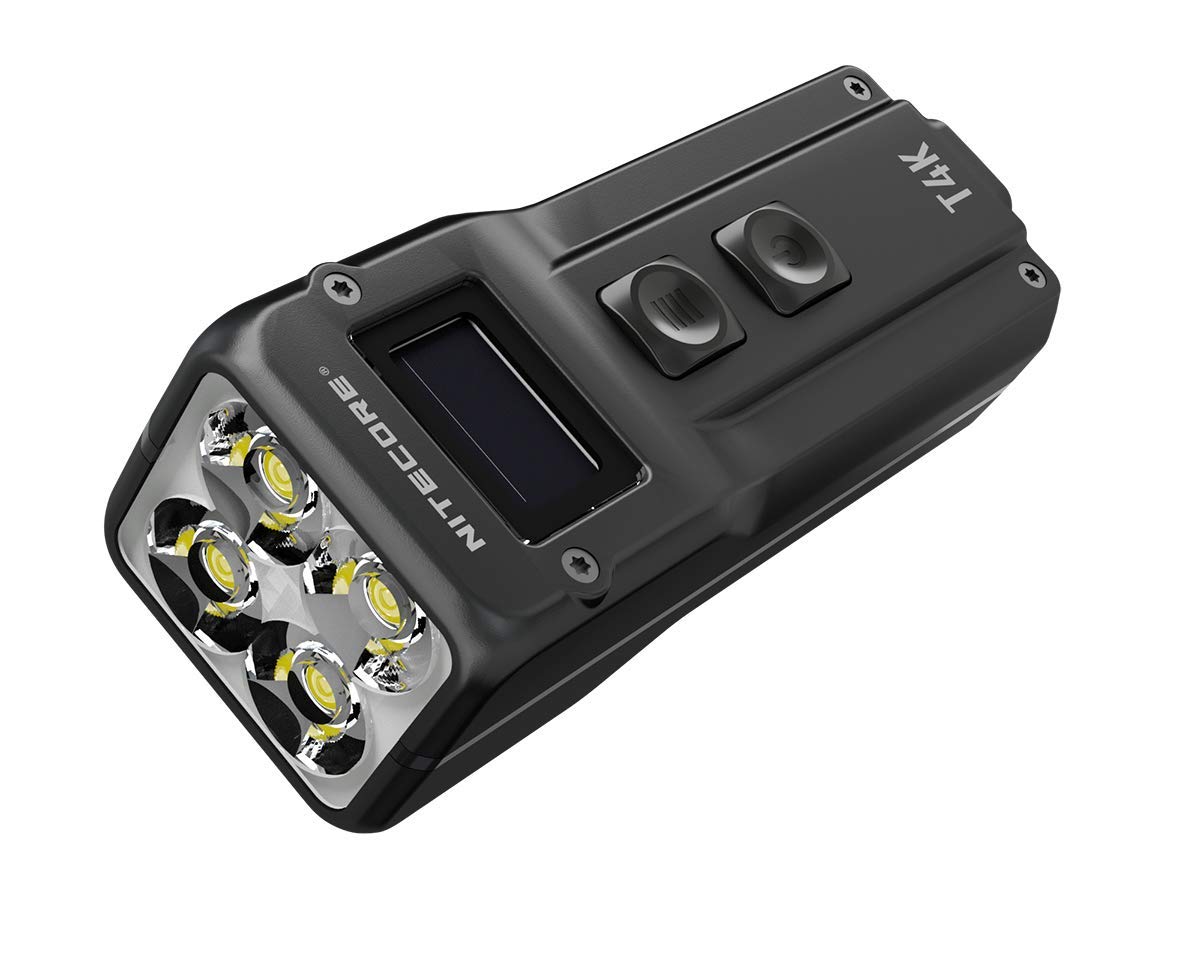
ചിത്രം: മുൻഭാഗം view of the Nitecore T4K flashlight, highlighting the OLED display and the two control buttons (Power and Mode/Turbo).
പവർ ഓൺ/ഓഫ്
- ഓണാക്കാൻ: Press and hold the Power button (lower button) for approximately 1 second.
- ഓഫാക്കാൻ: Press and hold the Power button for approximately 1 second.
തെളിച്ച മോഡുകൾ
The T4K features multiple brightness levels. While the exact number of modes and their lumen outputs (besides Turbo) are not specified in the provided data, typical Nitecore flashlights offer Ultra-low, Low, Mid, High, and Turbo modes.
- മാറ്റുന്ന മോഡുകൾ: With the flashlight on, short press the Mode button (upper button) to cycle through available brightness levels.
- Turbo Mode (4000 Lumens): From any state (on or off), press and hold the Mode button to instantly activate Turbo mode. Release the button to return to the previous state or turn off. Note that Turbo mode is designed for short bursts due to heat generation.
വിവരങ്ങൾ പ്രദർശിപ്പിക്കുക
The integrated OLED display provides real-time information such as brightness level, battery voltage, ശേഷിക്കുന്ന റൺടൈം.
മെയിൻ്റനൻസ്
- വൃത്തിയാക്കൽ: Use a soft, clean cloth to wipe the flashlight body. For the lens, use a lens cleaning cloth. Avoid abrasive materials or harsh chemicals.
- സംഭരണം: നേരിട്ടുള്ള സൂര്യപ്രകാശത്തിൽ നിന്നും തീവ്രമായ താപനിലയിൽ നിന്നും അകലെ തണുത്തതും വരണ്ടതുമായ സ്ഥലത്ത് ഫ്ലാഷ്ലൈറ്റ് സൂക്ഷിക്കുക.
- ബാറ്ററി: Recharge the battery regularly, even if not in use, to maintain its lifespan. Avoid fully discharging the battery for extended periods.
ട്രബിൾഷൂട്ടിംഗ്
- ഫ്ലാഷ്ലൈറ്റ് ഓണാക്കുന്നില്ല:
- Ensure the battery is charged. Connect to a USB power source to charge.
- Check if the power button is being pressed correctly (long press for 1 second).
- Dim light or short runtime:
- ബാറ്ററി ചാർജ് കുറവായിരിക്കാം. ഫ്ലാഷ്ലൈറ്റ് പൂർണ്ണമായും ചാർജ് ചെയ്യുക.
- ലെൻസ് വൃത്തിയുള്ളതാണെന്ന് ഉറപ്പാക്കുക.
- Flashlight gets hot:
- This is normal for high-output flashlights, especially in Turbo mode. Reduce brightness if it becomes too hot to handle comfortably.
സ്പെസിഫിക്കേഷനുകൾ
| ഫീച്ചർ | വിശദാംശങ്ങൾ |
|---|---|
| മോഡൽ | T4K (D207531) |
| ബ്രാൻഡ് | നിറ്റ്കോർ |
| പ്രത്യേക ഫീച്ചർ | റീചാർജ് ചെയ്യാവുന്നത് |
| നിറം | കറുപ്പ് |
| പവർ ഉറവിടം | ബാറ്ററി പവർ (ഇന്റഗ്രേറ്റഡ് ലിഥിയം അയോൺ) |
| പ്രകാശ സ്രോതസ്സ് തരം | LED (CREE XP-L2 V6 LEDs) |
| മെറ്റീരിയൽ | അലുമിനിയം |
| വെളുത്ത തെളിച്ചം | 4000 ല്യൂമൻസ് (പരമാവധി) |
| ലൈറ്റ് പാത്ത് ദൂരം | 209 മീറ്റർ |
| ബാറ്ററി തരം | Lithium Ion (Integrated) |
| പ്രവർത്തനസമയം | Up to 67 hours (Lowest mode) |
| ജല പ്രതിരോധ നില | വാട്ടർ റെസിസ്റ്റൻ്റ് അല്ല |
| ഇനത്തിൻ്റെ ഭാരം | 100 ഗ്രാം |
| Item Dimensions (Length) | 3.4 ഇഞ്ച് / 8 സെ.മീ |
| ഉൾപ്പെടുത്തിയ ഘടകങ്ങൾ | Flashlight, USB-C Charging Cable, Key Clasp |
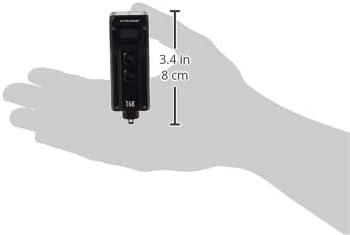
Image: The Nitecore T4K flashlight shown in a hand for size comparison, indicating its compact form factor.
വാറൻ്റി
This Nitecore T4K Flashlight comes with a limited warranty. Please refer to the warranty card included in your package or visit the official Nitecore webവിശദമായ വാറന്റി നിബന്ധനകൾക്കും വ്യവസ്ഥകൾക്കും സൈറ്റ് സന്ദർശിക്കുക. വാറന്റി ക്ലെയിമുകൾക്കായി നിങ്ങളുടെ വാങ്ങലിന്റെ തെളിവ് സൂക്ഷിക്കുക.
പിന്തുണ
For technical assistance, troubleshooting not covered in this manual, or general inquiries, please contact Nitecore customer support. Contact information can typically be found on the official Nitecore webസൈറ്റ് അല്ലെങ്കിൽ ഉൽപ്പന്ന പാക്കേജിംഗിൽ.