
1. ആമുഖം
This user manual provides detailed instructions for the proper installation, operation, and maintenance of your ANYSECU AnyTone AT-778UV Dual Band Mobile Radio. To ensure optimal performance and safety, please read this manual thoroughly before using the device and retain it for future reference.
2 സുരക്ഷാ വിവരങ്ങൾ
- Do not operate the radio in explosive atmospheres (e.g., near flammable gas, dust particles, metallic powders, etc.).
- Ensure the radio is connected to a stable 13.8V DC power source. Incorrect voltage യൂണിറ്റിന് കേടുപാടുകൾ വരുത്താം.
- നേരിട്ടുള്ള സൂര്യപ്രകാശത്തിലോ ഉയർന്ന താപനിലയിലോ ദീർഘനേരം എക്സ്പോഷർ ചെയ്യുന്നത് ഒഴിവാക്കുക.
- റേഡിയോ വേർപെടുത്തുകയോ പരിഷ്കരിക്കുകയോ ചെയ്യരുത്. യോഗ്യതയുള്ള സാങ്കേതിക വിദഗ്ധർ മാത്രമേ അറ്റകുറ്റപ്പണികൾ നടത്താവൂ.
- Maintain a safe distance from the antenna during transmission to avoid exposure to RF energy.
- The radio's heat sink can become hot during prolonged transmission. Avoid direct contact.
3. പാക്കേജ് ഉള്ളടക്കം
താഴെ ലിസ്റ്റ് ചെയ്തിരിക്കുന്ന എല്ലാ ഇനങ്ങളും നിങ്ങളുടെ പാക്കേജിൽ ഉൾപ്പെടുത്തിയിട്ടുണ്ടെന്ന് ഉറപ്പാക്കുക. ഏതെങ്കിലും ഇനങ്ങൾ നഷ്ടപ്പെട്ടിട്ടുണ്ടെങ്കിലോ കേടായിട്ടുണ്ടെങ്കിലോ, ദയവായി നിങ്ങളുടെ ഡീലറെ ബന്ധപ്പെടുക.
- ANYSECU AnyTone AT-778UV Mobile Radio Unit
- Lighted Keypad Microphone
- ഫ്യൂസ് ഹോൾഡറുള്ള ഡിസി പവർ കേബിൾ
- മൌണ്ടിംഗ് ബ്രാക്കറ്റ്
- സ്ക്രൂ പാക്ക്
- ഉപയോക്തൃ മാനുവൽ

4. ഉൽപ്പന്നം കഴിഞ്ഞുview
The ANYSECU AnyTone AT-778UV is a compact dual-band VHF/UHF mobile radio transceiver designed for reliable communication. It features a color LCD display, DTMF and 5Tone functions, and a rotatable display for flexible installation.
4.1 Radio Unit Features

- പവർ ഓൺ/ഓഫ്/മ്യൂട്ട്: Controls the radio's power and mute function.
- മൈക്രോഫോൺ ജാക്ക്: Connects the hand microphone.
- P1-P6 (Self-Define Keys): പ്രോഗ്രാം ചെയ്യാവുന്ന ഫംഗ്ഷൻ കീകൾ.
- FUNC (Function Key): Accesses various radio functions.
- Channel Switch/Push Button/Key Lock: Used for channel selection, menu navigation, and locking controls.
- LCD ഡിസ്പ്ലേ: Shows frequency, channel, and status information.
4.2 Hand Microphone Features

- മുകളിലേക്ക്/താഴ്ന്ന ബട്ടണുകൾ: Adjust frequency, channel, or menu options.
- പിടിടി (പുഷ്-ടു-ടോക്ക്): സംപ്രേഷണം സജീവമാക്കുന്നു.
- നമ്പർ കീപാഡ്: For direct frequency entry or DTMF tones.
- A/B Band: മെയിൻ, സബ്-ബാൻഡുകൾക്കിടയിൽ മാറുന്നു.
- Band Indicator: Shows the currently active band.
- TX/RX ഇൻഡിക്കേറ്റർ: Illuminates during transmit (TX) or receive (RX).
- MIC: മൈക്രോഫോൺ ഇൻപുട്ട്.
- സ്പീക്കർ: ഓഡിയോ ഔട്ട്പുട്ടിനുള്ള ബിൽറ്റ്-ഇൻ സ്പീക്കർ.
- Lock UP/DOWN: Locks the UP/DOWN buttons.
4.3 അളവുകൾ

5. സജ്ജീകരണം
Follow these steps to set up your AT-778UV mobile radio.
5.1 പവർ കണക്ഷൻ
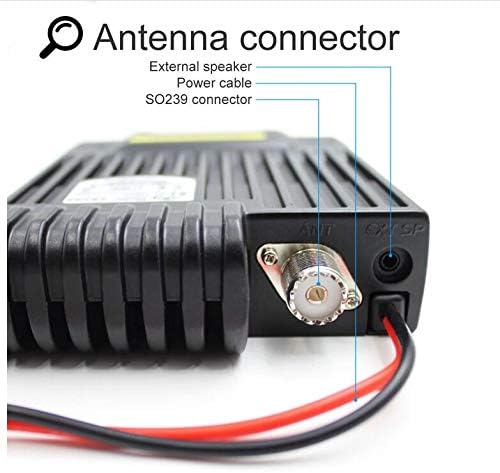
Connect the supplied DC power cable to the radio's power input. Ensure correct polarity (red to positive, black to negative) and connect to a stable 13.8V DC power source capable of supplying sufficient current (e.g., a car battery or regulated power supply).
5.2 ആന്റിന കണക്ഷൻ
Connect a suitable dual-band VHF/UHF antenna to the SO239 antenna connector on the rear of the radio. Ensure the connection is secure to prevent signal loss and potential damage.
5.3 മൈക്രോഫോൺ കണക്ഷൻ
Plug the hand microphone's RJ45 connector into the microphone jack on the front panel of the radio. Ensure it clicks into place securely.
5.4 പ്രാരംഭ പവർ-ഓൺ
After connecting power, antenna, and microphone, press the power button on the radio's front panel to turn on the unit. The LCD display will illuminate, showing the current frequency and status.
6. പ്രവർത്തന നിർദ്ദേശങ്ങൾ
This section covers the basic operation of your AT-778UV mobile radio.
6.1 പവർ ഓൺ/ഓഫ്, വോളിയം നിയന്ത്രണം
- To power on/off, press the ശക്തി മുൻ പാനലിലെ ബട്ടൺ.
- തിരിക്കുക Channel Switch/Push Button വോളിയം ക്രമീകരിക്കാൻ.
6.2 ഫ്രീക്വൻസിയും ചാനൽ തിരഞ്ഞെടുപ്പും
- ഉപയോഗിക്കുക മുകളിലേക്ക് / താഴേക്ക് buttons on the microphone or rotate the ചാനൽ സ്വിച്ച് on the radio to change frequencies or channels.
- അമർത്തുക എ/ബി button on the microphone to switch between the main (VHF) and sub (UHF) bands.
- The radio supports 200 channels.
6.3 Transmission (PTT)
പ്രക്ഷേപണം ചെയ്യാൻ, അമർത്തിപ്പിടിക്കുക പിടി button on the left side of the microphone. Speak clearly into the microphone. Release the PTT button to receive.
6.4 വിപുലമായ പ്രവർത്തനങ്ങൾ
- The radio supports CTCSS, DCS, DTMF, and 5Tone functions. Refer to the full user manual for detailed programming and usage of these features.
- Programmable keys (P1-P6) can be customized for quick access to frequently used functions.
- Programming software is available for advanced configuration. Please refer to the official AnyTone webസോഫ്റ്റ്വെയർ ഡൗൺലോഡുകൾക്കും നിർദ്ദേശങ്ങൾക്കുമുള്ള സൈറ്റ്.
7. പരിപാലനം
Proper maintenance ensures the longevity and reliable operation of your radio.
- വൃത്തിയാക്കൽ: ഒരു സോഫ്റ്റ് ഉപയോഗിക്കുക, ഡിamp റേഡിയോയുടെ പുറംഭാഗം വൃത്തിയാക്കാൻ തുണി ഉപയോഗിക്കുക. കഠിനമായ രാസവസ്തുക്കളോ അബ്രാസീവ് ക്ലീനറുകളോ ഉപയോഗിക്കരുത്.
- സംഭരണം: When not in use for extended periods, store the radio in a dry, cool place away from direct sunlight and extreme temperatures.
- ആൻ്റിന: Regularly check the antenna connection for corrosion or damage.
- പവർ കേബിൾ: Inspect the power cable and fuse holder for any signs of wear or damage.
8. പ്രശ്നപരിഹാരം
നിങ്ങളുടെ റേഡിയോയിൽ പ്രശ്നങ്ങൾ നേരിടുകയാണെങ്കിൽ, ഇനിപ്പറയുന്ന പൊതുവായ പ്രശ്നങ്ങളും പരിഹാരങ്ങളും പരിശോധിക്കുക:
| പ്രശ്നം | സാധ്യമായ കാരണം | പരിഹാരം |
|---|---|---|
| റേഡിയോ ഓൺ ചെയ്യുന്നില്ല. | വൈദ്യുതിയില്ല, തെറ്റായ വയറിംഗ്, ഫ്യൂസ് പൊട്ടി. | Check power cable connections, ensure correct polarity, inspect fuse. |
| സ്പീക്കറിൽ നിന്ന് ഓഡിയോ ഇല്ല. | Volume too low, squelch too high, external speaker connected. | Increase volume, adjust squelch level, check external speaker connection. |
| സ്വീകരിക്കാനോ കൈമാറാനോ കഴിയില്ല. | Incorrect frequency/channel, antenna issue, power output setting. | Verify frequency/channel, check antenna connection, ensure power output is set correctly. |
| ഡിസ്പ്ലേ ശൂന്യമാണ് അല്ലെങ്കിൽ ക്രമരഹിതമാണ്. | Loose connection, internal fault. | Power cycle the radio. If problem persists, contact support. |
For more complex issues, consult the full user manual or contact customer support.
9 സ്പെസിഫിക്കേഷനുകൾ
Key technical specifications for the ANYSECU AnyTone AT-778UV Mobile Radio:
- ബ്രാൻഡ്: ANYSECU
- മോഡൽ നമ്പർ: AT 778UV
- ഫ്രീക്വൻസി ശ്രേണി: വിഎച്ച്എഫ്: 136-174 മെഗാഹെട്സ്, യുഎച്ച്എഫ്: 400-480 മെഗാഹെട്സ്
- ചാനലുകളുടെ എണ്ണം: 200
- ഔട്ട്പുട്ട് പവർ: 25W/15W/5W (തിരഞ്ഞെടുക്കാവുന്നത്)
- വാല്യംtage: 13.8 വോൾട്ട് ഡിസി
- പ്രത്യേക സവിശേഷതകൾ: DTMF, 5Tone, CTCSS, DCS, Color LCD, 180-degree rotatable TFT LCD display, Lighted keypad mic, Built-in speakers (radio & mic), Built-in cooling fan
- ഇനത്തിൻ്റെ ഭാരം: 1.12 Pounds (approximately 508g)
- ജല പ്രതിരോധ നില: വെള്ളത്തെ പ്രതിരോധിക്കുന്ന
- FCC ഐഡി: T4K-778UV
10. വാറൻ്റിയും പിന്തുണയും
For warranty information and technical support, please refer to the documentation included with your product or visit the official ANYSECU webവാറന്റി ക്ലെയിമുകൾക്കുള്ള വാങ്ങലിന്റെ തെളിവായി നിങ്ങളുടെ വാങ്ങൽ രസീത് സൂക്ഷിക്കുക.
നിർമ്മാതാവ്: Anytone