
Raynic CR1009pro
Raynic Emergency Weather Radio User Manual
Model: CR1009pro
Brand: Raynic
ആമുഖം
This manual provides comprehensive instructions for the safe and effective use of your Raynic Emergency Weather Radio (Model CR1009pro). Designed for reliability in various conditions, this multi-functional device offers AM/FM/SW/NOAA radio reception, multiple charging options, and essential emergency features. Please read this manual thoroughly before operation and retain it for future reference.
പ്രധാന സവിശേഷതകൾ
- Automatic NOAA Weather Alert: Scans for and alerts to emergency weather broadcasts.
- Large HD LCD Display: Clear digital tuning and battery level indication.
- ഒന്നിലധികം ചാർജിംഗ് ഓപ്ഷനുകൾ: Supports 6 ways of charging, including built-in rechargeable battery, solar, and hand crank.
- അടിയന്തര പ്രവർത്തനങ്ങൾ: Integrated 3W flashlight, 2.5W reading lamp, and SOS alarm with loud siren and flashing red light.
- പോർട്ടബിൾ ഡിസൈൻ: Compact, lightweight (1.2 lbs), and IPX3 water-resistant for outdoor use.
- കണക്റ്റിവിറ്റി: USB port for charging external devices and 3.5mm headphone jack.

Image: The Raynic Emergency Weather Radio in green, showcasing its front panel with LCD display, control buttons, and a charging smartphone connected via USB.
സജ്ജീകരണ ഗൈഡ്
- പ്രാരംഭ ചാർജ്: Before first use, fully charge the radio using the included power adapter via the USB port. This ensures the internal rechargeable battery is ready.
- ബാറ്ററി ഇൻസ്റ്റാളേഷൻ (ഓപ്ഷണൽ): For extended backup power, open the battery compartment and insert 3 AAA batteries (not included) according to the polarity indicators.
- ആന്റിന എക്സ്റ്റൻഷൻ: Extend the telescopic antenna fully for optimal radio reception.
- സമയ ക്രമീകരണം: Press the "SET TIME" button to adjust the current time displayed on the LCD screen.
പ്രവർത്തന നിർദ്ദേശങ്ങൾ
പവർ ഓൺ/ഓഫ്
" അമർത്തുകപവർ" button to turn the radio on or off. The LCD display will illuminate when powered on.
Radio Tuning (AM/FM/SW/NOAA)
- ബാൻഡ് തിരഞ്ഞെടുക്കൽ: " അമർത്തുകബാൻഡ്" button repeatedly to cycle through AM, FM, SW, and WB (NOAA Weather Band) frequencies.
- സ്വമേധയാലുള്ള ട്യൂണിംഗ്: "ഉപയോഗിക്കുക"ട്യൂൺ+"ഒപ്പം"ട്യൂൺ-" buttons to manually adjust the frequency.
- ഓട്ടോ-സ്കാൻ: Long-press the "ട്യൂൺ+" അല്ലെങ്കിൽ "ട്യൂൺ-" button to auto-scan for available stations.
- NOAA കാലാവസ്ഥാ മുന്നറിയിപ്പ്: " അമർത്തുകWX അലേർട്ട്" button to activate the automatic NOAA weather alert function. The radio will scan for and alert you to emergency warnings.

Image: The radio displaying "162.425 MHz" on its LCD screen, indicating NOAA weather band reception. Text highlights "Automatically scan 7 NOAA Channels Alert Weather Radio".
വോളിയം നിയന്ത്രണം
Adjust the volume using the "VOL+"ഒപ്പം"വോൾ-" buttons.
ലൈറ്റ് ഫംഗ്ഷനുകൾ
- ഫ്ലാഷ്ലൈറ്റ്: Press the dedicated flashlight button on the side of the radio to turn on the 3W LED flashlight. Press again to dim, and a third time to turn off.
- എൽ വായിക്കുന്നുamp: Lift the top panel to reveal the 2.5W reading lamp. റീഡിംഗ് l അമർത്തുകamp button on the side to turn it on. Press again to dim, and a third time to turn off.
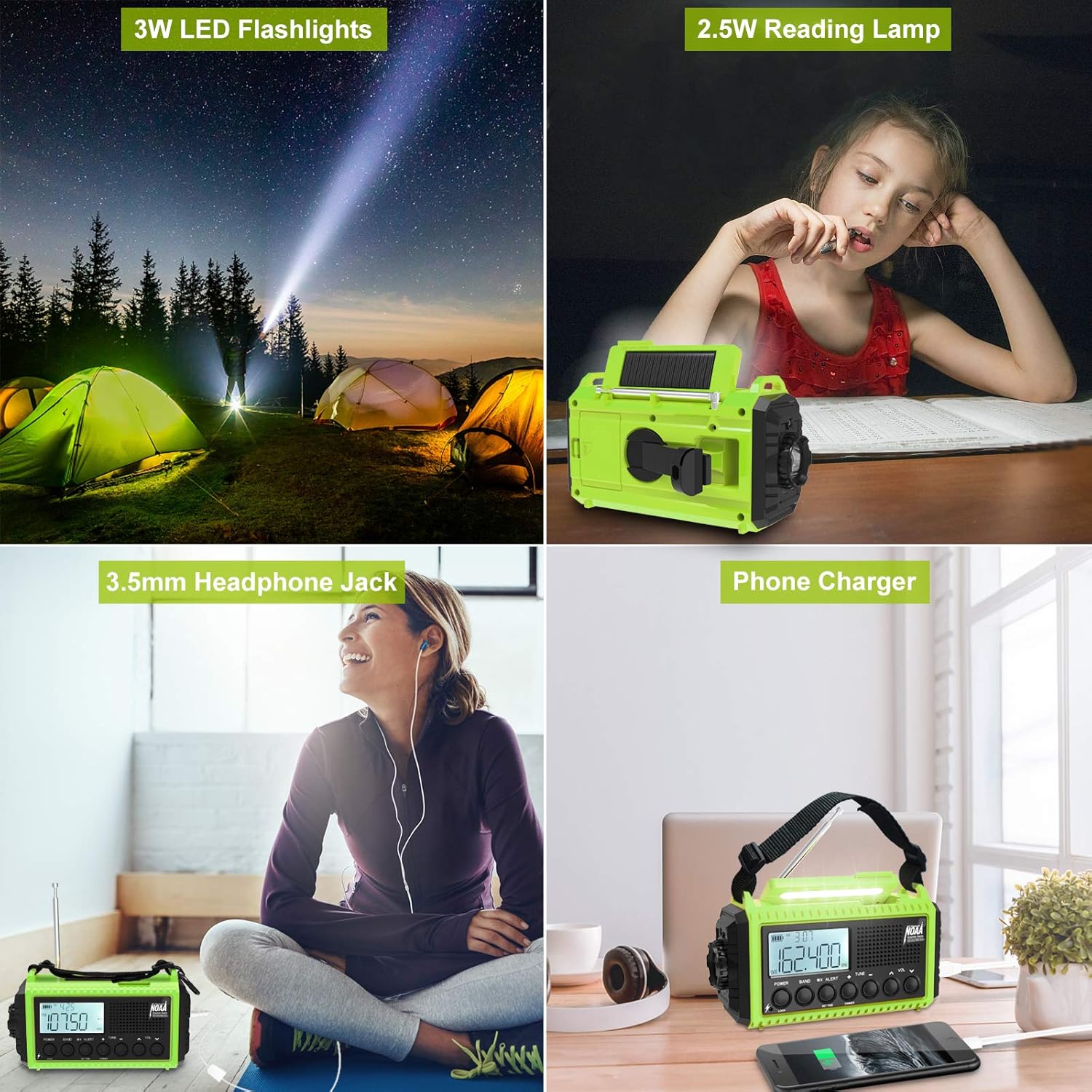
Image: A collage showing the radio's 3W LED flashlight illuminating a dark campsite and the 2.5W reading lamp providing light for reading indoors.
SOS അലാറം
In an emergency, long-press the "SOS" button. This will activate a loud siren and a flashing red light to signal for assistance. Press the button again to deactivate the alarm.

Image: A collage demonstrating the radio's portability (held in hand, clipped to backpack), IPX3 water resistance (in light rain), and the SOS alarm function (flashing red light in a dark forest setting).
ബാഹ്യ ഉപകരണങ്ങൾ ചാർജ് ചെയ്യുന്നു
Connect your USB-enabled smartphone or other small electronic devices to the USB output port on the side of the radio to use it as a power bank for emergency charging.
നിങ്ങളുടെ റേഡിയോ ചാർജ് ചെയ്യുന്നു
Your Raynic Emergency Weather Radio supports six different charging methods to ensure power availability in any situation:
- AC Adapter Charging: Use the included power adapter and USB cable to charge the radio from a standard wall outlet.
- USB ചാർജിംഗ്: Connect the radio to any standard USB power source (e.g., computer, power bank) using the USB cable.
- സോളാർ പാനൽ ചാർജിംഗ്: Place the radio with the solar panel facing direct sunlight. The solar panel will slowly charge the internal battery. This method is ideal for maintaining charge or for trickle charging in emergencies.
- ഹാൻഡ് ക്രാങ്ക് ചാർജിംഗ്: Extend the hand crank handle and rotate it clockwise or counter-clockwise at a steady pace (approx. 130-150 RPM) to generate power. A few minutes of cranking can provide enough power for a short period of radio use or light.
- ബിൽറ്റ്-ഇൻ റീചാർജ് ചെയ്യാവുന്ന ബാറ്ററി: The radio features a powerful 5000mAh/18500mWh internal rechargeable battery.
- AAA Battery Backup: For additional backup, the radio can be powered by 3 AAA batteries (not included) inserted into the dedicated compartment.

Image: A diagram illustrating the six charging methods: Solar Power, AC Adapter, USB Charging, 3 AAA Battery (not included), Rechargeable Battery included, and Crank Hand Power.
മെയിൻ്റനൻസ്
- വൃത്തിയാക്കൽ: ഒരു സോഫ്റ്റ് ഉപയോഗിച്ച് റേഡിയോ തുടയ്ക്കുക, ഡിamp തുണി. കഠിനമായ രാസവസ്തുക്കളോ ഉരച്ചിലുകളുള്ള ക്ലീനറുകളോ ഉപയോഗിക്കരുത്.
- സംഭരണം: Store the radio in a cool, dry place away from direct sunlight and extreme temperatures. If storing for extended periods, ensure the internal battery is partially charged (around 50%) and recharge it every 3-6 months to maintain battery health.
- ജല പ്രതിരോധം: The radio is IPX3 water-resistant, meaning it can withstand spraying water. Do not submerge the radio in water. Ensure all port covers are securely closed to maintain water resistance.
ട്രബിൾഷൂട്ടിംഗ്
If you encounter issues with your Raynic Emergency Weather Radio, please refer to the following common solutions:
- ശക്തിയില്ല: Ensure the battery is charged. Try charging via AC adapter, solar, or hand crank. Check if AAA batteries are correctly installed if using them.
- മോശം റേഡിയോ സ്വീകരണം: Fully extend the telescopic antenna. Try repositioning the radio to a location with better signal. Ensure you are within range of broadcast signals.
- Flashlight/Lamp പ്രവർത്തിക്കുന്നില്ല: Check battery level. Ensure the correct button is pressed for the desired light function.
- ഉപകരണം ചാർജ് ചെയ്യുന്നില്ല: Verify the USB cable and power source are functioning correctly. Ensure the radio's battery is not completely depleted, which might require a longer initial charge.
കൂടുതൽ വിശദമായ ട്രബിൾഷൂട്ടിംഗ് ഘട്ടങ്ങൾക്ക്, ദയവായി ഔദ്യോഗിക വെബ്സൈറ്റ് കാണുക. ട്രബിൾഷൂട്ടിംഗ് ഗൈഡ് (PDF).
സ്പെസിഫിക്കേഷനുകൾ
| ഫീച്ചർ | വിശദാംശങ്ങൾ |
|---|---|
| മോഡൽ നമ്പർ | CR1009pro |
| അളവുകൾ | 7 x 2 x 4 ഇഞ്ച് (6.8"L x 2.9"W x 3.7"H) |
| ഭാരം | 1 പൗണ്ട് |
| ബാറ്ററി | 5000mAh/18500mWh Lithium Polymer (included) |
| ചാർജിംഗ് ഓപ്ഷനുകൾ | AC Adapter, USB, Solar, Hand Crank, 3xAAA (not included) |
| റേഡിയോ ബാൻഡുകൾ | AM/FM/SW/NOAA Weather Band |
| ഫ്ലാഷ്ലൈറ്റ് | 3W LED |
| എൽ വായിക്കുന്നുamp | 2.5W |
| ജല പ്രതിരോധം | IPX3 (വാട്ടർ റെസിസ്റ്റൻ്റ്) |
| കണക്റ്റിവിറ്റി | USB (output), 3.5mm Headphone Jack |

Image: The radio with its dimensions (6.8 in L, 2.9 in W, 3.7 in H) and icons representing its features: 6 Charge Ways, Solar Panel, Headphone Jack, 3W Flashlight/Lamp Light, Time Display, SW/AM/FM/WB Radio, and SOS.
വാറൻ്റിയും പിന്തുണയും
For warranty information and customer support, please refer to the documentation included with your product or visit the official Raynic website. You may also contact Raynic Electronic directly for assistance.
A ട്രബിൾഷൂട്ടിംഗ് ഗൈഡ് (PDF) is available for common issues.
Ask a question about this manual
Ask about setup, troubleshooting, compatibility, parts, safety, or missing instructions. Manuals+ will review the question and use this page’s manual context to help answer it.