
1. ആമുഖം
This manual provides essential information for the safe and efficient operation of your DOOGEE S97 Pro Rugged Smartphone. Please read it thoroughly before using your device.

Image 1.1: The DOOGEE S97 Pro Rugged Smartphone, showcasing its robust design and display.
2. ഡിവൈസ് ഓവർview
The DOOGEE S97 Pro is a rugged smartphone designed for durability and performance. Key features include:
- ഓപ്പറേറ്റിംഗ് സിസ്റ്റം: ആൻഡ്രോയിഡ് 11
- പ്രോസസ്സർ: Helio G95 Octa Core 2.1GHz 12nm
- മെമ്മറി: 8 ജിബി റാം + 128 ജിബി റോം
- ബാറ്ററി: 8500mAh Super Battery with 33W Fast Charging and 10W Wireless Charging
- ഡിസ്പ്ലേ: 5.71-inch Corning Gorilla Glass
- പിൻ ക്യാമറ: Samsung 48MP AI Main Camera (48MP + 8MP + 2MP + 2MP)
- മുൻ ക്യാമറ: 16എംപി
- പ്രത്യേക സവിശേഷതകൾ: 40m Rangefinder, IP68 Waterproof, Dustproof, Shockproof, NFC Support
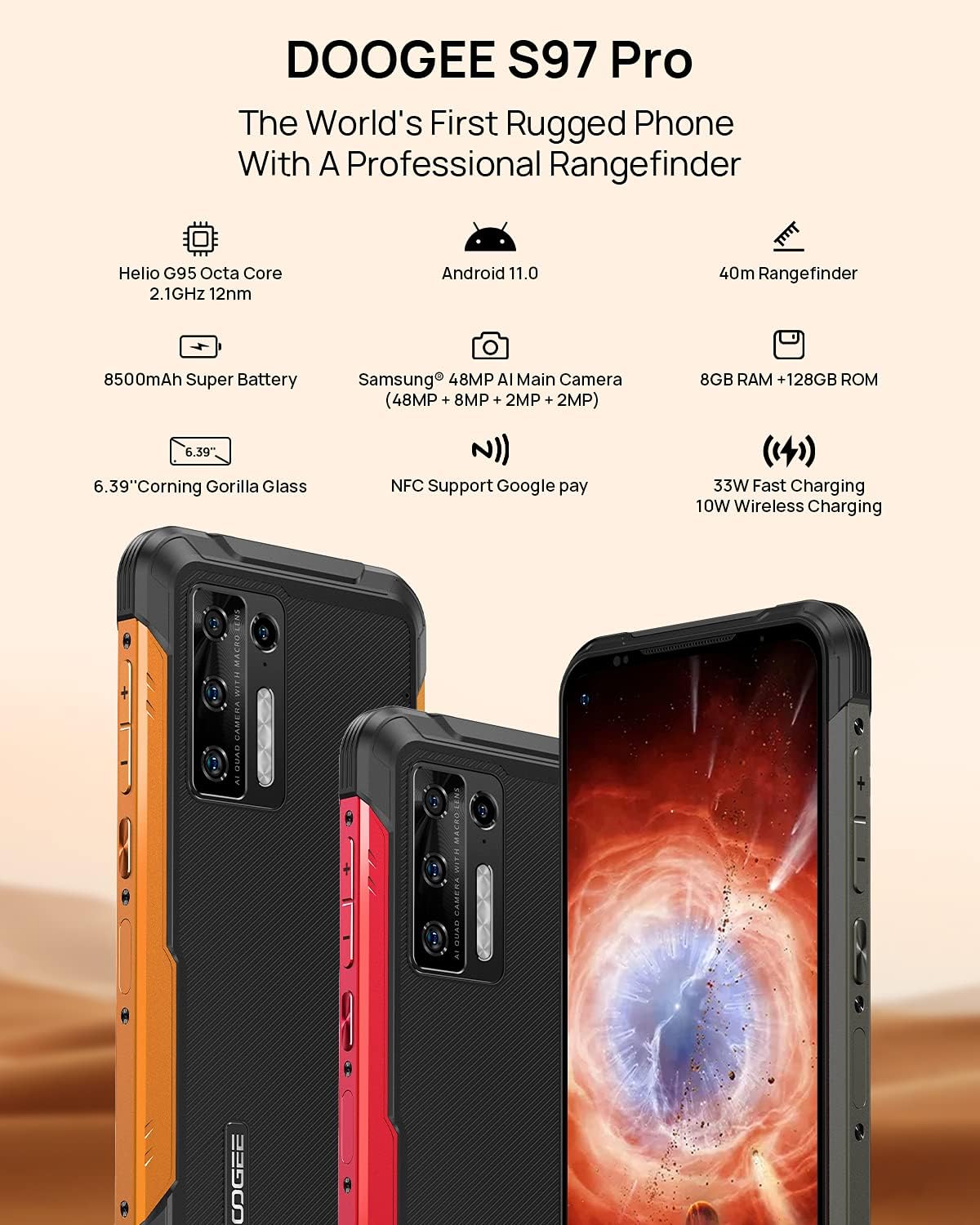
Image 2.1: Visual representation of the DOOGEE S97 Pro's main features, including processor, battery, camera, and display.
3. സജ്ജീകരണം
3.1 സിം കാർഡ് ഇൻസ്റ്റാളേഷൻ
- നിങ്ങളുടെ ഉപകരണത്തിന്റെ വശത്ത് സിം കാർഡ് ട്രേ കണ്ടെത്തുക.
- ട്രേ തുറക്കാൻ നൽകിയിരിക്കുന്ന സിം എജക്റ്റർ ഉപകരണം ഉപയോഗിക്കുക.
- Carefully place your Nano SIM card(s) into the designated slots. Ensure proper orientation.
- Gently push the SIM card tray back into the device until it is flush with the body.
കുറിപ്പ്: This device supports specific frequency bands. Please verify compatibility with your network carrier before use. The DOOGEE S97 Pro does not support certain CDMA network carriers such as Verizon, Sprint, Xfinity, and TracFone.
3.2 പ്രാരംഭ പവർ ഓൺ
- Press and hold the Power button located on the side of the device until the DOOGEE logo appears.
- ഭാഷാ തിരഞ്ഞെടുപ്പ്, വൈ-ഫൈ കണക്ഷൻ, ഗൂഗിൾ അക്കൗണ്ട് സജ്ജീകരണം എന്നിവയുൾപ്പെടെയുള്ള പ്രാരംഭ സജ്ജീകരണം പൂർത്തിയാക്കാൻ ഓൺ-സ്ക്രീൻ നിർദ്ദേശങ്ങൾ പാലിക്കുക.
4. പ്രവർത്തന നിർദ്ദേശങ്ങൾ
4.1 അടിസ്ഥാന നാവിഗേഷൻ
- Back Function: Swipe from the left or right edge of the screen towards the center.
- ഹോം സ്ക്രീൻ: ഹോം സ്ക്രീനിലേക്ക് മടങ്ങാൻ സ്ക്രീനിന്റെ താഴെ നിന്ന് മുകളിലേക്ക് സ്വൈപ്പ് ചെയ്യുക.
- സമീപകാല ആപ്പുകൾ: Swipe up from the bottom of the screen and hold briefly to view recent applications. Swipe left or right along the very bottom of the screen to scroll through recent apps.
- ആപ്പ് ഡ്രോയർ: The device does not feature a traditional app drawer. All installed applications are displayed on the home screen. Additional home screens are automatically added to the right as more apps are installed.
4.2 ക്യാമറ ഉപയോഗം
The DOOGEE S97 Pro is equipped with a versatile camera system:
- പിൻ ക്യാമറ: 48MP main sensor, 8MP ultra-wide angle, 2MP portrait, and 2MP macro lens.
- മുൻ ക്യാമറ: സെൽഫികൾക്കും വീഡിയോ കോളുകൾക്കും 16MP.
To access the camera, tap the Camera icon on your home screen. Select desired modes (Photo, Video, Portrait, Macro, etc.) from the interface.

ചിത്രം 4.1: ക്ലോസ്-അപ്പ് view of the Samsung 48MP AI Quad Rear Camera system on the DOOGEE S97 Pro.
4.3 Rangefinder Functionality
The integrated 40m laser rangefinder allows for precise distance measurements. To use:
- Locate and open the 'Rangefinder' application on your device.
- Select the desired measurement mode (Length, Area, Volume, Pythagoras).
- Follow the on-screen instructions to aim the laser and take measurements.

Image 4.2: Screenshots of the DOOGEE S97 Pro's 40m Rangefinder application interface, showing various measurement modes.
4.4 ബാറ്ററി മാനേജ്മെൻ്റ്
The DOOGEE S97 Pro features an 8500mAh battery. To optimize battery life and charging:
- വയർഡ് ചാർജിംഗ്: Use the provided USB Type-C cable and a compatible 33W fast charger for optimal charging speed.
- വയർലെസ് ചാർജിംഗ്: The device supports 10W wireless charging. Place the phone on a compatible wireless charging pad.
- ബാറ്ററി ഒപ്റ്റിമൈസേഷൻ: Access battery settings to manage app power usage and enable power-saving modes.

Image 4.3: Illustration of the DOOGEE S97 Pro's 8500mAh Super Battery and charging capabilities.
4.5 ഈട് സവിശേഷതകൾ
The S97 Pro is built to withstand harsh environments:
- IP68 റേറ്റിംഗ്: പൊടി കയറുന്നതിൽ നിന്നും 1.5 മീറ്റർ വരെ 30 മിനിറ്റ് വെള്ളത്തിൽ മുങ്ങുന്നതിൽ നിന്നും സംരക്ഷണം നൽകുന്നു.
- ഷോക്ക് പ്രൂഫ്: Designed to resist drops and impacts.
- കോർണിംഗ് ഗൊറില്ല ഗ്ലാസ്: Enhances screen durability against scratches and minor impacts.

Image 4.4: Demonstrations of the DOOGEE S97 Pro's waterproof, dustproof, and shockproof capabilities.
Video 4.5: An official video from DOOGEE showcasing the rugged features and capabilities of the S59 Pro smartphone.
4.6 ആൻഡ്രോയിഡ് 11 ഓപ്പറേറ്റിംഗ് സിസ്റ്റം
The device runs on Android 11, offering enhanced privacy controls, improved notification management, and a streamlined user experience.

Image 4.6: Visual representation of the Android 11 operating system interface on the DOOGEE S97 Pro.
5. പരിപാലനം
5.1 നിങ്ങളുടെ ഉപകരണം വൃത്തിയാക്കൽ
Due to its waterproof design, the DOOGEE S97 Pro can be cleaned with water. Ensure all ports are securely closed before rinsing. Use a soft, damp cloth to wipe the screen and body. Avoid harsh chemicals or abrasive materials.
5.2 സോഫ്റ്റ്വെയർ അപ്ഡേറ്റുകൾ
മികച്ച പ്രകടനം, സുരക്ഷ, പുതിയ സവിശേഷതകളിലേക്കുള്ള ആക്സസ് എന്നിവ ഉറപ്പാക്കാൻ സോഫ്റ്റ്വെയർ അപ്ഡേറ്റുകൾ പതിവായി പരിശോധിച്ച് ഇൻസ്റ്റാൾ ചെയ്യുക. ഇതിലേക്ക് നാവിഗേറ്റ് ചെയ്യുക ക്രമീകരണങ്ങൾ > സിസ്റ്റം > സിസ്റ്റം അപ്ഡേറ്റ് ലഭ്യമായ അപ്ഡേറ്റുകൾ പരിശോധിക്കാൻ.
6. പ്രശ്നപരിഹാരം
നിങ്ങളുടെ ഉപകരണത്തിൽ പ്രശ്നങ്ങൾ നേരിടുകയാണെങ്കിൽ, ഇനിപ്പറയുന്ന പൊതുവായ പരിഹാരങ്ങൾ പരിശോധിക്കുക:
- ഉപകരണം പ്രതികരിക്കുന്നില്ല: പുനരാരംഭിക്കാൻ നിർബന്ധിതമാക്കാൻ പവർ ബട്ടൺ ഏകദേശം 10-15 സെക്കൻഡ് അമർത്തിപ്പിടിക്കുക.
- നെറ്റ്വർക്ക് കണക്റ്റിവിറ്റി പ്രശ്നങ്ങൾ: Verify your SIM card is correctly inserted. Check network settings (ക്രമീകരണം > നെറ്റ്വർക്കും ഇന്റർനെറ്റും > മൊബൈൽ നെറ്റ്വർക്ക്). ഉപകരണം പുനരാരംഭിക്കുക.
- ചാർജിംഗ് പ്രശ്നങ്ങൾ: Ensure the USB cable and charger are securely connected and undamaged. Try a different charger or cable. For wireless charging, ensure the phone is correctly positioned on the charging pad.
- Fingerprint Sensor Inaccuracy: നിങ്ങളുടെ വിരൽ വൃത്തിയുള്ളതും വരണ്ടതുമാണെന്ന് ഉറപ്പാക്കുക. നിങ്ങളുടെ വിരലടയാളങ്ങൾ വീണ്ടും രജിസ്റ്റർ ചെയ്യുക ക്രമീകരണം > സുരക്ഷ > ഫിംഗർപ്രിന്റ്.
- മന്ദഗതിയിലുള്ള പ്രകടനം: Close unused applications. Clear cache (ക്രമീകരണങ്ങൾ > ആപ്പുകളും അറിയിപ്പുകളും > എല്ലാ ആപ്പുകളും കാണുക > [ആപ്പ് നാമം] > സംഭരണവും കാഷെയും > കാഷെ മായ്ക്കുക). Consider a factory reset as a last resort (ക്രമീകരണങ്ങൾ > സിസ്റ്റം > റീസെറ്റ് ഓപ്ഷനുകൾ > എല്ലാ ഡാറ്റയും മായ്ക്കുക (ഫാക്ടറി റീസെറ്റ്)).
7 സ്പെസിഫിക്കേഷനുകൾ
| ഫീച്ചർ | വിശദാംശങ്ങൾ |
|---|---|
| ഉൽപ്പന്ന അളവുകൾ | 6.41 x 3.19 x 0.63 ഇഞ്ച് |
| ഇനത്തിൻ്റെ ഭാരം | 12 ഔൺസ് (340 ഗ്രാം) |
| ഓപ്പറേറ്റിംഗ് സിസ്റ്റം | ആൻഡ്രോയിഡ് 11.0 |
| റാം | 8 GB (Note: Product data shows 4GB RAM, but images and title indicate 8GB. This manual uses 8GB as per prominent product claims.) |
| മെമ്മറി സ്റ്റോറേജ് കപ്പാസിറ്റി | 128 ജിബി |
| സ്ക്രീൻ വലിപ്പം | 5.71 ഇഞ്ച് |
| ബാറ്ററി ശേഷി | 8500 മില്ലിamp Hours (Note: Product data shows 10050 mAh, but images and title indicate 8500 mAh. This manual uses 8500 mAh as per prominent product claims.) |
| വയർലെസ് കമ്മ്യൂണിക്കേഷൻ ടെക്നോളജീസ് | സെല്ലുലാർ, വൈ-ഫൈ |
| സെല്ലുലാർ ടെക്നോളജി | എൽടിഇ |
| കണക്റ്റർ തരം | യുഎസ്ബി ടൈപ്പ് സി |
| ഹ്യൂമൻ ഇന്റർഫേസ് ഇൻപുട്ട് | ബട്ടണുകൾ |
| ബോക്സിൽ എന്താണുള്ളത് | USB കേബിൾ |
For detailed specifications, please refer to the product packaging or the official DOOGEE webസൈറ്റ്.

Image 7.1: The DOOGEE S97 Pro highlighting its 8GB RAM and 128GB ROM, powered by a Helio G95 Octa Core processor.
8. വാറൻ്റിയും പിന്തുണയും
Your DOOGEE S97 Pro smartphone is covered by a manufacturer's warranty. Please refer to the warranty card included in your product packaging for specific terms and conditions, including warranty duration and coverage details.
For technical support, product inquiries, or service requests, please visit the official DOOGEE website or contact their customer service department. Contact information can typically be found on the DOOGEE webസൈറ്റ് അല്ലെങ്കിൽ ഉൽപ്പന്ന പാക്കേജിംഗിൽ.