
ആമുഖം
Welcome to your new TELLUR Dash Patrol DC1 Car Camera. This manual provides instructions for installation, operation, and maintenance to ensure optimal performance and longevity of your device. Please read this manual thoroughly before using the product.
സുരക്ഷാ വിവരങ്ങൾ
- Ensure the dash camera is securely mounted and does not obstruct the driver's view അല്ലെങ്കിൽ വാഹന നിയന്ത്രണങ്ങളിൽ ഇടപെടുക.
- Do not operate the device while driving. Adjust settings only when the vehicle is safely parked.
- ഉപകരണത്തെ തീവ്രമായ താപനിലയിലോ, ദീർഘനേരം നേരിട്ടുള്ള സൂര്യപ്രകാശത്തിലോ, ഈർപ്പത്തിലോ തുറന്നുകാട്ടുന്നത് ഒഴിവാക്കുക.
- Use only the provided power adapter and cables to prevent damage and ensure proper operation.
- Keep the lens clean to ensure clear video recordings.
- ഉപകരണം സ്വയം വേർപെടുത്താനോ നന്നാക്കാനോ ശ്രമിക്കരുത്. സഹായത്തിനായി യോഗ്യതയുള്ള സേവന ഉദ്യോഗസ്ഥരെ ബന്ധപ്പെടുക.
പാക്കേജ് ഉള്ളടക്കം
- 1 x Dash Patrol Dashcam DC1
- 1 x കാന്തിക ബ്രാക്കറ്റ്
- 1 x മൈക്രോയുഎസ്ബി കേബിൾ
- 1 x Dual USB Car Charger
- 1 x ഉപയോക്തൃ മാനുവൽ
ഉൽപ്പന്നം കഴിഞ്ഞുview
ഘടകങ്ങൾ


നിയന്ത്രണങ്ങളും സൂചകങ്ങളും
- പവർ ബട്ടൺ: Press and hold to turn the device on or off. Short press to toggle screen display.
- എം (മോഡ്) ബട്ടൺ: Switches between video recording, still photo, and playback modes.
- അപ്പ്/ഡൗൺ ബട്ടണുകൾ: മെനു ഓപ്ഷനുകളിലൂടെ നാവിഗേറ്റ് ചെയ്യുക അല്ലെങ്കിൽ ക്രമീകരണങ്ങൾ ക്രമീകരിക്കുക.
- ശരി ബട്ടൺ: Confirms selections or starts/stops recording in video mode.
- ടിഎഫ് കാർഡ് സ്ലോട്ട്: Insert a microSD card for storing recordings.
- മൈക്രോ യുഎസ്ബി പോർട്ട്: Connects to the car charger for power.
- മൈക്രോഫോൺ: ഓഡിയോ റെക്കോർഡ് ചെയ്യുന്നു.
സജ്ജമാക്കുക
1. മെമ്മറി കാർഡ് ചേർക്കുക
Before first use, insert a Class 10 or higher microSD card (not included) into the TF Card slot. Ensure the card is inserted correctly until it clicks into place.
2. Mount the Dash Camera
Clean the windshield area where the camera will be mounted. Attach the magnetic bracket to the windshield using its adhesive. Ensure the camera's position does not obstruct your view. Once the bracket is secured, attach the dash camera to the magnetic bracket.
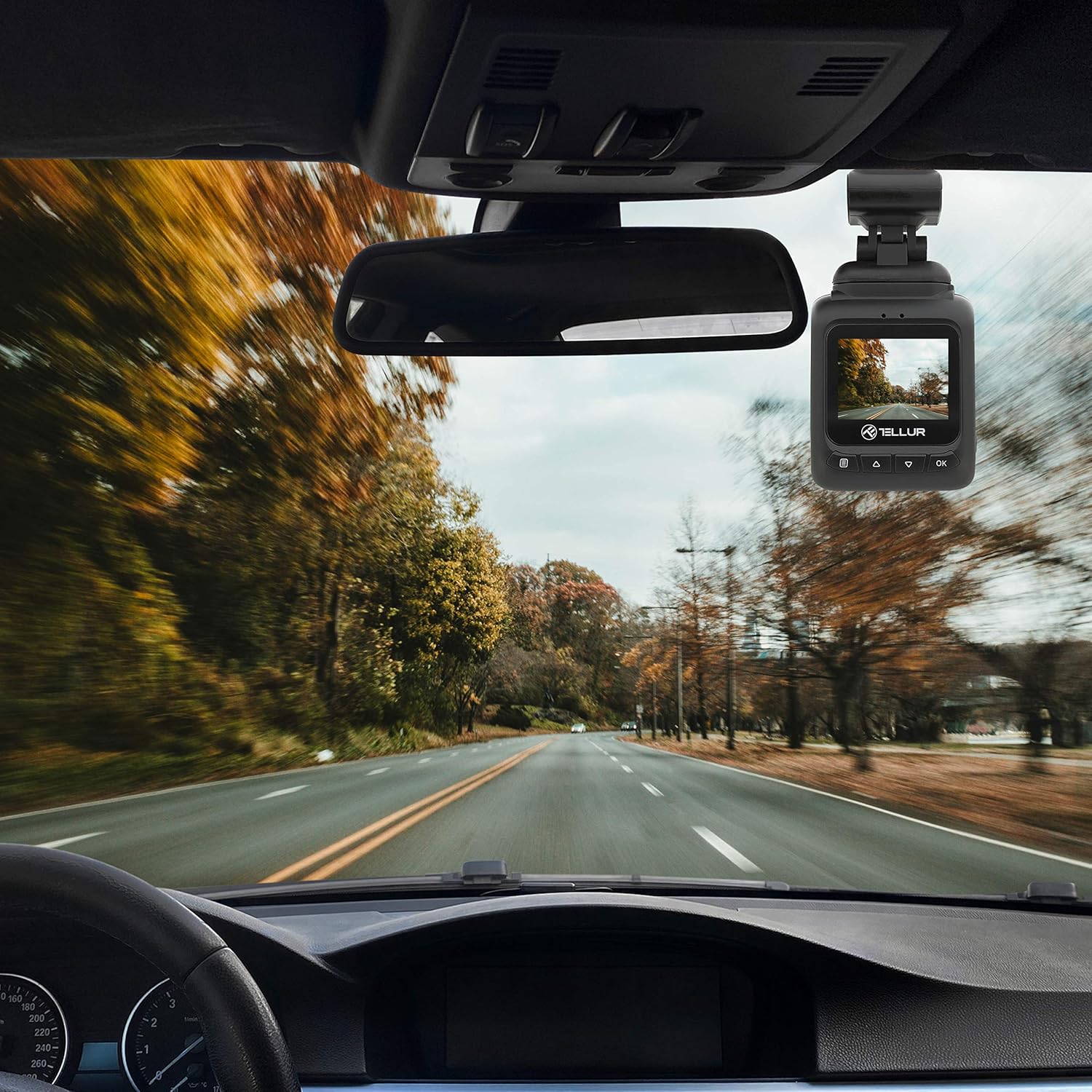
3. പവർ ബന്ധിപ്പിക്കുക
Connect the MicroUSB cable to the dash camera's MicroUSB port and the other end to the Dual USB Car Charger. Plug the car charger into your vehicle's 12V power outlet (cigarette lighter socket). The camera will automatically power on and begin recording when the vehicle starts.
പ്രവർത്തന നിർദ്ദേശങ്ങൾ
അടിസ്ഥാന റെക്കോർഡിംഗ്
Once powered on, the camera automatically starts recording in a continuous loop. The recording indicator (usually a red dot) will flash on the screen. Videos are recorded in FullHD 1080P resolution with a 140-degree wide-angle lens.
ജി-സെൻസർ പ്രവർത്തനം
The built-in G-sensor detects sudden impacts or collisions. When an event is detected, the current video segment is automatically locked and saved to prevent it from being overwritten by loop recording. This ensures critical footagഇ സംരക്ഷിക്കപ്പെട്ടിരിക്കുന്നു.

പാർക്കിംഗ് മോണിറ്ററിംഗ് പ്രവർത്തനം
When the parking monitoring function is enabled, the camera will automatically start recording if it detects motion or an impact while the vehicle is parked and the engine is off. This feature provides surveillance for your vehicle when unattended.

മെനു നാവിഗേഷൻ
അമർത്തുക M button to enter the menu. Use the മുകളിലേക്ക് / താഴേക്ക് buttons to navigate through options and the OK തിരഞ്ഞെടുക്കാൻ ബട്ടൺ. അമർത്തുക M മെനുവിൽ നിന്ന് പുറത്തുകടക്കാൻ വീണ്ടും.
വീഡിയോ പ്ലേബാക്ക്
In playback mode (accessed via the M button), use the മുകളിലേക്ക് / താഴേക്ക് ഒരു വീഡിയോ തിരഞ്ഞെടുക്കാനുള്ള ബട്ടണുകൾ file ഒപ്പം OK to play it. Press M എന്നതിലേക്ക് മടങ്ങാൻ file പട്ടിക.
മെയിൻ്റനൻസ്
ലെൻസ് വൃത്തിയാക്കൽ
Regularly clean the camera lens with a soft, lint-free cloth to ensure clear video quality. Do not use abrasive cleaners.
മെമ്മറി കാർഡ് മാനേജ്മെന്റ്
It is recommended to format the microSD card periodically (e.g., once a month) within the camera's settings to maintain optimal performance and prevent data corruption.
ട്രബിൾഷൂട്ടിംഗ്
- ക്യാമറ ഓണാക്കുന്നില്ല: Check the power connection to the car charger and the vehicle's 12V outlet. Ensure the vehicle's ignition is on.
- റെക്കോർഡിംഗ് അപ്രതീക്ഷിതമായി നിലയ്ക്കുന്നു: Ensure the microSD card is properly inserted and is a Class 10 or higher. Format the card if issues persist.
- മോശം വീഡിയോ നിലവാരം: Clean the camera lens. Check menu settings to ensure 1080P resolution is selected.
- G-Sensor not triggering: Adjust the G-sensor sensitivity in the camera's settings.
- Parking Monitor not working: Ensure the parking monitoring function is enabled in the settings.
സ്പെസിഫിക്കേഷനുകൾ
| ഫീച്ചർ | വിശദാംശങ്ങൾ |
|---|---|
| മോഡലിൻ്റെ പേര് | DC1 |
| ഇനം മോഡൽ നമ്പർ | TLL711001 |
| വീഡിയോ ക്യാപ്ചർ റെസല്യൂഷൻ | 1080p |
| ഫീൽഡ് ഓഫ് View | 140 ഡിഗ്രി |
| പ്രത്യേക ഫീച്ചർ | Automatic Incident Detection (G-Sensor), Parking Monitoring |
| കണക്റ്റിവിറ്റി ടെക്നോളജി | USB |
| മൗണ്ടിംഗ് തരം | Magnetic Mount with Adhesive |
| ഉൽപ്പന്ന അളവുകൾ | 1.72 x 1.47 x 2.17 ഇഞ്ച് |
| ഇനത്തിൻ്റെ ഭാരം | 8.4 ഔൺസ് |
| ബാറ്ററികൾ | 1 ലിഥിയം പോളിമർ ബാറ്ററി ആവശ്യമാണ് |
| നിറം | കറുപ്പ് |
| നിർമ്മാതാവ് | തെല്ലൂർ |
വാറൻ്റിയും പിന്തുണയും
TELLUR products are designed for reliability and performance. For warranty information, technical support, or service inquiries, please refer to the contact details provided on the official TELLUR webനിങ്ങളുടെ സൈറ്റ് അല്ലെങ്കിൽ വാങ്ങൽ ഡോക്യുമെന്റേഷൻ. വാറന്റി ക്ലെയിമുകൾക്കായി നിങ്ങളുടെ വാങ്ങലിന്റെ തെളിവ് സൂക്ഷിക്കുക.