
യുലെഫോൺ നോട്ട് 11P
Ulefone Note 11P സ്മാർട്ട്ഫോൺ ഉപയോക്തൃ മാനുവൽ
മോഡൽ: നോട്ട് 11P
1. ആമുഖം
This manual provides essential information for the safe and efficient use of your Ulefone Note 11P smartphone. Please read this manual carefully before using the device to ensure proper operation and to prevent damage.

ചിത്രം 1.1: മുന്നിലും പിന്നിലും view of the Ulefone Note 11P Smartphone, showcasing അതിന്റെ മിനുസമാർന്ന രൂപകൽപ്പനയും ക്യാമറ മൊഡ്യൂളും.
2. ഉപകരണ ലേഔട്ട്
Familiarize yourself with the physical components and buttons of your Ulefone Note 11P.

Figure 2.1: Detailed diagram illustrating the location of the 8MP front camera, receiver, light/proximity sensor, rear flash, 48MP main camera, 8MP ultra-wide angle camera, 2MP macro camera, 2MP sub-camera, fingerprint sensor, 3.5mm earphone jack, speaker, microphone, Type-C charging port, volume buttons, and power key.
2.1 ബട്ടണുകളും പോർട്ടുകളും
- പവർ കീ: പവർ ഓൺ/ഓഫ് ചെയ്യാനോ പുനരാരംഭിക്കാനോ അമർത്തിപ്പിടിക്കുക. സ്ക്രീൻ ലോക്ക്/അൺലോക്ക് ചെയ്യാൻ ചെറുതായി അമർത്തുക.
- വോളിയം ബട്ടണുകൾ: മീഡിയ വോളിയം, റിംഗ്ടോൺ വോളിയം, അലാറം വോളിയം എന്നിവ ക്രമീകരിക്കുക.
- ടൈപ്പ്-സി ചാർജിംഗ് പോർട്ട്: Connect the provided USB cable for charging and data transfer.
- 3.5 എംഎം ഇയർഫോൺ ജാക്ക്: സ്റ്റാൻഡേർഡ് 3.5mm ഹെഡ്ഫോണുകൾ ബന്ധിപ്പിക്കുക.
3. സജ്ജീകരണം
3.1 ബോക്സിൽ എന്താണുള്ളത്
Verify that all components are present in your product package:
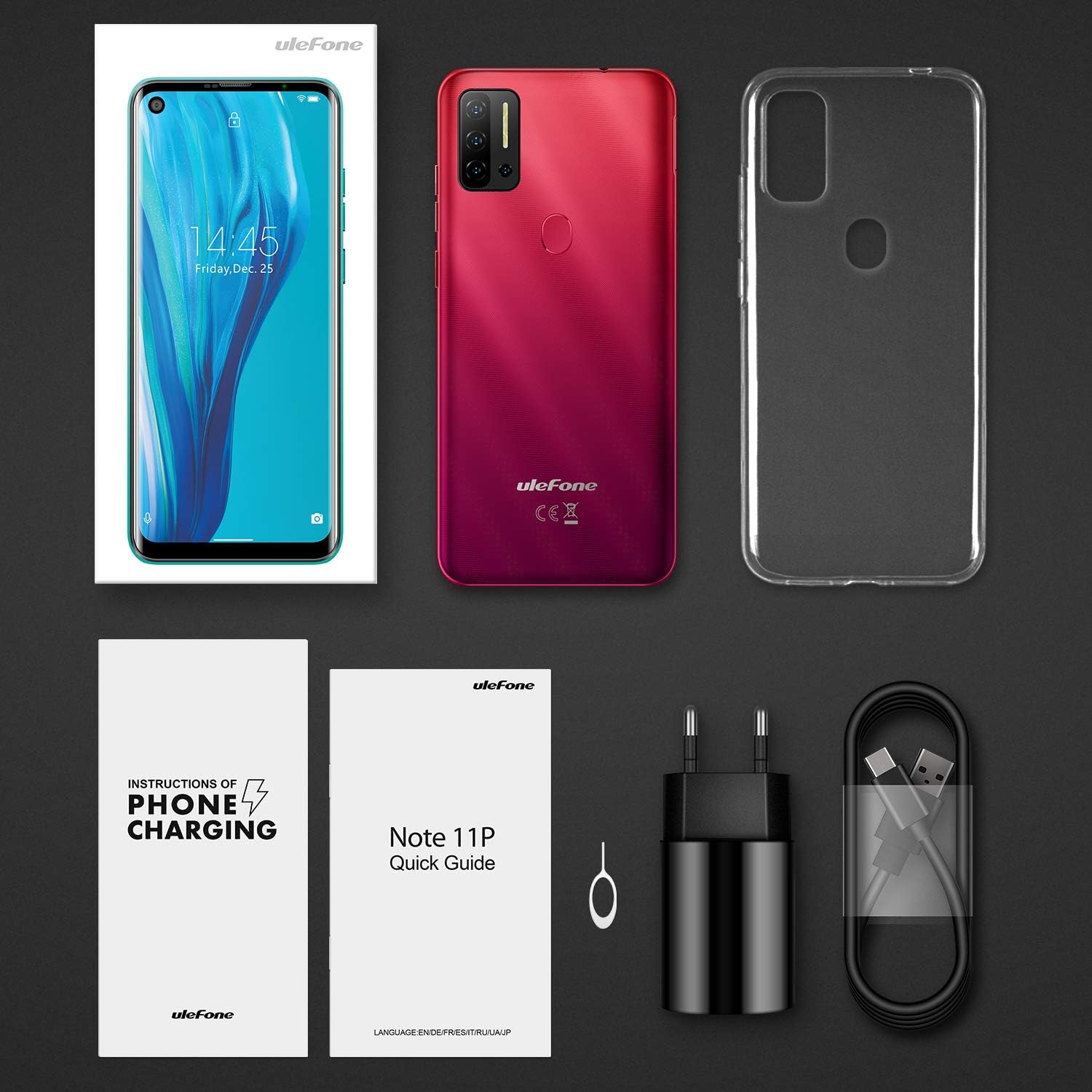
Figure 3.1: Contents of the Ulefone Note 11P package, including the smartphone, AC charger, USB data cable, protective case, pre-applied screen protector, SIM ejector tool, warranty certificate, and user manual.
- Ulefone Note 11P Smartphone (battery included)
- എസി പവർ ചാർജർ
- USB Data Cable (100 cm)
- സംരക്ഷണ കേസ്
- Screen Protector (pre-applied)
- SIM Ejector Needle
- വാറൻ്റി സർട്ടിഫിക്കറ്റ്
- ഉപയോക്തൃ മാനുവൽ (ഈ പ്രമാണം)
3.2 സിം കാർഡുകളും SD കാർഡും ചേർക്കൽ
The Ulefone Note 11P supports Dual SIM Dual Standby and a dedicated SD card slot for expanded storage up to 2TB.
- ഫോണിന്റെ വശത്ത് സിം കാർഡ് ട്രേ കണ്ടെത്തുക.
- ട്രേ തുറക്കാൻ അതിനടുത്തുള്ള ചെറിയ ദ്വാരത്തിലേക്ക് സിം എജക്റ്റർ ഉപകരണം തിരുകുക.
- ട്രേ ശ്രദ്ധാപൂർവ്വം പുറത്തെടുക്കുക.
- Place your Nano-SIM cards and/or a microSD (TF) card into the designated slots on the tray. Ensure the gold contacts face downwards.
- ട്രേ അതിന്റെ സ്ഥാനത്ത് ക്ലിക്കായി വരുന്നത് വരെ ഫോണിലേക്ക് പതുക്കെ തിരികെ തള്ളുക.
3.3 പ്രാരംഭ ചാർജിംഗ്
ആദ്യ ഉപയോഗത്തിന് മുമ്പ്, നിങ്ങളുടെ ഉപകരണം പൂർണ്ണമായും ചാർജ് ചെയ്യാൻ ശുപാർശ ചെയ്യുന്നു.
- ഫോണിന്റെ അടിയിലുള്ള ചാർജിംഗ് പോർട്ടിലേക്ക് യുഎസ്ബി ടൈപ്പ്-സി കേബിൾ ബന്ധിപ്പിക്കുക.
- Connect the other end of the USB cable to the AC power charger.
- Plug the AC power charger into a wall outlet.
- സ്ക്രീനിലെ ബാറ്ററി ഐക്കൺ ചാർജിംഗ് നിലയെ സൂചിപ്പിക്കും.

Figure 3.2: The Ulefone Note 11P displaying its charging status, highlighting the powerful 4400mAh battery designed for extended use.
4. നിങ്ങളുടെ ഉപകരണം പ്രവർത്തിപ്പിക്കുന്നു
4.1 പവർ ഓൺ/ഓഫ്
- To power on, press and hold the Power Key until the Ulefone logo appears.
- To power off, press and hold the Power Key until the power options menu appears, then select "Power off".
4.2 ആൻഡ്രോയിഡ് 11 ഓപ്പറേറ്റിംഗ് സിസ്റ്റം
Your Ulefone Note 11P runs on the latest Android 11 OS, offering enhanced privacy controls, conversation management, and device connectivity features.

Figure 4.1: Visual representation of the Android 11 operating system interface on the Ulefone Note 11P, emphasizing its privacy protection features.
4.3 ഡിസ്പ്ലേയും നാവിഗേഷനും
The 6.55-inch punch-hole display provides an immersive visual experience.

Figure 4.2: Close-up of the Ulefone Note 11P's 6.55-inch punch-hole screen, illustrating its large display and enhanced visual quality.
- ടച്ച്സ്ക്രീൻ ആംഗ്യങ്ങൾ: Tap, long press, swipe, pinch-to-zoom for navigation and interaction.
- അറിയിപ്പ് പാനൽ: ദ്രുത ക്രമീകരണങ്ങളും അറിയിപ്പുകളും ആക്സസ് ചെയ്യുന്നതിന് സ്ക്രീനിന്റെ മുകളിൽ നിന്ന് താഴേക്ക് സ്വൈപ്പ് ചെയ്യുക.
- നാവിഗേഷൻ ബാർ: ആപ്പുകൾക്കും സ്ക്രീനുകൾക്കുമിടയിൽ നീങ്ങാൻ ഓൺ-സ്ക്രീൻ നാവിഗേഷൻ ബട്ടണുകൾ (ബാക്ക്, ഹോം, സമീപകാലങ്ങൾ) അല്ലെങ്കിൽ ജെസ്റ്റർ നാവിഗേഷൻ (പ്രവർത്തനക്ഷമമാക്കിയിട്ടുണ്ടെങ്കിൽ) ഉപയോഗിക്കുക.
4.4 സുരക്ഷാ സവിശേഷതകൾ
The Note 11P offers multiple ways to secure your device.
- ഫിംഗർപ്രിന്റ് അൺലോക്ക്: Register your fingerprints for quick and secure unlocking. The fingerprint sensor is located on the rear of the device.
- Facial Unlock: Use the front camera to unlock your phone with your face.
- പിൻ/പാറ്റേൺ/പാസ്വേഡ്: Set up a traditional lock screen method for backup security.
4.5 ക്യാമറ ഉപയോഗം
Capture high-quality photos and videos with the 48MP AI Quad Camera system.

Figure 4.3: Close-up of the Ulefone Note 11P's 48MP AI Quad Camera setup, featuring ultra-wide angle and macro lenses for diverse photographic capabilities.
- ഹോം സ്ക്രീനിൽ നിന്നോ ആപ്പ് ഡ്രോയറിൽ നിന്നോ ക്യാമറ ആപ്പ് തുറക്കുക.
- Switch between main, ultra-wide, and macro lenses as needed.
- ഒരു ഫോട്ടോ എടുക്കാൻ ഷട്ടർ ബട്ടൺ ടാപ്പ് ചെയ്യുക.
- Switch to video mode to record videos.
5. പരിപാലനം
5.1 നിങ്ങളുടെ ഉപകരണം വൃത്തിയാക്കൽ
- ഫോണിന്റെ സ്ക്രീനും ബോഡിയും വൃത്തിയാക്കാൻ മൃദുവായ, ലിന്റ് രഹിത തുണി ഉപയോഗിക്കുക.
- കഠിനമായ രാസവസ്തുക്കൾ, അബ്രസീവ് ക്ലീനറുകൾ, അല്ലെങ്കിൽ എയറോസോൾ സ്പ്രേകൾ എന്നിവ ഉപയോഗിക്കുന്നത് ഒഴിവാക്കുക.
- Do not expose the phone to excessive dust or moisture.
5.2 ബാറ്ററി കെയർ
- ബാറ്ററി ആയുസ്സ് വർദ്ധിപ്പിക്കുന്നതിന്, ഉയർന്ന താപനില ഒഴിവാക്കുക.
- ഉപകരണത്തിനൊപ്പം നൽകിയിരിക്കുന്ന ഒറിജിനൽ ചാർജറും കേബിളും മാത്രം ഉപയോഗിക്കുക.
- ബാറ്ററി ഇടയ്ക്കിടെ പൂർണ്ണമായും കളയുന്നത് ഒഴിവാക്കുക.
5.3 സോഫ്റ്റ്വെയർ അപ്ഡേറ്റുകൾ
മികച്ച പ്രകടനവും സുരക്ഷയും ഉറപ്പാക്കാൻ സോഫ്റ്റ്വെയർ അപ്ഡേറ്റുകൾ പതിവായി പരിശോധിച്ച് ഇൻസ്റ്റാൾ ചെയ്യുക.
- പോകുക ക്രമീകരണങ്ങൾ > സിസ്റ്റം > സിസ്റ്റം അപ്ഡേറ്റ് ലഭ്യമായ അപ്ഡേറ്റുകൾ പരിശോധിക്കാൻ.
- Ensure your device has sufficient battery and a stable Wi-Fi connection before performing an update.
6. പ്രശ്നപരിഹാരം
6.1 പൊതുവായ പ്രശ്നങ്ങളും പരിഹാരങ്ങളും
| പ്രശ്നം | സാധ്യമായ പരിഹാരം |
|---|---|
| ഉപകരണം ഓണാക്കുന്നില്ല | Ensure the battery is charged. Press and hold the Power Key for at least 10 seconds. |
| ആപ്പുകൾ ക്രാഷാകുന്നു അല്ലെങ്കിൽ മരവിക്കുന്നു | Clear app cache/data (Settings > Apps > [App Name] > Storage). Restart the device. |
| മോശം ബാറ്ററി ലൈഫ് | പശ്ചാത്തല ആപ്പുകൾ അടയ്ക്കുക. സ്ക്രീൻ തെളിച്ചം കുറയ്ക്കുക. ഉപയോഗത്തിലില്ലാത്തപ്പോൾ GPS അല്ലെങ്കിൽ ബ്ലൂടൂത്ത് പോലുള്ള അനാവശ്യ സവിശേഷതകൾ പ്രവർത്തനരഹിതമാക്കുക. |
| Wi-Fi-യിലേക്ക് കണക്റ്റുചെയ്യാൻ കഴിയില്ല | Restart your Wi-Fi router. Forget the network on your phone and reconnect. Ensure Wi-Fi is enabled on the phone. |
| ഫിംഗർപ്രിന്റ് സെൻസർ പ്രവർത്തിക്കുന്നില്ല | Ensure your finger is clean and dry. Re-register your fingerprints in Settings > Security. |
6.2 ഫാക്ടറി റീസെറ്റ്
പ്രശ്നങ്ങൾ നിലനിൽക്കുകയാണെങ്കിൽ, ഒരു ഫാക്ടറി റീസെറ്റ് ആവശ്യമായി വന്നേക്കാം. മുന്നറിയിപ്പ്: ഇത് നിങ്ങളുടെ ഫോണിലെ എല്ലാ ഡാറ്റയും മായ്ക്കും. തുടരുന്നതിന് മുമ്പ് പ്രധാനപ്പെട്ട ഡാറ്റയുടെ ബാക്കപ്പ് എടുക്കുക.
- പോകുക ക്രമീകരണങ്ങൾ > സിസ്റ്റം > റീസെറ്റ് ഓപ്ഷനുകൾ > എല്ലാ ഡാറ്റയും മായ്ക്കുക (ഫാക്ടറി റീസെറ്റ്).
- റീസെറ്റ് സ്ഥിരീകരിക്കാൻ ഓൺ-സ്ക്രീൻ നിർദ്ദേശങ്ങൾ പാലിക്കുക.
7 സ്പെസിഫിക്കേഷനുകൾ
Key technical specifications of the Ulefone Note 11P smartphone.

ചിത്രം 7.1: ഓവർview of Ulefone Note 11P's main features including Android 11, 6.55-inch punch-hole screen, Helio P60 Octa-Core Processor, 8GB RAM + 128GB ROM, 48MP Quad Camera, Facial and Fingerprint Identification, 4400mAh Battery, and 3-Card Slot.
| ഫീച്ചർ | വിശദാംശങ്ങൾ |
|---|---|
| മോഡലിൻ്റെ പേര് | കുറിപ്പ് 11P |
| ഓപ്പറേറ്റിംഗ് സിസ്റ്റം | ആൻഡ്രോയിഡ് 11.0 |
| പ്രോസസ്സർ | MediaTek Helio P60 Octa-core, 2 GHz |
| റാം | 8 ജിബി |
| ആന്തരിക സംഭരണം | 128 ജിബി (യുഎഫ്എസ് 2.1) |
| വികസിപ്പിക്കാവുന്ന സംഭരണം | Up to 2 TB via TF card (dedicated slot) |
| പ്രദർശിപ്പിക്കുക | 6.55-inch Punch-Hole LCD, 720x1600 resolution, 20:9 aspect ratio |
| പിൻ ക്യാമറ | 48MP Main (Samsung sensor) + 8MP Ultra-Wide Angle (120°) + 2MP Macro + 2MP Sub-camera |
| മുൻ ക്യാമറ | 8എംപി |
| ബാറ്ററി ശേഷി | 4400 mAh (Lithium-Polymer) |
| സിം കാർഡ് പിന്തുണ | Dual SIM Dual Standby (Nano-SIM) |
| കണക്റ്റിവിറ്റി | 4G LTE, Wi-Fi, Bluetooth, GPS, GLONASS, Beidou, Type-C, 3.5mm Jack |
| സുരക്ഷ | Fingerprint ID, Facial Unlock |
| അളവുകൾ | 16.69 x 7.72 x 0.99 സെ.മീ |
| ഭാരം | 209 ഗ്രാം |

Figure 7.2: The Ulefone Note 11P highlighting its 8GB RAM and 128GB ROM, with support for up to 1TB TF card expansion, allowing users to store a vast amount of data.
8. വാറൻ്റിയും പിന്തുണയും
Your Ulefone Note 11P comes with a warranty. Please refer to the included Warranty Certificate for specific terms and conditions.
8.1 ഉപഭോക്തൃ പിന്തുണ
സാങ്കേതിക സഹായത്തിനോ, ഈ മാനുവലിനപ്പുറമുള്ള പ്രശ്നപരിഹാരത്തിനോ, വാറന്റി ക്ലെയിമുകൾക്കോ, ദയവായി Ulefone ഉപഭോക്തൃ പിന്തുണയെ അവരുടെ ഔദ്യോഗിക വിലാസത്തിലൂടെ ബന്ധപ്പെടുക. webസൈറ്റ് അല്ലെങ്കിൽ നിങ്ങളുടെ വാറന്റി ഡോക്യുമെന്റേഷനിൽ നൽകിയിരിക്കുന്ന ബന്ധപ്പെടാനുള്ള വിവരങ്ങൾ.
You can also visit the official Ulefone store on Amazon for product information and support: Ulefone Amazon Store
Ask a question about this manual
Ask about setup, troubleshooting, compatibility, parts, safety, or missing instructions. Manuals+ will review the question and use this page’s manual context to help answer it.