
1. ആമുഖം
This manual provides comprehensive instructions for the Technical Pro Dual 21 Band Professional Stereo Equalizer, model EQ7153. This device is engineered to offer precise control over audio frequencies, allowing for detailed sound shaping and enhancement in various audio environments. Please read this manual thoroughly before operating the unit to ensure proper usage and to maximize its performance.
2. പ്രധാന സുരക്ഷാ നിർദ്ദേശങ്ങൾ
- ഊർജ്ജ സ്രോതസ്സ്: നിർദ്ദിഷ്ട പവർ സപ്ലൈ വോള്യത്തിലേക്ക് മാത്രം യൂണിറ്റ് ബന്ധിപ്പിക്കുക.tage as indicated on the rear panel. Ensure the power switch is set to the correct voltage (110V or 220V) for your region before connecting to power.
- വെൻ്റിലേഷൻ: Ensure adequate ventilation around the unit. Do not block ventilation openings. Avoid placing the unit on carpets or in enclosed spaces that restrict airflow.
- ഈർപ്പം: മഴ, ഈർപ്പം, തുള്ളികൾ, തെറിക്കൽ എന്നിവയ്ക്ക് യൂണിറ്റ് വിധേയമാക്കരുത്. പാത്രങ്ങൾ പോലുള്ള ദ്രാവകങ്ങൾ നിറച്ച വസ്തുക്കൾ ഉപകരണത്തിൽ വയ്ക്കരുത്.
- ചൂട്: റേഡിയേറ്ററുകൾ, ഹീറ്റ് രജിസ്റ്ററുകൾ, സ്റ്റൗകൾ അല്ലെങ്കിൽ മറ്റ് ഉപകരണങ്ങൾ (ഉൾപ്പെടെ) പോലുള്ള താപ സ്രോതസ്സുകളിൽ നിന്ന് യൂണിറ്റ് അകറ്റി നിർത്തുക. ampലൈഫയറുകൾ) ചൂട് ഉത്പാദിപ്പിക്കുന്നത്.
- വൃത്തിയാക്കൽ: Disconnect the power cord from the outlet before cleaning. Use only a dry cloth for cleaning.
- സേവനം: ഈ ഉൽപ്പന്നം സ്വയം സർവീസ് ചെയ്യാൻ ശ്രമിക്കരുത്. എല്ലാ സർവീസിംഗും യോഗ്യതയുള്ള സർവീസ് ഉദ്യോഗസ്ഥർക്ക് റഫർ ചെയ്യുക. വൈദ്യുതി വിതരണ ചരട് അല്ലെങ്കിൽ പ്ലഗ് കേടായപ്പോൾ, ദ്രാവകം തെറിച്ചുവീണപ്പോൾ അല്ലെങ്കിൽ വസ്തുക്കൾ ഉപകരണത്തിനുള്ളിൽ വീണപ്പോൾ, ഉപകരണം മഴയിലോ ഈർപ്പത്തിലോ സമ്പർക്കത്തിൽ വന്നപ്പോൾ, സാധാരണയായി പ്രവർത്തിക്കാത്തപ്പോൾ, അല്ലെങ്കിൽ താഴെ വീണപ്പോൾ എന്നിങ്ങനെ ഏതെങ്കിലും വിധത്തിൽ ഉപകരണത്തിന് കേടുപാടുകൾ സംഭവിച്ചപ്പോൾ സർവീസിംഗ് ആവശ്യമാണ്.
- ഒബ്ജക്റ്റ്, ലിക്വിഡ് എൻട്രി: അപകടകരമായ വോളിയം സ്പർശിച്ചേക്കാവുന്നതിനാൽ, തുറസ്സുകളിലൂടെ ഈ ഉൽപ്പന്നത്തിലേക്ക് ഏതെങ്കിലും തരത്തിലുള്ള വസ്തുക്കളെ ഒരിക്കലും തള്ളരുത്tagതീയോ വൈദ്യുതാഘാതമോ ഉണ്ടാക്കിയേക്കാവുന്ന ഇ പോയിൻ്റുകൾ അല്ലെങ്കിൽ ഷോർട്ട്-ഔട്ട് ഭാഗങ്ങൾ.
3. പാക്കേജ് ഉള്ളടക്കം
Upon unpacking, please verify that the following items are included:
- Technical Pro EQ7153 Dual 21 Band Professional Stereo Equalizer
- പവർ കേബിൾ
- Removable Rack-Mount Brackets
- നിർദ്ദേശ മാനുവൽ (ഈ പ്രമാണം)
4. ഉൽപ്പന്നം കഴിഞ്ഞുview
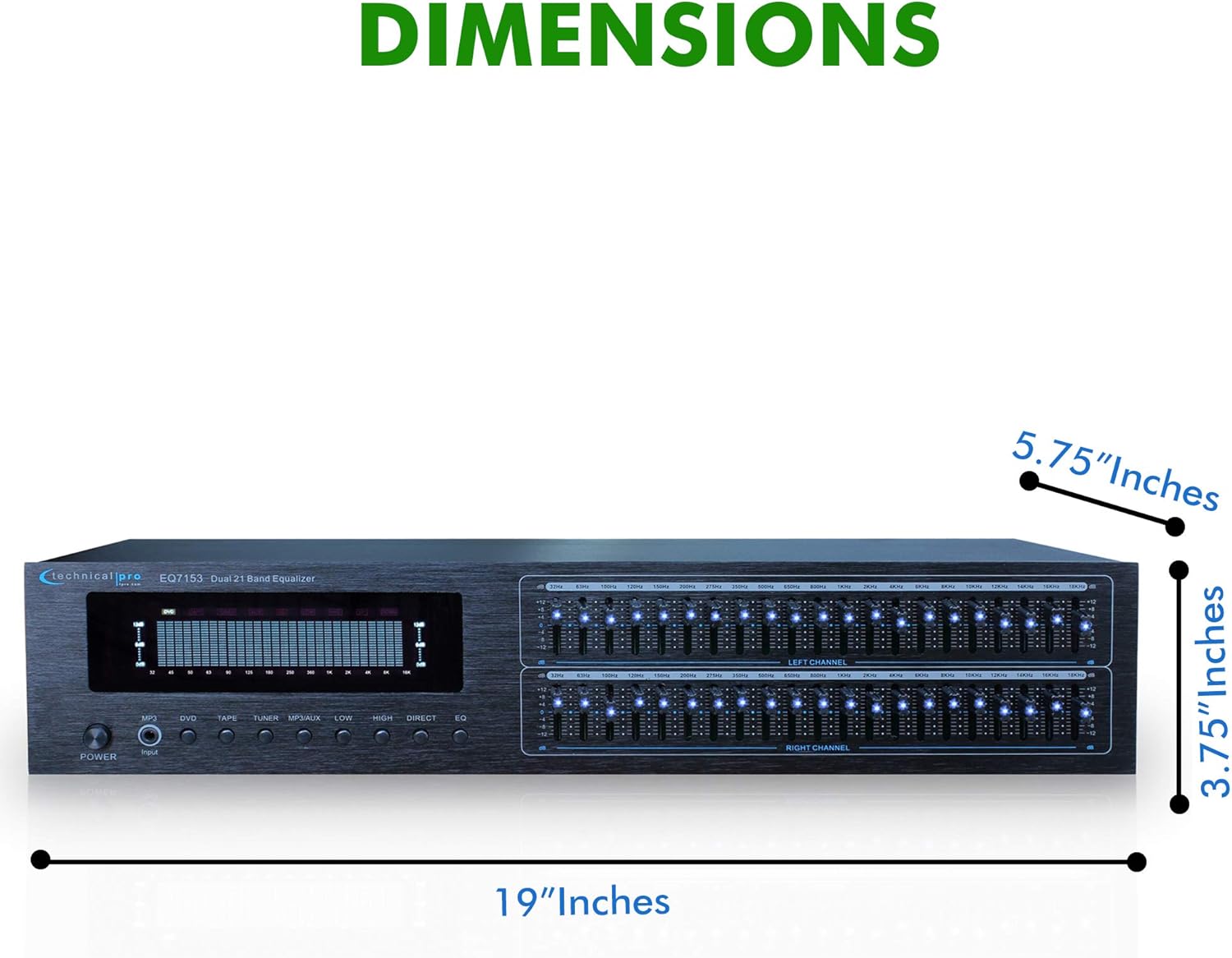
The EQ7153 is a dual 21-band graphic equalizer designed for precise audio frequency adjustment. It features individual LED indicators for each frequency band, a fluorescent spectrum display, and multiple input/output options.
4.1 ഫ്രണ്ട് പാനൽ

- പവർ ബട്ടൺ: യൂണിറ്റ് ഓണാക്കുകയോ ഓഫാക്കുകയോ ചെയ്യുന്നു.
- ഇൻപുട്ട് സെലക്ടറുകൾ: Buttons for MP3, DVD, TAPE, TUNER, MP3/AUX, LOW, HIGH, DIRECT, EQ to select the desired audio source or processing mode.
- Dual 21-Band Equalizer Sliders: Individual sliders for Left and Right channels, each with 21 frequency bands for precise audio adjustment. Each slider has an individual LED indicator.
- Fluorescent Spectrum Display: Visual representation of the audio frequency spectrum.
- ബാസ് ബൂസ്റ്റർ: Increases low-frequency levels.
- Loudness Booster: Increases both low and high-frequency levels.
- Direct / Equalizer Function: Allows for an unfiltered pass-through of the audio signal or engages the equalizer processing.
4.2 പിൻ പാനൽ
- RCA Audio Inputs: Connect up to four audio sources (DVD, TAPE, TUNER, AUX) using RCA cables. An additional 1/8'' MP3 input is available on the front panel.
- RCA Audio Outputs: നിങ്ങളിലേക്ക് ബന്ധിപ്പിക്കുക amplifier or recording device via the RECORD and MAIN RCA outputs.
- പവർ ഇൻപുട്ട്: Standard AC power connection with a voltagഇ സെലക്ടർ സ്വിച്ച് (110V/220V).
4.3 പ്രധാന സവിശേഷതകൾ

- Dual 21-Band Equalization: Offers precise control over 21 frequency bands per channel.
- Equalization Points: 32Hz, 63Hz, 100Hz, 120Hz, 150Hz, 200Hz, 275Hz, 350Hz, 500Hz, 1KHz, 1.5KHz, 2KHz, 2.5KHz, 3KHz, 4KHz, 5KHz, 6KHz, 8KHz, 10KHz, 12KHz, 14KHz.
- ക്രമീകരണ ശ്രേണി: ±12dB for each frequency band.
- ഫ്രീക്വൻസി പ്രതികരണം: 20Hz-20kHz.
- Fluorescent Spectrum Display: Provides real-time visual feedback of audio levels across frequencies.
- Bass Booster & Loudness Booster: Dedicated functions to enhance low and high frequencies.
- ഒന്നിലധികം ഇൻപുട്ടുകൾ: RCA (4 audio sources) and 1/8'' MP3 input.
- RCA ഔട്ട്പുട്ടുകൾ: For main audio and recording.
- Removable Rack-Mount Brackets: For easy integration into a standard audio rack.
5. സജ്ജീകരണ നിർദ്ദേശങ്ങൾ
5.1 അൺപാക്കിംഗും പ്ലേസ്മെന്റും
- Carefully remove the EQ7153 from its packaging.
- Place the unit on a stable, flat surface or install it into a standard 19-inch audio rack using the provided brackets.
- Ensure there is adequate space around the unit for proper ventilation to prevent overheating.
5.2 ഓഡിയോ കണക്ഷനുകൾ
The EQ7153 typically connects between your audio source(s) and your ampലൈഫയർ/സ്വീകർത്താവ്.
- ഓഡിയോ ഉറവിടങ്ങൾ ബന്ധിപ്പിക്കുക: Use RCA cables to connect your audio sources (e.g., DVD player, tape deck, tuner, auxiliary device) to the corresponding RCA INPUT jacks on the rear panel (DVD, TAPE, TUNER, AUX). For MP3 players or other portable devices, use a 1/8'' stereo cable to the front panel MP3 input.
- എന്നതിലേക്ക് ബന്ധിപ്പിക്കുക Ampലൈഫയർ/സ്വീകർത്താവ്: Use RCA cables to connect the MAIN OUTPUT jacks on the rear panel of the EQ7153 to an available input on your amplifier or receiver (e.g., AUX IN, CD IN).
- Connect to Recording Device (Optional): If you wish to record the processed audio, connect the REC OUTPUT jacks on the EQ7153 to the input of your recording device.
5.3 പവർ കണക്ഷൻ
- Before connecting the power cable, verify that the 110V/220V voltage selector switch on the rear panel is set to match your local power supply.
- Connect the provided power cable to the AC IN socket on the rear panel of the EQ7153.
- പവർ കേബിളിന്റെ മറ്റേ അറ്റം അനുയോജ്യമായ ഒരു എസി പവർ ഔട്ട്ലെറ്റിലേക്ക് പ്ലഗ് ചെയ്യുക.
6. പ്രവർത്തന നിർദ്ദേശങ്ങൾ
6.1 പവർ ഓൺ/ഓഫ്
അമർത്തുക പവർ button on the front panel to turn the unit on or off. The fluorescent spectrum display and individual LED indicators will illuminate when the unit is powered on.
6.2 ഇൻപുട്ട് തിരഞ്ഞെടുക്കൽ
Press the corresponding input button on the front panel (MP3, DVD, TAPE, TUNER, MP3/AUX) to select the audio source you wish to process. Ensure only one input is selected at a time.
6.3 ഇക്വലൈസർ അഡ്ജസ്റ്റ്മെന്റ്
- Engage Equalizer: അമർത്തുക EQ button to activate the equalizer function. If you prefer an unprocessed signal, press the നേരിട്ടുള്ള ബട്ടൺ.
- Adjust Frequency Bands: Use the individual sliders for the Left and Right channels to boost or cut specific frequency bands. Moving a slider up boosts the frequency, while moving it down cuts the frequency. The range of adjustment is ±12dB.
- മോണിറ്റർ ഡിസ്പ്ലേ: Observe the fluorescent spectrum display to visually monitor the frequency distribution of your audio signal as you make adjustments.
6.4 Using Boost Functions
- ബാസ് ബൂസ്റ്റർ: അമർത്തുക കുറവ് button to engage the Bass Booster, which will increase the overall low-frequency levels in your audio.
- Loudness Booster: അമർത്തുക ഉയർന്നത് button to engage the Loudness Booster, which will simultaneously increase both low and high-frequency levels, providing a fuller sound at lower volumes.
7. പരിപാലനം
7.1 വൃത്തിയാക്കൽ
To maintain the appearance and longevity of your EQ7153:
- വൃത്തിയാക്കുന്നതിന് മുമ്പ് എല്ലായ്പ്പോഴും പവർ കേബിൾ വിച്ഛേദിക്കുക.
- പുറംഭാഗങ്ങൾ തുടയ്ക്കാൻ മൃദുവായതും ഉണങ്ങിയതുമായ തുണി ഉപയോഗിക്കുക.
- Do not use liquid cleaners, aerosol cleaners, or strong chemicals, as they may damage the finish or internal components.
- For dust accumulation around sliders or buttons, use a soft brush or compressed air, being careful not to force dust into the unit.
7.2 പൊതു പരിചരണം
- ഭാരമുള്ള വസ്തുക്കൾ യൂണിറ്റിന് മുകളിൽ വയ്ക്കുന്നത് ഒഴിവാക്കുക.
- Protect the unit from extreme temperatures and direct sunlight.
- Ensure all cable connections are secure and free from strain.
8. പ്രശ്നപരിഹാരം
If you encounter issues with your EQ7153, refer to the following common problems and solutions:
| പ്രശ്നം | സാധ്യമായ കാരണം | പരിഹാരം |
|---|---|---|
| യൂണിറ്റ് പവർ ഓണാക്കുന്നില്ല. | Power cable not connected; Power outlet faulty; Voltage സെലക്ടർ തെറ്റാണ്. | Ensure power cable is securely connected. Test power outlet with another device. Verify 110V/220V switch matches local voltage. |
| ശബ്ദ ഔട്ട്പുട്ട് ഇല്ല. | Incorrect input selected; Cables not connected properly; Ampലൈഫയർ ഇൻപുട്ട് തിരഞ്ഞെടുത്തിട്ടില്ല. | Select the correct input source on the EQ7153. Check all RCA cable connections. Ensure your amplifier is set to the correct input connected to the EQ7153. |
| വികലമായ അല്ലെങ്കിൽ മോശം ശബ്ദ നിലവാരം. | Input signal too high; Equalizer settings extreme; Faulty cables. | Reduce the input level from your source device. Adjust equalizer sliders to a more neutral position. Replace audio cables if suspected faulty. |
| LED indicators are too bright. | This is a characteristic of the product design. | While there is no built-in brightness adjustment, some users have applied light-dimming films or paint to the LEDs for personal preference. This is not officially supported and may void warranty. |
9 സ്പെസിഫിക്കേഷനുകൾ

- മോഡൽ: TPEQA7153
- ഇക്വലൈസേഷൻ ബാൻഡുകൾ: Dual 21-band per channel
- Equalization Points: 32Hz, 63Hz, 100Hz, 120Hz, 150Hz, 200Hz, 275Hz, 350Hz, 500Hz, 1KHz, 1.5KHz, 2KHz, 2.5KHz, 3KHz, 4KHz, 5KHz, 6KHz, 8KHz, 10KHz, 12KHz, 14KHz
- ക്രമീകരണ ശ്രേണി: ±12dB
- ഫ്രീക്വൻസി പ്രതികരണം: 20Hz-20kHz
- ഇൻപുട്ടുകൾ: RCA (4 audio sources), 1/8'' MP3
- ഔട്ട്പുട്ടുകൾ: RCA (Record, Main)
- ഉൽപ്പന്ന അളവുകൾ (W x D x H): 19 x 5.75 x 3.75 ഇഞ്ച്
- ഇനത്തിൻ്റെ ഭാരം: 4 പൗണ്ട്
- നിർമ്മാതാവ്: സാങ്കേതിക പ്രോ
10. വാറൻ്റിയും പിന്തുണയും
For warranty information and technical support, please refer to the documentation provided with your purchase or visit the official Technical Pro webസൈറ്റ്. ഏതെങ്കിലും വാറന്റി ക്ലെയിമുകൾക്ക് നിങ്ങളുടെ വാങ്ങലിന്റെ തെളിവ് സൂക്ഷിക്കുക.