
ആമുഖം
The Sharkoon Skiller SGK30 is a mechanical gaming keyboard designed for performance and durability. It features customizable RGB lighting, N-Key rollover, and a 1000Hz polling rate for responsive gameplay and typing. This manual provides essential information for setting up, operating, and maintaining your keyboard.

Image: Sharkoon Skiller SGK30 Mechanical Gaming Keyboard banner displaying the product name and type.
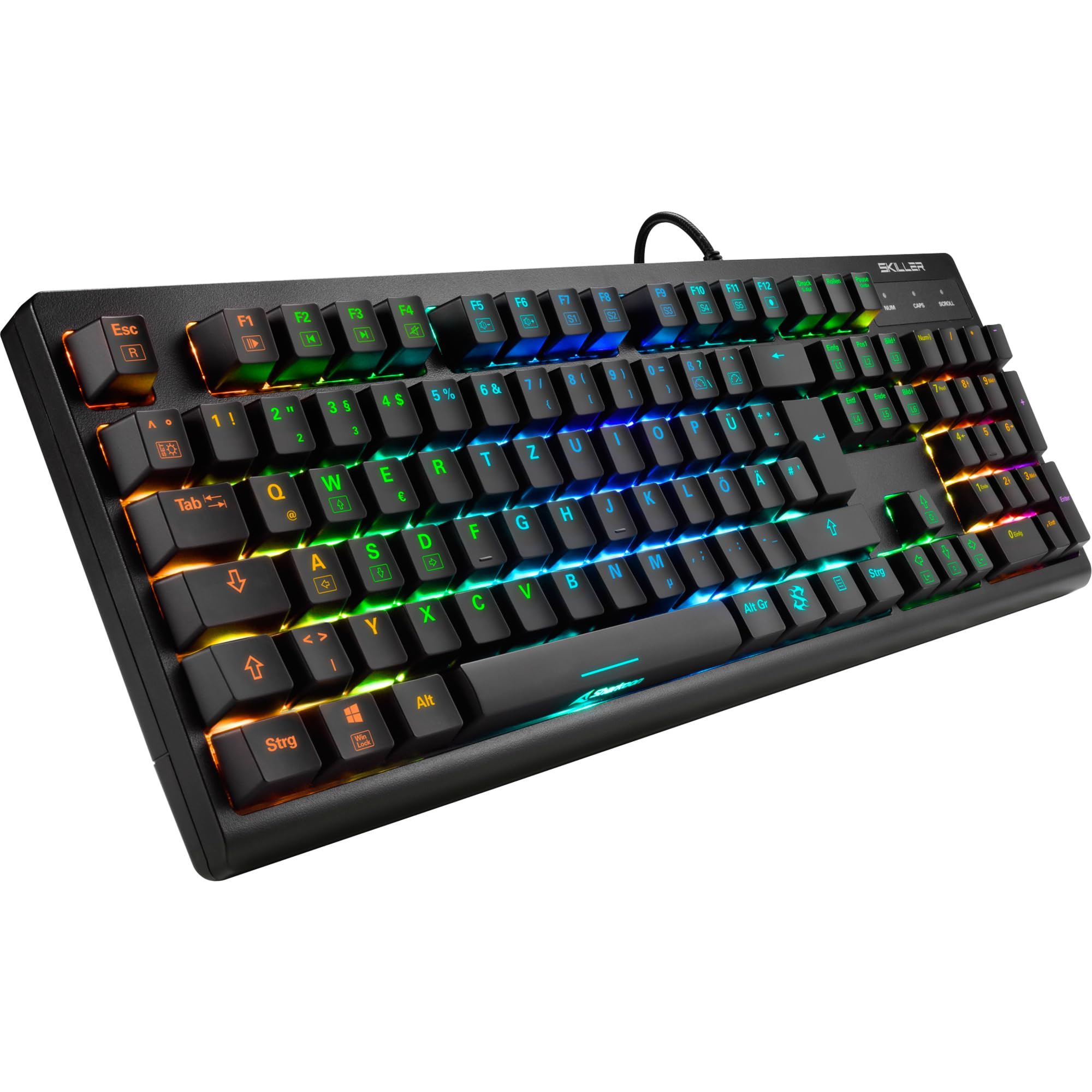
ചിത്രം: മുകളിൽ നിന്ന് താഴേക്ക് view of the Sharkoon Skiller SGK30 mechanical gaming keyboard, showcasing അതിന്റെ പൂർണ്ണമായ ലേഔട്ടും ഊർജ്ജസ്വലമായ RGB ബാക്ക്ലൈറ്റിംഗും.
ഉൽപ്പന്നം കഴിഞ്ഞുview വീഡിയോ
വീഡിയോ: ഒരു ഔദ്യോഗിക ഉൽപ്പന്നം അവസാനിച്ചുview of the Sharkoon Skiller SGK30 Mechanical Gaming Keyboard, demonstrating its features, RGB lighting effects, and mechanical switches.
സജ്ജമാക്കുക
Follow these steps to set up your Sharkoon Skiller SGK30 keyboard:
- കീബോർഡ് അൺപാക്ക് ചെയ്യുക: Carefully remove the keyboard and the included USB cable from its packaging.
- കമ്പ്യൂട്ടറുമായി ബന്ധിപ്പിക്കുക: Plug the Micro USB end of the cable into the keyboard's port and the standard USB-A end into an available USB port on your computer.
- ഡ്രൈവർ ഇൻസ്റ്റാളേഷൻ: The keyboard is plug-and-play. Your operating system (Windows 10 or later recommended) should automatically detect and install the necessary drivers.
- സോഫ്റ്റ്വെയർ ഇൻസ്റ്റാളേഷൻ (ഓപ്ഷണൽ): For advanced customization of RGB lighting and key assignments, download the official Sharkoon software from the manufacturer's webസൈറ്റ്.

Image: The Sharkoon Skiller SGK30 keyboard positioned on a desk, ready for connection.
പ്രവർത്തന നിർദ്ദേശങ്ങൾ
അടിസ്ഥാന കീ പ്രവർത്തനങ്ങൾ
The Sharkoon Skiller SGK30 features a standard layout with additional function keys accessible via the FN താക്കോൽ.
- എഫ്എൻ + എഫ്1-എഫ്12: Access multimedia controls (e.g., play/pause, volume up/down, mute).
- FN + വിൻഡോസ് കീ: ഗെയിമിംഗ് സമയത്ത് ആകസ്മികമായി അമർത്തുന്നത് തടയാൻ വിൻഡോസ് കീ ലോക്ക്/അൺലോക്ക് ചെയ്യുക.
- എൻ-കീ റോൾഓവർ: All keys are registered simultaneously, ensuring every keystroke is detected, even during rapid input.
RGB ലൈറ്റിംഗ് നിയന്ത്രണം
The keyboard offers extensive RGB lighting customization. Use the following combinations to adjust lighting effects:
- FN + Insert/Home/Page Up/Delete/End/Page Down: Cycle through various pre-programmed lighting effects.
- FN + Arrow Keys (Up/Down): Adjust brightness levels of the lighting.
- FN + Arrow Keys (Left/Right): ഡൈനാമിക് ലൈറ്റിംഗ് ഇഫക്റ്റുകളുടെ വേഗത ക്രമീകരിക്കുക.
- Custom Illumination: Use the dedicated software for advanced per-key lighting customization.

ചിത്രം: ഒരു ക്ലോസ്-അപ്പ് view of the keyboard keys highlighting the adjustable RGB illumination capabilities.
സോഫ്റ്റ്വെയർ കസ്റ്റമൈസേഷൻ
For advanced settings, macro programming, and detailed RGB customization, download and install the Sharkoon Skiller SGK30 software from the official Sharkoon webസൈറ്റ്. സോഫ്റ്റ്വെയർ നിങ്ങളെ ഇനിപ്പറയുന്നവ അനുവദിക്കുന്നു:
- ഇഷ്ടാനുസൃത ലൈറ്റിംഗ് പ്രോ സൃഷ്ടിച്ച് സംരക്ഷിക്കുകfiles.
- Program macros for specific keys.
- കീ ഫംഗ്ഷനുകൾ റീമാപ്പ് ചെയ്യുക.

Image: A screenshot showing the graphical user interface of the Sharkoon Skiller SGK30 customization software, illustrating various options for lighting and key remapping.
മെയിൻ്റനൻസ്
ശരിയായ അറ്റകുറ്റപ്പണി നിങ്ങളുടെ കീബോർഡിന്റെ ദീർഘായുസ്സും പ്രകടനവും ഉറപ്പാക്കുന്നു:
- വൃത്തിയാക്കൽ: Use a soft, dry cloth to wipe the surface of the keyboard. For deeper cleaning, use compressed air to remove dust and debris from between the keycaps.
- കീക്യാപ്പ് നീക്കംചെയ്യൽ: If necessary, keycaps can be carefully removed using a keycap puller (not included) for thorough cleaning of the switches. Reinstall keycaps by pressing them firmly onto the switch stems.
- ദ്രാവകങ്ങൾ ഒഴിവാക്കുക: കീബോർഡിൽ ദ്രാവകങ്ങൾ കയറിയിറങ്ങരുത്. ചോർന്നൊലിക്കുന്ന സാഹചര്യത്തിൽ, ഉടൻ തന്നെ കീബോർഡ് വിച്ഛേദിച്ച് പൂർണ്ണമായും ഉണങ്ങാൻ അനുവദിക്കുക, തുടർന്ന് വീണ്ടും ബന്ധിപ്പിക്കുക.
- സംഭരണം: നേരിട്ടുള്ള സൂര്യപ്രകാശവും കടുത്ത താപനിലയും ഏൽക്കാത്ത തണുത്തതും വരണ്ടതുമായ സ്ഥലത്ത് കീബോർഡ് സൂക്ഷിക്കുക.

ചിത്രം: ഒരു ക്ലോസ്-അപ്പ് view of the mechanical switches on the Sharkoon Skiller SGK30 keyboard, illustrating their design for durability and ease of maintenance. Note: This model is available with Red switches, while the image shows Blue switches.
ട്രബിൾഷൂട്ടിംഗ്
If you encounter issues with your Sharkoon Skiller SGK30 keyboard, refer to the following common solutions:
| പ്രശ്നം | സാധ്യമായ കാരണം | പരിഹാരം |
|---|---|---|
| കീബോർഡ് പ്രതികരിക്കുന്നില്ല | അയഞ്ഞ യുഎസ്ബി കണക്ഷൻ, തകരാറുള്ള യുഎസ്ബി പോർട്ട്, ഡ്രൈവർ പ്രശ്നം. |
|
| RGB ലൈറ്റിംഗ് പ്രവർത്തിക്കുന്നില്ല അല്ലെങ്കിൽ തെറ്റാണ് | Lighting settings incorrect, software conflict. |
|
| കീകൾ രജിസ്റ്റർ ചെയ്യുന്നില്ല. | കീക്യാപ്പിനടിയിൽ പൊടി/അവശിഷ്ടങ്ങൾ, സ്വിച്ച് തകരാറിലാണ്. |
|
സ്പെസിഫിക്കേഷനുകൾ
| ഫീച്ചർ | വിശദാംശങ്ങൾ |
|---|---|
| ബ്രാൻഡ് | ഷാർകൂൺ |
| മോഡൽ നമ്പർ | 4044951030026 |
| കീബോർഡ് തരം | മെക്കാനിക്കൽ ഗെയിമിംഗ് കീബോർഡ് |
| സ്വിച്ച് തരം | Red Switch (Blue switches are also available for this model series) |
| കണക്റ്റിവിറ്റി | മൈക്രോ യുഎസ്ബി |
| പോളിംഗ് നിരക്ക് | 1000Hz |
| എൻ-കീ റോൾഓവർ | പിന്തുണച്ചു |
| RGB ലൈറ്റിംഗ് | Customizable RGB |
| ഓപ്പറേറ്റിംഗ് സിസ്റ്റം | വിൻഡോസ് 10 (മറ്റ് വിൻഡോസ് പതിപ്പുകളുമായി പൊരുത്തപ്പെടുന്നു) |
| അളവുകൾ (LxWxH) | 44 x 14.4 x 3.5 സെ.മീ |
| ഭാരം | 867 ഗ്രാം |
ബോക്സിൽ എന്താണുള്ളത്
The Sharkoon Skiller SGK30 package includes:
- Sharkoon Skiller SGK30 Mechanical Gaming Keyboard
- USB കേബിൾ
വാറൻ്റിയും പിന്തുണയും
വാറന്റി വിവരങ്ങൾക്കും സാങ്കേതിക പിന്തുണയ്ക്കും, ദയവായി ഔദ്യോഗിക ഷാർക്കൂൺ പരിശോധിക്കുക. webനിങ്ങളുടെ പ്രാദേശിക റീട്ടെയിലറെ ബന്ധപ്പെടുക അല്ലെങ്കിൽ സൈറ്റിൽ ബന്ധപ്പെടുക. വാറന്റി ക്ലെയിമുകൾക്കായി നിങ്ങളുടെ വാങ്ങിയതിന്റെ തെളിവ് സൂക്ഷിക്കുക.
കുറിപ്പ്: ഉൽപ്പന്ന സവിശേഷതകളും സവിശേഷതകളും മുൻകൂർ അറിയിപ്പ് കൂടാതെ മാറ്റത്തിന് വിധേയമാണ്.