
ഓട്ടോൂൾ BT280
AUTOOL BT280 Electric System Circuit Tester User Manual
മോഡൽ: BT280
1. ആമുഖം
The AUTOOL BT280 Electric System Circuit Tester is a versatile diagnostic tool designed for automotive electrical systems. It provides comprehensive testing capabilities including multimeter functions, oscilloscope mode, relay testing, injector testing, and component activation. This manual provides detailed instructions for the safe and effective use of your BT280 tester.
2 സുരക്ഷാ വിവരങ്ങൾ
Always observe the following safety precautions to prevent personal injury or damage to the vehicle and the tester:
- ഉചിതമായ നേത്ര സംരക്ഷണം ധരിക്കുക.
- Do not use the tester if the cable is damaged.
- Do not connect the tester to voltages exceeding 30V DC.
- ചൂടുള്ള എഞ്ചിൻ ഭാഗങ്ങളുമായോ ചലിക്കുന്ന ഘടകങ്ങളുമായോ സമ്പർക്കം ഒഴിവാക്കുക.
- Ensure the vehicle's ignition is off before connecting or disconnecting the tester, unless specific test procedures require otherwise.
- ടെസ്റ്റർ വൃത്തിയായും വരണ്ടതുമായി സൂക്ഷിക്കുക.
3. പാക്കേജ് ഉള്ളടക്കം
താഴെ ലിസ്റ്റ് ചെയ്തിരിക്കുന്ന എല്ലാ ഇനങ്ങളും നിങ്ങളുടെ പാക്കേജിൽ ഉൾപ്പെടുത്തിയിട്ടുണ്ടെന്ന് ഉറപ്പാക്കുക:
- 1 Set BT280 Electric System Circuit Tester
- ഉപയോക്തൃ മാനുവൽ (ഈ പ്രമാണം)
- Power connection cable with alligator clips
- സഹായ ഗ്രൗണ്ട് ലീഡ്
- അന്വേഷണ നുറുങ്ങ്

Image 3.1: Contents of the AUTOOL BT280 package, including the main unit, cables, and accessories.
4. ഡിവൈസ് ഓവർview
Familiarize yourself with the components of the BT280 tester:

Image 4.1: Diagram illustrating the various parts of the BT280 tester, including the probe tip, LCD screen, function buttons, power connector, and test clamps.
- അന്വേഷണ നുറുങ്ങ്: Used to contact circuits for testing.
- മുൻവശത്തെ LED ലൈറ്റ്: ജോലിസ്ഥലം പ്രകാശിപ്പിക്കുന്നു.
- LCD സ്ക്രീൻ: Displays test results and menu options.
- Red/Green LED Indicator: Provides visual feedback on polarity (Red for positive, Green for negative).
- ഫംഗ്ഷൻ ബട്ടണുകൾ: Navigate menus and select functions (Up, Down, Left, Right, OK).
- ഹുക്ക്: For hanging the device during use.
- ഓക്സിലറി ഗ്രൗണ്ട് ലീഡ്: Provides an additional ground connection.
- സ്പീക്കർ: കേൾക്കാവുന്ന അലേർട്ടുകൾ പുറപ്പെടുവിക്കുന്നു.
- USB പോർട്ട്: For potential firmware updates or data transfer (refer to manufacturer for specific functionality).
- പവർ കണക്റ്റർ: Connects to the vehicle's power source.
- കേബിൾ: Main connection cable.
- Test Clamps: Red for positive (+), Black for negative (-) connection to the vehicle battery.
- Relay Test Port: Dedicated port for relay testing.
5. പ്രാരംഭ സജ്ജീകരണം
- പവർ ബന്ധിപ്പിക്കുക: ചുവന്ന ടെസ്റ്റ് cl കണക്റ്റുചെയ്യുകamp to the vehicle's positive (+) battery terminal and the black test clamp to the vehicle's negative (-) battery terminal. The device will power on automatically.
- ഭാഷ തിരഞ്ഞെടുക്കൽ: Upon first use, or after a reset, you may be prompted to select your preferred language. Use the navigation buttons to select and press OK. The BT280 supports 14 languages including English, Spanish, German, Russian, Italian, Polish, Portuguese, French, Vietnamese, Malaysian, Filipino, Indonesian, Arabic, and Thai.
- Probe Tip Attachment: Ensure the probe tip is securely attached to the main unit.
6 ഓപ്പറേറ്റിംഗ് മോഡുകൾ
The BT280 offers several operating modes accessible from the main menu. Use the navigation buttons to select a mode and press OK.

Image 6.1: The main interface of the BT280 showing icons for Smart Test, Multimeter, Oscilloscope, Relay, Active, Powered by, Injector, P-N, and Setup functions.
6.1 Smart Test Mode
This mode automatically identifies voltage, resistance, and polarity (positive/negative) of the tested component. Simply touch the probe tip to the circuit or component. The screen will display the detected values and polarity.

ചിത്രം 6.2: ഉദാamples of Smart Test results, showing automatic identification of positive voltagഇ, നെഗറ്റീവ് വോള്യംtage, and resistance values.
6.2 മൾട്ടിമീറ്റർ മോഡ്
The Multimeter Mode provides comprehensive measurements including DC voltage, resistance, diode/continuity, current, and frequency. Use the navigation buttons to select the desired measurement type.

Image 6.3: The Multimeter Mode interface displaying various electrical parameters such as DC voltage, resistance, diode/continuity, current, and frequency. The device also features a flashlight for illuminating dark areas.
6.3 ഓസിലോസ്കോപ്പ് മോഡ്
This mode displays the parameter curve diagram of the tested component, such as voltage, frequency, and time. This is useful for analyzing signal waveforms.

Image 6.4: The Oscilloscope Mode interface displaying a waveform. The 'DIV' setting allows adjustment of voltage per grid (test range 1V-49V) by pressing the up and down keys.
6.4 Component Activation
The BT280 can generate 'Active' signals to test components like lights, motors, and other on-board electronic devices. This allows for functional testing of components outside of their normal operating circuit.
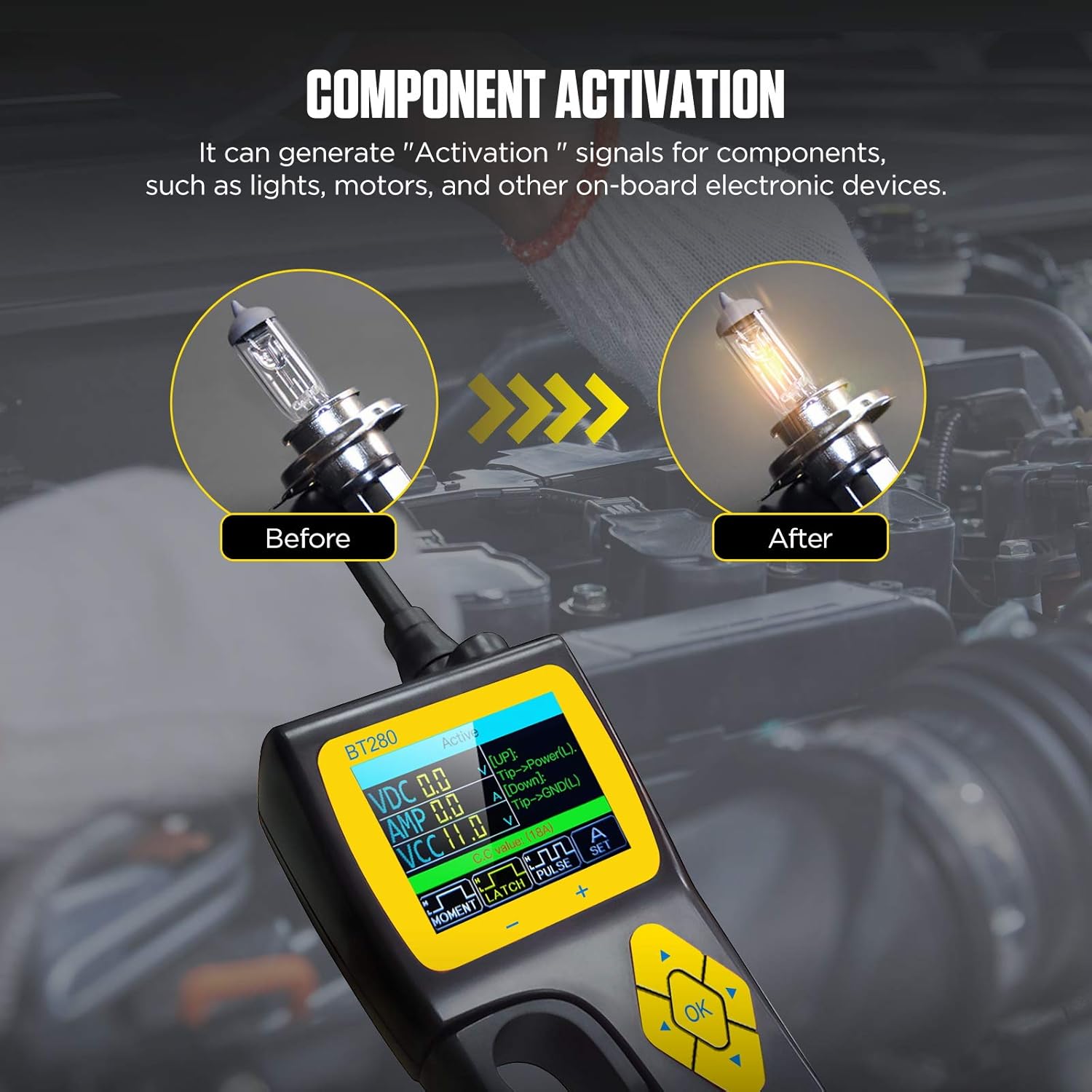
Image 6.5: The Component Activation function being used to test a light bulb, demonstrating its ability to provide power to activate components.
6.5 Relay Test
This mode allows testing of common automotive relays, including 5-terminal and 4-terminal relays. Connect the relay to the dedicated relay test port and follow the on-screen instructions.

Image 6.6: The Relay Test function showing connections for both 5-terminal and 4-terminal automotive relays, along with a schematic diagram.
6.6 Injector Mode
The BT280 can output different pulse signals to an injector, providing 4 pulse modes to detect the injector's condition. This helps in diagnosing fuel injector issues.
6.7 0-5V Power Supply
This function allows you to set an output voltage between 0-5V, useful for verifying the wiring condition of a tested component or powering small circuits.
6.8 വോളിയംtagഇ അലാറം
The device is equipped with a voltage setting alarm. If a short circuit or fault causes the voltage to be greater than or less than a user-defined set value, the device will emit an alarm.
7. പരിപാലനം
7.1 പരിചരണവും ശുചീകരണവും
- Clean the tester's exterior with a soft, damp തുണി. ഉരച്ചിലുകളുള്ള ക്ലീനറുകളോ ലായകങ്ങളോ ഉപയോഗിക്കരുത്.
- Keep the probe tip clean and free of debris.
- Ensure all connections are clean and dry before use.
7.2 സംഭരണം
- Store the BT280 in its original case or a suitable protective container when not in use.
- നേരിട്ടുള്ള സൂര്യപ്രകാശത്തിൽ നിന്നും തീവ്രമായ താപനിലയിൽ നിന്നും അകന്ന് തണുത്തതും വരണ്ടതുമായ സ്ഥലത്ത് സൂക്ഷിക്കുക.
8. പ്രശ്നപരിഹാരം
This section addresses common issues you might encounter with your BT280 tester.
| പ്രശ്നം | സാധ്യമായ കാരണം | പരിഹാരം |
|---|---|---|
| ടെസ്റ്റർ പവർ ഓൺ ചെയ്യുന്നില്ല. | Incorrect battery connection; Vehicle battery discharged. | ചുവന്ന cl ഉറപ്പാക്കുകamp is on positive (+), black on negative (-). Check vehicle battery voltage. |
| കൃത്യമല്ലാത്ത വായനകൾ. | Poor connection; Damaged probe tip or cable; Incorrect mode selected. | Ensure secure connections. Inspect probe and cable for damage. Select the appropriate testing mode. |
| സ്ക്രീൻ ശൂന്യമാണ് അല്ലെങ്കിൽ നിശ്ചലമാണ്. | സോഫ്റ്റ്വെയർ തകരാർ; വൈദ്യുതി തടസ്സം. | Disconnect and reconnect power. If issue persists, contact customer support. |
| സ്പീക്കറിൽ നിന്ന് ശബ്ദമില്ല. | Volume muted; Speaker malfunction. | Check device settings for volume. If still no sound, contact customer support. |
9 സാങ്കേതിക സവിശേഷതകൾ
| സ്പെസിഫിക്കേഷൻ | മൂല്യം |
|---|---|
| ഓപ്പറേറ്റിംഗ് വോളിയംtage | 9 വി -30 വി ഡിസി |
| പ്രദർശിപ്പിക്കുക | 2.4-ഇഞ്ച് എൽസിഡി |
| ഇനം മോഡൽ നമ്പർ | BT280 |
| പാക്കേജ് അളവുകൾ | 11.93 x 10.39 x 4.41 ഇഞ്ച് |
| ഇനത്തിൻ്റെ ഭാരം | 1.68 കിലോഗ്രാം (3.7 പൗണ്ട്) |
| പവർ ഉറവിടം | Battery Powered (via vehicle battery) |
| പിന്തുണയ്ക്കുന്ന ഭാഷകൾ | 14 (English, Spanish, German, Russian, Italian, Polish, Portuguese, French, Vietnamese, Malaysian, Filipino, Indonesian, Arabic, Thai) |
10. വാറൻ്റിയും പിന്തുണയും
10.1 വാറൻ്റി വിവരങ്ങൾ
The AUTOOL BT280 Electric System Circuit Tester comes with a മൂന്ന് വർഷത്തെ വാറൻ്റി for damage caused by non-human factors. AUTOOL promises to resend parts for free within this period. Additionally, the product includes Lifetime Maintenance.
10.2 ഉപഭോക്തൃ പിന്തുണ
For any technical assistance, warranty claims, or inquiries, please contact AUTOOL customer support. You are welcomed to contact us, and we will respond within 24 hours.
Please refer to the AUTOOL official webഏറ്റവും പുതിയ കോൺടാക്റ്റ് വിവരങ്ങൾക്ക് സൈറ്റ് അല്ലെങ്കിൽ നിങ്ങളുടെ വാങ്ങൽ ഡോക്യുമെന്റേഷൻ.
Ask a question about this manual
Ask about setup, troubleshooting, compatibility, parts, safety, or missing instructions. Manuals+ will review the question and use this page’s manual context to help answer it.