
1. ആമുഖം
The Sygonix SY-4599778 is a robust, surface-mounted code lock designed for secure access control. This device features a durable metal, vandal-resistant housing and is IP66 rated for weather resistance, making it suitable for both indoor and outdoor environments. Access can be granted via RFID card or a user-defined PIN code.
2 സുരക്ഷാ വിവരങ്ങൾ
പൊതു സുരക്ഷ
- ഇൻസ്റ്റാളേഷനും പ്രവർത്തനത്തിനും മുമ്പ് എല്ലാ നിർദ്ദേശങ്ങളും ശ്രദ്ധാപൂർവ്വം വായിക്കുക.
- ഭാവി റഫറൻസിനായി ഈ മാനുവൽ സൂക്ഷിക്കുക.
- ഉപകരണം സ്വയം പരിഷ്കരിക്കാനോ നന്നാക്കാനോ ശ്രമിക്കരുത്. എല്ലാ സേവനങ്ങളും യോഗ്യതയുള്ള ഉദ്യോഗസ്ഥരെ ഏൽപ്പിക്കുക.
- Ensure the device is used within its specified operating conditions.
ഇലക്ട്രിക്കൽ സുരക്ഷ
- The device operates on 18V/DC. Ensure the power supply matches this requirement.
- Disconnect power before performing any installation or wiring work.
- Wiring should be performed by a qualified electrician to prevent electrical hazards.
- ഷോർട്ട് സർക്യൂട്ടുകൾ തടയാൻ എല്ലാ കണക്ഷനുകളും സുരക്ഷിതമാണെന്നും ഇൻസുലേറ്റ് ചെയ്തിട്ടുണ്ടെന്നും ഉറപ്പാക്കുക.
പാരിസ്ഥിതിക പരിഗണനകൾ
- The device has an IP66 rating, providing protection against dust ingress and powerful water jets.
- While weather-resistant, avoid submerging the device in water.
- Do not expose the device to extreme temperatures outside its specified operating range.
3. ഉൽപ്പന്നം കഴിഞ്ഞുview
ഫീച്ചറുകൾ
- Vandal-resistant metal housing for enhanced security.
- IP66 weather resistance for outdoor installation.
- Multiple access methods: RFID card or PIN code.
- Integrated keypad for code entry.
ഘടകങ്ങൾ
പാക്കേജിൽ സാധാരണയായി ഇനിപ്പറയുന്ന ഘടകങ്ങൾ ഉൾപ്പെടുന്നു:
- Sygonix SY-4599778 Code Lock Unit (Keypad)
- മൗണ്ടിംഗ് സ്ക്രൂകളും വാൾ പ്ലഗുകളും
- Allen Key for secure mounting
- Diode (for electrical protection)
- Wiring Cable (integrated)
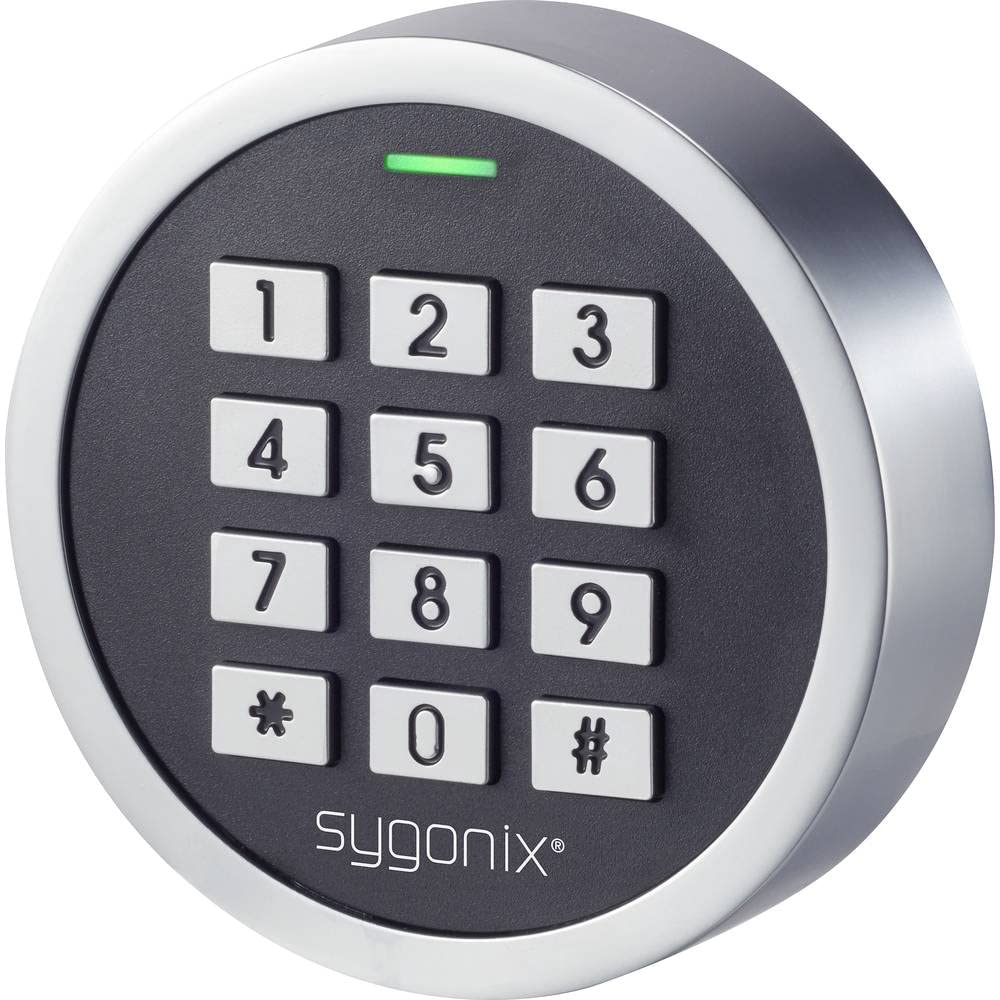
ചിത്രം 1: മുൻഭാഗം view of the Sygonix SY-4599778 Code Lock, showing the numeric keypad and brand logo.
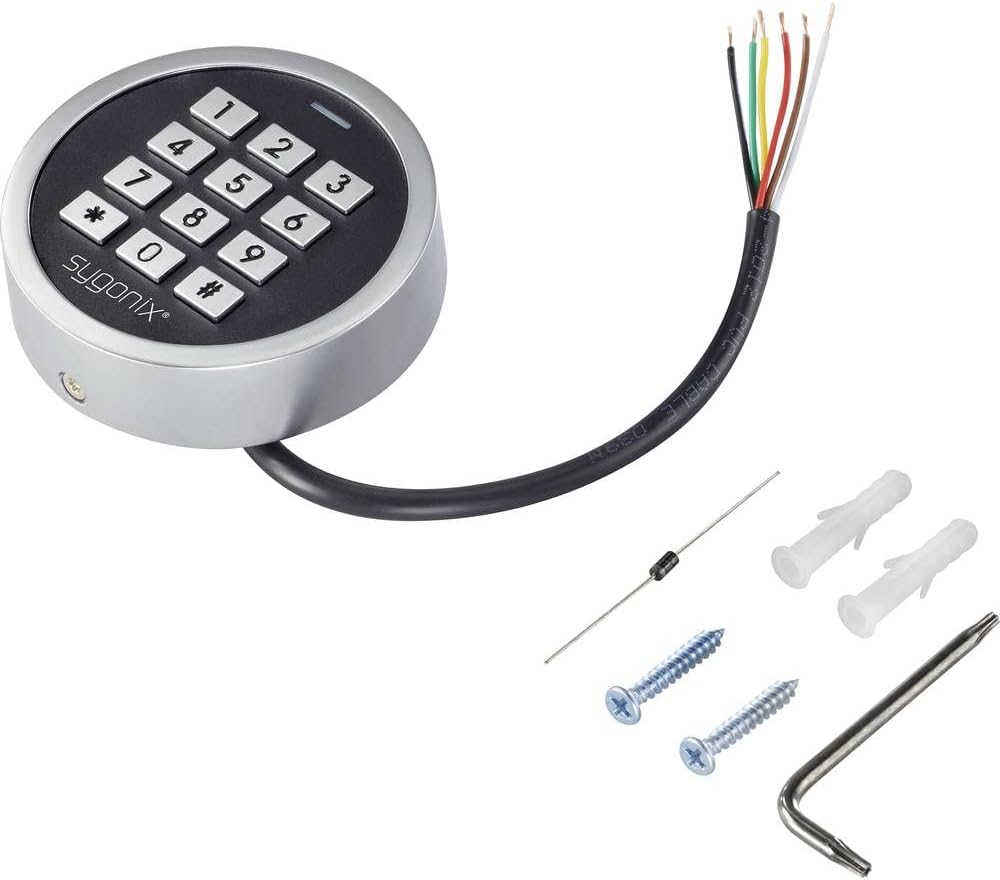
Figure 2: The Sygonix SY-4599778 Code Lock unit, displaying the integrated wiring cable, mounting screws, wall plugs, and a diode.
4. സജ്ജീകരണവും ഇൻസ്റ്റാളേഷനും
യൂണിറ്റ് മൌണ്ട് ചെയ്യുന്നു
- Choose a suitable surface for mounting, ensuring it is flat and stable.
- Use the back plate of the unit as a template to mark the drilling points for the mounting screws.
- Drill holes at the marked positions and insert the provided wall plugs.
- Secure the back plate to the wall using the mounting screws.
- Attach the main unit to the secured back plate, ensuring a snug fit. Use the Allen key to tighten any security screws if present.
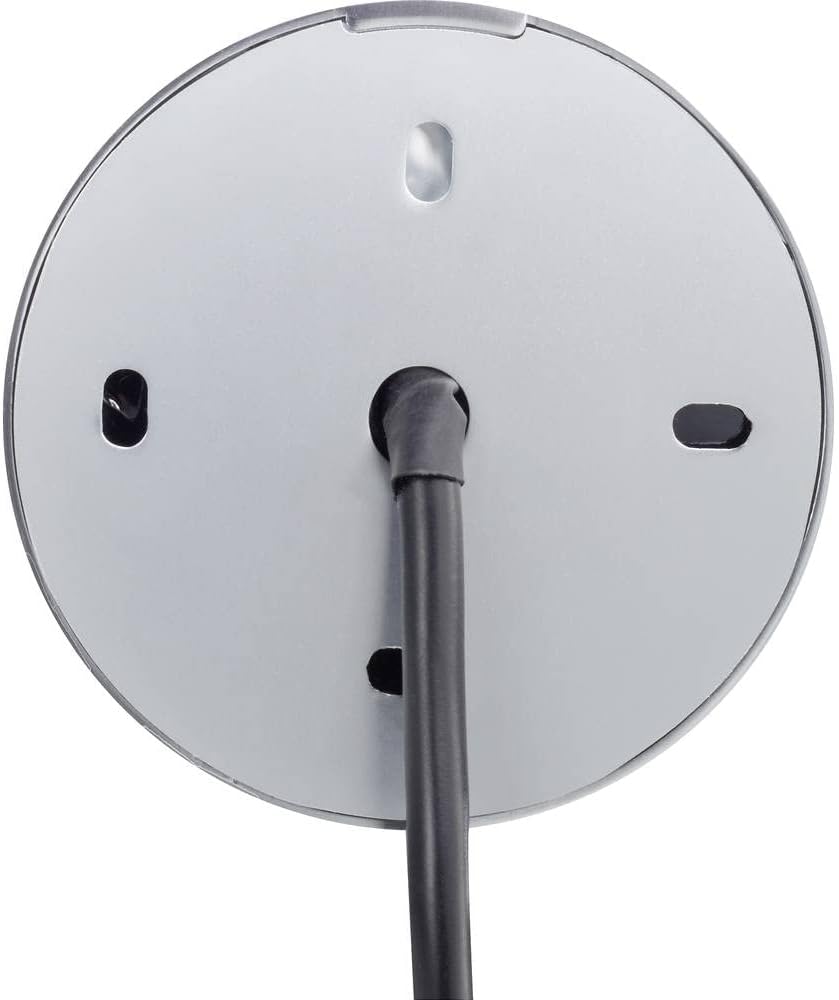
ചിത്രം 3: പിൻഭാഗം view of the code lock, illustrating the mounting points and the integrated wiring cable.
വയറിംഗ് കണക്ഷനുകൾ
The device requires an 18V/DC power supply. Connect the integrated wiring cable according to the following general guidelines. It is highly recommended that a qualified electrician performs the wiring.
- Identify the power input wires (typically red for positive, black for negative).
- Connect the provided diode to the power line as instructed in the detailed wiring diagram (not provided in this general manual, refer to product-specific diagram). The diode helps protect the circuit from reverse polarity.
- Connect the output wires (e.g., for electric strike, alarm) to the corresponding terminals of your access control system.
- എല്ലാ കണക്ഷനുകളും ഇൻസുലേറ്റ് ചെയ്തിട്ടുണ്ടെന്നും പാരിസ്ഥിതിക ഘടകങ്ങളിൽ നിന്ന് സംരക്ഷിക്കപ്പെട്ടിട്ടുണ്ടെന്നും ഉറപ്പാക്കുക.
- After wiring, restore power to the unit. The unit should power on, indicated by an LED or audible signal.
5. പ്രവർത്തന നിർദ്ദേശങ്ങൾ
This section outlines the basic operation and programming of the Sygonix SY-4599778 code lock. Specific programming steps may vary slightly; always refer to the detailed programming guide included with your product for precise instructions.
Initial Setup and Master Code
- Upon first power-up, the device will be in a default state.
- Enter the default master programming code (refer to your product's specific manual for this code, often a sequence like `*123456#`).
- Change the default master code immediately for security purposes. Follow the prompts or specific key sequences to set a new master code.
Adding User PIN Codes
- Enter the master programming code to enter programming mode.
- Select the option to add a new user code (e.g., press `1` or a specific key).
- Enter the desired new PIN code (typically 4-6 digits) and confirm it.
- പ്രോഗ്രാമിംഗ് മോഡിൽ നിന്ന് പുറത്തുകടക്കുക.
Adding RFID Cards
- Enter the master programming code to enter programming mode.
- Select the option to add a new RFID card (e.g., press `2` or a specific key).
- Present the RFID card to the reader area on the keypad. The unit will typically beep or flash to confirm registration.
- പ്രോഗ്രാമിംഗ് മോഡിൽ നിന്ന് പുറത്തുകടക്കുക.
ലോക്ക് ആക്സസ് ചെയ്യുന്നു
പ്രവേശനം നേടുന്നതിന്:
- Using a PIN Code: Enter your valid PIN code followed by the `#` key. The lock will activate (e.g., unlock an electric strike) for a set duration.
- Using an RFID Card: Present your registered RFID card to the reader area on the keypad. The lock will activate for a set duration.

Figure 4: The code lock keypad with a green indicator light, typically indicating successful operation or entry into programming mode.
6. പരിപാലനം
വൃത്തിയാക്കൽ
- കീപാഡ് പ്രതലം മൃദുവായ, ഡി-ടച്ച് ഉപയോഗിച്ച് വൃത്തിയാക്കുക.amp തുണി.
- അബ്രാസീവ് ക്ലീനറുകളോ, ലായകങ്ങളോ, കഠിനമായ രാസവസ്തുക്കളോ ഉപയോഗിക്കരുത്, കാരണം ഇവ ഫിനിഷിനോ ഇലക്ട്രോണിക് ഘടകങ്ങളോ നശിപ്പിക്കും.
- Ensure no liquid enters the internal components of the device.
പരിശോധന
- Periodically inspect the unit for any signs of physical damage or wear.
- Check the mounting screws to ensure the unit remains securely attached to the surface.
- Verify that all wiring connections are intact and free from corrosion or damage.
7. പ്രശ്നപരിഹാരം
If you encounter issues with your Sygonix SY-4599778 code lock, refer to the following common problems and solutions:
| പ്രശ്നം | സാധ്യമായ കാരണം | പരിഹാരം |
|---|---|---|
| യൂണിറ്റ് പവർ ഓണാക്കുന്നില്ല. | വൈദ്യുതി വിതരണം ഇല്ല അല്ലെങ്കിൽ തെറ്റായ വയറിംഗ്. | Check the 18V/DC power supply connection. Ensure wiring is correct and secure. |
| PIN code not recognized. | Incorrect PIN entered or PIN not programmed. | Verify the PIN code. Re-program the PIN if necessary. Ensure the '#' key is pressed after the PIN. |
| RFID കാർഡ് പ്രവർത്തിക്കുന്നില്ല. | Card not programmed or not presented correctly. | Ensure the RFID card is registered. Present the card directly to the reader area. |
| Lock does not activate after valid entry. | Wiring issue to the electric strike/lock mechanism. | Check the output wiring from the code lock to the connected locking device. Ensure the locking device is functional. |
| Unit is unresponsive. | താൽക്കാലിക ഇലക്ട്രോണിക് തകരാർ. | Disconnect power for a few seconds, then reconnect to perform a power cycle. |
ഈ പരിഹാരങ്ങൾ പരീക്ഷിച്ചതിനുശേഷവും പ്രശ്നം നിലനിൽക്കുകയാണെങ്കിൽ, ദയവായി ഉപഭോക്തൃ പിന്തുണയെയോ യോഗ്യതയുള്ള ഒരു ടെക്നീഷ്യനെയോ ബന്ധപ്പെടുക.
8 സ്പെസിഫിക്കേഷനുകൾ
| മോഡൽ നമ്പർ: | SY-4599778 |
| ബ്രാൻഡ്: | സിഗോണിക്സ് |
| വൈദ്യുതി വിതരണം: | 18V/DC |
| സംരക്ഷണ റേറ്റിംഗ്: | IP66 (പൊടി കടക്കാത്തത്, ശക്തമായ വാട്ടർ ജെറ്റുകളിൽ നിന്ന് സംരക്ഷിതം) |
| പ്രവേശന രീതികൾ: | PIN Code, RFID Card |
| മെറ്റീരിയൽ: | Metal (Vandal-resistant housing) |
| അളവുകൾ (L x W x H): | 20 x 73 x 73 മിമി |
| ഭാരം: | 199 ഗ്രാം |
| ശുപാർശ ചെയ്യുന്ന ഉപയോഗം: | Outdoor environments, weather-exposed areas |
9. വാറൻ്റിയും പിന്തുണയും
വാറൻ്റി വിവരങ്ങൾ
The availability of spare parts for this product is typically 1 year from the date of purchase. For specific warranty terms and conditions, please refer to the documentation provided at the time of purchase or contact your retailer.
ഉപഭോക്തൃ പിന്തുണ
For technical assistance, troubleshooting beyond this manual, or warranty claims, please contact your point of purchase or the official Sygonix customer support channels. Contact information can usually be found on the product packaging or the manufacturer's official webസൈറ്റ്.