
1. ആമുഖം
The TechniSat DIGITRADIO 21 is a compact DAB+ and FM radio designed for under-cabinet installation, ideal for kitchens or other spaces where a space-saving audio solution is desired. It features digital radio reception (DAB+), traditional FM radio, Bluetooth audio streaming, and a clear color display. This manual provides essential information for the safe and efficient use of your device.
2 സുരക്ഷാ വിവരങ്ങൾ
- ഉപകരണം പ്രവർത്തിപ്പിക്കുന്നതിന് മുമ്പ് എല്ലാ നിർദ്ദേശങ്ങളും ശ്രദ്ധാപൂർവ്വം വായിക്കുക.
- Keep the device away from water, moisture, and direct heat sources.
- അമിതമായി ചൂടാക്കുന്നത് തടയാൻ യൂണിറ്റിന് ചുറ്റും ശരിയായ വായുസഞ്ചാരം ഉറപ്പാക്കുക.
- നൽകിയിരിക്കുന്ന പവർ അഡാപ്റ്റർ മാത്രം ഉപയോഗിക്കുക.
- ഉപകരണം സ്വയം തുറക്കാനോ നന്നാക്കാനോ ശ്രമിക്കരുത്. എല്ലാ സേവനങ്ങളും യോഗ്യതയുള്ള ഉദ്യോഗസ്ഥരെ ഏൽപ്പിക്കുക.
- മൃദുവായതും ഉണങ്ങിയതുമായ തുണി ഉപയോഗിച്ച് ഉപകരണം വൃത്തിയാക്കുക. ലിക്വിഡ് ക്ലീനറുകൾ ഉപയോഗിക്കരുത്.
3. പാക്കേജ് ഉള്ളടക്കം
പാക്കേജിൽ എല്ലാ ഇനങ്ങളും ഉണ്ടെന്ന് ഉറപ്പാക്കുക:
- TechniSat DIGITRADIO 21 Unit
- പവർ അഡാപ്റ്റർ
- Mounting Material (screws, mounting plate)
- ഉപയോക്തൃ മാനുവൽ (ഈ പ്രമാണം)
4. ഉൽപ്പന്നം കഴിഞ്ഞുview
4.1 ഫ്രണ്ട് പാനൽ നിയന്ത്രണങ്ങളും ഡിസ്പ്ലേയും
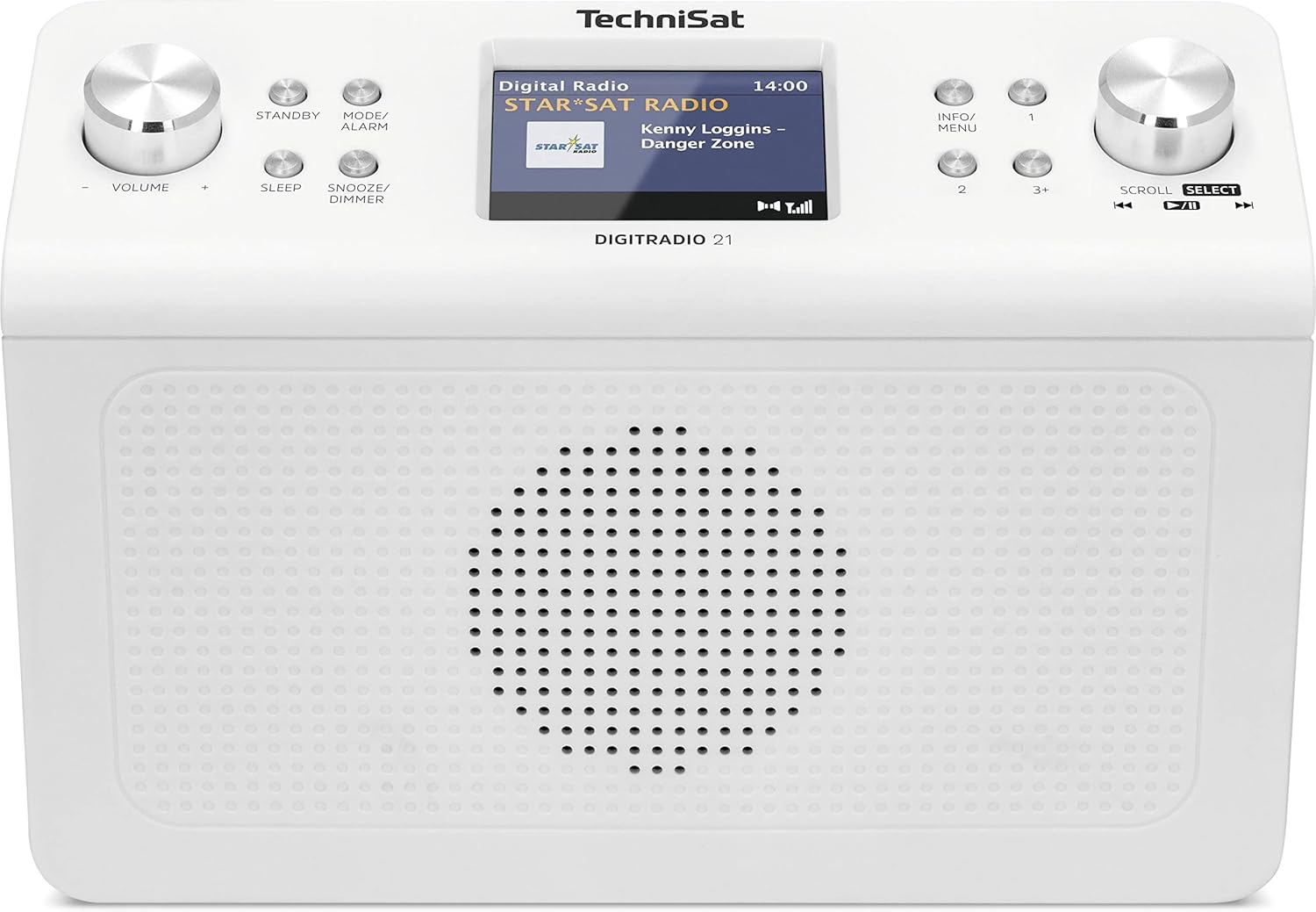
ചിത്രം 4.1: ഫ്രണ്ട് view of the TechniSat DIGITRADIO 21. This image displays the central 2.8-inch color TFT display, the large volume knob on the left, and the scroll/select knob on the right. Surrounding buttons include Standby, Mode/Alarm, Sleep, Snooze/Dimmer, Info/Menu, and preset buttons 1, 2, 3+.
- ഡിസ്പ്ലേ: 2.8-inch TFT color display for showing station information, time, and menu options.
- വോളിയം നോബ്: വോളിയം ക്രമീകരിക്കാൻ തിരിക്കുക.
- സ്റ്റാൻഡ്ബൈ ബട്ടൺ: യൂണിറ്റ് ഓണാക്കുകയോ ഓഫാക്കുകയോ ചെയ്യുന്നു.
- Mode/Alarm Button: Switches between radio modes (DAB+, FM, Bluetooth) and accesses alarm settings.
- സ്ലീപ്പ് ബട്ടൺ: സ്ലീപ്പ് ടൈമർ ഫംഗ്ഷൻ സജീവമാക്കുന്നു.
- Snooze/Dimmer Button: Snoozes the alarm or adjusts display brightness.
- വിവരം/മെനു ബട്ടൺ: Displays additional information or accesses the main menu.
- പ്രീസെറ്റ് ബട്ടണുകൾ (1, 2, 3+): Quickly access stored favorite stations.
- Scroll/Select Knob: Rotate to navigate menus or tune stations, press to confirm selection.
4.2 പിൻ പാനൽ കണക്ഷനുകൾ

ചിത്രം 4.2: പിൻഭാഗം view of the TechniSat DIGITRADIO 21. This image highlights the power input port (DC IN) and the 3.5mm headphone jack located on the back of the unit.
- DC IN: Power adapter connection port.
- ഹെഡ്ഫോൺ ജാക്ക് (3.5 മിമി): സ്വകാര്യ ശ്രവണത്തിനായി ഹെഡ്ഫോണുകൾ ബന്ധിപ്പിക്കുന്നതിന്.
5. സജ്ജീകരണം
5.1 റേഡിയോ മൗണ്ട് ചെയ്യുന്നു
The DIGITRADIO 21 is designed for under-cabinet mounting. The included mounting plate and screws facilitate installation.
- Select a suitable location under a cabinet or shelf, ensuring sufficient space for the unit and access to controls.
- Position the mounting plate and mark the screw holes.
- ആവശ്യമെങ്കിൽ പൈലറ്റ് ദ്വാരങ്ങൾ തുരത്തുക.
- Secure the mounting plate to the underside of the cabinet/shelf using the provided screws.
- Slide the DIGITRADIO 21 onto the mounted plate until it clicks securely into place.
Alternatively, the radio can be used as a standalone unit on a flat surface.
5.2 പവർ കണക്ഷൻ
- Connect the power adapter cable to the "DC IN" port on the rear of the DIGITRADIO 21.
- പവർ അഡാപ്റ്റർ അനുയോജ്യമായ ഒരു മതിൽ ഔട്ട്ലെറ്റിലേക്ക് പ്ലഗ് ചെയ്യുക.
- The unit will power on or enter standby mode.
6. പ്രവർത്തന നിർദ്ദേശങ്ങൾ
6.1 പവർ ഓൺ/ഓഫ്
- അമർത്തുക സ്റ്റാൻഡ് ബൈ റേഡിയോ ഓണാക്കാനോ ഓഫാക്കാനോ ഉള്ള ബട്ടൺ.
6.2 മോഡ് തിരഞ്ഞെടുക്കൽ
- അമർത്തുക Mode/Alarm button repeatedly to cycle through available modes: DAB+, FM, Bluetooth.
6.3 DAB+ Radio Operation
- Select DAB+ mode using the Mode/Alarm ബട്ടൺ.
- ആദ്യ ഉപയോഗത്തിലോ സ്റ്റേഷനുകളൊന്നും കണ്ടെത്തിയില്ലെങ്കിലോ ലഭ്യമായ DAB+ സ്റ്റേഷനുകൾക്കായി റേഡിയോ സ്വയമേവ സ്കാൻ ചെയ്യും.
- തിരിക്കുക സ്ക്രോൾ/തിരഞ്ഞെടുക്കുക knob to browse the list of available stations.
- അമർത്തുക സ്ക്രോൾ/തിരഞ്ഞെടുക്കുക knob to select and listen to a station.
- To store a favorite station: While listening, press and hold one of the Preset buttons (1, 2, 3+) until "Preset Saved" appears on the display.
- To recall a favorite station: Briefly press the corresponding പ്രീസെറ്റ് ബട്ടൺ.
6.4 എഫ്എം റേഡിയോ പ്രവർത്തനം
- ഉപയോഗിച്ച് FM മോഡ് തിരഞ്ഞെടുക്കുക Mode/Alarm ബട്ടൺ.
- തിരിക്കുക സ്ക്രോൾ/തിരഞ്ഞെടുക്കുക ഒരു ഫ്രീക്വൻസിയിലേക്ക് സ്വമേധയാ ട്യൂൺ ചെയ്യുന്നതിനുള്ള നോബ്.
- ലഭ്യമായ അടുത്ത സ്റ്റേഷനായി യാന്ത്രികമായി സ്കാൻ ചെയ്യാൻ, അമർത്തിപ്പിടിക്കുക സ്ക്രോൾ/തിരഞ്ഞെടുക്കുക മുട്ട്.
- To store a favorite station: While listening, press and hold one of the Preset buttons (1, 2, 3+) until "Preset Saved" appears on the display.
- To recall a favorite station: Briefly press the corresponding പ്രീസെറ്റ് ബട്ടൺ.
6.5 ബ്ലൂടൂത്ത് ഓഡിയോ സ്ട്രീമിംഗ്
- ഉപയോഗിച്ച് ബ്ലൂടൂത്ത് മോഡ് തിരഞ്ഞെടുക്കുക Mode/Alarm button. The display will show "Bluetooth Pairing".
- നിങ്ങളുടെ Bluetooth പ്രാപ്തമാക്കിയ ഉപകരണത്തിൽ (ഉദാ: സ്മാർട്ട്ഫോൺ, ടാബ്ലെറ്റ്), Bluetooth പ്രാപ്തമാക്കി ലഭ്യമായ ഉപകരണങ്ങൾക്കായി തിരയുക.
- Select "DIGITRADIO 21" from the list of devices to pair.
- ജോടിയാക്കിയാൽ, നിങ്ങളുടെ ഉപകരണത്തിൽ നിന്ന് റേഡിയോയിലേക്ക് ഓഡിയോ സ്ട്രീം ചെയ്യാൻ കഴിയും.
6.6 Alarm, Sleep Timer, and Snooze
- അലാറം: അമർത്തിപ്പിടിക്കുക Mode/Alarm button to enter alarm settings. Use the സ്ക്രോൾ/തിരഞ്ഞെടുക്കുക knob to set time, source, and volume.
- സ്ലീപ്പ് ടൈമർ: അമർത്തുക ഉറങ്ങുക button repeatedly to set a sleep timer (e.g., 15, 30, 60 minutes) after which the radio will automatically turn off.
- സ്നൂസ്: അലാറം മുഴങ്ങുമ്പോൾ, അമർത്തുക സ്നൂസ്/ഡിമ്മർ button to temporarily silence it for a set period.
6.7 ഡിസ്പ്ലേ ക്രമീകരണങ്ങൾ
- അമർത്തുക സ്നൂസ്/ഡിമ്മർ button (when not snoozing an alarm) to adjust the display brightness.
- അമർത്തുക വിവരം/മെനു button to cycle through different display information (e.g., program type, frequency, date/time).
7. പരിപാലനം
- വൃത്തിയാക്കൽ: മൃദുവായതും ഉണങ്ങിയതും ലിന്റ് രഹിതവുമായ തുണി ഉപയോഗിച്ച് റേഡിയോ തുടയ്ക്കുക. അബ്രാസീവ് ക്ലീനറുകൾ, മെഴുക് അല്ലെങ്കിൽ ലായകങ്ങൾ ഉപയോഗിക്കരുത്.
- സംഭരണം: യൂണിറ്റ് ദീർഘനേരം സൂക്ഷിക്കുകയാണെങ്കിൽ, വൈദ്യുതി വിതരണത്തിൽ നിന്ന് അത് വിച്ഛേദിച്ച് തണുത്തതും വരണ്ടതുമായ സ്ഥലത്ത് സൂക്ഷിക്കുക.
8. പ്രശ്നപരിഹാരം
| പ്രശ്നം | സാധ്യമായ കാരണം | പരിഹാരം |
|---|---|---|
| ശക്തിയില്ല | പവർ അഡാപ്റ്റർ ബന്ധിപ്പിച്ചിട്ടില്ല അല്ലെങ്കിൽ ഔട്ട്ലെറ്റ് തകരാറിലാണ്. | പവർ അഡാപ്റ്റർ സുരക്ഷിതമായി ബന്ധിപ്പിച്ചിട്ടുണ്ടെന്നും ഔട്ട്ലെറ്റ് പ്രവർത്തനക്ഷമമാണെന്നും ഉറപ്പാക്കുക. |
| Poor DAB+ / FM reception | Weak signal, antenna position. | Adjust the position of the wire antenna for better reception. Perform a full scan for stations. |
| ബ്ലൂടൂത്ത് ജോടിയാക്കൽ പ്രശ്നങ്ങൾ | Device not in pairing mode, radio not discoverable. | Ensure the radio is in Bluetooth pairing mode. Check your device's Bluetooth settings and try re-pairing. |
| ശബ്ദമില്ല | ശബ്ദം വളരെ കുറവാണ്, ഹെഡ്ഫോണുകൾ കണക്റ്റ് ചെയ്തിരിക്കുന്നു. | Increase volume. Disconnect headphones if external sound is desired. |
9 സ്പെസിഫിക്കേഷനുകൾ
- മോഡൽ: ഡിജിട്രാഡിയോ 21
- ബ്രാൻഡ്: ടെക്നിസാറ്റ്
- മോഡൽ നമ്പർ: 0001/3964
- റേഡിയോ ബാൻഡുകൾ: DAB+, FM (with RDS and PLL)
- ബ്ലൂടൂത്ത് പതിപ്പ്: 4.2
- സ്പീക്കർ: 2 W (RMS) മോണോ സ്പീക്കർ
- ഡിസ്പ്ലേ: 2.8-inch TFT Color Display
- Favorite Station Memory: 10 for DAB+, 10 for FM
- കണക്ഷനുകൾ: 3.5mm Headphone Jack, DC IN
- പ്രത്യേക സവിശേഷതകൾ: Clock, Alarm, Sleep Timer, Snooze Function, Display Dimmer, Bluetooth Audio Streaming
- വൈദ്യുതി വിതരണം: External Power Adapter (DC 5.9 V / 1000 mA)
- അളവുകൾ (W x H x D): 22.5 x 7.2 x 15.1 സെ.മീ (ഏകദേശം 8.86 x 2.83 x 5.94 ഇഞ്ച്)
- നിറം: വെള്ള (ന്യൂട്രൽ)
10. വാറൻ്റിയും പിന്തുണയും
Specific warranty details are not provided in the product information. For warranty claims or technical support, please refer to the official TechniSat website or contact your retailer. Keep your proof of purchase for any warranty-related inquiries.
കൂടുതൽ സഹായത്തിന്, സന്ദർശിക്കുക TechniSat official webസൈറ്റ്.