
1. ആമുഖം
This manual provides instructions for the ALLIMITY EN3V39S remote control, designed as a replacement for Sharp televisions. This remote control requires no programming or setup; simply insert batteries to begin use.
2. പാക്കേജ് ഉള്ളടക്കം
- 1 x ALLIMITY EN3V39S Remote Control
3. സജ്ജീകരണം: ബാറ്ററി ഇൻസ്റ്റാളേഷൻ
To prepare your remote control for use, follow these steps to install the batteries:
- റിമോട്ട് കൺട്രോളിൻ്റെ പിൻഭാഗത്ത് ബാറ്ററി കമ്പാർട്ട്മെൻ്റ് കവർ കണ്ടെത്തുക.
- കമ്പാർട്ട്മെന്റ് തുറക്കാൻ ടാബിൽ അമർത്തി കവർ താഴേക്ക് സ്ലൈഡ് ചെയ്യുക.
- Insert two AAA alkaline batteries, ensuring the positive (+) and negative (-) terminals align correctly with the markings inside the compartment.
- സുരക്ഷിതമായി ക്ലിക്ക് ചെയ്യുന്നതുവരെ ബാറ്ററി കമ്പാർട്ട്മെന്റ് കവർ തിരികെ സ്ഥലത്തേക്ക് സ്ലൈഡ് ചെയ്യുക.
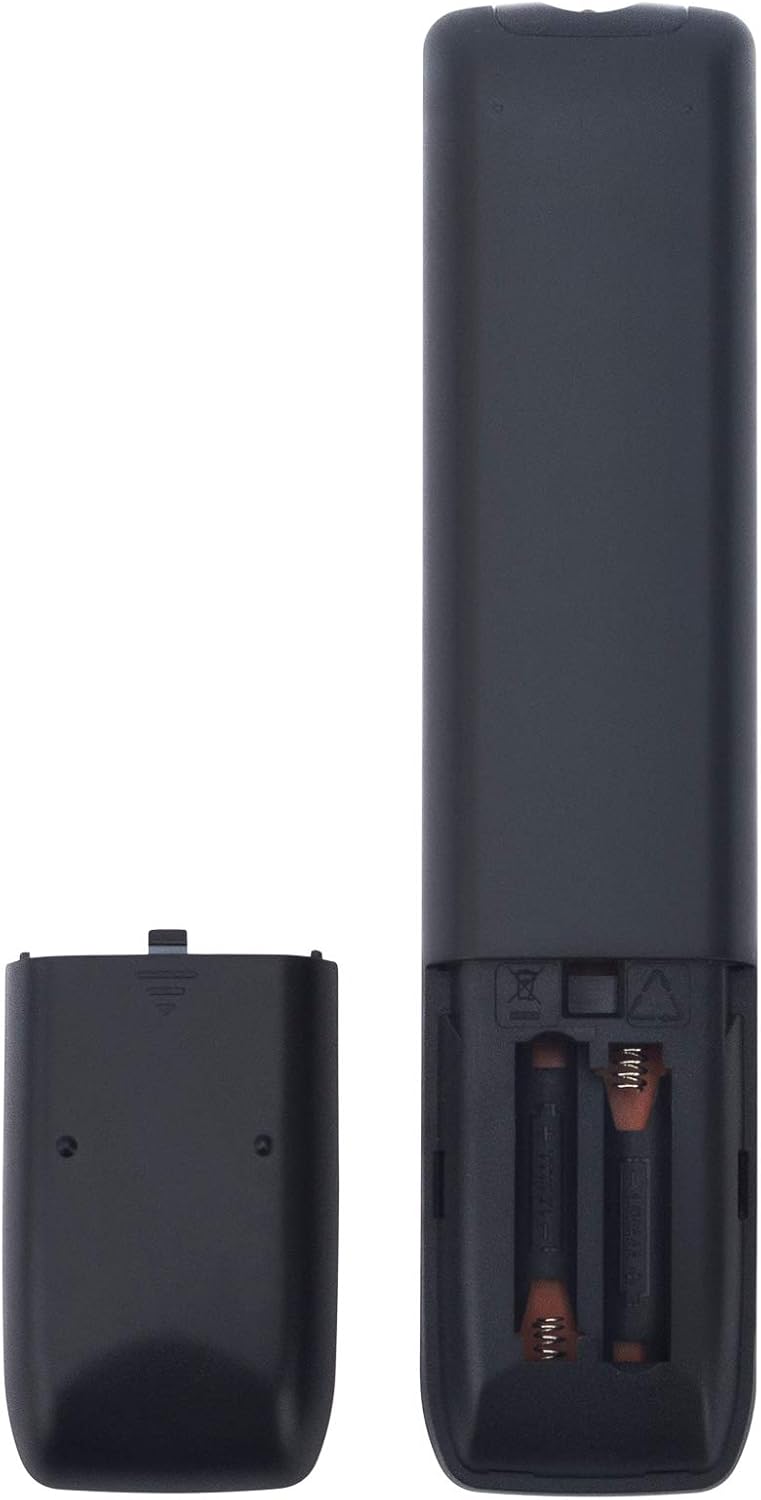
ചിത്രം: പിൻഭാഗം view of the remote control with the battery cover open, illustrating battery insertion.
The remote control is now ready for use with your Sharp TV without any additional programming.
4. പ്രവർത്തന നിർദ്ദേശങ്ങൾ
The ALLIMITY EN3V39S remote control provides direct access to various functions of your Sharp TV. Point the remote control directly at your television's infrared receiver for optimal performance.

ചിത്രം: മുൻഭാഗം view of the ALLIMITY EN3V39S remote control, displaying its button layout.
അടിസ്ഥാന പ്രവർത്തനങ്ങൾ:
- പവർ (●): ടിവി ഓണാക്കുകയോ ഓഫാക്കുകയോ ചെയ്യുന്നു.
- ഇൻപുട്ട്: Selects the video input source (e.g., HDMI 1, AV).
- നമ്പർ ബട്ടണുകൾ (0-9): Directly enter channel numbers.
- VOL (+/-): വോളിയം ലെവൽ ക്രമീകരിക്കുന്നു.
- CH (▲/▼): ടെലിവിഷൻ ചാനൽ മുകളിലേക്കോ താഴേക്കോ മാറ്റുന്നു.
- നിശബ്ദമാക്കുക (🔇): ടിവി ഓഡിയോ നിശബ്ദമാക്കുകയോ അൺമ്യൂട്ടുചെയ്യുകയോ ചെയ്യുന്നു.
- നാവിഗേഷൻ ബട്ടണുകൾ (▲/▼/◀/▶): മെനുകളിലൂടെയും ഓപ്ഷനുകളിലൂടെയും നാവിഗേറ്റ് ചെയ്യുക.
- ശരി: മെനുകളിലെ തിരഞ്ഞെടുപ്പുകൾ സ്ഥിരീകരിക്കുന്നു.
- തിരികെ: മുമ്പത്തെ മെനുവിലേക്കോ സ്ക്രീനിലേക്കോ മടങ്ങുന്നു.
- പുറത്ത്: നിലവിലുള്ള മെനുവിൽ നിന്നോ ആപ്ലിക്കേഷനിൽ നിന്നോ പുറത്തുകടക്കുന്നു.
പ്രത്യേക സവിശേഷതകൾ:
- APPS: Accesses the TV's smart applications menu.
- Netflix, Claro video, Tikilive, YouTube: ഈ സ്ട്രീമിംഗ് സേവനങ്ങളിലേക്ക് വേഗത്തിൽ പ്രവേശിക്കുന്നതിനായി സമർപ്പിത ബട്ടണുകൾ.
- Picture, Sound, Aspect, Sleep: Direct access to TV settings for picture, sound, aspect ratio, and sleep timer.
- CC: Activates or deactivates Closed Captions.
- വീട് (🏠): ടിവിയുടെ ഹോം സ്ക്രീനിലേക്ക് മടങ്ങുന്നു.
- Media Playback Controls (◀◀, ▶▶, ▮▮, ▶, ■): Control media playback (rewind, fast forward, pause, play, stop).
5. പരിപാലനം
നിങ്ങളുടെ റിമോട്ട് കൺട്രോളിന്റെ ദീർഘായുസ്സും ശരിയായ പ്രവർത്തനവും ഉറപ്പാക്കാൻ:
- വൃത്തിയാക്കൽ: മൃദുവായതും ഉണങ്ങിയതുമായ തുണി ഉപയോഗിച്ച് റിമോട്ട് കൺട്രോൾ തുടയ്ക്കുക. ലിക്വിഡ് ക്ലീനറുകളോ ഉരച്ചിലുകളുള്ള വസ്തുക്കളോ ഉപയോഗിക്കരുത്.
- ബാറ്ററി മാറ്റിസ്ഥാപിക്കൽ: Replace batteries when the remote's response becomes sluggish or stops working. Always replace both batteries at the same time with new AAA alkaline batteries.
- സംഭരണം: നേരിട്ടുള്ള സൂര്യപ്രകാശത്തിൽ നിന്നും കടുത്ത താപനിലയിൽ നിന്നും മാറി തണുത്തതും വരണ്ടതുമായ സ്ഥലത്ത് റിമോട്ട് സൂക്ഷിക്കുക.
- തുള്ളികൾ ഒഴിവാക്കുക: തുള്ളികൾ ആന്തരിക ഘടകങ്ങളെ നശിപ്പിക്കുമെന്നതിനാൽ, ശാരീരിക ആഘാതത്തിൽ നിന്ന് റിമോട്ടിനെ സംരക്ഷിക്കുക.
6. പ്രശ്നപരിഹാരം
If you encounter issues with your remote control, consider the following:
- റിമോട്ട് പ്രതികരിക്കുന്നില്ല:
- ബാറ്ററികൾ ശരിയായ പോളാരിറ്റിയിൽ (+/-) ശരിയായി ചേർത്തിട്ടുണ്ടോയെന്ന് പരിശോധിക്കുക.
- പഴയ ബാറ്ററികൾ പുതിയ AAA ആൽക്കലൈൻ ബാറ്ററികൾ ഉപയോഗിച്ച് മാറ്റിസ്ഥാപിക്കുക.
- റിമോട്ട് കൺട്രോളിനും ടിവിയുടെ ഇൻഫ്രാറെഡ് സെൻസറിനും ഇടയിൽ തടസ്സങ്ങളൊന്നുമില്ലെന്ന് ഉറപ്പാക്കുക.
- Confirm you are pointing the remote directly at the TV.
- പരിമിത ശ്രേണി:
- The maximum effective range is approximately 10 meters (33 feet). Ensure you are within this range.
- Weak batteries can reduce the remote's effective range. Replace them if necessary.
- പ്രവർത്തിക്കാത്ത പ്രത്യേക ബട്ടണുകൾ:
- Ensure the TV is fully powered on and not in a standby mode that might restrict certain functions.
- If only certain buttons fail, it might indicate a physical issue with the remote.
7 സ്പെസിഫിക്കേഷനുകൾ
| ഫീച്ചർ | വിശദാംശങ്ങൾ |
|---|---|
| ബ്രാൻഡ് | അലിമിറ്റി |
| മോഡൽ നമ്പർ | EN3V39S |
| അനുയോജ്യമായ ഉപകരണങ്ങൾ | Sharp Televisions |
| കണക്റ്റിവിറ്റി ടെക്നോളജി | ഇൻഫ്രാറെഡ് |
| പ്രത്യേക ഫീച്ചർ | പ്രോഗ്രാമിംഗ് ആവശ്യമില്ല |
| പിന്തുണയ്ക്കുന്ന ഉപകരണങ്ങളുടെ പരമാവധി എണ്ണം | 1 |
| ബട്ടൺ അളവ് | 20 |
| കൺട്രോളർ തരം | ബട്ടൺ നിയന്ത്രണം |
| പരമാവധി പരിധി | 10 മീറ്റർ (ഏകദേശം 33 അടി) |
| ബാറ്ററി തരം | 2 x AAA ആൽക്കലൈൻ ബാറ്ററികൾ (ഉൾപ്പെടുത്തിയിട്ടില്ല) |
| ഇനത്തിൻ്റെ ഭാരം | 3.36 ഔൺസ് (ഏകദേശം 95 ഗ്രാം) |
| ഇനത്തിന്റെ അളവുകൾ (L x W x H) | 6"L x 2"W x 0.5"H (ഏകദേശം 15.24 x 5.08 x 1.27 സെ.മീ) |
8. വാറൻ്റിയും പിന്തുണയും
For information regarding warranty coverage or customer support, please refer to your purchase documentation or contact the seller directly. Keep your proof of purchase for any warranty claims.