
1. ആമുഖം
The Monster Rockin' Roller 270 is a robust portable speaker designed for both indoor and outdoor use. It delivers powerful audio output and features a long-lasting battery, wireless charging capabilities, and multiple connectivity options, making it suitable for various events and gatherings. This manual provides detailed instructions for setup, operation, and maintenance to ensure optimal performance and longevity of your device.
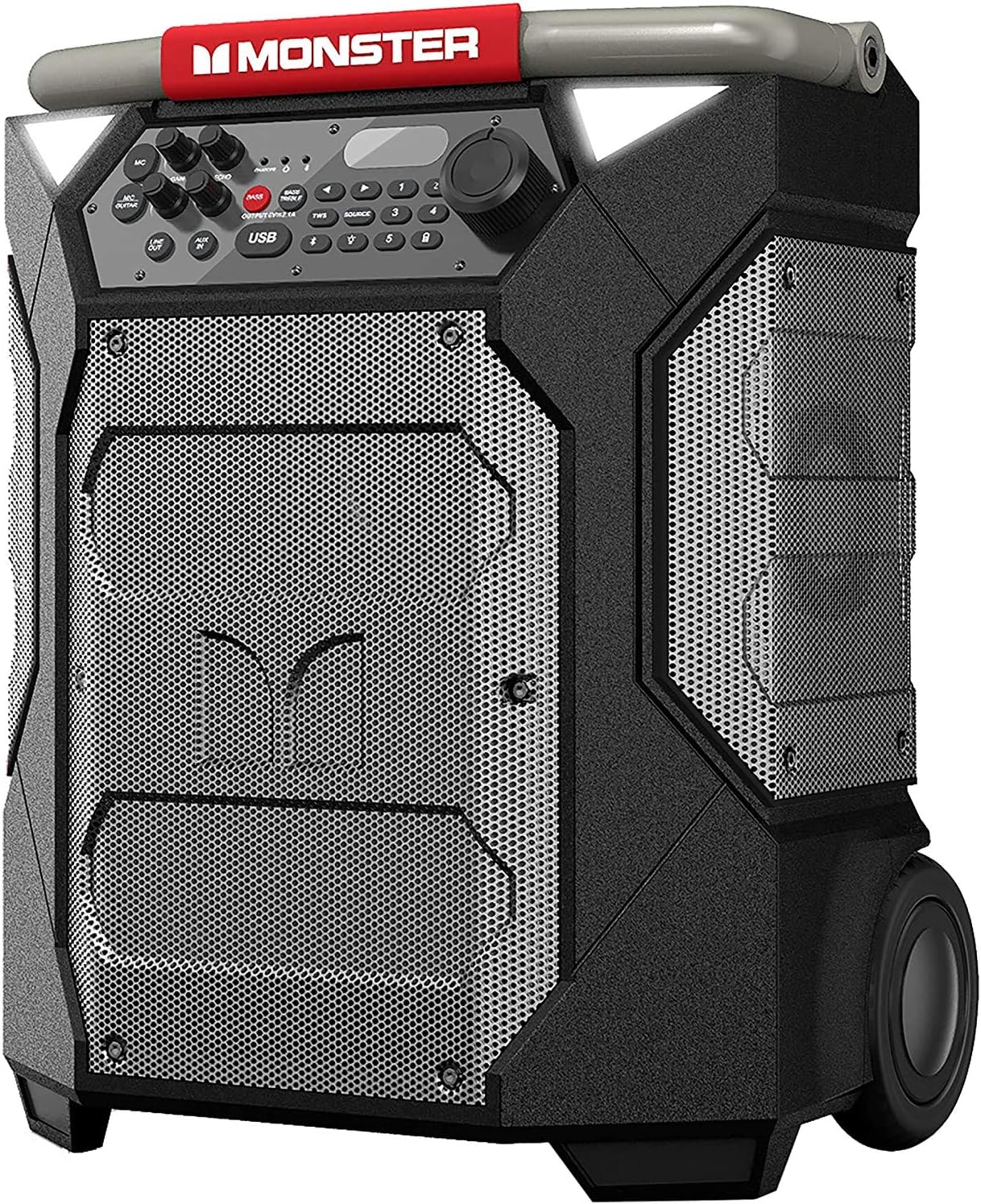
ചിത്രം 1: മുൻഭാഗം view of the Monster Rockin' Roller 270 speaker, showcasing its rugged design and extended handle for portability.
2 സുരക്ഷാ വിവരങ്ങൾ
- സ്പീക്കർ പ്രവർത്തിപ്പിക്കുന്നതിന് മുമ്പ് എല്ലാ നിർദ്ദേശങ്ങളും വായിക്കുക.
- ഉയർന്ന താപനിലയിലോ നേരിട്ടുള്ള സൂര്യപ്രകാശത്തിലോ ദീർഘനേരം സ്പീക്കറിനെ തുറന്നുകാട്ടരുത്.
- Ensure the input power cover is securely closed when not charging to maintain water resistance.
- Avoid placing the speaker near heat sources or in areas with excessive moisture.
- സ്പീക്കർ ഡിസ്അസംബ്ലിംഗ് ചെയ്യാനോ പരിഷ്ക്കരിക്കാനോ ശ്രമിക്കരുത്. എല്ലാ സേവനങ്ങളും യോഗ്യതയുള്ള ഉദ്യോഗസ്ഥർക്ക് റഫർ ചെയ്യുക.
- കുട്ടികളിൽ നിന്നും വളർത്തുമൃഗങ്ങളിൽ നിന്നും സ്പീക്കർ അകറ്റി നിർത്തുക.
3. പാക്കേജ് ഉള്ളടക്കം
പാക്കേജിൽ എല്ലാ ഇനങ്ങളും ഉണ്ടെന്ന് ഉറപ്പാക്കുക:
- Monster Rockin' Roller 270 Speaker
- പവർ കേബിൾ
- സഹായ കേബിൾ
- ഉപയോക്തൃ മാനുവൽ (ഈ പ്രമാണം)
- സ്റ്റോറേജ് ബാഗ് (ആക്സസറികൾക്കായി)
4. ഉൽപ്പന്ന സവിശേഷതകൾ
- 200 വാട്ട്സ് പവർ: Delivers powerful audio for both indoor and outdoor environments.
- 100 മണിക്കൂർ വരെ പ്ലേടൈം: Extended battery life ensures long periods of uninterrupted audio.
- Qi Wireless Fast Charge: Built-in charging pad for compatible wireless devices.

Figure 2: The integrated Qi wireless charging pad on top of the speaker.
- TWS Pairing (True Wireless System): Connect two Rockin' Roller 270 speakers wirelessly for a stereo sound experience.
- IPX4 Weather Resistant: Designed with a tough exterior to withstand splashes and light rain, making it suitable for outdoor use.

ചിത്രം 3: സൈഡ് പ്രോfile of the speaker, illustrating its robust build and all-terrain wheels for easy transport.
- ഒന്നിലധികം കണക്റ്റിവിറ്റി ഓപ്ഷനുകൾ: Supports Bluetooth, Auxiliary (AUX In), and NFC for versatile audio input.
- Microphone and Guitar Inputs: Features dedicated inputs for microphone and guitar, allowing for live performances or karaoke.
- Telescoping Handle and Rugged Wheels: For convenient portability, similar to luggage.

ചിത്രം 4: പിൻഭാഗം view of the speaker, showing the attached storage bag for cables and accessories.
5. സജ്ജീകരണം
5.1 പ്രാരംഭ ചാർജിംഗ്
- Before first use, fully charge the speaker using the provided power cable.
- Locate the power input on the back of the speaker, beneath the protective cover.
- Connect the power cable to the speaker and a wall outlet. The charging indicator light will illuminate.
- Allow approximately 8-10 hours for a full charge. The charging indicator will change or turn off when fully charged.
5.2 പവർ ഓൺ/ഓഫ്
- To power on, locate the power switch on the back of the speaker (under the input power cover) and flip it to the "ON" position.
- To power off, flip the switch to the "OFF" position.
5.3 Handle Extension
- To extend the telescoping handle, press the button on the handle and pull upwards.
- To retract, press the button and push the handle downwards until it locks into place.
6. പ്രവർത്തന നിർദ്ദേശങ്ങൾ

Figure 5: The control panel of the speaker, featuring various input and sound adjustment options.
6.1 ബ്ലൂടൂത്ത് ജോടിയാക്കൽ
- Power on the speaker. The Bluetooth indicator light will flash, indicating it's in pairing mode.
- On your device (smartphone, tablet, etc.), enable Bluetooth and search for "Monster RR270".
- Select "Monster RR270" from the list of available devices to pair.
- ജോടിയാക്കിക്കഴിഞ്ഞാൽ, ബ്ലൂടൂത്ത് ഇൻഡിക്കേറ്റർ ലൈറ്റ് ദൃഢമായി തുടരും.
6.2 ഓക്സിലറി (AUX) കണക്ഷൻ
- Connect one end of the provided auxiliary cable to the "AUX IN" port on the speaker's control panel.
- മറ്റേ അറ്റം നിങ്ങളുടെ ഉപകരണത്തിന്റെ ഓഡിയോ ഔട്ട്പുട്ടിലേക്ക് ബന്ധിപ്പിക്കുക.
- Press the "SOURCE" button on the speaker until "AUX" is displayed.
6.3 മൈക്രോഫോണും ഗിറ്റാർ ഇൻപുട്ടുകളും
- Plug your microphone or guitar into the respective "MIC/GUITAR" input jacks on the control panel.
- Adjust the "GAIN" knob for input volume and "ECHO" knob for vocal effects as desired.
6.4 TWS (True Wireless System) Pairing
To pair two Rockin' Roller 270 speakers for stereo sound:
- രണ്ട് സ്പീക്കറുകളും ഓണാക്കിയിട്ടുണ്ടെന്നും ഏതെങ്കിലും ബ്ലൂടൂത്ത് ഉപകരണവുമായി ബന്ധിപ്പിച്ചിട്ടില്ലെന്നും ഉറപ്പാക്കുക.
- On one speaker (this will be the primary), press and hold the "TWS" button until you hear a confirmation tone.
- On the second speaker, press the "TWS" button briefly.
- The speakers will automatically connect. Once connected, pair your device to the primary speaker via Bluetooth as described in section 6.1.
6.5 ക്വി വയർലെസ് ചാർജിംഗ്
- Place your Qi-compatible device on the designated charging area on top of the speaker.
- Ensure the device is centered for optimal charging. The device's screen will indicate charging status.
6.6 ശബ്ദ ക്രമീകരണം
- Use the "BASS" and "BASS TREBLE" buttons on the control panel to adjust the sound profile നിങ്ങളുടെ അഭിരുചിക്കനുസരിച്ച്.
- The main rotary knob controls the overall volume.
7. പരിപാലനം
- Clean the speaker's exterior with a soft, damp തുണി. ഉരച്ചിലുകൾ ഉണ്ടാക്കുന്ന ക്ലീനറുകളോ ലായകങ്ങളോ ഒഴിവാക്കുക.
- Ensure all ports and covers are free of dust and debris.
- When storing for extended periods, fully charge the battery and store in a cool, dry place.
- Periodically check the wheels and handle for any signs of wear or damage.
8. പ്രശ്നപരിഹാരം
| പ്രശ്നം | സാധ്യമായ കാരണം | പരിഹാരം |
|---|---|---|
| ശക്തിയില്ല | ബാറ്ററി തീർന്നു; പവർ സ്വിച്ച് ഓഫാണ്. | സ്പീക്കർ ചാർജ് ചെയ്യുക; പവർ സ്വിച്ച് "ഓൺ" സ്ഥാനത്താണെന്ന് ഉറപ്പാക്കുക. |
| ശബ്ദമില്ല | Volume too low; Incorrect source selected; Device not paired/connected. | Increase volume; Press "SOURCE" to select correct input; Re-pair Bluetooth or check AUX connection. |
| ബ്ലൂടൂത്ത് ജോടിയാക്കൽ പരാജയപ്പെട്ടു | സ്പീക്കർ ജോടിയാക്കൽ മോഡിലല്ല; ഉപകരണം വളരെ അകലെയാണ്; തടസ്സം. | Ensure speaker is in pairing mode (flashing light); Move device closer; Turn off other Bluetooth devices. |
| Qi charging not working | Device not Qi-compatible; Device not centered; Obstruction. | Verify device compatibility; Re-position device on charging pad; Remove any foreign objects. |
9 സ്പെസിഫിക്കേഷനുകൾ
| ഫീച്ചർ | വിശദാംശങ്ങൾ |
|---|---|
| മോഡലിൻ്റെ പേര് | Monster Rockin' Roller |
| മോഡൽ നമ്പർ | RR270 |
| സ്പീക്കർ തരം | ഔട്ട്ഡോർ |
| സ്പീക്കർ പരമാവധി ഔട്ട്പുട്ട് പവർ | 200 വാട്ട്സ് |
| കളിസമയം | 100 മണിക്കൂർ വരെ |
| ജല പ്രതിരോധ നില | IPX4 വാട്ടർ റെസിസ്റ്റൻ്റ് |
| വയർലെസ് കമ്മ്യൂണിക്കേഷൻ ടെക്നോളജി | ബ്ലൂടൂത്ത് |
| കണക്റ്റിവിറ്റി പ്രോട്ടോക്കോൾ | ബ്ലൂടൂത്ത് |
| അനുയോജ്യമായ ഉപകരണങ്ങൾ | ലാപ്ടോപ്പ്, പേഴ്സണൽ കമ്പ്യൂട്ടർ, സ്മാർട്ട്ഫോൺ, ടാബ്ലെറ്റ് |
| പവർ ഉറവിടം | ബാറ്ററി പവർ (1 12V ബാറ്ററി ഉൾപ്പെടുത്തിയിരിക്കുന്നു) |
| ഉൽപ്പന്ന അളവുകൾ (D x W x H) | 10.8" x 13.2" x 18.6" |
| ഇനത്തിൻ്റെ ഭാരം | 29.5 പൗണ്ട് |
| നിറം | Black/Slate |
| യു.പി.സി | 827396546130 |

Figure 6: Size reference of the Rockin' Roller 270 compared to other models and a 6-foot tall man.
10. വാറൻ്റിയും പിന്തുണയും
For warranty information, technical support, or service inquiries, please refer to the warranty card included in your product packaging or visit the official Monster webസൈറ്റ്. സഹായത്തിനായി നിങ്ങൾക്ക് മോൺസ്റ്റർ ഉപഭോക്തൃ സേവനവുമായി നേരിട്ട് ബന്ധപ്പെടാം.
ഓൺലൈൻ പിന്തുണ: www.monsterproducts.com/support - പിന്തുണ