
1. ആമുഖം
The Amazon Echo Show 8 (2nd Gen, 2021 Release) is an HD smart display with Alexa built-in, featuring an 8-inch touchscreen and a 13 MP camera. This manual provides instructions for setting up, operating, maintaining, and troubleshooting your device.
2. ബോക്സിൽ എന്താണുള്ളത്?
അൺബോക്സിംഗ് ചെയ്യുമ്പോൾ, ഇനിപ്പറയുന്ന ഇനങ്ങൾ ഉൾപ്പെടുത്തിയിട്ടുണ്ടെന്ന് ഉറപ്പാക്കുക:
- എക്കോ ഷോ 8 ഉപകരണം
- Glacier White power adapter (30W) and cable (4.9 ft.)
- ദ്രുത ആരംഭ ഗൈഡ്
3. സജ്ജീകരണം
നിങ്ങളുടെ എക്കോ ഷോ 8 സജ്ജീകരിക്കാൻ ഈ ഘട്ടങ്ങൾ പാലിക്കുക:
- പവർ ഓൺ: Connect the included power adapter to your Echo Show 8 and plug it into a wall outlet. The device will automatically power on.
- On-Screen Instructions: Follow the on-screen prompts to select your language and connect to your Wi-Fi network. The Echo Show 8 supports dual-band Wi-Fi (802.11a/b/g/n/ac).
- ആമസോൺ അക്കൗണ്ട്: നിങ്ങളുടെ ആമസോൺ അക്കൗണ്ട് ക്രെഡൻഷ്യലുകൾ ഉപയോഗിച്ച് ലോഗിൻ ചെയ്യുക. നിങ്ങൾക്ക് ഒരു അക്കൗണ്ട് ഇല്ലെങ്കിൽ, ഒന്ന് സൃഷ്ടിക്കാൻ നിങ്ങളോട് ആവശ്യപ്പെടും.
- Alexa ആപ്പ്: പൂർണ്ണമായ പ്രവർത്തനക്ഷമതയ്ക്കും വിപുലമായ ക്രമീകരണങ്ങൾക്കും, നിങ്ങളുടെ ഫയർ ഒഎസ്, ആൻഡ്രോയിഡ് അല്ലെങ്കിൽ iOS ഉപകരണത്തിൽ അലക്സ ആപ്പ് ഡൗൺലോഡ് ചെയ്യുക. ആപ്പ് ഒരു വഴിയും ആക്സസ് ചെയ്യാൻ കഴിയും. web ബ്രൗസർ.
Amazon WiFi simple setup can automatically connect your device to your Wi-Fi network if you have compatible devices and have previously enabled this feature.
4. നിങ്ങളുടെ എക്കോ ഷോ 8 പ്രവർത്തിപ്പിക്കുക
Basic Interaction
Interact with your Echo Show 8 using voice commands (by saying "Alexa") or by touching the 8.0-inch HD display.
വിനോദം
The Echo Show 8 provides access to various entertainment options:
- വീഡിയോ സ്ട്രീമിംഗ്: Watch TV shows and movies in HD from services like Prime Video and Netflix.
- സംഗീത സ്ട്രീമിംഗ്: Stream music from Amazon Music, Apple Music, or Spotify.

Image: The Echo Show 8 screen showing various music streaming services, indicating its capability to play audio from different platforms.

Image: The Echo Show 8 displaying a movie from Prime Video, demonstrating its video playback capabilities.
ആശയവിനിമയം
Utilize the 13 MP camera for video calls. The camera features auto-framing to keep you centered during calls. Simply ask Alexa to call your contacts.
Daily Assistance
Alexa can assist with daily tasks:
- View calendars and reminders.
- Get daily recipe ideas with step-by-step instructions.
- Set timers and update lists.
- Receive news and traffic updates.
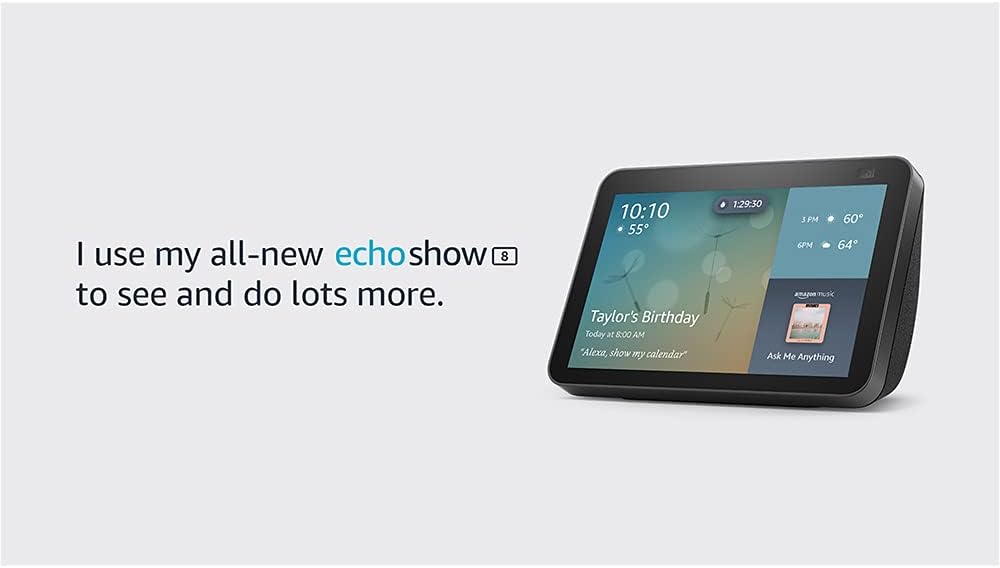
Image: The Echo Show 8 screen showing the current time, weather, and a calendar event, illustrating its utility as a personal assistant.
ഫോട്ടോ ഡിസ്പ്ലേ
Use Amazon Photos to turn your home screen into a digital photo frame. Adaptive color technology ensures your photos look good in any lighting condition.
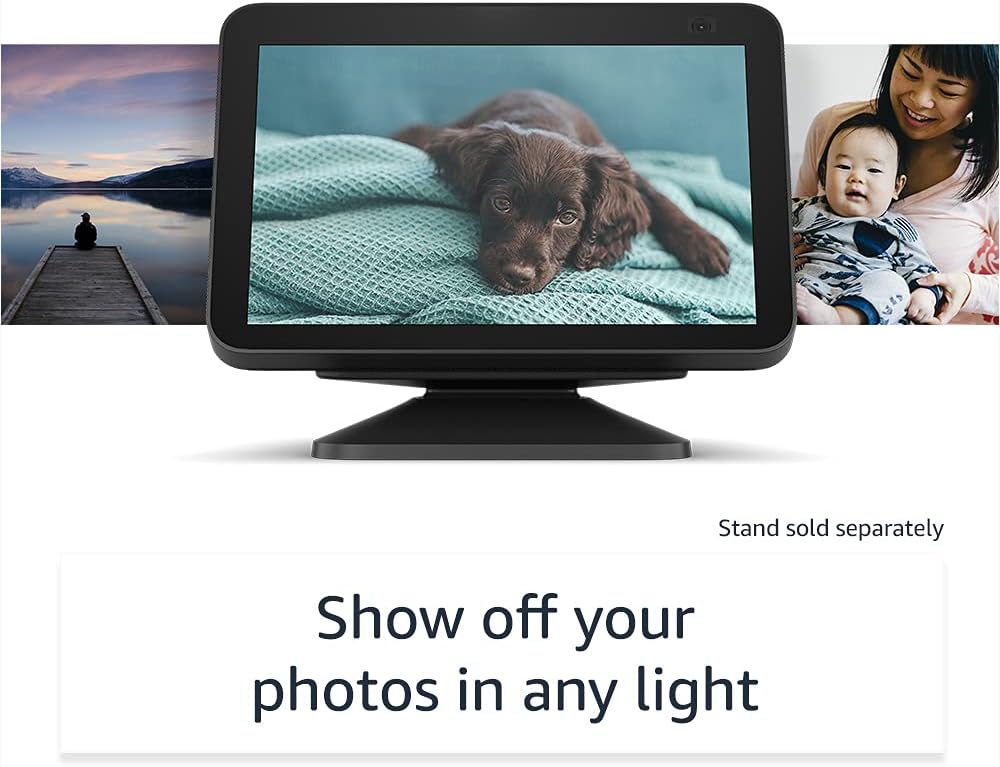
Image: The Echo Show 8 displaying a personal photo, highlighting its digital photo frame feature.
5. സ്മാർട്ട് ഹോം ഇന്റഗ്രേഷൻ
The Echo Show 8 can manage compatible smart home devices using its interactive display, your voice, or motion. It supports Wi-Fi, Bluetooth Low Energy Mesh, and Matter for device compatibility.
- റിമോട്ട് മോണിറ്ററിംഗ്: Use the built-in camera to look in on your home when you are away.
- ഉപകരണ നിയന്ത്രണം: Control compatible devices such as cameras, lights, and thermostats.

Image: The Echo Show 8 screen showing live feeds from four different cameras, demonstrating its smart home monitoring capabilities.
ആമസോൺ നടപ്പാത
Amazon Sidewalk is a shared network that helps compatible devices work better. It uses a small portion of your internet bandwidth to provide benefits to you and your neighbors via Sidewalk Bridges (participating Echo and Ring devices). Sidewalk is turned on by default but can be disabled at any time through the Alexa app.
6. സ്വകാര്യതാ സവിശേഷതകൾ
എക്കോ ഷോ 8 രൂപകൽപ്പന ചെയ്തിരിക്കുന്നത് ഒന്നിലധികം സ്വകാര്യതാ നിയന്ത്രണങ്ങൾ ഉപയോഗിച്ചാണ്:
- മൈക്രോഫോൺ/ക്യാമറ ഓഫ് ബട്ടൺ: മൈക്രോഫോണുകളും ക്യാമറയും ഇലക്ട്രോണിക് ആയി വിച്ഛേദിക്കുന്നതിനുള്ള ഒരു ഫിസിക്കൽ ബട്ടൺ.
- ബിൽറ്റ്-ഇൻ ക്യാമറ ഷട്ടർ: ക്യാമറ ലെൻസ് മറയ്ക്കുന്നതിനുള്ള ഒരു ഫിസിക്കൽ സ്ലൈഡർ.
- വേക്ക് വേഡ് ടെക്നോളജി: വേക്ക് വേഡ് കണ്ടെത്തിയതിനുശേഷം മാത്രമേ അലക്സ ഉപകരണങ്ങൾ ഓഡിയോ റെക്കോർഡുചെയ്യാനും ക്ലൗഡിലേക്ക് അയയ്ക്കാനും തുടങ്ങുകയുള്ളൂ.
- സ്ട്രീമിംഗ് സൂചകങ്ങൾ: Visual indicators show when your device is streaming to the cloud.
- വോയ്സ് റെക്കോർഡിംഗ് മാനേജ്മെന്റ്: കഴിവ് view നിങ്ങളുടെ വോയ്സ് റെക്കോർഡിംഗുകൾ ഇല്ലാതാക്കുക.
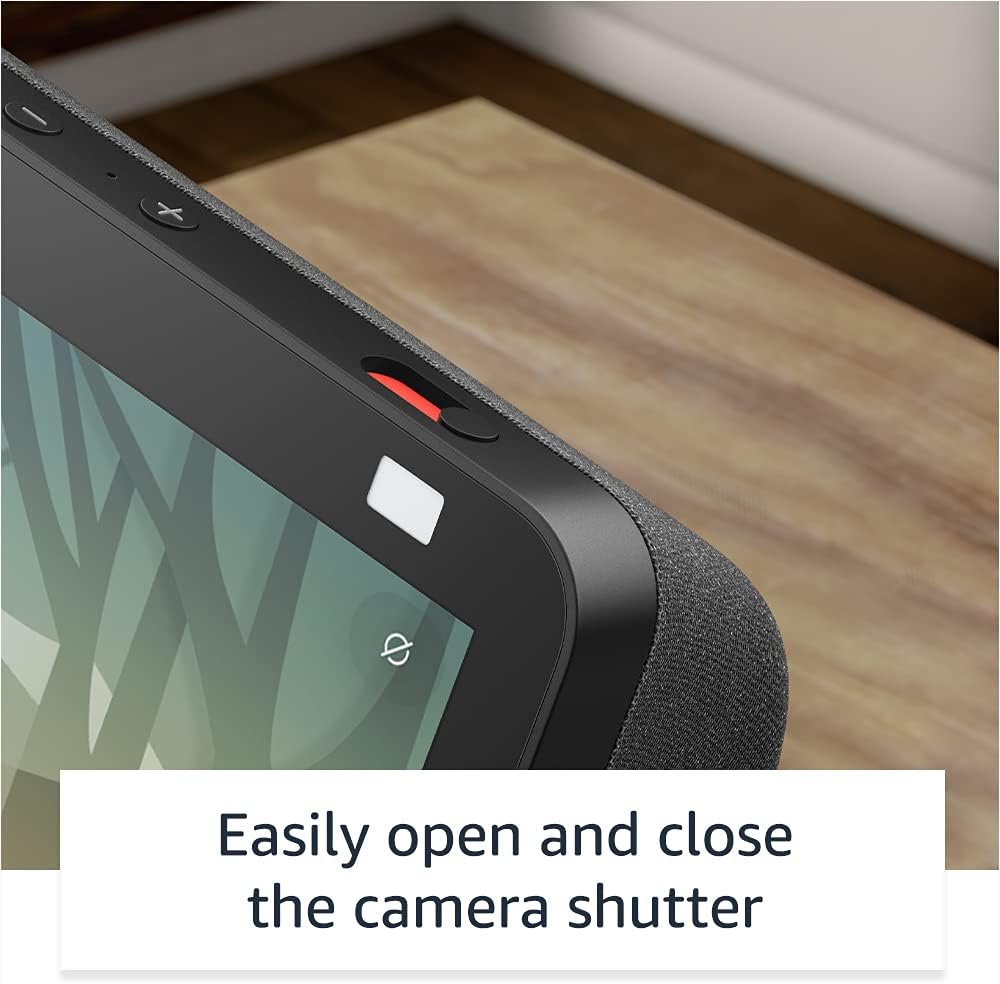
ചിത്രം: ഒരു ക്ലോസ്-അപ്പ് view of the Echo Show 8's physical camera shutter and microphone/camera off button, highlighting its privacy controls.
കൂടുതൽ വിവരങ്ങൾക്ക്, Alexa പ്രൈവസി ഹബ് സന്ദർശിക്കുക.
7. പ്രവേശനക്ഷമത സവിശേഷതകൾ
എക്കോ ഷോ 8-ൽ വിവിധ ആക്സസബിലിറ്റി സവിശേഷതകൾ ഉൾപ്പെടുന്നു. ഈ ക്രമീകരണങ്ങൾ വഴി ആക്സസ് ചെയ്യുക ക്രമീകരണങ്ങൾ → പ്രവേശനക്ഷമത നിങ്ങളുടെ ഉപകരണത്തിൽ:
- അലക്സയിൽ ടാപ്പ് ചെയ്യുക: ഓൺ-സ്ക്രീൻ ടൈലുകളോ കീബോർഡോ ഉപയോഗിച്ച് ടച്ച് വഴി അലക്സയുമായി സംവദിക്കുക.
- അഡാപ്റ്റീവ് ലിസണിംഗ്: അലക്സാ പ്രതികരിക്കുന്നതിന് മുമ്പ് സംസാരിച്ചു തീർക്കാൻ കൂടുതൽ സമയം നൽകുന്നു.
- ഇഷ്ടപ്പെട്ട സംസാര നിരക്ക്: അലക്സയുടെ സംസാര വേഗത നിയന്ത്രിക്കുക.
- അടിക്കുറിപ്പ്: പിന്തുണയ്ക്കുന്ന ഉള്ളടക്കത്തിനായി അലക്സാ ക്യാപ്ഷനിംഗ്, കോൾ ക്യാപ്ഷനിംഗ്, ക്ലോസ്ഡ് ക്യാപ്ഷനിംഗ്.
- കാണിക്കുക, പറയുക: Helps identify products for blind or visually impaired users by saying "Alexa, what am I holding."
- ശബ്ദംView സ്ക്രീൻ റീഡർ: Provides audio feedback for blind or visually impaired users.
- സ്ക്രീൻ മാഗ്നിഫയർ: സൂം ഇൻ/ഔട്ട് ചെയ്ത് സ്ക്രീനിന് ചുറ്റും പാൻ ചെയ്യുക.
- സമീപത്തുള്ളപ്പോൾ അറിയിക്കുക: ഉപകരണത്തിന് സമീപം കണ്ടെത്തുമ്പോൾ അറിയിപ്പ് ശബ്ദങ്ങൾ പ്ലേ ചെയ്യുന്നു.
- കിൻഡിൽ ഉറക്കെ വായിക്കുക: അലക്സയ്ക്ക് നിങ്ങളുടെ കിൻഡിൽ പുസ്തകങ്ങൾ ഉറക്കെ വായിക്കാൻ കഴിയും.
- തത്സമയ വാചകം: വീഡിയോ കോളിനിടെ ലൈവ് ടെക്സ്റ്റ് ടൈപ്പ് ചെയ്യുക.
- അധിക ക്രമീകരണങ്ങളിൽ കളർ ഇൻവേർഷൻ, കളർ കറക്ഷൻ, റിക്വസ്റ്റ് സൗണ്ട് എന്നിവ ഉൾപ്പെടുന്നു.
8. പരിപാലനം
നിങ്ങളുടെ എക്കോ ഷോ 8 ന്റെ ഒപ്റ്റിമൽ പ്രകടനവും ദീർഘായുസ്സും ഉറപ്പാക്കാൻ:
- വൃത്തിയാക്കൽ: മൃദുവായ, ലിന്റ് രഹിത തുണി ഉപയോഗിച്ച് സ്ക്രീനും ഉപകരണത്തിന്റെ പുറംഭാഗവും സൌമ്യമായി തുടയ്ക്കുക. ഉരച്ചിലുകൾ ഉള്ള ക്ലീനറുകളോ സ്പ്രേകളോ ഉപയോഗിക്കുന്നത് ഒഴിവാക്കുക.
- സോഫ്റ്റ്വെയർ അപ്ഡേറ്റുകൾ: The device receives automatic software security updates. Ensure your device is connected to Wi-Fi to receive these updates.
- പ്ലേസ്മെൻ്റ്: നേരിട്ടുള്ള സൂര്യപ്രകാശം, താപ സ്രോതസ്സുകൾ, ഈർപ്പം എന്നിവയിൽ നിന്ന് അകലെ സ്ഥിരതയുള്ളതും പരന്നതുമായ ഒരു പ്രതലത്തിൽ ഉപകരണം സ്ഥാപിക്കുക.
9. പ്രശ്നപരിഹാരം
If you encounter issues with your Echo Show 8, consider the following:
- ശക്തിയില്ല: പവർ അഡാപ്റ്റർ ഉപകരണത്തിലേക്കും പ്രവർത്തിക്കുന്ന ഒരു പവർ ഔട്ട്ലെറ്റിലേക്കും സുരക്ഷിതമായി ബന്ധിപ്പിച്ചിട്ടുണ്ടെന്ന് ഉറപ്പാക്കുക.
- വൈഫൈ കണക്റ്റിവിറ്റി പ്രശ്നങ്ങൾ:
- നിങ്ങളുടെ വൈഫൈ റൂട്ടർ ഓണാണോയെന്നും പ്രവർത്തിക്കുന്നുണ്ടെന്നും പരിശോധിക്കുക.
- നിങ്ങളുടെ റൂട്ടറും എക്കോ ഷോ 8 ഉം പുനരാരംഭിക്കുക.
- Verify that the device is within range of your Wi-Fi network.
- Ensure you are connecting to a supported Wi-Fi network (802.11a/b/g/n/ac). Ad-hoc networks are not supported.
- അലക്സ പ്രതികരിക്കുന്നില്ല:
- മൈക്രോഫോൺ നിശബ്ദമാക്കിയിട്ടില്ലെന്ന് ഉറപ്പാക്കുക (മൈക്ക്/ക്യാമറ ഓഫ് ബട്ടൺ പരിശോധിക്കുക).
- വ്യക്തമായും സാധാരണ ശബ്ദത്തിലും സംസാരിക്കുക.
- ഉപകരണത്തിലേക്ക് അടുക്കുക.
- സ്ക്രീൻ പ്രതികരിക്കുന്നില്ല: Restart the device by unplugging it for a few seconds and then plugging it back in.
- Video Call Issues: Check your internet connection speed. Ensure the camera shutter is open.
For persistent issues, consult the Alexa app or Amazon's online support resources.
10 സ്പെസിഫിക്കേഷനുകൾ
| ഫീച്ചർ | വിശദാംശങ്ങൾ |
|---|---|
| വലിപ്പം | 7.9”x 5.4”x 3.9” (200 മിമി x 135 മിമി x 99 മിമി) |
| ഭാരം | 36.6 ഔൺസ് (1037 ഗ്രാം) |
| പ്രദർശിപ്പിക്കുക | 8.0" ടച്ച് സ്ക്രീൻ |
| ക്യാമറ | ബിൽറ്റ്-ഇൻ ഷട്ടറുള്ള 13 MP ക്യാമറ |
| വൈഫൈ കണക്റ്റിവിറ്റി | ഡ്യുവൽ-ബാൻഡ് വൈ-ഫൈ (802.11a/b/g/n/ac) |
| ബ്ലൂടൂത്ത് കണക്റ്റിവിറ്റി | ഓഡിയോ സ്ട്രീമിംഗിന് A2DP പിന്തുണ, കണക്റ്റുചെയ്ത മൊബൈൽ ഉപകരണങ്ങളുടെ വോയ്സ് നിയന്ത്രണത്തിനായി AVRCP |
| ഓഡിയോ | പാസീവ് ബാസ് റേഡിയേറ്ററുള്ള 2.0” (52 എംഎം) നിയോഡൈമിയം സ്പീക്കറുകൾ |
| പ്രോസസ്സർ | മീഡിയടെക് എംടി 8183 |
| സിസ്റ്റം ആവശ്യകതകൾ | WiFi connection, Alexa app (Fire OS, Android, iOS, web ബ്രൗസർ) |
| സ്മാർട്ട് ഹോം അനുയോജ്യത | WiFi, Bluetooth Low Energy Mesh, Matter |
| ഭാഷ | അലക്സ ഇംഗ്ലീഷും സ്പാനിഷും സംസാരിക്കും |
| തലമുറ | എക്കോ ഷോ 8 (രണ്ടാം തലമുറ) - 2021 റിലീസ് |
11. വാറന്റിയും സേവനവും
Your Echo Show 8 includes a 1-year limited warranty and service. Optional extended warranty plans (1-year, 2-year, and 3-year) are available for purchase separately for U.S. customers. Use of the Echo Show 8 is subject to these terms.
12. പിന്തുണ
For further assistance, refer to the following resources:
- Alexa ആപ്പ്: The Alexa app provides comprehensive settings, help topics, and troubleshooting guides.
- ആമസോൺ പിന്തുണ Webസൈറ്റ്: Visit the official Amazon support website for your Echo Show 8 model for FAQs, community forums, and contact options.