
ARCADE1UP 195570000861
Arcade1Up Outrun Stand Up Edition Instruction Manual
മോഡൽ: 195570000861
ആമുഖം
This manual provides essential information for the safe and proper assembly, operation, maintenance, and troubleshooting of your Arcade1Up Outrun Stand Up Edition arcade game. Please read this manual thoroughly before assembly and retain it for future reference.
The Arcade1Up Outrun cabinet includes four classic racing games: ഔട്ട്റൺ, Turbo Outrun, Outrunners, ഒപ്പം Power Drift. It features a steering wheel, gas pedal, and brake pedal for an authentic arcade experience.
സുരക്ഷാ വിവരങ്ങൾ
Always follow basic safety precautions when assembling and operating this product to reduce the risk of fire, electric shock, or injury.
- ജലത്തിൽ നിന്നും ഈർപ്പത്തിൽ നിന്നും അകറ്റി നിർത്തുക.
- യൂണിറ്റ് ഡിസ്അസംബ്ലിംഗ് ചെയ്യാനോ പരിഷ്ക്കരിക്കാനോ ശ്രമിക്കരുത്.
- യൂണിറ്റ് സുസ്ഥിരവും നിരപ്പും ഉള്ള പ്രതലത്തിൽ സ്ഥാപിച്ചിട്ടുണ്ടെന്ന് ഉറപ്പാക്കുക.
- Unplug the unit from the power outlet before cleaning or maintenance.
- ഈ ഉൽപ്പന്നം ഇൻഡോർ ഉപയോഗത്തിന് മാത്രമുള്ളതാണ്.
പാക്കേജ് ഉള്ളടക്കം
Verify that all components are present before beginning assembly. If any parts are missing or damaged, contact Arcade1Up customer support.
- Arcade Cabinet Panels
- Control Panel Assembly (Steering Wheel, Buttons)
- Gas and Brake Pedal Assembly
- Light-Up Marquee
- മോണിറ്റർ
- പവർ അഡാപ്റ്റർ
- ഹാർഡ്വെയർ പായ്ക്ക് (സ്ക്രൂകൾ, ബോൾട്ടുകൾ മുതലായവ)
- ഇൻസ്ട്രക്ഷൻ മാനുവൽ
സജ്ജീകരണവും അസംബ്ലിയും
Assembly typically requires two adults. Follow the numbered steps carefully. Tools required (not included): Phillips head screwdriver.
- ഘടകങ്ങൾ അൺപാക്ക് ചെയ്യുക: പാക്കേജിംഗിൽ നിന്ന് എല്ലാ ഭാഗങ്ങളും ശ്രദ്ധാപൂർവ്വം നീക്കം ചെയ്ത് പോറലുകൾ ഉണ്ടാകാതിരിക്കാൻ വൃത്തിയുള്ളതും മൃദുവായതുമായ ഒരു പ്രതലത്തിൽ വയ്ക്കുക.
- സൈഡ് പാനലുകൾ കൂട്ടിച്ചേർക്കുക: Attach the base and back panels to the main side panels using the provided hardware. Ensure all connections are secure.
- Install Monitor: Mount the monitor into the designated slot within the cabinet structure. Connect the necessary video and power cables.
- നിയന്ത്രണ പാനൽ അറ്റാച്ചുചെയ്യുക: Secure the control panel, including the steering wheel and buttons, to the front of the cabinet. Connect the control panel wiring to the main board.
- Install Pedal Assembly: Place the gas and brake pedal assembly at the base of the cabinet and connect its cable to the main board.
- Mount Light-Up Marquee: Attach the light-up marquee to the top of the cabinet and connect its power cable.
- അന്തിമ പരിശോധനകൾ: Before powering on, double-check all connections and ensure all screws are tightened.

Figure 1: Fully assembled Arcade1Up Outrun cabinet.

Figure 2: Close-up of the control panel and screen displaying game options.
പ്രവർത്തന നിർദ്ദേശങ്ങൾ
Once assembled and plugged in, the unit is ready for operation.
- പവർ ഓൺ: Locate the power switch, typically on the back or side of the cabinet, and switch it to the 'ON' position. The marquee will light up and the screen will display the game selection menu.
- ഗെയിം തിരഞ്ഞെടുക്കുക: Use the steering wheel or directional buttons (if present) and the 'SELECT' or 'ENTER' button to navigate through the available games: ഔട്ട്റൺ, Turbo Outrun, Outrunners, ഒപ്പം Power Drift.
- ഗെയിം ആരംഭിക്കുക: Press the 'START' button to begin playing the selected game.
- Gameplay Controls:
- സ്റ്റിയറിംഗ് വീൽ: Turn left or right to control your vehicle's direction.
- Gas Pedal: ത്വരിതപ്പെടുത്താൻ താഴേക്ക് അമർത്തുക.
- ബ്രേക്ക് പെഡൽ: Press down to decelerate or stop.
- Shift Lever (if applicable): Use to change gears (High/Low).
- Exiting a Game: To return to the main game selection menu, press and hold the 'PLAYER 1 START' button for approximately 5 seconds.
- പവർ ഓഫ്: When finished playing, switch the power button to the 'OFF' position.
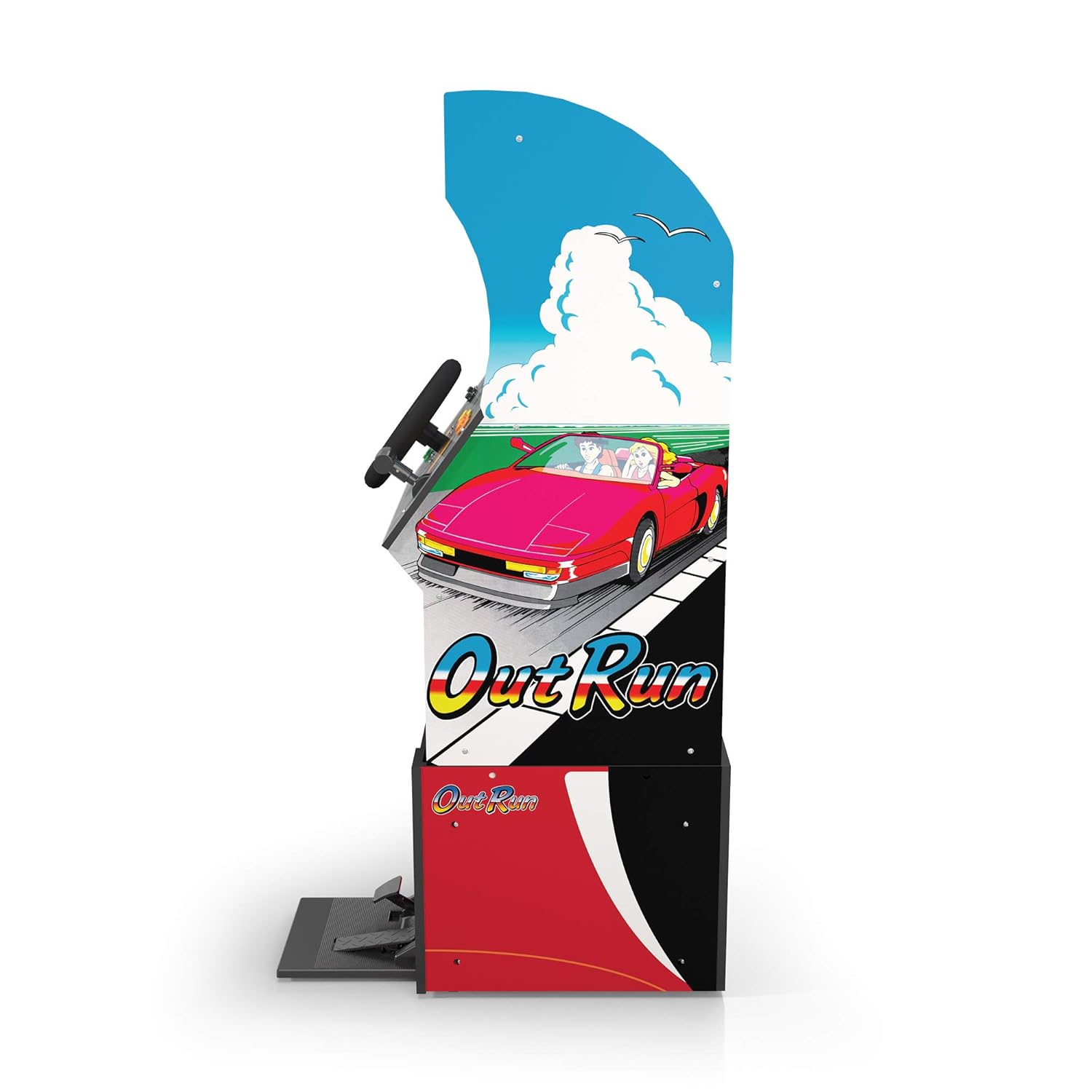
ചിത്രം 3: സൈഡ് പ്രോfile of the arcade cabinet, illustrating the driving controls.
മെയിൻ്റനൻസ്
Regular maintenance ensures the longevity and optimal performance of your arcade cabinet.
- വൃത്തിയാക്കൽ: Use a soft, dry cloth to wipe down the cabinet surfaces. For stubborn marks, a slightly damp cloth with mild soap can be used, followed by drying. Avoid abrasive cleaners or excessive moisture.
- സ്ക്രീൻ കെയർ: Clean the monitor screen with a microfiber cloth specifically designed for electronics. Do not spray liquid directly onto the screen.
- പെഡൽ പരിപാലനം: Periodically check the gas and brake pedals for any debris or obstructions that might hinder their movement. Keep the area around the pedals clean.
- കേബിൾ മാനേജുമെന്റ്: Ensure all cables are neatly tucked away and not pinched or exposed, which could lead to damage.
ട്രബിൾഷൂട്ടിംഗ്
പൊതുവായ പ്രശ്നങ്ങളും അവയുടെ പരിഹാരങ്ങളും അറിയാൻ ഈ വിഭാഗം പരിശോധിക്കുക. പ്രശ്നം നിലനിൽക്കുകയാണെങ്കിൽ, ഉപഭോക്തൃ പിന്തുണയുമായി ബന്ധപ്പെടുക.
| പ്രശ്നം | സാധ്യമായ കാരണം | പരിഹാരം |
|---|---|---|
| യൂണിറ്റ് പവർ ഓണാക്കുന്നില്ല. | Power cable not connected; Power outlet issue; Power switch off. | Ensure power cable is securely plugged into the unit and a working outlet. Check power switch is 'ON'. |
| സ്ക്രീനിൽ ചിത്രമൊന്നുമില്ല. | Monitor cable loose; Monitor not powered. | Check monitor's power and video cables are securely connected. |
| Controls (steering wheel/pedals) unresponsive. | Control panel/pedal cables loose; Software glitch. | Verify all control panel and pedal cables are firmly connected to the main board. Try restarting the unit. |
| ഗെയിം മരവിപ്പിക്കുകയോ തകരുകയോ ചെയ്യുന്നു. | Temporary software issue. | Power off the unit, wait 10 seconds, then power back on. |
സ്പെസിഫിക്കേഷനുകൾ
- മോഡൽ നമ്പർ: 195570000861
- അളവുകൾ (അസംബിൾ ചെയ്തത്): 47.75 x 23.75 x 10.5 inches (Height x Width x Depth)
- ഭാരം: 89.5 പൗണ്ട്
- ഉൾപ്പെടുത്തിയ ഗെയിമുകൾ: Outrun, Turbo Outrun, Outrunners, Power Drift
- നിയന്ത്രണങ്ങൾ: Steering Wheel, Gas Pedal, Brake Pedal, Game Selection Buttons
- ശക്തി: AC Adapter (Input: 100-240V ~ 50/60Hz, Output: Specific to adapter, refer to label)
- നിർമ്മാതാവ്: Arcade 1Up
- റിലീസ് തീയതി: ഏപ്രിൽ 7, 2021
വാറൻ്റിയും പിന്തുണയും
Arcade1Up products typically come with a limited manufacturer's warranty. For specific warranty terms and conditions, please refer to the warranty card included with your product or visit the official Arcade1Up webസൈറ്റ്.
For technical support, missing parts, or warranty claims, please contact Arcade1Up Customer Support:
- Webസൈറ്റ്: arcade1up.com/pages/contact-us
- ഫോൺ: ഉദ്യോഗസ്ഥനെ റഫർ ചെയ്യുക webപ്രാദേശിക കോൺടാക്റ്റ് നമ്പറുകൾക്കായുള്ള സൈറ്റ്.
പിന്തുണയുമായി ബന്ധപ്പെടുമ്പോൾ, ദയവായി നിങ്ങളുടെ മോഡൽ നമ്പറും (195570000861) വാങ്ങിയതിന്റെ തെളിവും ലഭ്യമായിരിക്കുക.
Ask a question about this manual
Ask about setup, troubleshooting, compatibility, parts, safety, or missing instructions. Manuals+ will review the question and use this page’s manual context to help answer it.