
1. ആമുഖം
Thank you for choosing PowerLocus P6 Wireless Bluetooth Over-Ear Headphones. These headphones are designed to provide a high-fidelity audio experience with deep bass, extended playtime, and comfortable wear. This manual provides essential information for setting up, operating, maintaining, and troubleshooting your device.

Image 1.1: PowerLocus P6 Wireless Bluetooth Over-Ear Headphones in Blue. A front-facing view of the PowerLocus P6 wireless over-ear headphones in blue, showcasinഇയർകപ്പുകളും ഹെഡ്ബാൻഡും g.
2. പാക്കേജ് ഉള്ളടക്കം
നിങ്ങളുടെ പാക്കേജിൽ എല്ലാ ഇനങ്ങളും ഉണ്ടെന്ന് ദയവായി പരിശോധിക്കുക:
- PowerLocus P6 Wireless Bluetooth Over-Ear Headphones
- 3.5 എംഎം ഓഡിയോ കേബിൾ
- യുഎസ്ബി ചാർജിംഗ് കേബിൾ
- ഉപയോക്തൃ മാനുവൽ (ഈ പ്രമാണം)
- പ്രൊട്ടക്റ്റീവ് കാരി കേസ്

Image 2.1: PowerLocus P6 headphones package contents. A flat lay image showing the PowerLocus P6 headphones, 3.5mm audio cable, USB charging cable, user manual, and premium carry case.
3. ഉൽപ്പന്നം കഴിഞ്ഞുview
The PowerLocus P6 headphones feature a foldable design for portability, soft over-ear earmuffs for comfort, and intuitive controls for ease of use.
3.1 പ്രധാന സവിശേഷതകൾ
- ബ്ലൂടൂത്ത് 5.3 കണക്റ്റിവിറ്റി: Ensures stable and low-latency wireless audio.
- ഹൈ-ഫൈ സ്റ്റീരിയോ സൗണ്ട്: Delivers powerful crisp sound with deep bass.
- 50 മണിക്കൂർ കളിസമയം: ദീർഘനേരം ഉപയോഗിക്കുന്നതിനായി ബാറ്ററി ലൈഫ് വർദ്ധിപ്പിച്ചു.
- ബിൽറ്റ്-ഇൻ HD മൈക്രോഫോൺ: വ്യക്തമായ ഹാൻഡ്സ്-ഫ്രീ കോളുകൾക്ക്.
- Foldable & Lightweight Design: Enhances portability and comfort.
- മൾട്ടി-പോയിന്റ് കണക്ഷൻ: ഒരേസമയം രണ്ട് ഉപകരണങ്ങളിലേക്ക് കണക്റ്റുചെയ്യുക.

Image 3.1: PowerLocus P6 headphones features. An infographic displaying key features of the PowerLocus P6 headphones, including Hi-Fi stereo sound, stable wireless connectivity, HD microphones for clear calls, foldable design, and long battery life.
3.2 ഹെഡ്ഫോൺ ഘടകങ്ങൾ
Refer to the image below for an overview of the headphone's physical components and controls.

ചിത്രം 3.2: വശം view of PowerLocus P6 headphones with control buttons. A side view of the PowerLocus P6 headphones, highlighting the control buttons located on the earcup for power, volume, and playback.
- പവർ ബട്ടൺ: പവർ ഓൺ/ഓഫ് ചെയ്യാൻ അമർത്തിപ്പിടിക്കുക.
- വോളിയം കൂട്ടുക/അടുത്ത ട്രാക്ക്: വോളിയം കൂട്ടാൻ ഷോർട്ട് പ്രസ്സ് ചെയ്യുക, അടുത്ത ട്രാക്കിനായി ദീർഘനേരം പ്രസ്സ് ചെയ്യുക.
- വോളിയം ഡൗൺ/മുൻ ട്രാക്ക്: വോളിയം കുറയ്ക്കാൻ ഷോർട്ട് പ്രസ്സ് ചെയ്യുക, മുമ്പത്തെ ട്രാക്കിനായി ദീർഘനേരം അമർത്തുക.
- മൾട്ടി-ഫംഗ്ഷൻ ബട്ടൺ (MFB): പ്ലേ ചെയ്യുക/താൽക്കാലികമായി നിർത്തുക, കോൾ സ്വീകരിക്കുക/അവസാനിപ്പിക്കുക, വോയ്സ് അസിസ്റ്റന്റ് സജീവമാക്കുക.
- 3.5mm ഓഡിയോ ജാക്ക്: വയർഡ് കണക്ഷനായി.
- യുഎസ്ബി ചാർജിംഗ് പോർട്ട്: ഹെഡ്ഫോണുകൾ ചാർജ് ചെയ്യുന്നതിനായി.
- മൈക്രോഫോൺ: ഹാൻഡ്സ് ഫ്രീ കോളുകൾക്കായി.
4. സജ്ജീകരണം
4.1 ഹെഡ്ഫോണുകൾ ചാർജ് ചെയ്യുന്നു
- ഹെഡ്ഫോണുകളിലെ ചാർജിംഗ് പോർട്ടിലേക്ക് USB ചാർജിംഗ് കേബിൾ ബന്ധിപ്പിക്കുക.
- USB കേബിളിന്റെ മറ്റേ അറ്റം അനുയോജ്യമായ ഒരു USB പവർ സ്രോതസ്സുമായി ബന്ധിപ്പിക്കുക (ഉദാ: കമ്പ്യൂട്ടർ USB പോർട്ട്, USB വാൾ അഡാപ്റ്റർ).
- The LED indicator will illuminate during charging. It typically takes approximately 2.5 hours for a full charge.
- Once fully charged, the LED indicator will change color or turn off, depending on the model. Disconnect the charging cable.
ഒരു ഫുൾ ചാർജ് 50 മണിക്കൂർ വരെ പ്ലേടൈം നൽകുന്നു.
4.2 പവർ ഓൺ/ഓഫ്
- പവർ ഓണാക്കാൻ: Press and hold the Power Button for approximately 3 seconds until the LED indicator flashes.
- പവർ ഓഫ് ചെയ്യാൻ: LED ഇൻഡിക്കേറ്റർ ഓഫാകുന്നതുവരെ ഏകദേശം 3 സെക്കൻഡ് നേരത്തേക്ക് പവർ ബട്ടൺ അമർത്തിപ്പിടിക്കുക.
4.3 ബ്ലൂടൂത്ത് ജോടിയാക്കൽ
The PowerLocus P6 headphones utilize Bluetooth 5.3 for quick and stable connections.
- ഹെഡ്ഫോണുകൾ ഓഫാണെന്ന് ഉറപ്പാക്കുക.
- Press and hold the Power Button for approximately 5-7 seconds until the LED indicator flashes red and blue alternately. This indicates pairing mode.
- നിങ്ങളുടെ ഉപകരണത്തിൽ (സ്മാർട്ട്ഫോൺ, ടാബ്ലെറ്റ്, പിസി), ബ്ലൂടൂത്ത് പ്രവർത്തനക്ഷമമാക്കി ലഭ്യമായ ഉപകരണങ്ങൾക്കായി തിരയുക.
- Select "PowerLocus P6" from the list of found devices.
- Once connected, the LED indicator will typically flash blue slowly or remain solid blue.
The headphones will automatically attempt to reconnect to the last paired device when powered on. The Bluetooth range is approximately 39 feet (12 meters).
4.4 മൾട്ടി-പോയിൻ്റ് കണക്ഷൻ
The P6 headphones can connect to two Bluetooth devices simultaneously.
- വിഭാഗം 4.3-ൽ വിവരിച്ചിരിക്കുന്നതുപോലെ ഹെഡ്ഫോണുകൾ ആദ്യ ഉപകരണവുമായി ജോടിയാക്കുക.
- ആദ്യത്തെ ഉപകരണത്തിൽ ബ്ലൂടൂത്ത് പ്രവർത്തനരഹിതമാക്കുക. ഹെഡ്ഫോണുകൾ ജോടിയാക്കൽ മോഡിലേക്ക് വീണ്ടും പ്രവേശിക്കും.
- രണ്ടാമത്തെ ഉപകരണവുമായി ഹെഡ്ഫോണുകൾ ജോടിയാക്കുക.
- ആദ്യത്തെ ഉപകരണത്തിൽ ബ്ലൂടൂത്ത് വീണ്ടും പ്രവർത്തനക്ഷമമാക്കുക. ഹെഡ്ഫോണുകൾ രണ്ട് ഉപകരണങ്ങളിലേക്കും യാന്ത്രികമായി കണക്റ്റ് ചെയ്യണം.
You can now switch between audio sources from either connected device without re-pairing.
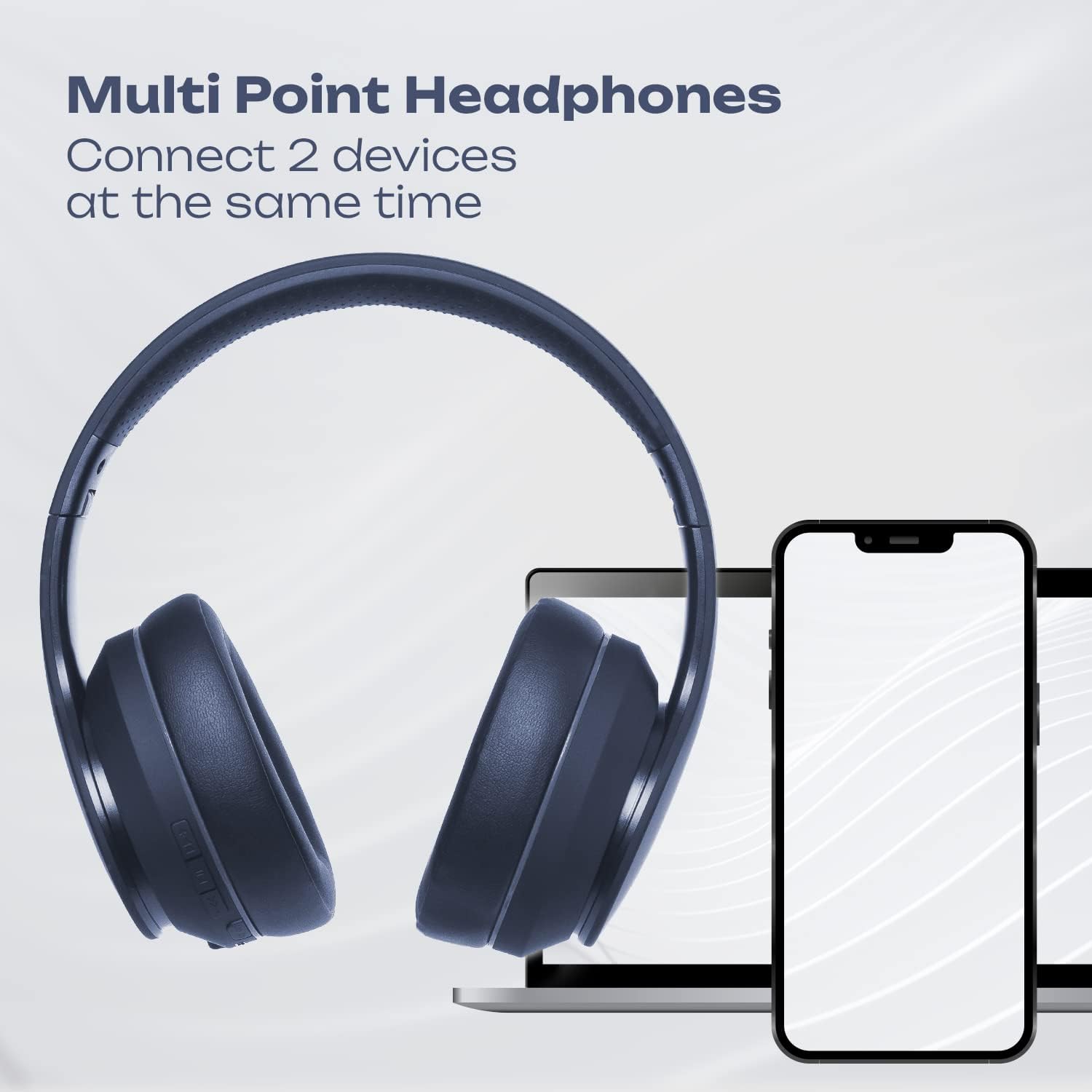
Image 4.1: Multi-Point Connection. An illustration showing the PowerLocus P6 headphones simultaneously connected to a laptop and a smartphone, demonstrating its multi-point connectivity feature.
5. പ്രവർത്തന നിർദ്ദേശങ്ങൾ
5.1 മ്യൂസിക് പ്ലേബാക്ക്
- പ്ലേ/താൽക്കാലികമായി നിർത്തുക: MFB ചെറുതായി അമർത്തുക.
- വോളിയം കൂട്ടുക: Short press the 'Volume Up' button.
- വോളിയം താഴേക്ക്: Short press the 'Volume Down' button.
- അടുത്ത ട്രാക്ക്: 'വോളിയം അപ്പ്' ബട്ടൺ ദീർഘനേരം അമർത്തുക.
- മുമ്പത്തെ ട്രാക്ക്: 'വോളിയം ഡൗൺ' ബട്ടൺ ദീർഘനേരം അമർത്തുക.
5.2 ഫോൺ കോളുകൾ
- മറുപടി കോൾ: Short press the MFB when an incoming call rings.
- കോൾ അവസാനിപ്പിക്കുക: ഒരു കോൾ സമയത്ത് MFB ഷോർട്ട് പ്രസ്സ് ചെയ്യുക.
- കോൾ നിരസിക്കുക: Long press the MFB when an incoming call rings.
- അവസാന നമ്പർ വീണ്ടും ഡയൽ ചെയ്യുക: MFB രണ്ടുതവണ അമർത്തുക.
5.3 വോയ്സ് അസിസ്റ്റന്റ്
To activate your device's voice assistant (Siri, Google Assistant, etc.), short press the MFB twice quickly.
5.4 വയേർഡ് മോഡ്
You can use the PowerLocus P6 headphones with the included 3.5mm audio cable, even if the battery is depleted.
- 3.5mm ഓഡിയോ കേബിളിന്റെ ഒരറ്റം ഹെഡ്ഫോണിന്റെ 3.5mm ഓഡിയോ ജാക്കുമായി ബന്ധിപ്പിക്കുക.
- മറ്റേ അറ്റം നിങ്ങളുടെ ഉപകരണത്തിന്റെ ഓഡിയോ ഔട്ട്പുട്ട് ജാക്കുമായി ബന്ധിപ്പിക്കുക.
In wired mode, the headphone's built-in controls (volume, track skip, calls) will not function. Control audio directly from your connected device.
6. പരിപാലനം
6.1 വൃത്തിയാക്കൽ
- മൃദുവായതും ഉണങ്ങിയതുമായ തുണി ഉപയോഗിച്ച് ഹെഡ്ഫോണുകൾ തുടയ്ക്കുക.
- അബ്രാസീവ് ക്ലീനറുകളോ, ലായകങ്ങളോ, ശക്തമായ രാസവസ്തുക്കളോ ഉപയോഗിക്കരുത്.
- ഏതെങ്കിലും ദ്വാരങ്ങളിൽ ഈർപ്പം കയറുന്നത് ഒഴിവാക്കുക.
6.2 സംഭരണം
When not in use, store the headphones in the provided protective carry case to prevent damage. The foldable design allows for compact storage.

Image 6.1: PowerLocus P6 headphones stored in their carry pouch. The PowerLocus P6 headphones partially visible inside their protective carry pouch, emphasizing portability and storage.
7. പ്രശ്നപരിഹാരം
| പ്രശ്നം | സാധ്യമായ കാരണം | പരിഹാരം |
|---|---|---|
| ഹെഡ്ഫോണുകൾ പവർ ഓൺ ചെയ്യുന്നില്ല. | കുറഞ്ഞ ബാറ്ററി. | ഹെഡ്ഫോണുകൾ കുറഞ്ഞത് 30 മിനിറ്റെങ്കിലും ചാർജ് ചെയ്യുക. |
| ഉപകരണവുമായി ജോടിയാക്കാൻ കഴിയില്ല. | ഹെഡ്ഫോണുകൾ ജോടിയാക്കൽ മോഡിൽ ഇല്ല; ഉപകരണത്തിൽ ബ്ലൂടൂത്ത് പ്രവർത്തനരഹിതമാക്കി; ഉപകരണം വളരെ അകലെയാണ്. | Ensure headphones are in pairing mode (flashing red/blue). Enable Bluetooth on your device. Move device closer to headphones (within 39 feet). |
| ശബ്ദമില്ല അല്ലെങ്കിൽ ശബ്ദ നിലവാരം മോശമാണ്. | Volume too low; headphones not connected; interference. | Increase volume on headphones and device. Re-pair headphones. Move away from sources of interference (e.g., Wi-Fi routers). |
| മൈക്രോഫോൺ പ്രവർത്തിക്കുന്നില്ല. | Headphones in wired mode; device settings. | Ensure headphones are in Bluetooth mode for microphone functionality. Check microphone input settings on your connected device. |
8 സ്പെസിഫിക്കേഷനുകൾ
| ഫീച്ചർ | വിശദാംശങ്ങൾ |
|---|---|
| മോഡലിൻ്റെ പേര് | P6 (pwl-6) |
| കണക്റ്റിവിറ്റി ടെക്നോളജി | വയർലെസ് (ബ്ലൂടൂത്ത്) |
| വയർലെസ് കമ്മ്യൂണിക്കേഷൻ ടെക്നോളജി | ബ്ലൂടൂത്ത് 5.3 |
| ബ്ലൂടൂത്ത് ശ്രേണി | 39 അടി (12 മീറ്റർ) |
| ബാറ്ററി ലൈഫ് | 50 മണിക്കൂർ വരെ |
| ചാർജിംഗ് സമയം | 2.5 മണിക്കൂർ |
| ഹെഡ്ഫോണുകൾ ജാക്ക് | 3.5 mm ജാക്ക് |
| ശബ്ദ നിയന്ത്രണം | സൗണ്ട് ഐസൊലേഷൻ |
| ഓഡിയോ ഡ്രൈവർ തരം | ഡൈനാമിക് ഡ്രൈവർ |
| ഫ്രീക്വൻസി റേഞ്ച് | 20Hz-20000kHz |
| പ്രതിരോധം | 32 ഓം |
| മെറ്റീരിയൽ | തുകൽ (ഇയർമഫുകൾ) |
| പ്രത്യേക സവിശേഷതകൾ | Foldable, Lightweight, Microphone Included, Wireless |
| ഇനത്തിൻ്റെ ഭാരം | 12 ഔൺസ് |
| നിർമ്മാതാവ് | പവർലോകസ് |
9. വാറൻ്റിയും പിന്തുണയും
9.1 വാറൻ്റി വിവരങ്ങൾ
PowerLocus P6 headphones come with a 24 മാസ വാറൻ്റി covering manufacturing defects from the date of purchase. Additionally, a 30 ദിവസത്തെ സൗജന്യ റിട്ടേൺ പോളിസി വാഗ്ദാനം ചെയ്യുന്നു.
ദുരുപയോഗം, അപകടം, അനധികൃത പരിഷ്കാരങ്ങൾ, അല്ലെങ്കിൽ സാധാരണ തേയ്മാനം എന്നിവ മൂലമുണ്ടാകുന്ന നാശനഷ്ടങ്ങൾക്ക് ഈ വാറന്റി പരിരക്ഷ നൽകുന്നില്ല.
9.2 ഉപഭോക്തൃ സേവനം
For any questions, technical support, or warranty claims, please contact PowerLocus customer service. Our USA-based customer service team is available to assist you.
Please refer to the PowerLocus official webഏറ്റവും പുതിയ കോൺടാക്റ്റ് വിവരങ്ങൾക്ക് സൈറ്റ് അല്ലെങ്കിൽ നിങ്ങളുടെ വാങ്ങൽ ഡോക്യുമെന്റേഷൻ.