
Pioneer DJ VM-50
Pioneer DJ VM-50 5.25-inch Active Monitor Speaker Instruction Manual
ബ്രാൻഡ്: പയനിയർ ഡിജെ
മോഡൽ: വിഎം-50
ആമുഖം
The Pioneer DJ VM-50 active monitor speaker is designed to produce clear audio with fast-attacking, punchy bass. This speaker can be precisely tuned to suit the acoustic characteristics of any room, making it ideal for recreating a club sound during DJ performances or providing a flat frequency response essential for music production in both home and professional studio environments.

Figure 1: Pioneer DJ VM-50 Active Monitor Speaker. This image shows the front view of the black VM-50 speaker, highlighting its compact and robust design.
പ്രധാന സവിശേഷതകൾ
- Low/High EQ Controls: Allows for precise sound adjustments to match your listening environment or production needs.
- Constant Directivity Horn: Delivers mid and high frequencies with power, creating a broad and uniform listening space. The horn and woofer edge are designed for a smooth frequency crossover, ensuring natural sound reproduction.

ചിത്രം 2: വശം view of the VM-50 speaker, illustrating the design of the constant directivity horn for optimal sound dispersion.
- DSP നിയന്ത്രണം: Each VM speaker includes DSP settings with 16 configurations, enabling users to find the perfect sound for DJing or music production, regardless of room shape, size, or construction.

ചിത്രം 3: വിശദമായി view of the DSP control panel on the rear of the VM-50, showing the Low and High EQ adjustment knobs and their corresponding frequency response curves.
- 4-mm Rigid Aluminum Front Baffle: The hexagonal aluminum front baffle not only provides a fresh aesthetic but also significantly improves sound quality and durability by reducing unwanted vibrations.

Figure 4: Close-up of the VM-50's hexagonal aluminum front baffle, showcasing its robust construction and brushed texture.
- Aramid Fiber Woofer Cone: Ensures fast response for bass and low-mid frequencies, contributing to the speaker's clear and punchy sound.

ചിത്രം 5: വിശദമായി view of the Aramid Fiber Woofer Cone, designed for precise and responsive low-frequency reproduction.
- Vortex Bass Accelerator: Features a bass reflex port with grooves that reduce air friction, ensuring tight and punchy bass without unwanted vibrations, even at high volumes.
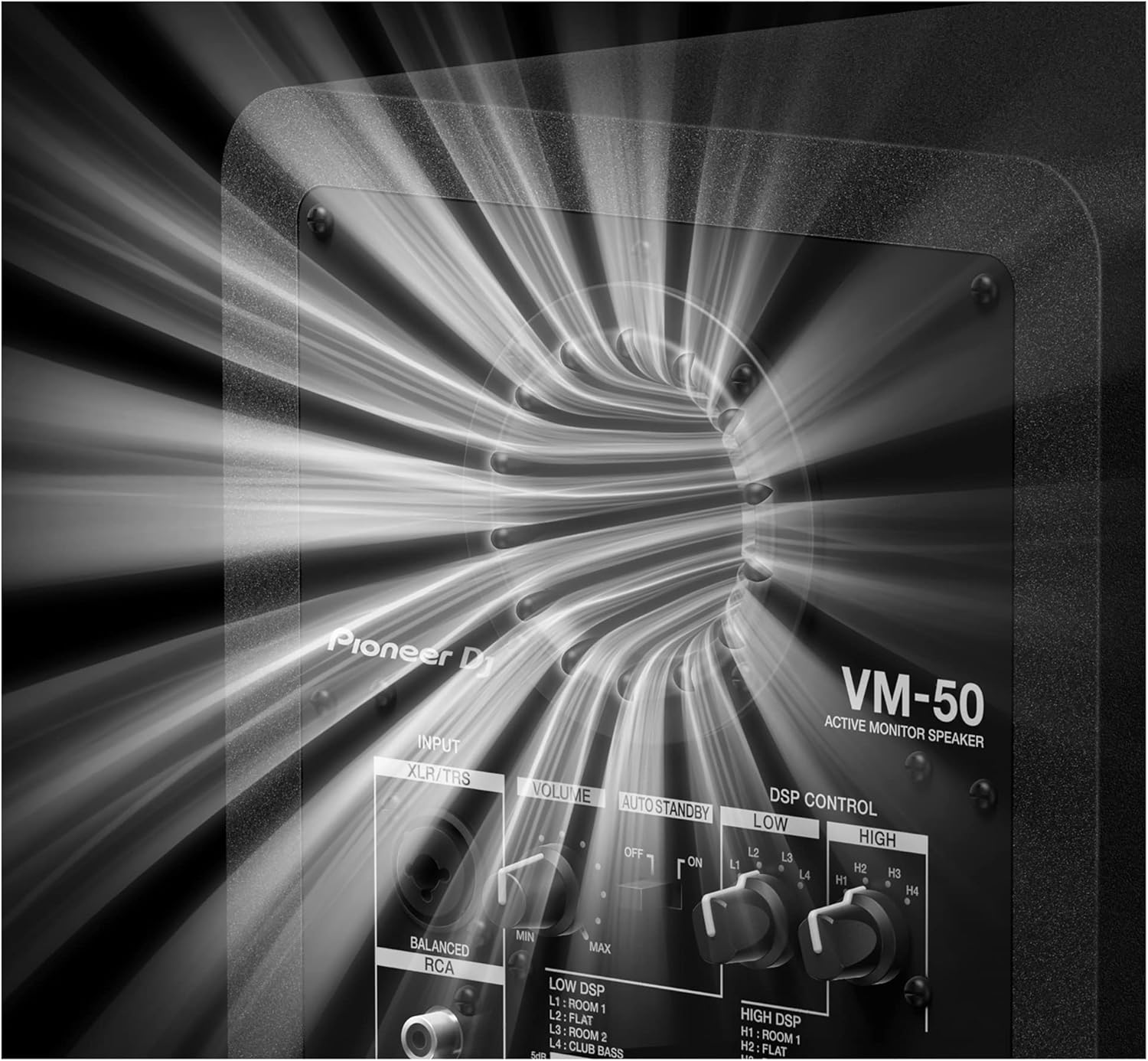
Figure 6: Close-up of the Vortex Bass Accelerator port on the rear of the VM-50, engineered for smooth airflow and distortion-free bass.
ഔദ്യോഗിക ഉൽപ്പന്ന വീഡിയോ
Video 1: Pioneer DJ Official new VM series active monitor speakers. This video provides an overview of the VM series, highlighting key features such as clear bass, club-style sound recreation, rigid aluminum baffle, Class D amplifier, Aramid fiber woofer cone, Vortex Bass Accelerator, and DSP control.
സജ്ജീകരണ ഗൈഡ്
1. പായ്ക്ക് ചെയ്യലും പ്ലേസ്മെന്റും
Carefully remove the VM-50 speaker from its packaging. Place the speaker on a stable, flat surface, ideally at ear level in your listening position. Ensure there is adequate space around the speaker for proper ventilation and bass port function. For optimal stereo imaging, position the speakers equidistant from your listening position, forming an equilateral triangle.
2. കണക്ഷനുകൾ
The VM-50 offers versatile input options:
- XLR/TRS Balanced Input: For professional audio equipment, use an XLR or 1/4-inch TRS cable to connect your audio interface, mixer, or controller to the speaker's balanced input.
- RCA Unbalanced Input: For consumer-level audio devices, use an RCA cable to connect to the speaker's unbalanced input.
Connect the power cable to the AC IN port on the rear of the speaker, then plug it into a suitable power outlet. Ensure the power switch is in the OFF position before connecting to power.

Figure 7: Rear panel of the VM-50, showing the XLR/TRS and RCA input ports, volume control, auto standby switch, DSP controls, and power input.
പ്രവർത്തന നിർദ്ദേശങ്ങൾ
1. പവർ ഓൺ/ഓഫ്
After all connections are made, flip the power switch on the rear panel to the ON position. The power indicator on the front of the speaker will illuminate.
2. വോളിയം അഡ്ജസ്റ്റ്മെൻ്റ്
ഉപയോഗിക്കുക വോളിയം knob on the rear panel to adjust the output level of the speaker. Start with the volume at its minimum setting and gradually increase it to a comfortable listening level. Avoid setting the volume too high to prevent distortion and potential damage to the speaker or your hearing.
3. DSP Control (EQ Settings)
The VM-50 features a DSP control section on the rear panel, allowing you to tailor the sound to your room acoustics or personal preference. There are separate controls for കുറഞ്ഞ ഇക്യു ഒപ്പം ഉയർന്ന ഇക്യു, each offering four distinct settings:
- LOW EQ Settings:
- L1: Room 1 (Boosted low-end for smaller rooms)
- L2: Flat (Neutral low-end response)
- L3: Room 2 (Slightly attenuated low-end for larger rooms or bass-heavy environments)
- L4: Club Bass (Enhanced low-end for a powerful, club-like sound)
- HIGH EQ Settings:
- H1: Room 1 (Slightly attenuated high-end for brighter rooms)
- H2: Flat (Neutral high-end response)
- H3: Room 2 (Slightly boosted high-end for duller rooms)
- H4: Bright Treble (Enhanced high-end for a crisp, detailed sound)
Experiment with these settings to achieve the desired sound profile for your specific application, whether it's critical listening for production or dynamic playback for DJing.
4. Auto Standby
ദി ഓട്ടോ സ്റ്റാൻഡ്ബി switch allows the speaker to automatically enter a low-power standby mode when no audio input is detected for a certain period. Flip the switch to ON to enable this feature, or ഓഫ് to keep the speaker fully active at all times.
മെയിൻ്റനൻസ്
- വൃത്തിയാക്കൽ: Regularly wipe the speaker's exterior with a soft, dry cloth. For stubborn dirt, a slightly damp cloth can be used, followed by a dry one. Avoid using abrasive cleaners, solvents, or chemical sprays, as these can damage the finish.
- വെൻ്റിലേഷൻ: Ensure the rear panel and bass port are free from obstructions to allow for proper airflow and prevent overheating.
- സംഭരണം: If storing the speaker for an extended period, disconnect it from power and store it in a cool, dry place, away from direct sunlight and extreme temperatures.
- കൈകാര്യം ചെയ്യൽ: Always handle the speaker carefully. Avoid dropping it or subjecting it to strong impacts, which can damage internal components.
ട്രബിൾഷൂട്ടിംഗ്
| പ്രശ്നം | സാധ്യമായ കാരണം | പരിഹാരം |
|---|---|---|
| സ്പീക്കറിൽ നിന്ന് ശബ്ദമില്ല |
|
|
| വികലമായ അല്ലെങ്കിൽ വ്യക്തമല്ലാത്ത ശബ്ദം |
|
|
| Speaker enters standby mode unexpectedly |
|
|
സ്പെസിഫിക്കേഷനുകൾ
| ആട്രിബ്യൂട്ട് | മൂല്യം |
|---|---|
| മെറ്റീരിയൽ | അലുമിനിയം |
| മോഡലിൻ്റെ പേര് | വിഎം-50 |
| സ്പീക്കർ തരം | വൂഫർ |
| പ്രത്യേക ഫീച്ചർ | ബാസ് ബൂസ്റ്റ് |
| ഉൽപ്പന്നത്തിനുള്ള ശുപാർശിത ഉപയോഗങ്ങൾ | സംഗീതം |
| അനുയോജ്യമായ ഉപകരണങ്ങൾ | ഡെസ്ക്ടോപ്പ്, ലാപ്ടോപ്പ്, സ്മാർട്ട്ഫോൺ, ടാബ്ലെറ്റ്, ടെലിവിഷൻ |
| സബ് വൂഫർ വ്യാസം | 5.25 ഇഞ്ച് |
| യൂണിറ്റ് എണ്ണം | 1.0 എണ്ണം |
| കൺട്രോളർ തരം | കോർഡ് ഇലക്ട്രിക് |
| നിറം | കറുപ്പ് |
| ഉൾപ്പെടുത്തിയ ഘടകങ്ങൾ | ഇയർബഡുകൾ |
| ഉൽപ്പന്ന അളവുകൾ | 1"D x 1"W x 1"H |
| ഇനത്തിൻ്റെ ഭാരം | 15.5 പൗണ്ട് |
| വാട്ടർപ്രൂഫ് ആണ് | തെറ്റായ |
| വാറൻ്റി തരം | ലിമിറ്റഡ് |
| ഇനങ്ങളുടെ എണ്ണം | 4 |
| നിയന്ത്രണ രീതി | സ്പർശിക്കുക |
| സ്പീക്കർ വലിപ്പം | 5.25 ഇഞ്ച് |
| പവർ ഉറവിടം | കോർഡഡ് ഇലക്ട്രിക് |
| വൂഫർ വ്യാസം | 5.25 ഇഞ്ച് |
| സബ്വൂഫർ കണക്റ്റിവിറ്റി സാങ്കേതികവിദ്യ | വയർഡ് |
| കണക്റ്റിവിറ്റി പ്രോട്ടോക്കോൾ | ബ്ലൂടൂത്ത് |
| MP3 പ്ലെയർ ഉൾപ്പെടുമോ? | ഇല്ല |
| പവർ ലെവലുകളുടെ എണ്ണം | 1 |
| ഉൽപ്പന്നത്തിൻ്റെ പ്രത്യേക ഉപയോഗങ്ങൾ | Home Studios, Professional Studios, DJing |
| യു.പി.സി | 841300102021 |
| ശൈലി | വിഎം-50 |
| നിർമ്മാതാവ് | പയനിയർ ഡിജെ |
| ASIN | B0918FSSRZ |
| ഇനത്തിൻ്റെ മോഡൽ നമ്പർ | വിഎം-50 |
| ആദ്യ തീയതി ലഭ്യമാണ് | 30 മാർച്ച് 2021 |
| ബ്രാൻഡ് | പയനിയർ ഡിജെ |
| സ്പീക്കർ പരമാവധി ഔട്ട്പുട്ട് പവർ | 60 വാട്ട്സ് |
| കണക്റ്റിവിറ്റി ടെക്നോളജി | ഏകപക്ഷീയമായ |
| ഓഡിയോ put ട്ട്പുട്ട് മോഡ് | സ്റ്റീരിയോ |
| മൗണ്ടിംഗ് തരം | ടേബിൾടോപ്പ് മൗണ്ട് |
ബോക്സിൽ എന്താണുള്ളത്
- Earbuds (as per product data, though unusual for a monitor speaker)
- പയനിയർ DJ VM-50 സജീവ മോണിറ്റർ സ്പീക്കർ
- പവർ കേബിൾ
- Operating Instructions / Safety Information
വാറൻ്റിയും പിന്തുണയും
The Pioneer DJ VM-50 Active Monitor Speaker comes with a പരിമിത വാറൻ്റി. For detailed information regarding warranty terms, conditions, and duration, please refer to the warranty card included with your product or visit the official Pioneer DJ webസൈറ്റ്.
For technical support, troubleshooting assistance beyond this manual, or to inquire about service, please visit the Pioneer DJ Store on Amazon അല്ലെങ്കിൽ അവരുടെ ഔദ്യോഗിക പിന്തുണാ ചാനലുകൾ.
Ask a question about this manual
Ask about setup, troubleshooting, compatibility, parts, safety, or missing instructions. Manuals+ will review the question and use this page’s manual context to help answer it.