
1. ആമുഖം
This manual provides detailed instructions for the installation, setup, and operation of your LoraTap 5th Generation Smart Roller Shutter Switch. Please read this manual thoroughly before installation and use to ensure proper function and safety.
2 സുരക്ഷാ വിവരങ്ങൾ
- ഇലക്ട്രിക്കൽ സുരക്ഷ: Installation must be performed by a qualified electrician or a person with a thorough understanding of electrical systems. Always turn off power at the circuit breaker before installation or maintenance.
- ന്യൂട്രൽ വയർ ആവശ്യമാണ്: This device requires a neutral wire for operation. Ensure your electrical box has a neutral wire available before attempting installation.
- ഓപ്പറേറ്റിംഗ് വോളിയംtage: The switch is designed for 240V AC systems. Do not connect to other voltagഇ സംവിധാനങ്ങൾ.
- പരമാവധി ലോഡ്: Do not exceed the maximum load of 2400W (10A) for connected devices.
- ഇൻഡോർ ഉപയോഗത്തിന് മാത്രം: This product is intended for indoor use in dry environments. Avoid exposure to moisture or extreme temperatures.
3. ഉൽപ്പന്നം കഴിഞ്ഞുview
The LoraTap 5th Gen Smart Roller Shutter Switch offers advanced control over your roller blinds, curtains, or awnings. It is compatible with electronic or motorized actuators. Key features include:
- ശതമാനംtagഇ നിയന്ത്രണം: Open or close blinds to a specific percentage (0-100%) via the Smart Life app or voice commands.
- ശബ്ദ നിയന്ത്രണം: ഹാൻഡ്സ്-ഫ്രീ പ്രവർത്തനത്തിനായി ആമസോൺ അലക്സ, ഗൂഗിൾ ഹോം എന്നിവയുമായി പൊരുത്തപ്പെടുന്നു.
- ടൈമർ പ്രവർത്തനം: Schedule automatic opening and closing times through the Smart Life app.
- റിമോട്ട് കൺട്രോൾ: Control your blinds from anywhere using the Smart Life/Tuya app on your smartphone.
- Group Control & Sharing: Control multiple switches as a group and share device access with family members.

ചിത്രം: കഴിഞ്ഞുview of LoraTap Smart Roller Shutter Switch key features including percentage control, timer, voice control, and app remote control.

Image: The LoraTap Smart Roller Shutter Switch alongside a smartphone displaying the Smart Life app interface, highlighting the percentage control feature for blinds.

ചിത്രം: ഉദാamples of compatible window coverings such as Venetian blinds, roller blinds, and awnings. The image includes a note indicating a typical motor wattage of less than 600W for such applications, while the switch itself supports up to 2400W.
4 സ്പെസിഫിക്കേഷനുകൾ
| മോഡൽ നമ്പർ | SC400W-EU-V5T2 |
| ബ്രാൻഡ് | ലോറടാപ്പ് |
| ഓപ്പറേറ്റിംഗ് വോളിയംtage | 240 വോൾട്ട് എ.സി |
| നിലവിലെ റേറ്റിംഗ് | 10 Ampമുമ്പ് |
| വാട്ട്tage | 2400 വാട്ട്സ് (പരമാവധി) |
| കണക്ഷൻ പ്രോട്ടോക്കോൾ | വൈഫൈ |
| മൗണ്ടിംഗ് തരം | മതിൽ മൗണ്ട് |
| മെറ്റീരിയൽ | എബിഎസ് |
| IP റേറ്റിംഗ് | IP20 |
| പാലിക്കൽ | CE സാക്ഷ്യപ്പെടുത്തിയത് |
| സ്ഥാനങ്ങളുടെ എണ്ണം | 101 (for 0-100% control) |
| പാക്കേജ് അളവുകൾ | 10.5 x 10.3 x 4.4 സെ.മീ |
| പാക്കേജ് ഭാരം | 140 ഗ്രാം |

Image: Front, side, and back dimensions of the switch, along with a wiring diagram showing input L, input N, output N, output L1, and output L2. Note: Earth wire connection is not required.
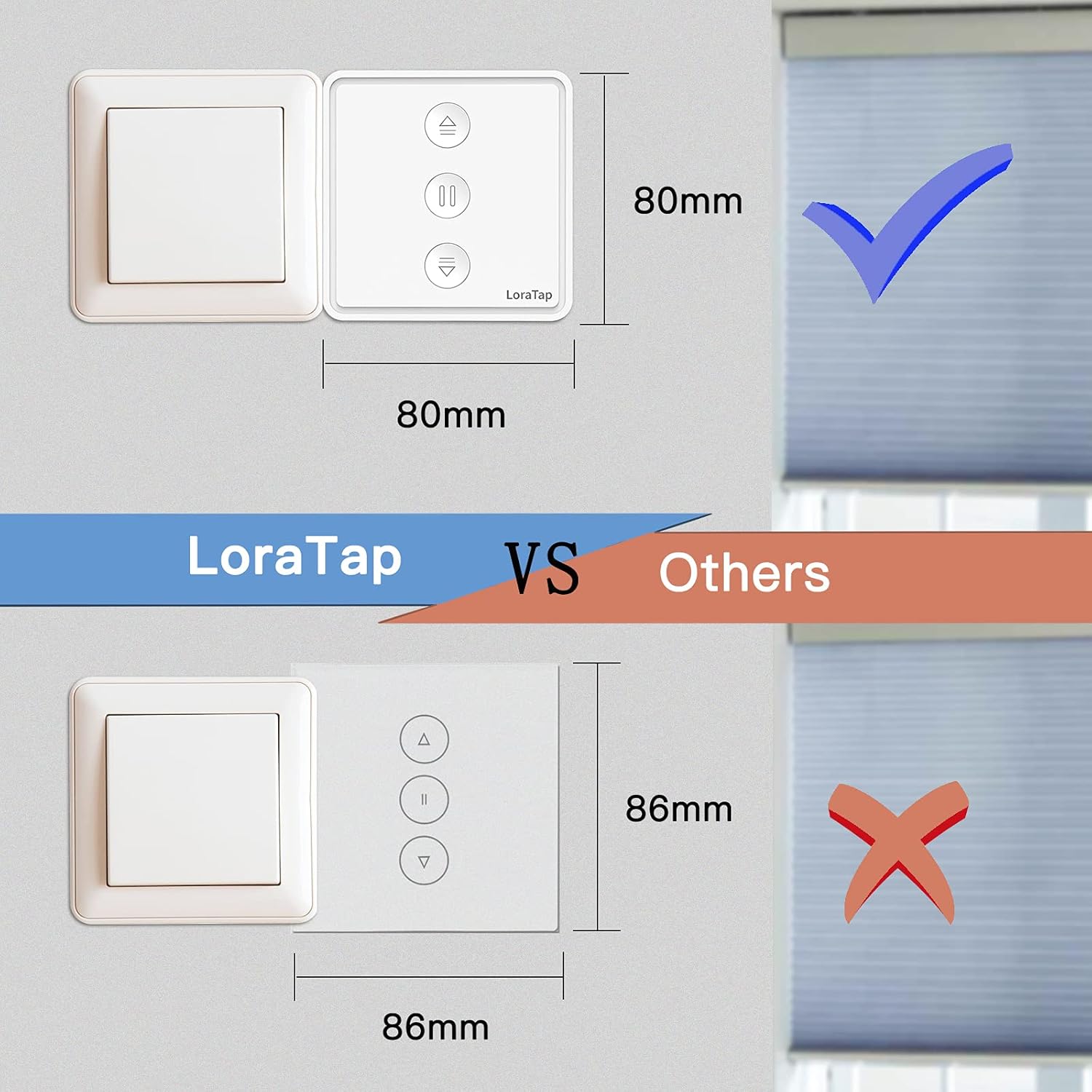
Image: A visual comparison illustrating the compact size of the LoraTap switch (80mm x 80mm) compared to larger standard switches (86mm x 86mm), indicating compatibility with standard wall boxes.
5. ഇൻസ്റ്റലേഷൻ
പ്രധാനപ്പെട്ടത്: Ensure power is turned off at the main circuit breaker before beginning installation. If you are unsure about electrical wiring, consult a qualified electrician.
- വയറിംഗ് തയ്യാറാക്കുക: Identify the Live (L), Neutral (N), and motor wires (Up/Down/Common) from your existing roller shutter system. This switch requires a neutral wire.
- വയറുകൾ ബന്ധിപ്പിക്കുക: താഴെയുള്ള വയറിംഗ് ഡയഗ്രം കാണുക.
- Connect the Live wire from your power supply to the 'Input L' terminal on the switch.
- Connect the Neutral wire from your power supply to the 'Input N' terminal on the switch.
- Connect the motor's Common wire to the 'Output N' terminal on the switch.
- Connect the motor's Up wire to the 'Output L1' terminal on the switch.
- Connect the motor's Down wire to the 'Output L2' terminal on the switch.
- Note: An Earth wire connection is not required for this switch.
- സ്വിച്ച് മൌണ്ട് ചെയ്യുക: Carefully place the wired switch into the wall box and secure it with screws. Attach the faceplate.
- പവർ പുന ore സ്ഥാപിക്കുക: സർക്യൂട്ട് ബ്രേക്കറിൽ പവർ വീണ്ടും ഓണാക്കുക.
Image: Detailed wiring diagram for the LoraTap switch. Ensure correct connection of Input L (Live), Input N (Neutral), Output N (Motor Common), Output L1 (Motor Up), and Output L2 (Motor Down). The diagram explicitly states no need to connect the Earth Wire.
6. സജ്ജീകരണം
- അപ്ലിക്കേഷൻ ഡൗൺലോഡുചെയ്യുക: Download the "Smart Life" or "Tuya Smart" app from your smartphone's app store (iOS or Android).
- രജിസ്റ്റർ ചെയ്യുക/ലോഗിൻ ചെയ്യുക: ഒരു അക്കൗണ്ട് സൃഷ്ടിക്കുക അല്ലെങ്കിൽ നിങ്ങളുടെ നിലവിലുള്ള അക്കൗണ്ടിലേക്ക് ലോഗിൻ ചെയ്യുക.
- ജോടിയാക്കൽ മോഡ് നൽകുക: After powering on the switch, the LED indicator should blink rapidly. If not, press and hold the central pause button for approximately 5 seconds until it blinks rapidly to enter pairing mode.
- ഉപകരണം ചേർക്കുക: In the app, tap the "+" icon to add a device. The app should automatically discover the switch. If not, manually select "Curtain Switch" or "Roller Shutter Switch" from the device list.
- വൈഫൈയിലേക്ക് കണക്റ്റുചെയ്യുക: Follow the in-app instructions to connect the switch to your 2.4GHz Wi-Fi network. (5GHz Wi-Fi is not supported).
- കാലിബ്രേഷൻ: Once connected, the app will prompt you to calibrate the motor's travel time. This is crucial for accurate percentagഇ നിയന്ത്രണം.
- Follow the app's instructions to fully open and fully close your blinds. The switch will record the time taken for each action.
- Accurate calibration ensures precise percentage positioning.
7. പ്രവർത്തന നിർദ്ദേശങ്ങൾ
7.1 മാനുവൽ നിയന്ത്രണം
The switch has three physical buttons:
- Up Arrow (▲): Press to open the blinds.
- Pause (▮▮): Press to stop the blinds at their current position.
- Down Arrow (▼): Press to close the blinds.
7.2 App Control (Smart Life/Tuya App)
After successful setup, you can control your blinds via the app:
- Open/Close/Pause: Use the dedicated buttons in the app interface.
- ശതമാനംtagഇ നിയന്ത്രണം: Use the slider in the app to set the blinds to any desired percentage (e.g., 50% open).
- ടൈമർ പ്രവർത്തനം:
- In the app, navigate to the switch's control interface.
- Select the "Timer" or "Schedule" option.
- Set desired times for opening or closing the blinds. You can also specify the percentage for scheduled actions.
- നിങ്ങളുടെ ഷെഡ്യൂൾ സംരക്ഷിക്കുക.
- ഗ്രൂപ്പ് നിയന്ത്രണം: Create groups of multiple LoraTap switches in the app to control them simultaneously.
- ഉപകരണം പങ്കിടൽ: Share control of the switch with other family members by inviting them through the app.

Image: A smartphone screen displaying the Smart Life app's timer function, allowing users to schedule automatic opening and closing of curtains at specific times, such as 8:00 AM and 10:00 PM.

Image: The LoraTap switch next to an illustration of device sharing, indicating that control of the smart switch can be easily shared with multiple family members via the app.
7.3 ശബ്ദ നിയന്ത്രണം
Integrate your LoraTap switch with Amazon Alexa or Google Home for voice commands:
- അക്കൗണ്ട് ലിങ്ക് ചെയ്യുക: In the Alexa or Google Home app, enable the "Smart Life" or "Tuya Smart" skill/action and link your account.
- ഉപകരണങ്ങൾ കണ്ടെത്തുക: നിങ്ങളുടെ വോയ്സ് അസിസ്റ്റന്റിനോട് "ഉപകരണങ്ങൾ കണ്ടെത്തുക" എന്ന് ആവശ്യപ്പെടുക.
- വോയ്സ് കമാൻഡുകൾ: ഇനിപ്പറയുന്നതുപോലുള്ള കമാൻഡുകൾ ഉപയോഗിക്കുക:
- "Alexa, open [Device Name]"
- "Hey Google, close [Device Name]"
- "Alexa, set [Device Name] to 50 percent"
- "Hey Google, pause [Device Name]"
8. പരിപാലനം
- വൃത്തിയാക്കൽ: മൃദുവായതും ഉണങ്ങിയതുമായ തുണി ഉപയോഗിച്ച് സ്വിച്ച് പ്രതലം തുടയ്ക്കുക. അബ്രാസീവ് ക്ലീനറുകളോ ലായകങ്ങളോ ഉപയോഗിക്കരുത്.
- പതിവ് പരിശോധനകൾ: Periodically check the physical condition of the switch and wiring for any signs of damage.
- സോഫ്റ്റ്വെയർ അപ്ഡേറ്റുകൾ: Keep your Smart Life/Tuya app updated to ensure optimal performance and access to new features.
9. പ്രശ്നപരിഹാരം
| പ്രശ്നം | സാധ്യമായ കാരണം / പരിഹാരം |
|---|---|
| Switch not responding / No power |
|
| ആപ്പുമായി ജോടിയാക്കാൻ കഴിയില്ല |
|
| Inaccurate percentagഇ നിയന്ത്രണം |
|
| ശബ്ദ നിയന്ത്രണം പ്രവർത്തിക്കുന്നില്ല |
|
10. വാറൻ്റിയും പിന്തുണയും
LoraTap provides a 3 വർഷത്തെ വാറൻ്റി for this product. LoraTap has over 10 years of experience in the research, development, and production of radio and smart switches. All LoraTap products are certified according to European standards.
For technical support or warranty claims, please contact LoraTapuk customer service through your purchase platform or visit the official LoraTap webബന്ധപ്പെടാനുള്ള വിവരങ്ങൾക്കുള്ള സൈറ്റ്.