
ആമുഖം
വാങ്ങിയതിന് നന്ദി.asing the MEGAWISE Digital Kitchen Scale K28H. This scale is designed for precise measurement of ingredients for baking, cooking, and meal preparation. It features a high-precision sensor, multiple unit conversions, a tare function, and an easy-to-read backlit display. Please read this manual thoroughly before use to ensure proper operation and maintenance.
സുരക്ഷാ വിവരങ്ങൾ
- കൃത്യമായ അളവുകൾക്കായി സ്കെയിൽ കട്ടിയുള്ളതും പരന്നതും സ്ഥിരതയുള്ളതുമായ ഒരു പ്രതലത്തിൽ വയ്ക്കുക.
- Avoid placing the scale near strong electromagnetic fields or vibrating equipment.
- Do not immerse the scale in water or other liquids. Wipe clean with a damp തുണി.
- Do not overload the scale beyond its maximum capacity of 15kg (33lb) to prevent damage.
- കുട്ടികൾക്ക് ലഭ്യമാകാതെ സൂക്ഷിക്കുക.
- സ്കെയിൽ കൂടുതൽ നേരം ഉപയോഗിക്കുന്നില്ലെങ്കിൽ, ചോർച്ച തടയാൻ ബാറ്ററികൾ നീക്കം ചെയ്യുക.
ഉൽപ്പന്ന സവിശേഷതകൾ
- ഉയർന്ന കൃത്യത: Measures from 1g up to 15kg (0.1oz to 33lb) with 1g accuracy.
- ഒന്നിലധികം യൂണിറ്റുകൾ: Easily switch between g, oz, lb:oz, ml (milk/water), and fl.oz.
- ബാക്ക്ലിറ്റ് ഡിസ്പ്ലേ: Clear LCD screen with bright backlight for easy reading.
- ടാരെ പ്രവർത്തനം: Subtracts the weight of containers for net measurements.
- പവർ ഓപ്ഷനുകൾ: Supports both traditional AAA batteries and USB-C charging.
- സ്വയമേവ ഷട്ട്ഡൗൺ: Saves power by automatically turning off when idle.
- മോടിയുള്ള ഡിസൈൻ: Crystal tempered glass panel for easy cleaning and durability.

ചിത്രം: കഴിഞ്ഞുview of the scale's key features, including high accuracy, low battery alarm, tare function, overload alarm, maximum capacity of 15kg, and 5 unit conversions.
പാക്കേജ് ഉള്ളടക്കം
- 1 x MEGAWISE Digital Kitchen Scale K28H
- 2 x AAA ബാറ്ററികൾ (ഉൾപ്പെട്ടിരിക്കുന്നു)
- 1 x USB ചാർജിംഗ് കേബിൾ
- 1 x ഉപയോക്തൃ മാനുവൽ (ഈ പ്രമാണം)
സജ്ജമാക്കുക
1. വൈദ്യുതി വിതരണം
The scale can be powered by two AAA batteries or via USB-C charging.
- ബാറ്ററി ഇൻസ്റ്റാളേഷൻ: Open the battery compartment on the underside of the scale. Insert 2 AAA batteries, ensuring correct polarity (+/-).
- USB ചാർജിംഗ്: Connect the provided USB-C cable to the scale's charging port and to a compatible USB power source (e.g., wall adapter, computer USB port). The scale can operate while charging.

Image: The underside of the scale illustrating the battery compartment and the USB charging port, demonstrating the two power supply options.
2. പ്ലേസ്മെന്റ്
Place the scale on a hard, flat, and level surface to ensure accurate readings. Uneven surfaces can affect precision.
പ്രവർത്തന നിർദ്ദേശങ്ങൾ
1. പവർ ഓൺ/ഓഫ്
- Press the "ON/OFF" button to turn the scale on. The display will show "0" when ready.
- Press and hold the "ON/OFF" button to turn the scale off. The scale will also automatically shut off after a period of inactivity to conserve power.
2. യൂണിറ്റ് പരിവർത്തനം
Press the "UNIT" button to cycle through the available measurement units: grams (g), ounces (oz), pounds:ounces (lb:oz), milliliters for water (ml), and fluid ounces for water (fl.oz).

Image: The scale's display illustrating the five available measurement units: grams, kilograms, pounds and ounces, fluid ounces, and milliliters.
3. ടെയർ ഫംഗ്ഷൻ
The tare function allows you to subtract the weight of a container or previously added ingredients, enabling you to measure subsequent items accurately.
- സ്കെയിലിൽ ഒരു ശൂന്യമായ കണ്ടെയ്നർ സ്ഥാപിക്കുക.
- Press the "TARE" button. The display will reset to "0".
- Add ingredients to the container. The display will show only the net weight of the ingredients.
- Repeat the tare process as needed for multiple ingredients.
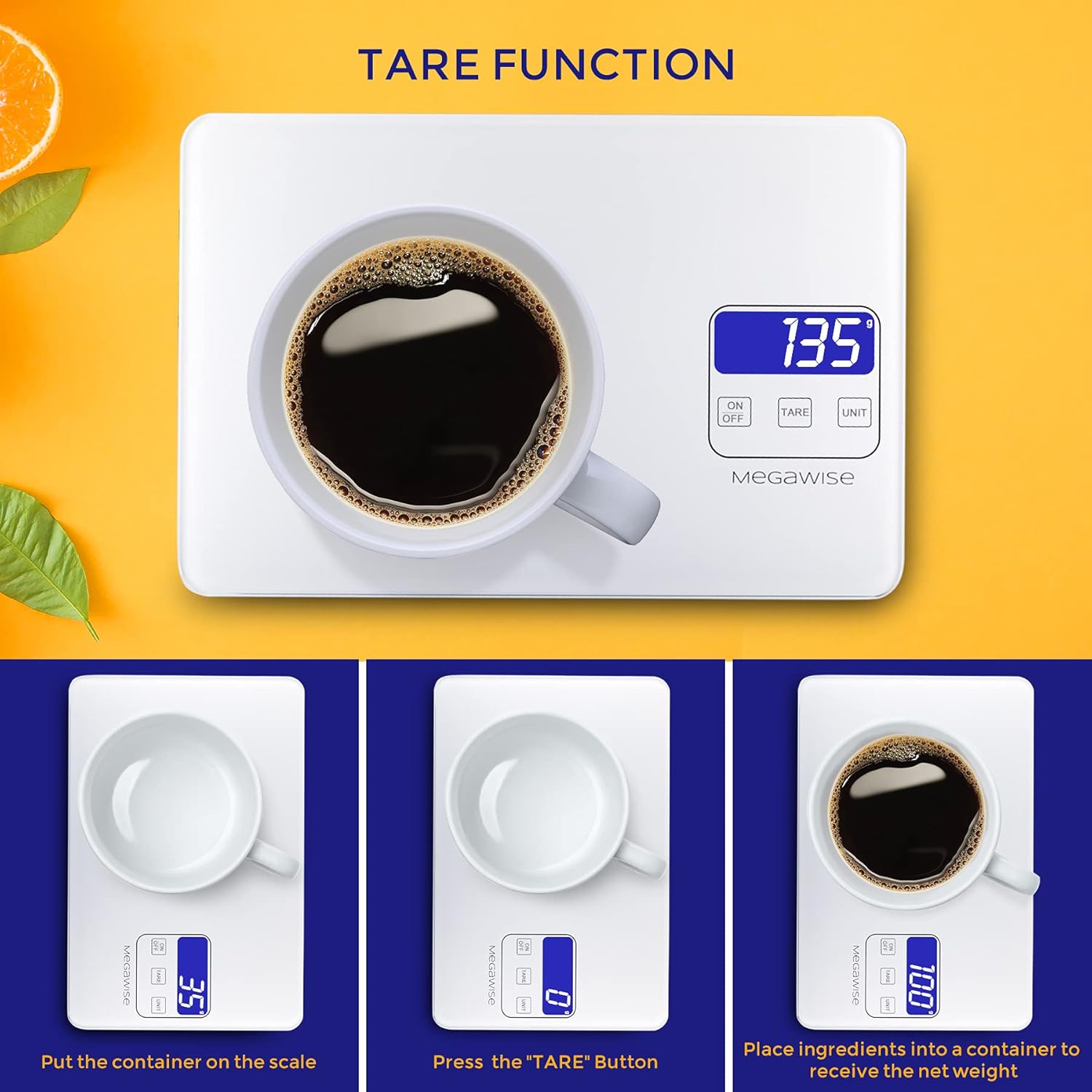
Image: A visual guide demonstrating the tare function, showing an empty cup being placed on the scale, the display zeroing out after pressing TARE, and then the net weight of coffee being measured.
4. തൂക്കമുള്ള വസ്തുക്കൾ
After powering on and selecting the desired unit (and taring if necessary), place the item(s) to be weighed directly onto the center of the scale platform. The weight will be displayed instantly.

Image: A bowl of fruit being weighed on the scale, demonstrating its high accuracy for various ingredients.
5. Overload Indication
If the display shows "EEEE" or a similar error message, the scale is overloaded. Remove items immediately to prevent damage.
6. കുറഞ്ഞ ബാറ്ററി സൂചന
When the battery symbol appears on the display, it indicates that the batteries are low and need to be replaced or recharged via the USB-C port.
മെയിൻ്റനൻസ്
- വൃത്തിയാക്കൽ: The tempered glass surface is easy to clean. Wipe the scale with a soft, damp തുണി. അബ്രാസീവ് ക്ലീനറുകൾ ഉപയോഗിക്കരുത് അല്ലെങ്കിൽ സ്കെയിൽ വെള്ളത്തിൽ മുക്കരുത്.
- സംഭരണം: Store the scale in a cool, dry place. Avoid extreme temperatures and humidity.
- കാലിബ്രേഷൻ: The scale is factory calibrated and generally does not require user calibration. If you suspect inaccuracies, ensure it is on a level surface and check battery levels.

Image: A hand cleaning the tempered glass surface of the scale, highlighting its easy-to-clean and durable design.
ട്രബിൾഷൂട്ടിംഗ്
| പ്രശ്നം | സാധ്യമായ കാരണം | പരിഹാരം |
|---|---|---|
| സ്കെയിൽ ഓണാക്കുന്നില്ല. | Low or dead batteries; incorrect battery installation; no USB power. | Replace batteries or ensure they are installed correctly. Connect to a USB power source. |
| കൃത്യമല്ലാത്ത വായനകൾ. | Uneven surface; scale overloaded; external vibrations; low battery. | Place on a flat, stable surface. Do not exceed 15kg. Avoid vibrations. Replace/recharge batteries. |
| "EEEE" or Overload message. | Weight exceeds maximum capacity (15kg). | Remove items immediately. Do not exceed maximum weight. |
| Display shows "Lo" or battery symbol. | കുറഞ്ഞ ബാറ്ററി പവർ. | Replace the AAA batteries or connect the scale to a USB power source for charging. |
സ്പെസിഫിക്കേഷനുകൾ
| ഫീച്ചർ | വിശദാംശങ്ങൾ |
|---|---|
| ബ്രാൻഡ് | മെഗാവൈസ് |
| മോഡൽ | K28H |
| ഭാര പരിധി | 15 കിലോഗ്രാം (33 പൗണ്ട്) |
| വായനാ കൃത്യത | 1 ഗ്രാം (0.1 oz) |
| അളക്കൽ യൂണിറ്റുകൾ | g, oz, lb:oz, ml (water), fl.oz (water) |
| ഡിസ്പ്ലേ തരം | ബാക്ക്ലൈറ്റിനൊപ്പം എൽസിഡി |
| മെറ്റീരിയൽ | ടെമ്പർഡ് ഗ്ലാസ് |
| പവർ ഉറവിടം | 2 AAA batteries (included) or USB-C charging |
| ഉൽപ്പന്ന അളവുകൾ | 9.5 x 0.7 x 6.3 ഇഞ്ച് |
| ഇനത്തിൻ്റെ ഭാരം | 1.39 പൗണ്ട് |
ഔദ്യോഗിക ഉൽപ്പന്ന വീഡിയോകൾ
MEGAWISE Kitchen Scales Overview
വീഡിയോ: ഒരു ഓവർview of the MEGAWISE Kitchen Scale, demonstrating its use in various kitchen scenarios like baking and meal preparation, highlighting its features and ease of use.
MegaWise Rechargeable Digital Kitchen Food Scale Features
Video: This video showcases the key features of the MegaWise Rechargeable Digital Kitchen Food Scale, including its precision, multiple unit options, and rechargeable capability.
വാറൻ്റിയും പിന്തുണയും
MEGAWISE provides customer support and warranty coverage for this product. For assistance, troubleshooting beyond this manual, or warranty claims, please refer to the contact information provided with your purchase or visit the official MEGAWISE webസൈറ്റ്.
കുറിപ്പ്: ഉൽപ്പന്ന സവിശേഷതകളും സവിശേഷതകളും മുൻകൂർ അറിയിപ്പ് കൂടാതെ മാറ്റത്തിന് വിധേയമാണ്.