
Other SD-548C
Sunding SD-548C Wireless Waterproof Bicycle Computer LCD Speedometer User Manual
Model: SD-548C | Brand: Other
ആമുഖം
This manual provides comprehensive instructions for the installation, operation, and maintenance of your Sunding SD-548C Wireless Waterproof Bicycle Computer. Please read this manual thoroughly before use to ensure proper functionality and longevity of the device.

ചിത്രം 1: മുൻഭാഗം view of the Sunding SD-548C Wireless Bicycle Computer. The display shows speed and other metrics, with "Sunding" branding and "WIRELESS" indicator visible.
പാക്കേജ് ഉള്ളടക്കം
പാക്കേജ് തുറക്കുമ്പോൾ, എല്ലാ ഘടകങ്ങളും ഉണ്ടെന്ന് ഉറപ്പാക്കുക:
- Sunding SD-548C Bicycle Computer Unit
- വയർലെസ് സ്പീഡ് സെൻസർ
- മൌണ്ടിംഗ് ബ്രാക്കറ്റ്
- Magnet for Wheel Spoke
- Cable Ties (for mounting)
- Battery (CR2032, typically pre-installed or included)
- ഉപയോക്തൃ മാനുവൽ (ഈ പ്രമാണം)
സജ്ജീകരണവും ഇൻസ്റ്റാളേഷനും
- ബാറ്ററി ഇൻസ്റ്റാൾ ചെയ്യുക: Open the battery compartment on the back of the computer unit and the sensor. Insert the CR2032 battery with the positive (+) side facing up. Close the compartment securely.
- Mount the Computer Unit:
- Attach the mounting bracket to your bicycle's handlebar or stem using the provided cable ties. Ensure it is firmly secured and positioned for easy viewing.
- Slide the SD-548C computer unit onto the mounting bracket until it clicks into place.
- Install the Speed Sensor:
- Attach the wireless speed sensor to the front fork of your bicycle using cable ties. Position it on the side opposite to the disc brake (if applicable).
- Ensure the sensor is aligned with the wheel spoke where the magnet will be attached. The distance between the sensor and the magnet should be less than 5mm.
- Attach the Magnet:
- Securely attach the magnet to a spoke on your front wheel.
- Adjust the magnet's position so that it passes directly in front of the speed sensor's marked area with each wheel rotation, maintaining the less than 5mm gap.
- പ്രാരംഭ ക്രമീകരണങ്ങൾ:
- അമർത്തിപ്പിടിക്കുക സെറ്റ് button (usually on the back or bottom) to enter setting mode.
- Set the unit of speed (KM/H or M/H) using the മോഡ് ബട്ടൺ ഉപയോഗിച്ച് സ്ഥിരീകരിക്കുക സെറ്റ്.
- Set the wheel circumference. Refer to the table below for common wheel sizes. For accurate readings, measure your wheel's circumference or use an online calculator.
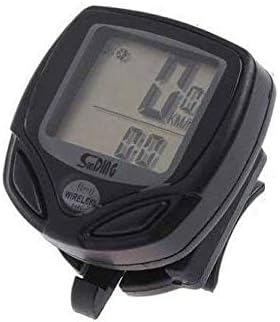
Figure 2: Illustration of the bicycle computer mounted on handlebars, with the wireless sensor attached to the fork and the magnet on a wheel spoke. Proper alignment is crucial for accurate speed measurement.
Wheel Circumference Reference Table (Approximate)
| Wheel Size (Inches) | ചുറ്റളവ് (മില്ലീമീറ്റർ) |
|---|---|
| 16" | 1272 |
| 20" | 1596 |
| 24" | 1916 |
| 26" | 2073 |
| 27" | 2155 |
| 27.5" | 2200 |
| 29" | 2340 |
| 700C | 2136 |
Note: These values are approximate. For best accuracy, measure your specific tire's circumference.
പ്രവർത്തന നിർദ്ദേശങ്ങൾ
ബട്ടൺ പ്രവർത്തനങ്ങൾ
- മോഡ് ബട്ടൺ: Short press to cycle through different display modes (e.g., Speed, Odometer, Trip Distance, Max Speed, Average Speed, Riding Time, Clock). Long press to enter setting mode in some contexts.
- SET ബട്ടൺ: Used to confirm settings or reset values. Long press typically enters setting mode or resets current trip data.
ഡിസ്പ്ലേ മോഡുകൾ
The SD-548C offers various display modes to monitor your ride data:
- SPD (Current Speed): Displays your real-time speed.
- ODO (ഓഡോമീറ്റർ): Total accumulated distance. This value cannot be reset.
- DST (Trip Distance): Distance covered during the current trip. Can be reset.
- MXS (Maximum Speed): നിലവിലെ യാത്രയിൽ നേടിയ ഏറ്റവും ഉയർന്ന വേഗത.
- AVS (Average Speed): നിലവിലെ യാത്രയിലെ ശരാശരി വേഗത.
- TM (Riding Time): നിലവിലെ യാത്രയുടെ ദൈർഘ്യം.
- CLK (ക്ലോക്ക്): Displays the current time (12H/24H format).
- സ്കാൻ: Automatically cycles through DST, MXS, AVS, and TM displays every few seconds.
Resetting Trip Data
To reset trip-specific data (DST, MXS, AVS, TM), navigate to any of these modes and typically long-press the സെറ്റ് button until the values reset to zero. Refer to the specific button combination for your model if this does not work.
മെയിൻ്റനൻസ്
- വൃത്തിയാക്കൽ: Wipe the computer unit and sensor with a soft, damp തുണി. ഉരച്ചിലുകളുള്ള ക്ലീനറുകളോ ലായകങ്ങളോ ഉപയോഗിക്കരുത്.
- ജല പ്രതിരോധം: The SD-548C is waterproof. However, avoid submerging it in water for extended periods or exposing it to high-pressure water jets.
- ബാറ്ററി മാറ്റിസ്ഥാപിക്കൽ: When the display becomes dim or erratic, it's time to replace the battery (CR2032) in both the computer unit and the sensor. Ensure the battery compartment seals are properly seated after replacement to maintain water resistance.
- Sensor/Magnet Alignment: Periodically check the alignment and gap between the speed sensor and the wheel magnet. Adjust if necessary to ensure consistent readings.
ട്രബിൾഷൂട്ടിംഗ്
| പ്രശ്നം | സാധ്യമായ കാരണം | പരിഹാരം |
|---|---|---|
| No speed reading / Display shows 0.0 |
|
|
| കൃത്യമല്ലാത്ത വേഗതാ വായന |
|
|
| ഡിസ്പ്ലേ മങ്ങിയതോ ശൂന്യമോ ആണ് |
|
|
സ്പെസിഫിക്കേഷനുകൾ
- മോഡൽ: SD-548C
- ബ്രാൻഡ്: മറ്റുള്ളവ
- ഡിസ്പ്ലേ തരം: ഡിജിറ്റൽ എൽസിഡി
- കണക്റ്റിവിറ്റി: വയർലെസ്
- സെൻസർ തരം: സ്പീഡ് സെൻസർ
- മൗണ്ടിംഗ്: ഹാൻഡിൽബാർ മൗണ്ട്
- ഊർജ്ജ സ്രോതസ്സ്: CR2032 Battery (Computer & Sensor)
- ജല പ്രതിരോധം: അതെ (ജലപ്രൂഫ്)
- നിറം: കറുപ്പ്
- ഇനത്തിൻ്റെ ഭാരം: Approximately 0.08 Kilograms (80g)
- പാക്കേജ് അളവുകൾ: 15.9 x 7.4 x 6.3 സെ.മീ
വാറൻ്റിയും പിന്തുണയും
For warranty information or technical support, please refer to the retailer or point of purchase. As the brand is listed as "Other", specific warranty details may vary. Keep your purchase receipt as proof of purchase.
For general inquiries or further assistance, you may attempt to contact the manufacturer if their details are provided on the product packaging or through the retailer.
Ask a question about this manual
Ask about setup, troubleshooting, compatibility, parts, safety, or missing instructions. Manuals+ will review the question and use this page’s manual context to help answer it.