
Other D28
D28 സ്മാർട്ട് വാച്ച് ഉപയോക്തൃ മാനുവൽ
Model: D28 | Brand: Other
1. ആമുഖം
The D28 Smart Watch is a versatile wearable device designed to help you monitor your health and daily activities, stay connected, and manage various functions directly from your wrist. This manual provides essential information for setting up, operating, maintaining, and troubleshooting your smart watch.

ചിത്രം 1.1: മുൻഭാഗം view of the D28 Smart Watch, showcasing its square display and black silicone strap.
2. സജ്ജീകരണം
2.1 ഉപകരണം ചാർജ് ചെയ്യുന്നു
Before first use, fully charge your D28 Smart Watch. The charging time is approximately 2-3 hours.
- Connect the charging cable to the charging port on the watch.
- Plug the other end of the cable into a standard USB power adapter (not included) or a computer's USB port.
- വാച്ച് ഡിസ്പ്ലേ ചാർജിംഗ് നില സൂചിപ്പിക്കും.
2.2 ആപ്പ് ഡൗൺലോഡും ജോടിയാക്കലും
To unlock the full functionality of your D28 Smart Watch, you must pair it with your smartphone using the dedicated application.
- Scan the digital code provided with your bracelet to download the official application to your smartphone. The application is compatible with Android 4.4 / iOS 8.4 and above.
- നിങ്ങളുടെ സ്മാർട്ട്ഫോണിൽ ബ്ലൂടൂത്ത് പ്രവർത്തനക്ഷമമാക്കിയിട്ടുണ്ടെന്ന് ഉറപ്പാക്കുക.
- Open the downloaded application and follow the on-screen instructions to search for and connect to your D28 Smart Watch.
- നിങ്ങളുടെ വാച്ചിലും സ്മാർട്ട്ഫോണിലും ജോടിയാക്കൽ അഭ്യർത്ഥന സ്ഥിരീകരിക്കുക.
3. പ്രവർത്തന നിർദ്ദേശങ്ങൾ
3.1 അടിസ്ഥാന നാവിഗേഷൻ
The D28 Smart Watch features a responsive touch screen for easy navigation. Swipe left, right, up, or down to access different menus and functions. Tap to select an option.
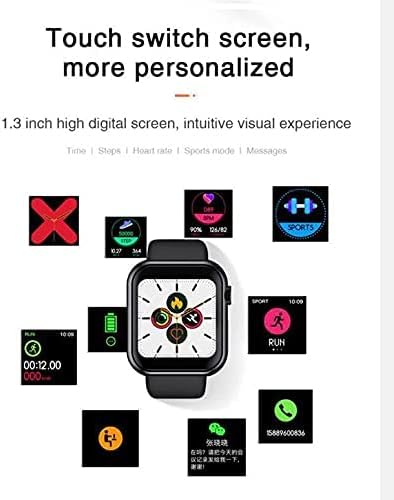
Figure 3.1: The D28 Smart Watch display showing different personalized screens and data points, including time, steps, heart rate, and sports mode.
3.2 പ്രവർത്തന ട്രാക്കിംഗ്
The watch continuously monitors your daily activity and health metrics.
- Steps, Calories, Distance: View your daily step count, calories burned, and distance covered directly on the watch or in the connected app.
- Heart Rate & Blood Pressure: The watch is equipped with sensors for heart rate and blood pressure detection. Access these functions from the main menu to take a measurement.
- മൾട്ടി-സ്പോർട്ട് മോഡ്: The watch supports various sports modes including Climbing, Walking, Basketball, Running, Table Tennis, Cycling, Swimming, Badminton, and Football. Select the appropriate mode before starting your activity for accurate tracking.
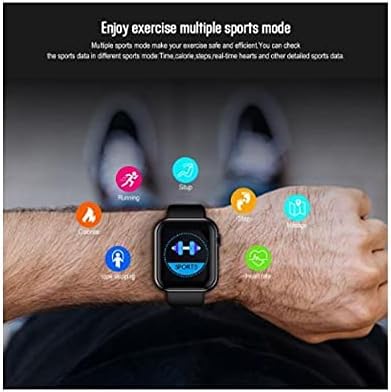
Figure 3.2: A user wearing the D28 Smart Watch, with icons representing various sports modes and health metrics like heart rate, steps, and calories.
3.3 സ്ലീപ്പ് മോണിറ്ററിംഗ്
The watch automatically monitors your sleep patterns, including sleep time and distinctions between night and day sleep. Review your sleep data in the companion application for insights into your sleep quality.
3.4 Notifications and Reminders
Once paired with your smartphone, the D28 Smart Watch can display various notifications and reminders:
- Date Reminder
- SMS ഓർമ്മപ്പെടുത്തൽ
- WeChat Reminder
- Facebook Notifications
- Alarm Reminders
- Medicine / Meeting / Drinking Water Reminders
3.5 റിമോട്ട് ക്യാമറ കൺട്രോൾ
Control your smartphone's camera remotely using your D28 Smart Watch.

Figure 3.3: The D28 Smart Watch displaying a camera icon, indicating its ability to remotely control a paired smartphone's camera function by shaking the watch band.
- Connect the phone through Bluetooth.
- Long press on the watch to enter the photo function.
- Control the photograph on your phone by shaking the watch band to take a photo.
3.6 Finding Your Phone or Watch
The watch includes a feature to help you locate your paired smartphone, and vice versa, the app can help you find your watch.

Figure 3.4: The D28 Smart Watch display showing a 'MORE' option, typically leading to additional settings or features.
4. പരിപാലനം
4.1 ജല പ്രതിരോധം
The D28 Smart Watch has an IP67 water rating. This means it is resistant to splashes and brief immersion. It is suitable for hand washing but should not be immersed into deep water and is not suitable for swimming.
4.2 വൃത്തിയാക്കൽ
To maintain the watch's appearance and functionality:
- Wipe the watch and strap regularly with a soft, dry, lint-free cloth.
- ആവശ്യമെങ്കിൽ, ഡിampen the cloth slightly with water. Avoid using harsh chemicals, cleaning solvents, or strong detergents.
- ചാർജ് ചെയ്യുന്നതിനുമുമ്പ് ചാർജിംഗ് കോൺടാക്റ്റുകൾ വൃത്തിയുള്ളതും വരണ്ടതുമാണെന്ന് ഉറപ്പാക്കുക.
4.3 ബാറ്ററി കെയർ
- Avoid exposing the watch to extreme temperatures (very hot or very cold), as this can affect battery life.
- Do not allow the battery to fully discharge frequently, as this can reduce its overall lifespan.
5. പ്രശ്നപരിഹാരം
If you encounter issues with your D28 Smart Watch, refer to the following common problems and solutions:
| പ്രശ്നം | സാധ്യമായ കാരണം | പരിഹാരം |
|---|---|---|
| വാച്ച് ഓണാകുന്നില്ല | ബാറ്ററി ചാർജ് കുറവാണ്; ഉപകരണം ഫ്രീസുചെയ്തു | Charge the watch for at least 30 minutes; Perform a hard reset (refer to app for specific instructions). |
| സ്മാർട്ട്ഫോണുമായി ജോടിയാക്കാൻ കഴിയില്ല | Bluetooth off; App not running; Watch not in pairing mode | Ensure Bluetooth is on for both devices; Restart the app and watch; Check app for pairing instructions. |
| Inaccurate health data (HR, steps) | അനുചിതമായ ഫിറ്റ്; സെൻസർ തടസ്സം | Ensure watch is snug but comfortable on wrist; Clean the sensor on the back of the watch. |
| അറിയിപ്പുകൾ ലഭിച്ചിട്ടില്ല | ആപ്പ് അനുമതികൾ; ബ്ലൂടൂത്ത് വിച്ഛേദിച്ചു | Check app notification settings and phone permissions; Reconnect Bluetooth. |
| ടച്ച് സ്ക്രീൻ പ്രതികരിക്കുന്നില്ല | സോഫ്റ്റ്വെയർ തകരാർ; സ്ക്രീൻ വൃത്തികേടായി | Restart the watch; Clean the screen with a soft cloth. |
6 സ്പെസിഫിക്കേഷനുകൾ
| ഫീച്ചർ | വിശദാംശങ്ങൾ |
|---|---|
| മോഡൽ നമ്പർ | D28 |
| ബ്രാൻഡ് | മറ്റുള്ളവ |
| ഓപ്പറേറ്റിംഗ് സിസ്റ്റം അനുയോജ്യത | ആൻഡ്രോയിഡ് 4.4 / iOS 8.4 ഉം അതിനുമുകളിലും |
| ഡിസ്പ്ലേ തരം | Color IPS Screen |
| സ്ക്രീൻ വലിപ്പം | 1.3 inches (33 Millimeters) |
| റെസലൂഷൻ | 240 x 240 |
| കണക്റ്റിവിറ്റി | ബ്ലൂടൂത്ത് 4.0 |
| വാട്ടർ റെസിസ്റ്റൻസ് റേറ്റിംഗ് | IP67 (Hand wash only, not for deep water immersion or swimming) |
| ചാർജിംഗ് സമയം | ഏകദേശം 2-3 മണിക്കൂർ |
| ബാൻഡ് മെറ്റീരിയൽ | സിലിക്കൺ |
| നിറം | കറുപ്പ് |
| ഇനത്തിൻ്റെ ഭാരം | 450 ഗ്രാം |
| പാക്കേജ് അളവുകൾ | 8 x 7.8 x 4 സെ.മീ |
7. വാറൻ്റിയും പിന്തുണയും
Information regarding product warranty and customer support was not available in the provided product data. Please refer to the product packaging, the seller's website, or contact the retailer directly for details on warranty coverage and support options for your D28 Smart Watch.
Ask a question about this manual
Ask about setup, troubleshooting, compatibility, parts, safety, or missing instructions. Manuals+ will review the question and use this page’s manual context to help answer it.