
1. ആമുഖം
Thank you for choosing the Mc Haus ARTIC-160 Portable Air Conditioner. This manual provides essential information for the safe and efficient operation of your new appliance. Please read it thoroughly before use and retain it for future reference.
The ARTIC-160 is designed to provide cooling, dehumidification, and fan functions for rooms up to 14 square meters, offering a comfortable indoor environment.
2. പ്രധാന സുരക്ഷാ നിർദ്ദേശങ്ങൾ
തീ, വൈദ്യുതാഘാതം, പരിക്കുകൾ എന്നിവ കുറയ്ക്കുന്നതിന് വൈദ്യുത ഉപകരണങ്ങൾ ഉപയോഗിക്കുമ്പോൾ എല്ലായ്പ്പോഴും അടിസ്ഥാന സുരക്ഷാ മുൻകരുതലുകൾ പാലിക്കുക.
- ഉപകരണം ഉപയോഗിക്കുന്നതിന് മുമ്പ് എല്ലാ നിർദ്ദേശങ്ങളും വായിക്കുക.
- വൈദ്യുതി വിതരണം വോള്യവുമായി പൊരുത്തപ്പെടുന്നുണ്ടെന്ന് ഉറപ്പാക്കുകtagഇ റേറ്റിംഗ് ലേബലിൽ വ്യക്തമാക്കിയിരിക്കുന്നു.
- കേടായ ചരടോ പ്ലഗോ ഉപയോഗിച്ച് യൂണിറ്റ് പ്രവർത്തിപ്പിക്കരുത്.
- താപ സ്രോതസ്സുകളിൽ നിന്നും നേരിട്ടുള്ള സൂര്യപ്രകാശത്തിൽ നിന്നും ഉപകരണം അകറ്റി നിർത്തുക.
- എയർ ഇൻലെറ്റുകളോ ഔട്ട്ലെറ്റുകളോ തടയരുത്.
- യൂണിറ്റ് എപ്പോഴും പരന്നതും സ്ഥിരതയുള്ളതുമായ ഒരു പ്രതലത്തിൽ സ്ഥാപിക്കുക.
- വൃത്തിയാക്കുന്നതിനോ സർവീസ് ചെയ്യുന്നതിനോ മുമ്പ് യൂണിറ്റ് അൺപ്ലഗ് ചെയ്യുക.
- ഈ ഉപകരണം, അവരുടെ സുരക്ഷയ്ക്ക് ഉത്തരവാദിയായ ഒരു വ്യക്തി ഉപകരണത്തിൻ്റെ ഉപയോഗത്തെ സംബന്ധിച്ച മേൽനോട്ടമോ നിർദ്ദേശമോ നൽകിയിട്ടില്ലെങ്കിൽ, ശാരീരികമോ ഇന്ദ്രിയപരമോ മാനസികമോ ആയ കഴിവുകൾ കുറഞ്ഞതോ അനുഭവത്തിൻ്റെയും അറിവിൻ്റെയും അഭാവം ഉള്ള വ്യക്തികൾക്ക് (കുട്ടികൾ ഉൾപ്പെടെ) ഉപയോഗിക്കാൻ ഉദ്ദേശിച്ചുള്ളതല്ല.
3. പാക്കേജ് ഉള്ളടക്കം
അൺപാക്ക് ചെയ്യുമ്പോൾ എല്ലാ ഘടകങ്ങളും ഉണ്ടെന്നും കേടുപാടുകൾ സംഭവിച്ചിട്ടില്ലെന്നും ഉറപ്പാക്കുക:
- Mc Haus ARTIC-160 Portable Air Conditioner Unit
- റിമോട്ട് കൺട്രോൾ
- എക്സ്ഹോസ്റ്റ് ഹോസ്
- Window Sealing Kit (adjustable panels, adapter)
- ഉപയോക്തൃ മാനുവൽ

Image 3.1: Main unit, remote control, and smartphone app representation.
4. സജ്ജീകരണ നിർദ്ദേശങ്ങൾ
4.1 പ്ലേസ്മെൻ്റ്
Place the air conditioner on a flat, stable surface in the room you wish to cool. Ensure there is at least 30 cm of space around the unit for proper airflow. The recommended room size for optimal performance is 10-14 square meters.

Image 4.1: Recommended room size diagram.
4.2 എക്സ്ഹോസ്റ്റ് ഹോസ് ഇൻസ്റ്റാളേഷൻ
- എക്സ്ഹോസ്റ്റ് ഹോസിന്റെ ഒരറ്റം യൂണിറ്റിന്റെ പിൻഭാഗത്തുള്ള എയർ ഔട്ട്ലെറ്റിൽ ഘടിപ്പിക്കുക.
- എക്സ്ഹോസ്റ്റ് ഹോസിന്റെ മറ്റേ അറ്റം വിൻഡോ കിറ്റ് അഡാപ്റ്ററുമായി ബന്ധിപ്പിക്കുക.
- Install the adjustable window sealing panels into your window opening (suitable for vertical and horizontal sliding windows).
- Secure the window kit adapter into the opening of the window sealing panels.
- Ensure the exhaust hose is as straight and short as possible to maximize efficiency. Avoid sharp bends.
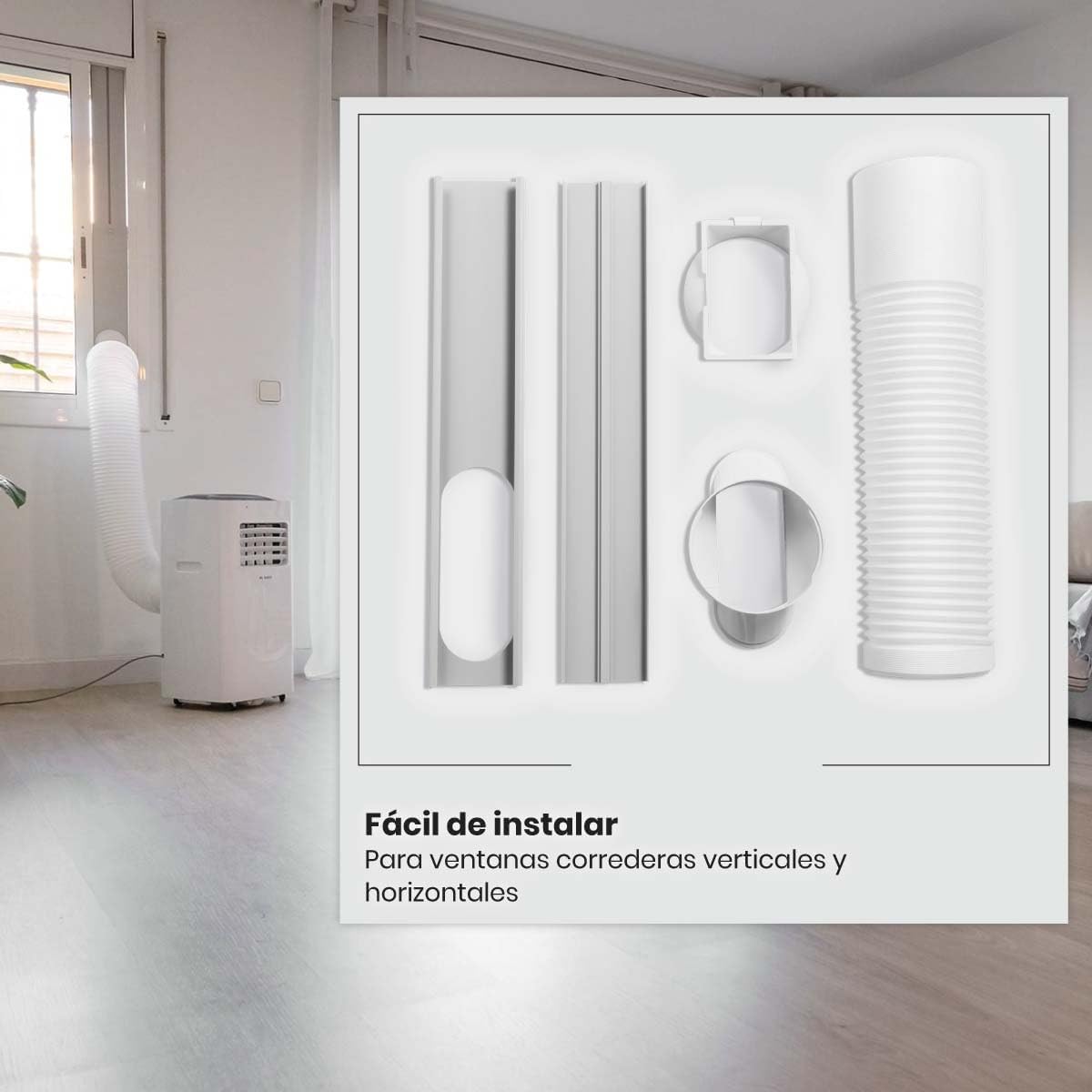
Image 4.2: Window installation kit components.

Image 4.3: Exhaust hose connection to the unit.
5. പ്രവർത്തന നിർദ്ദേശങ്ങൾ
5.1 നിയന്ത്രണ പാനൽ
The control panel is located on the top of the unit. It features a digital display and various buttons for function selection.

Image 5.1: Unit control panel.

ചിത്രം 5.2: മുകളിൽ view of the unit with control panel.
5.2 വിദൂര നിയന്ത്രണം
The included remote control allows convenient operation from a distance. Ensure batteries are correctly inserted.
5.3 ഓപ്പറേറ്റിംഗ് മോഡുകൾ
- രസകരമായ മോഡ്: Provides cooling. Adjust temperature between 15°C and 31°C.
- ഫാൻ മോഡ്: തണുപ്പിക്കാതെ വായു സഞ്ചാരം നടത്തുന്നു. 3 ഫാൻ വേഗതകളിൽ നിന്ന് (കുറഞ്ഞ, ഇടത്തരം, ഉയർന്ന) തിരഞ്ഞെടുക്കുക.
- ഡ്രൈ മോഡ് (ഡീഹ്യുമിഡിഫയർ): മുറിയിലെ ഈർപ്പം കുറയ്ക്കുന്നു.
- യാന്ത്രിക മോഡ്: Automatically selects cooling or fan based on room temperature.
- സ്ലീപ്പ് മോഡ്: സുഖകരമായ ഉറക്കത്തിനും ഊർജ്ജ ലാഭത്തിനുമായി താപനിലയും ഫാൻ വേഗതയും ക്രമീകരിക്കുന്നു.
5.4 ടൈമർ പ്രവർത്തനം
The 24-hour timer allows you to set the unit to turn on or off automatically after a specified period.
5.5 Wi-Fi and Smart Control
The ARTIC-160 can be controlled via a smartphone application, compatible with Alexa and Tuya platforms. Download the app from Google Play or the App Store for remote control and advanced features.

Image 5.3: Smartphone application interface for smart control.
6. പരിപാലനം
പതിവ് അറ്റകുറ്റപ്പണികൾ നിങ്ങളുടെ എയർ കണ്ടീഷണറിന്റെ മികച്ച പ്രകടനവും ദീർഘായുസ്സും ഉറപ്പാക്കുന്നു.
6.1 എയർ ഫിൽട്ടർ വൃത്തിയാക്കൽ
The air filter should be cleaned every two weeks or more frequently depending on usage. A dirty filter can reduce efficiency and airflow.
- പവർ ഔട്ട്ലെറ്റിൽ നിന്ന് യൂണിറ്റ് അൺപ്ലഗ് ചെയ്യുക.
- Locate and remove the air filter (usually on the back or side of the unit).
- ഫിൽട്ടർ ചൂടുള്ള സോപ്പ് വെള്ളത്തിൽ കഴുകുക. നന്നായി കഴുകുക.
- യൂണിറ്റിലേക്ക് വീണ്ടും ചേർക്കുന്നതിന് മുമ്പ് ഫിൽട്ടർ പൂർണ്ണമായും വായുവിൽ ഉണങ്ങാൻ അനുവദിക്കുക.
6.2 വെള്ളം വറ്റിക്കൽ
The unit collects condensate water during operation. Depending on humidity levels, you may need to drain the water periodically. Refer to the unit's drainage port and follow instructions for continuous drainage or manual draining.
6.3 യൂണിറ്റ് എക്സ്റ്റീരിയർ വൃത്തിയാക്കൽ
ഒരു സോഫ്റ്റ്, ഡി ഉപയോഗിച്ച് യൂണിറ്റിൻ്റെ പുറംഭാഗം തുടയ്ക്കുകamp തുണി. കഠിനമായ രാസവസ്തുക്കളോ ഉരച്ചിലുകളുള്ള ക്ലീനറുകളോ ഉപയോഗിക്കരുത്.
7. പ്രശ്നപരിഹാരം
ഉപഭോക്തൃ പിന്തുണയുമായി ബന്ധപ്പെടുന്നതിന് മുമ്പ്, ഇനിപ്പറയുന്ന പൊതുവായ പ്രശ്നങ്ങളും പരിഹാരങ്ങളും പരിശോധിക്കുക:
| പ്രശ്നം | സാധ്യമായ കാരണം | പരിഹാരം |
|---|---|---|
| യൂണിറ്റ് ഓണാക്കുന്നില്ല | No power; Power cord not plugged in; Fuse blown/Circuit breaker tripped | Check power outlet; Plug in power cord securely; Reset circuit breaker/Replace fuse |
| യൂണിറ്റ് ഫലപ്രദമായി തണുക്കുന്നില്ല. | Dirty air filter; Room too large; Doors/windows open; Exhaust hose blocked/leaking | Clean air filter; Ensure room size is within recommended range; Close doors/windows; Check exhaust hose for blockages or leaks |
| അമിതമായ ശബ്ദം | Unit not on a level surface; Obstruction in fan; Loose parts | Place unit on a flat surface; Check for and remove any obstructions; Contact customer support if noise persists |
| വെള്ളം ചോർച്ച | Drain plug not properly sealed; Drainage hose blocked | Ensure drain plug is secure; Clear any blockages in the drainage hose |
8 സാങ്കേതിക സവിശേഷതകൾ
| ഫീച്ചർ | സ്പെസിഫിക്കേഷൻ |
|---|---|
| മോഡൽ | ARTIC-160 |
| ബ്രാൻഡ് | Mc Haus |
| ശക്തി | 2050 വാട്ട്സ് |
| തണുപ്പിക്കൽ ശേഷി | 1.765 frigories (7000 BTU) |
| വാല്യംtage | 240 വോൾട്ട് |
| അളവുകൾ (L x W x H) | 30 x 30 x 70 സെ.മീ |
| ഭാരം | 20 കിലോഗ്രാം |
| ശബ്ദ നില | 65 ഡി.ബി |
| ഊർജ്ജ കാര്യക്ഷമത | High (Class A) |
| ശുപാർശ ചെയ്യുന്ന റൂം ഏരിയ | 10-14 m² |
| എയർ ഫ്ലോ | 350 m³/h |
| താപനില പരിധി | 15-31 ഡിഗ്രി സെൽഷ്യസ് |
| പ്രത്യേക സവിശേഷതകൾ | Dehumidifier, Air purification filter |
| ഇൻസ്റ്റലേഷൻ തരം | External outlet |

Image 8.1: Key features and specifications.

Image 8.2: Unit dimensions.
9. വാറൻ്റി വിവരങ്ങൾ
This product comes with a standard manufacturer's warranty. Please refer to the warranty card included in your package for specific terms, conditions, and duration. Keep your proof of purchase for warranty claims.
10. ഉപഭോക്തൃ പിന്തുണ
If you encounter any issues not covered in the troubleshooting section or require further assistance, please contact Mc Haus customer support. Contact details can typically be found on the manufacturer's webസൈറ്റ് അല്ലെങ്കിൽ ഉൽപ്പന്ന പാക്കേജിംഗിൽ.