
1 പ്രധാനപ്പെട്ട സുരക്ഷാ വിവരങ്ങൾ
Please read this manual carefully before operating the appliance and keep it for future reference. Failure to follow these instructions may result in electric shock, fire, or injury.
- വൈദ്യുതി വിതരണം വോള്യവുമായി പൊരുത്തപ്പെടുന്നുണ്ടെന്ന് ഉറപ്പാക്കുകtagഇ റേറ്റിംഗ് ലേബലിൽ വ്യക്തമാക്കിയിരിക്കുന്നു.
- കേടായ ചരടോ പ്ലഗോ ഉപയോഗിച്ച് യൂണിറ്റ് പ്രവർത്തിപ്പിക്കരുത്.
- താപ സ്രോതസ്സുകളിൽ നിന്നും നേരിട്ടുള്ള സൂര്യപ്രകാശത്തിൽ നിന്നും ഉപകരണം അകറ്റി നിർത്തുക.
- എയർ ഇൻലെറ്റുകളോ ഔട്ട്ലെറ്റുകളോ തടയരുത്.
- This appliance contains R290 refrigerant. Handle with care and ensure proper ventilation during installation and maintenance.
- വൃത്തിയാക്കുന്നതിനോ സർവീസ് ചെയ്യുന്നതിനോ മുമ്പായി എപ്പോഴും യൂണിറ്റ് അൺപ്ലഗ് ചെയ്യുക.
- വൃത്തിയാക്കാൻ രാസ ലായകങ്ങൾ ഉപയോഗിക്കരുത്.
- ഈ ഉപകരണം, അവരുടെ സുരക്ഷയ്ക്ക് ഉത്തരവാദിയായ ഒരു വ്യക്തി ഉപകരണത്തിൻ്റെ ഉപയോഗത്തെ സംബന്ധിച്ച മേൽനോട്ടമോ നിർദ്ദേശമോ നൽകിയിട്ടില്ലെങ്കിൽ, ശാരീരികമോ ഇന്ദ്രിയപരമോ മാനസികമോ ആയ കഴിവുകൾ കുറഞ്ഞതോ അനുഭവത്തിൻ്റെയും അറിവിൻ്റെയും അഭാവം ഉള്ള വ്യക്തികൾക്ക് (കുട്ടികൾ ഉൾപ്പെടെ) ഉപയോഗിക്കാൻ ഉദ്ദേശിച്ചുള്ളതല്ല.
2. പാക്കേജ് ഉള്ളടക്കം
അൺപാക്ക് ചെയ്യുമ്പോൾ എല്ലാ ഇനങ്ങളും ഉണ്ടെന്നും കേടുപാടുകൾ സംഭവിച്ചിട്ടില്ലെന്നും ഉറപ്പാക്കുക.
- 1 x Klarstein Kraftwerk Smart Portable Air Conditioner
- 1 x റിമോട്ട് കൺട്രോൾ
- 1 x Window Sealing Kit (for tilt windows)
- 1 x Exhaust Hose with Connectors
- 1 x Water Drainage Hose
- 1 x യൂസർ മാനുവൽ (ഇംഗ്ലീഷ്)

Image: Contents of the delivery, including the air conditioner unit, remote control, window sealing kit, exhaust hose, and drainage hose.
3. സജ്ജീകരണവും ഇൻസ്റ്റാളേഷനും
3.1 യൂണിറ്റിന്റെ സ്ഥാനം
Place the air conditioner on a flat, stable surface. Ensure there is at least 30 cm (12 inches) of space around the unit for proper airflow. The integrated castors allow for easy movement between rooms.

Image: The portable air conditioner with integrated wheels for easy transport.
3.2 എക്സ്ഹോസ്റ്റ് ഹോസ് ഇൻസ്റ്റാളേഷൻ
- യൂണിറ്റിന്റെ പിൻഭാഗത്തുള്ള എയർ ഔട്ട്ലെറ്റിൽ എക്സ്ഹോസ്റ്റ് ഹോസ് ഘടിപ്പിക്കുക.
- ഏറ്റവും അടുത്തുള്ള ജനാലയിലേക്കോ ദ്വാരത്തിലേക്കോ ഹോസ് നീട്ടുക.
- Use the provided window sealing kit to secure the exhaust hose in the window opening, preventing hot air from re-entering the room.

Image: Quick installation with the window kit, showing the exhaust hose and window seal.
3.3 Drainage Hose (Dehumidifier Mode)
For continuous dehumidification, connect the drainage hose to the designated outlet and route it to a suitable drain or container. In cooling mode, water typically evaporates, but manual drainage may be required if the internal tank fills.
4. പ്രവർത്തന നിർദ്ദേശങ്ങൾ
4.1 നിയന്ത്രണ പാനലും റിമോട്ട് നിയന്ത്രണവും
The unit can be controlled via the touch control panel on top of the unit or the included remote control. The remote control requires 2x AAA batteries (not included).
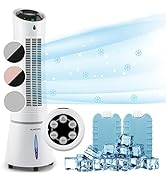
Image: Digital display and remote control for the air conditioner.
4.2 ഓപ്പറേറ്റിംഗ് മോഡുകൾ
- കൂളിംഗ് മോഡ്: Reduces room temperature. Set desired temperature and fan speed.
- ഡീഹ്യൂമിഡിഫയർ മോഡ്: വായുവിൽ നിന്ന് അധിക ഈർപ്പം നീക്കം ചെയ്യുന്നു.
- ഫാൻ മോഡ്: തണുപ്പിക്കാതെ വായു പ്രസരിപ്പിക്കുന്നു. ആവശ്യമുള്ള ഫാൻ വേഗത തിരഞ്ഞെടുക്കുക.
- സ്ലീപ്പ് മോഡ്: Operates quietly with reduced fan speed and gradually increases temperature for comfortable sleep.
4.3 Smart Control (App & Alexa)
The Klarstein Kraftwerk Smart can be controlled via the Klarstein app on your smartphone and is compatible with Amazon Alexa and Google Home. Follow the app's instructions for pairing the device.

Image: Simple and practical use with the Klarstein app, compatible with Amazon Alexa and Google Home.
4.4 ടൈമർ പ്രവർത്തനം
Use the timer function to set the unit to turn on or off automatically after a specified period.
5. പരിപാലനം
പതിവ് അറ്റകുറ്റപ്പണികൾ നിങ്ങളുടെ എയർ കണ്ടീഷണറിന്റെ മികച്ച പ്രകടനം ഉറപ്പാക്കുകയും അതിന്റെ ആയുസ്സ് വർദ്ധിപ്പിക്കുകയും ചെയ്യുന്നു. ഏതെങ്കിലും അറ്റകുറ്റപ്പണി നടത്തുന്നതിന് മുമ്പ് എല്ലായ്പ്പോഴും യൂണിറ്റ് അൺപ്ലഗ് ചെയ്യുക.
5.1 എയർ ഫിൽട്ടർ വൃത്തിയാക്കൽ
The air filter should be cleaned every two weeks or more frequently depending on usage. A dirty filter reduces efficiency.
- യൂണിറ്റ് ഓഫ് ചെയ്ത് അൺപ്ലഗ് ചെയ്യുക.
- യൂണിറ്റിന്റെ പിൻഭാഗത്തോ വശത്തോ നിന്ന് എയർ ഫിൽട്ടർ കണ്ടെത്തി നീക്കം ചെയ്യുക.
- Clean the filter with a vacuum cleaner or wash it with warm water and mild detergent.
- ഫിൽട്ടർ വീണ്ടും ചേർക്കുന്നതിന് മുമ്പ് പൂർണ്ണമായും ഉണങ്ങാൻ അനുവദിക്കുക.
5.2 യൂണിറ്റ് എക്സ്റ്റീരിയർ വൃത്തിയാക്കൽ
ഒരു സോഫ്റ്റ്, ഡി ഉപയോഗിച്ച് യൂണിറ്റിൻ്റെ പുറംഭാഗം തുടയ്ക്കുകamp തുണി. കഠിനമായ രാസവസ്തുക്കളോ, ഉരച്ചിലുകളോ, ലായകങ്ങളോ ഉപയോഗിക്കരുത്.
5.3 സീസണൽ സംഭരണം
യൂണിറ്റ് ദീർഘനേരം സൂക്ഷിക്കുകയാണെങ്കിൽ:
- Drain any accumulated water from the unit.
- എയർ ഫിൽട്ടർ വൃത്തിയാക്കുക.
- പൊടിയിൽ നിന്ന് സംരക്ഷിക്കാൻ യൂണിറ്റ് മൂടുക.
- വരണ്ടതും തണുത്തതുമായ സ്ഥലത്ത് സൂക്ഷിക്കുക.
6. പ്രശ്നപരിഹാരം
ഉപഭോക്തൃ പിന്തുണയുമായി ബന്ധപ്പെടുന്നതിന് മുമ്പ്, പൊതുവായ പ്രശ്നങ്ങളും പരിഹാരങ്ങളും അറിയാൻ ഇനിപ്പറയുന്ന പട്ടിക പരിശോധിക്കുക.
| പ്രശ്നം | സാധ്യമായ കാരണം | പരിഹാരം |
|---|---|---|
| യൂണിറ്റ് ഓണാക്കുന്നില്ല. | No power, power cord unplugged, fuse blown. | Check power connection, wall outlet, and circuit breaker. |
| അപര്യാപ്തമായ തണുപ്പിക്കൽ. | വൃത്തികെട്ട എയർ ഫിൽറ്റർ, അടഞ്ഞ എയർ ഇൻടേക്ക്/ഔട്ട്ലെറ്റ്, മുറി വളരെ വലുതാണ്, ജനാലകൾ/വാതിലുകൾ തുറന്നിരിക്കുന്നു, എക്സ്ഹോസ്റ്റ് ഹോസ് ശരിയായി സ്ഥാപിച്ചിട്ടില്ല. | Clean filter, clear obstructions, ensure proper room size for unit capacity, close windows/doors, check exhaust hose installation. |
| യൂണിറ്റ് ശബ്ദമയമാണ്. | Unit not on a flat surface, internal components vibrating. | Ensure unit is on a level surface. Some operational noise is normal for portable AC units. |
| വെള്ളം ചോർച്ച. | Drainage plug not properly sealed, drainage hose blocked or improperly connected. | Check drainage plug and hose connections. Clear any blockages in the drainage hose. |
| വൈഫൈ കണക്ഷൻ പ്രശ്നങ്ങൾ. | Incorrect Wi-Fi settings, 5GHz network used, temporary glitch. | Ensure you are connecting to a 2.4GHz Wi-Fi network. Try unplugging the unit for 10 seconds, then reconnecting. Refer to the app's pairing instructions. |
7 സ്പെസിഫിക്കേഷനുകൾ
| ഫീച്ചർ | വിശദാംശങ്ങൾ |
|---|---|
| ബ്രാൻഡ് | ക്ലാർസ്റ്റീൻ |
| മോഡലിൻ്റെ പേര് | Kraftwerk Smart |
| തണുപ്പിക്കൽ ശേഷി | 10,000 BTU (2.9 kW) |
| നിർജ്ജലീകരണ ശേഷി | 23 ലിറ്റർ |
| എയർ ഫ്ലോ വോളിയം | 440 m³/h |
| ശുപാർശ ചെയ്യുന്ന മുറിയുടെ വലിപ്പം | 29-49 m² |
| ശബ്ദ നില | 50 dB (Min) / 65 dB (Max) |
| എനർജി എഫിഷ്യൻസി ക്ലാസ് | A |
| റഫ്രിജറൻ്റ് | R-290 |
| വൈദ്യുതി ഉപഭോഗം | 1150 വാട്ട്സ് |
| വാല്യംtage | 220 വോൾട്ട് |
| അളവുകൾ (D x W x H) | 38പൗണ്ട് x 35.5lx 82.2H സെ.മീ |
| ഭാരം | 26 കിലോഗ്രാം |
| നിയന്ത്രണ രീതി | റിമോട്ട് കൺട്രോൾ, ആപ്പ് കൺട്രോൾ |
| ഫിൽട്ടർ തരം | കരി |

Image: Energy efficiency label for the product.
Image: Technical drawing with product dimensions.
8. വാറണ്ടിയും ഉപഭോക്തൃ പിന്തുണയും
8.1 വാറൻ്റി വിവരങ്ങൾ
This product comes with a limited warranty. Please refer to the warranty card included in your package or contact customer support for detailed terms and conditions. The warranty covers manufacturing defects under normal use.
8.2 ഉപഭോക്തൃ പിന്തുണ
For technical assistance, spare parts, or any questions regarding your Klarstein Kraftwerk Smart air conditioner, please contact Klarstein customer support. Contact details can typically be found on the official Klarstein webസൈറ്റ് അല്ലെങ്കിൽ നിങ്ങളുടെ വാങ്ങൽ ഡോക്യുമെന്റേഷനിൽ.
Before contacting support, please have your model number (Kraftwerk Smart) and purchase date available.