
1. ആമുഖം
വാങ്ങിയതിന് നന്ദി.asing the Technical Pro SPARK8GNEON Portable Bluetooth Speaker. This manual provides essential information for the safe and efficient operation of your device. Please read it thoroughly before use and retain it for future reference.
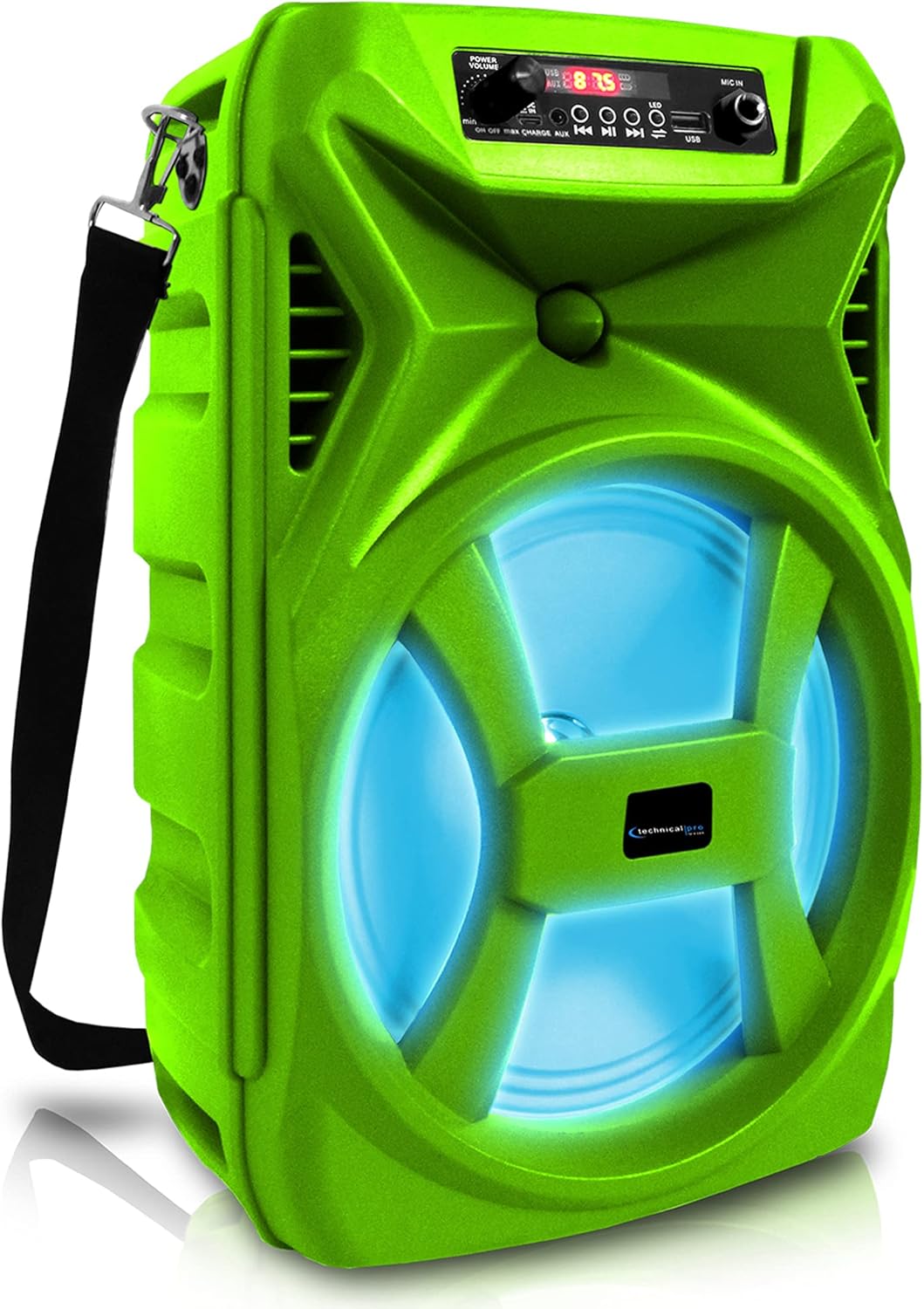
ഫ്രണ്ട് view of the Technical Pro SPARK8GNEON portable Bluetooth speaker, showcasing its vibrant green casing, illuminated woofer, and the top-mounted control panel.
2 സുരക്ഷാ വിവരങ്ങൾ
- സ്പീക്കറിനെ തീവ്രമായ താപനില, ഈർപ്പം, നേരിട്ടുള്ള സൂര്യപ്രകാശം എന്നിവയ്ക്ക് വിധേയമാക്കരുത്.
- സ്പീക്കറെ ശക്തമായ ആഘാതങ്ങൾക്ക് വിധേയമാക്കുകയോ താഴെയിടുകയോ ചെയ്യുന്നത് ഒഴിവാക്കുക.
- സ്പീക്കർ ഡിസ്അസംബ്ലിംഗ് ചെയ്യാനോ പരിഷ്കരിക്കാനോ ശ്രമിക്കരുത്. ഇത് വാറന്റി അസാധുവാക്കും.
- സ്പീക്കർ വെള്ളത്തിൽ നിന്നും മറ്റ് ദ്രാവകങ്ങളിൽ നിന്നും അകറ്റി നിർത്തുക.
- നൽകിയിരിക്കുന്ന ചാർജിംഗ് കേബിളോ സാക്ഷ്യപ്പെടുത്തിയ തത്തുല്യമായതോ മാത്രം ഉപയോഗിക്കുക.
- സ്പീക്കർ പ്രവർത്തിപ്പിക്കുമ്പോൾ ശരിയായ വായുസഞ്ചാരം ഉറപ്പാക്കുക.
3. പാക്കേജ് ഉള്ളടക്കം
പാക്കേജിൽ എല്ലാ ഇനങ്ങളും ഉണ്ടോ എന്ന് ദയവായി പരിശോധിക്കുക:
- Technical Pro SPARK8GNEON Portable Bluetooth Speaker
- യുഎസ്ബി ചാർജിംഗ് കേബിൾ
- ഷോൾഡർ സ്ട്രാപ്പ്
- ഉപയോക്തൃ മാനുവൽ (ഈ പ്രമാണം)
4. ഉൽപ്പന്നം കഴിഞ്ഞുview
സ്പീക്കറിന്റെ ഘടകങ്ങളും നിയന്ത്രണങ്ങളും സ്വയം പരിചയപ്പെടുത്തുക.

An infographic detailing the main features of the Technical Pro SPARK8GNEON speaker, such as its built-in rechargeable battery, True Wireless Stereo (TWS) capability, Bluetooth compatibility, USB and card inputs, durable ABS plastic construction, and support for A2DP & AVRCP stereo Bluetooth devices.
നിയന്ത്രണ പാനൽ (മുകളിൽ View)
- പവർ ബട്ടൺ: സ്പീക്കർ ഓൺ/ഓഫ് ചെയ്യാൻ അമർത്തിപ്പിടിക്കുക.
- മോഡ് ബട്ടൺ: Short press to switch between Bluetooth, USB, TF Card, and AUX modes.
- പ്ലേ/താൽക്കാലികമായി നിർത്തുക ബട്ടൺ: ഓഡിയോ പ്ലേ ചെയ്യാനോ താൽക്കാലികമായി നിർത്താനോ അമർത്തുക.
- മുൻഭാഗം/ശബ്ദം കുറയ്ക്കൽ ബട്ടൺ: മുമ്പത്തെ ട്രാക്കിനായി ഹ്രസ്വമായി അമർത്തുക, ശബ്ദം കുറയ്ക്കാൻ ദീർഘനേരം അമർത്തുക.
- അടുത്തത്/വോളിയം അപ്പ് ബട്ടൺ: അടുത്ത ട്രാക്കിനായി ഷോർട്ട് പ്രസ്സ് ചെയ്യുക, വോളിയം കൂട്ടാൻ ദീർഘനേരം അമർത്തുക.
- LED ലൈറ്റ് ബട്ടൺ: LED ലൈറ്റ് മോഡുകളിലൂടെ സൈക്കിൾ ചെയ്യാൻ അമർത്തുക അല്ലെങ്കിൽ അവ ഓഫ് ചെയ്യുക.
- USB പോർട്ട്: യുഎസ്ബി ഫ്ലാഷ് ഡ്രൈവ് പ്ലേബാക്കിനായി.
- ടിഎഫ് കാർഡ് സ്ലോട്ട്: TF (മൈക്രോ എസ്ഡി) കാർഡ് പ്ലേബാക്കിനായി.
- AUX ഇൻപുട്ട്: ബാഹ്യ ഓഡിയോ ഉപകരണങ്ങൾക്കായി 3.5mm ജാക്ക്.
- ചാർജിംഗ് പോർട്ട്: യുഎസ്ബി ചാർജിംഗ് കേബിൾ ബന്ധിപ്പിക്കുന്നതിന്.
5. സജ്ജീകരണം
5.1 പ്രാരംഭ ചാർജിംഗ്
- Before first use, fully charge the speaker for 8-10 hours.
- Connect the USB charging cable to the speaker's charging port and the other end to a USB power adapter (not included) or a computer's USB port.
- ചാർജ് ചെയ്യുമ്പോൾ ചാർജിംഗ് ഇൻഡിക്കേറ്റർ ലൈറ്റ് പ്രകാശിക്കുകയും പൂർണ്ണമായി ചാർജ് ചെയ്യുമ്പോൾ ഓഫാകുകയും ചെയ്യും.
5.2 പവർ ഓൺ/ഓഫ്
- To power ON, press and hold the Power Button until the display illuminates.
- To power OFF, press and hold the Power Button again until the display turns off.
6. പ്രവർത്തന നിർദ്ദേശങ്ങൾ
6.1 ബ്ലൂടൂത്ത് ജോടിയാക്കൽ
- Turn on the speaker. It will automatically enter Bluetooth pairing mode, indicated by a flashing Bluetooth icon on the display.
- നിങ്ങളുടെ മൊബൈൽ ഉപകരണത്തിൽ (സ്മാർട്ട്ഫോൺ, ടാബ്ലെറ്റ് മുതലായവ), ബ്ലൂടൂത്ത് പ്രവർത്തനക്ഷമമാക്കി ലഭ്യമായ ഉപകരണങ്ങൾക്കായി തിരയുക.
- Select "SPARK8GNEON" from the list of devices.
- ജോടിയാക്കിക്കഴിഞ്ഞാൽ, സ്പീക്കർ ഒരു സ്ഥിരീകരണ ടോൺ പുറപ്പെടുവിക്കും, ബ്ലൂടൂത്ത് ഐക്കൺ മിന്നുന്നത് നിർത്തും.
- ഇപ്പോൾ നിങ്ങളുടെ ഉപകരണത്തിൽ നിന്ന് സ്പീക്കറിലൂടെ ഓഡിയോ പ്ലേ ചെയ്യാൻ കഴിയും.
6.2 USB/TF കാർഡ് പ്ലേബാക്ക്
- ബന്ധപ്പെട്ട പോർട്ടിലേക്ക് ഒരു യുഎസ്ബി ഫ്ലാഷ് ഡ്രൈവ് അല്ലെങ്കിൽ ടിഎഫ് (മൈക്രോ എസ്ഡി) കാർഡ് ചേർക്കുക.
- സ്പീക്കർ യാന്ത്രികമായി USB അല്ലെങ്കിൽ TF കാർഡ് മോഡിലേക്ക് മാറുകയും ഓഡിയോ പ്ലേ ചെയ്യാൻ തുടങ്ങുകയും ചെയ്യും. files. If not, press the Mode Button to select the correct mode.
- Use the Play/Pause, Previous, and Next buttons to control playback.
6.3 AUX ഇൻപുട്ട്
- Connect one end of a 3.5mm audio cable (not included) to the speaker's AUX input port.
- മറ്റേ അറ്റം നിങ്ങളുടെ ബാഹ്യ ഉപകരണത്തിന്റെ (ഉദാ: MP3 പ്ലെയർ, ലാപ്ടോപ്പ്) ഓഡിയോ ഔട്ട്പുട്ട് ജാക്കുമായി ബന്ധിപ്പിക്കുക.
- Press the Mode Button to select AUX mode.
- നിങ്ങളുടെ ബാഹ്യ ഉപകരണത്തിൽ നിന്ന് പ്ലേബാക്കും ശബ്ദവും നിയന്ത്രിക്കുക.
6.4 ട്രൂ വയർലെസ് സ്റ്റീരിയോ (TWS) ജോടിയാക്കൽ
The TWS function allows you to connect two SPARK8GNEON speakers wirelessly for a stereo sound experience.

Illustration demonstrating the True Wireless Stereo (TWS) feature, showing two Technical Pro SPARK8GNEON speakers wirelessly connected to a single smartphone for synchronized audio playback.
- Ensure both SPARK8GNEON speakers are powered on and in Bluetooth mode, but not yet paired with any device.
- On one of the speakers (this will be the primary speaker), press and hold the TWS button (if available, or a specific button designated for TWS pairing, otherwise assume it's initiated by a long press of the Mode button or a dedicated TWS button not explicitly listed but implied by feature).
- The speakers will attempt to connect to each other. A confirmation tone will sound once connected.
- ഇപ്പോൾ, വിഭാഗം 6.1-ൽ വിവരിച്ചിരിക്കുന്നതുപോലെ ബ്ലൂടൂത്ത് വഴി നിങ്ങളുടെ മൊബൈൽ ഉപകരണം പ്രാഥമിക സ്പീക്കറുമായി ബന്ധിപ്പിക്കുക.
- രണ്ട് സ്പീക്കറുകളിലും ഓഡിയോ ഇപ്പോൾ സ്റ്റീരിയോയിൽ പ്ലേ ചെയ്യും.
6.5 LED ലൈറ്റുകൾ
Press the LED Light Button on the control panel to cycle through various light modes or to turn the LED lights off.
7. പരിപാലനം
- വൃത്തിയാക്കൽ: സ്പീക്കറിന്റെ പുറംഭാഗം വൃത്തിയാക്കാൻ മൃദുവായതും ഉണങ്ങിയതുമായ തുണി ഉപയോഗിക്കുക. അബ്രസീവ് ക്ലീനറുകളോ ലായകങ്ങളോ ഉപയോഗിക്കരുത്.
- സംഭരണം: ദീർഘനേരം ഉപയോഗിക്കാത്തപ്പോൾ, നേരിട്ട് സൂര്യപ്രകാശം ഏൽക്കാത്ത ഒരു തണുത്തതും വരണ്ടതുമായ സ്ഥലത്ത് സ്പീക്കർ സൂക്ഷിക്കുക.
- ബാറ്ററി കെയർ: ബാറ്ററി ലൈഫ് വർദ്ധിപ്പിക്കുന്നതിന്, ദീർഘനേരം സൂക്ഷിക്കുന്നതിന് മുമ്പ് സ്പീക്കർ പൂർണ്ണമായും ചാർജ് ചെയ്യുക, ഓരോ 3-6 മാസത്തിലും റീചാർജ് ചെയ്യുക.
8. പ്രശ്നപരിഹാരം
| പ്രശ്നം | സാധ്യമായ കാരണം | പരിഹാരം |
|---|---|---|
| സ്പീക്കർ പവർ ഓൺ ചെയ്യുന്നില്ല. | ബാറ്ററി തീർന്നു. | സ്പീക്കർ പൂർണ്ണമായും ചാർജ് ചെയ്യുക. |
| ശബ്ദമില്ല. | Volume is too low; incorrect mode selected; device not connected. | Increase volume on speaker and connected device; press Mode button to select correct input; ensure Bluetooth/AUX connection is established. |
| ബ്ലൂടൂത്ത് ഉപകരണം ജോടിയാക്കാൻ കഴിയില്ല. | സ്പീക്കർ ജോടിയാക്കൽ മോഡിലല്ല; ഉപകരണം വളരെ അകലെയാണ്; ഇടപെടൽ. | Ensure speaker is in Bluetooth pairing mode (flashing icon); move device closer to speaker; turn off other Bluetooth devices nearby. |
| TWS ജോടിയാക്കൽ പരാജയപ്പെടുന്നു. | സ്പീക്കറുകൾ വളരെ അകലെയാണ്; ഒരു സ്പീക്കർ ഇതിനകം ഒരു ഉപകരണവുമായി ജോടിയാക്കിയിട്ടുണ്ട്. | Ensure speakers are within close proximity; disconnect any Bluetooth devices from both speakers before initiating TWS pairing. |
9 സ്പെസിഫിക്കേഷനുകൾ
- മോഡൽ: SPARK8GNEON
- പവർ ഔട്ട്പുട്ട്: 500 വാട്ട്സ് (പീക്ക്)
- സ്പീക്കർ വലിപ്പം: 8 Inch Woofer & Tweeter
- കണക്റ്റിവിറ്റി: Bluetooth, USB, TF Card, AUX (3.5mm)
- ബ്ലൂടൂത്ത് പതിപ്പ്: (Not specified, assuming standard)
- ബാറ്ററി: 1 ലിഥിയം അയോൺ ബാറ്ററി (ഉൾപ്പെടുത്തിയിരിക്കുന്നു)
- ബാറ്ററി ലൈഫ്: (Not specified, varies with usage)
- ചാർജിംഗ് സമയം: 8-10 hours (initial charge)
- ഉൽപ്പന്ന അളവുകൾ (L x W x H): 8.86 x 7.48 x 14.17 ഇഞ്ച്
- ഇനത്തിൻ്റെ ഭാരം: 4 പൗണ്ട്
- പ്രതിരോധം: 3 ഓം
- UPC: 817802016296

Diagram illustrating the physical dimensions of the Technical Pro SPARK8GNEON speaker, measuring 14.17 inches in height, 8.86 inches in width, and 7.48 inches in depth.
10. വാറൻ്റിയും പിന്തുണയും
For warranty information or technical support, please refer to the warranty card included with your product or visit the official Technical Pro website. You may also contact Technical Pro customer service directly for assistance.
Webസൈറ്റ്: Technical Pro Store on Amazon