
ആമുഖം
This manual provides detailed instructions for the installation, operation, and maintenance of your Hertz HMA-USB-AUX-in 2 Meter Extension Cable. This cable is designed to extend USB and auxiliary audio input capabilities, specifically optimized for use with Hertz HMR 20 and HMR 10 marine receivers. Please read this manual thoroughly before installation and use to ensure proper functionality and longevity of the product.
പാക്കേജ് ഉള്ളടക്കം
താഴെ കൊടുത്തിരിക്കുന്ന എല്ലാ ഇനങ്ങളും നിങ്ങളുടെ പാക്കേജിൽ ഉണ്ടെന്ന് ഉറപ്പാക്കുക:
- HMA-USB-AUX-in 2 Meter Extension Cable (integrated USB and 3.5mm AUX flush-mount port)
- USB-A Male Connector (for connection to source unit)
- RCA Male Connectors (Red and White, for AUX audio input to source unit)
- Flush-mount retaining nut
- ആംഗിൾ മൗണ്ടിംഗ് ബ്രാക്കറ്റ്
- മൗണ്ടിംഗ് സ്ക്രൂകൾ (4x)
- Rubber protective cap for flush-mount port
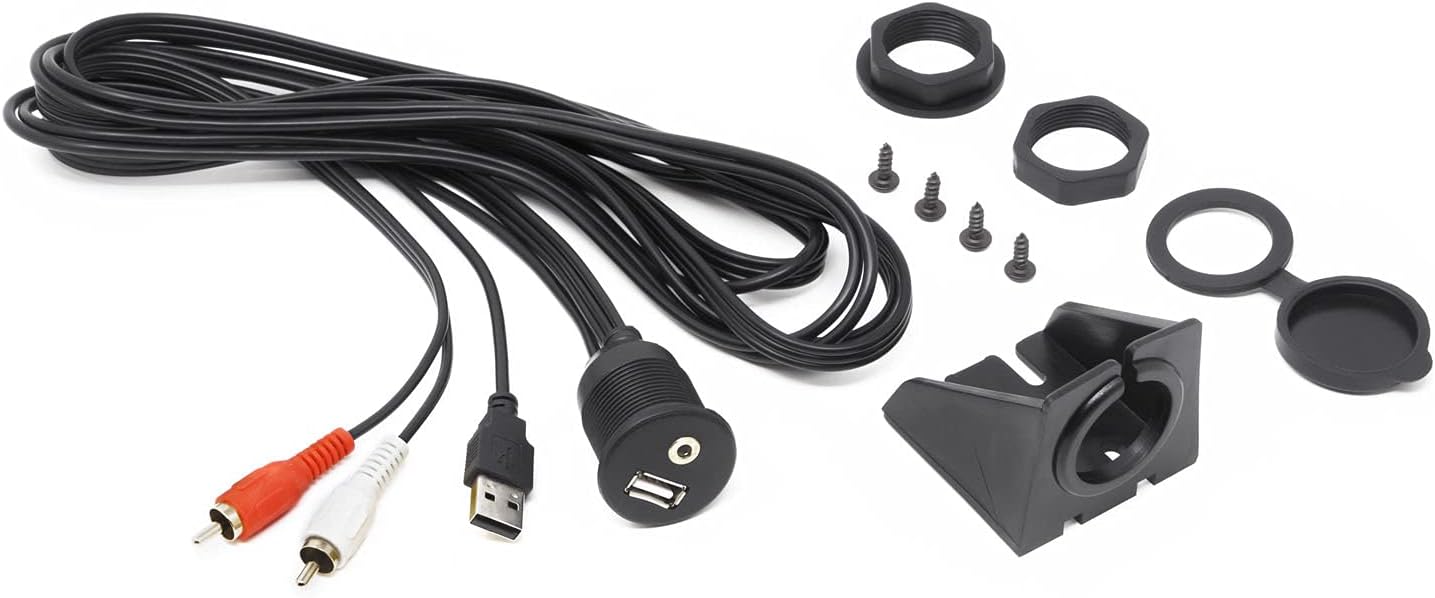
ചിത്രം 1: All components included with the Hertz HMA-USB-AUX-in 2 Meter Extension Cable. This image displays the coiled 2-meter cable, the integrated USB and 3.5mm AUX flush-mount port, a USB-A male connector, red and white RCA male connectors, a flush-mount retaining nut, an angled mounting bracket, four mounting screws, and a rubber protective cap.
സജ്ജീകരണവും ഇൻസ്റ്റാളേഷനും
Before beginning installation, ensure the power to your audio system is turned off to prevent damage.
- മൗണ്ടിംഗ് ലൊക്കേഷൻ തിരഞ്ഞെടുക്കുക: Select a suitable location for the flush-mount USB/AUX port. Consider accessibility, protection from elements, and cable routing. Ensure there is sufficient space behind the mounting surface for the cable and connectors.
- Prepare Mounting Hole (Flush Mount): If flush-mounting, use a hole saw to create a circular opening of the appropriate diameter (refer to specifications for exact size) in the chosen surface. Carefully deburr the edges of the hole.
- Install Flush-Mount Port: Insert the integrated USB/AUX port through the prepared hole from the front. Secure it from the rear with the provided retaining nut, tightening it firmly but without over-tightening.
- Install with Angled Bracket (Optional): Alternatively, if flush-mounting is not desired or possible, use the angled mounting bracket. Secure the bracket to a flat surface using the provided screws. Then, insert the integrated USB/AUX port into the bracket and secure it with its retaining nut.
- റൂട്ട് കേബിളുകൾ: Carefully route the USB-A and RCA cables from the back of the flush-mount port to your Hertz HMR 20 or HMR 10 marine receiver. Avoid sharp bends, pinching, or routing near heat sources or moving parts.
- USB ബന്ധിപ്പിക്കുക: Plug the USB-A male connector into the USB input port on your Hertz HMR 20 or HMR 10 receiver.
- Connect AUX: Plug the red and white RCA male connectors into the corresponding AUX input ports (typically labeled "AUX IN" or similar) on your Hertz HMR 20 or HMR 10 receiver. Ensure correct polarity (red to right, white to left).
- സുരക്ഷിത കണക്ഷനുകൾ: എല്ലാ കണക്ഷനുകളും സുരക്ഷിതമാണെന്ന് ഉറപ്പാക്കുക.
- Apply Protective Cap: Place the rubber protective cap over the flush-mount port when not in use to protect against dust and moisture.
പ്രവർത്തന നിർദ്ദേശങ്ങൾ
Once installed, the HMA-USB-AUX-in cable provides convenient access to your receiver's USB and auxiliary inputs.
- USB പോർട്ട് ഉപയോഗിക്കുന്നത്:
- Connect a USB storage device (e.g., flash drive) containing compatible audio files to the USB port for media playback through your receiver.
- The USB port can also be used for charging compatible devices, depending on the power output capabilities of your connected receiver.
- Refer to your Hertz HMR 20 or HMR 10 receiver's manual for specific instructions on USB media playback and device compatibility.
- Using the AUX-in Port:
- Connect an external audio source (e.g., smartphone, MP3 player) using a standard 3.5mm audio cable to the AUX-in port.
- Select the "AUX" input source on your Hertz HMR 20 or HMR 10 receiver to listen to audio from the connected device.
- Adjust the volume on both the external device and the receiver for optimal sound quality.
മെയിൻ്റനൻസ്
Proper maintenance ensures the longevity and reliable performance of your extension cable.
- വൃത്തിയാക്കൽ: Periodically wipe the flush-mount port and cable with a soft, damp തുണി. കഠിനമായ രാസവസ്തുക്കളോ ഉരച്ചിലുകളുള്ള ക്ലീനറുകളോ ഉപയോഗിക്കുന്നത് ഒഴിവാക്കുക.
- സംരക്ഷണം: Always use the provided rubber protective cap over the USB/AUX port when it is not in use to prevent ingress of dust, dirt, and moisture, especially in marine environments.
- കേബിൾ പരിശോധന: Regularly inspect the cable for any signs of wear, cuts, or damage. If damage is observed, discontinue use and consider replacement.
- കണക്ഷൻ പരിശോധന: Ensure all connections to the receiver remain secure and free from corrosion.
ട്രബിൾഷൂട്ടിംഗ്
If you encounter issues with your HMA-USB-AUX-in extension cable, refer to the following common problems and solutions:
| പ്രശ്നം | സാധ്യമായ കാരണം | പരിഹാരം |
|---|---|---|
| No audio from AUX input. |
|
|
| USB device not recognized or not playing. |
|
|
| Device not charging via USB. |
|
|
സ്പെസിഫിക്കേഷനുകൾ
- മോഡൽ: HMA-USB-AUX-in
- കേബിൾ നീളം: 2 മീറ്റർ (ഏകദേശം 6.5 അടി)
- Connectors (Input Side): USB-A Male, RCA Male (Red/White)
- Connectors (Output Side): Integrated Flush-Mount USB-A Female, 3.5mm AUX Female
- അനുയോജ്യത: Optimized for Hertz HMR 20 and HMR 10 marine receivers.
- മൗണ്ടിംഗ് ഓപ്ഷനുകൾ: Flush-mount or surface-mount with angled bracket.
വാറൻ്റിയും പിന്തുണയും
For warranty information, technical support, or service inquiries regarding your Hertz HMA-USB-AUX-in extension cable, please refer to the warranty card included with your product or visit the official Hertz website. You may also contact your authorized Hertz dealer for assistance.
Hertz Official Webസൈറ്റ്: www.hertzaudiovideo.com