
1. ആമുഖം
This manual provides essential instructions for setting up, operating, and maintaining your Zeblaze NEO Waterproof Sport Smart Watch. Please read this manual thoroughly before using the device to ensure proper function and longevity.
2. പാക്കേജ് ഉള്ളടക്കം
നിങ്ങളുടെ ഉൽപ്പന്ന പാക്കേജിൽ എല്ലാ ഇനങ്ങളും ഉണ്ടെന്ന് ഉറപ്പാക്കുക:
- Zeblaze NEO Smart Watch
- ലെതർ സ്ട്രോപ്പുകൾ
- ചാർജിംഗ് കേബിൾ
- ഉപയോക്തൃ മാനുവൽ (ഈ പ്രമാണം)
3. ഉൽപ്പന്നം കഴിഞ്ഞുview
The Zeblaze NEO features a 1.54-inch IPS color touch display and is designed for sport and daily use. It includes a heart-rate sensor, proximity sensor, and accelerometer sensor for comprehensive tracking.

ചിത്രം 1: മുൻഭാഗം view of the Zeblaze NEO Smart Watch, showing the display with time and activity indicators.
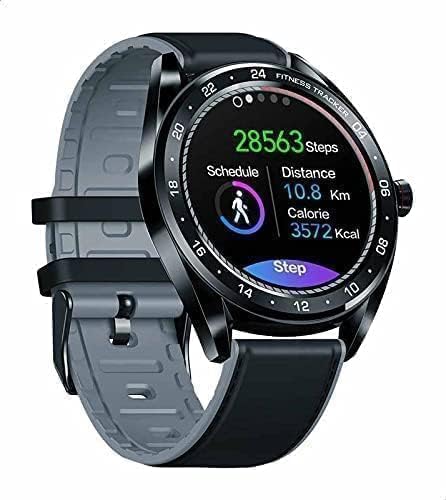
ചിത്രം 2: ആംഗിൾഡ് view of the Zeblaze NEO Smart Watch, highlighting the fitness tracking interface with steps, distance, and calories.
പ്രധാന ഘടകങ്ങൾ:
- ഡിസ്പ്ലേ: 1.54 inches IPS color touch display screen (240 x 240 pixels).
- സെൻസറുകൾ: Heart-rate sensor, proximity sensor, accelerometer sensor.
- സ്ട്രാപ്പ്: Leather straps, adjustable for wrist sizes 135 - 230 mm.
- ഫിസിക്കൽ ബട്ടൺ(കൾ): (Typically a side button for power/menu, specific function may vary)
4. സജ്ജീകരണം
4.1 ഉപകരണം ചാർജ് ചെയ്യുന്നു
- Connect the charging cable to the charging port on the back of the watch.
- Plug the other end of the charging cable into a USB power adapter (5V/1A recommended) or a computer's USB port.
- വാച്ച് ഡിസ്പ്ലേ ചാർജിംഗ് നില സൂചിപ്പിക്കും. പൂർണ്ണമായി ചാർജ് ചെയ്യാൻ സാധാരണയായി ഏകദേശം 2 മണിക്കൂർ എടുക്കും.
- ബാറ്ററി ശേഷി 180 mAh ആണ്.
4.2 Installing the Companion Application
To unlock the full functionality of your Zeblaze NEO, you need to install the official companion application on your smartphone. ഇതിനായി തിരയുക "Zeblaze Fit" or a similar official application in your device's app store.
- Compatible with Android 4.4 or iOS 8.0 and above.
4.3 നിങ്ങളുടെ സ്മാർട്ട്ഫോണുമായി ജോടിയാക്കൽ
- നിങ്ങളുടെ സ്മാർട്ട്ഫോണിന്റെ ബ്ലൂടൂത്ത് പ്രവർത്തനക്ഷമമാക്കിയിട്ടുണ്ടെന്ന് ഉറപ്പാക്കുക.
- Open the Zeblaze companion application on your smartphone.
- Follow the in-app instructions to search for and connect to your Zeblaze NEO device. The watch uses Bluetooth version 4.0.
- നിങ്ങളുടെ വാച്ചിലും സ്മാർട്ട്ഫോണിലും ജോടിയാക്കൽ അഭ്യർത്ഥന സ്ഥിരീകരിക്കുക.
5. പ്രവർത്തന നിർദ്ദേശങ്ങൾ
5.1 അടിസ്ഥാന നാവിഗേഷൻ
- ടച്ച് സ്ക്രീൻ: മെനുകളിലൂടെയും സവിശേഷതകളിലൂടെയും നാവിഗേറ്റ് ചെയ്യാൻ ഇടത്തേക്ക്/വലത്തേക്ക്, മുകളിലേക്കും താഴേക്കും സ്വൈപ്പ് ചെയ്യുക. തിരഞ്ഞെടുക്കാൻ ടാപ്പ് ചെയ്യുക.
- സൈഡ് ബട്ടൺ: സ്ക്രീൻ ഉണർത്താനോ ഹോം സ്ക്രീനിലേക്ക് മടങ്ങാനോ പ്രധാന മെനു ആക്സസ് ചെയ്യാനോ അമർത്തുക.
5.2 ഹൃദയമിടിപ്പ് നിരീക്ഷണം
The Zeblaze NEO is equipped with a heart-rate sensor. To measure your heart rate:
- വാച്ച് നിങ്ങളുടെ കൈത്തണ്ടയിൽ നന്നായി ധരിച്ചിട്ടുണ്ടെന്ന് ഉറപ്പാക്കുക.
- Navigate to the heart rate monitoring interface on the watch.
- The watch will automatically begin measuring your heart rate.
- For continuous monitoring, enable the feature in the companion app settings.
5.3 പ്രവർത്തന ട്രാക്കിംഗ്
Utilize the accelerometer sensor to track your daily steps, distance, and calories burned. Access these metrics directly on the watch or through the companion app for detailed historical data.
5.4 അറിയിപ്പുകൾ
Once paired with your smartphone, the watch can display notifications for calls, messages, and other applications. Configure notification settings within the companion application.
6. പരിപാലനം
6.1 ശുചീകരണവും പരിചരണവും
- വാച്ച് സ്ക്രീനും ബോഡിയും ഒരു സോഫ്റ്റ്, ഡി ക്ലീനർ ഉപയോഗിച്ച് തുടയ്ക്കുക.amp തുണി.
- കഠിനമായ രാസവസ്തുക്കളോ ഉരച്ചിലുകളോ ഉപയോഗിക്കുന്നത് ഒഴിവാക്കുക.
- For leather straps, clean with a specialized leather cleaner and avoid prolonged exposure to water.
6.2 ജല പ്രതിരോധം (IP67)
The Zeblaze NEO has an IP67 waterproof rating. This means it is protected from dust and can withstand immersion in water up to 1 meter for up to 30 minutes. It is suitable for daily use, such as hand washing or light rain.
പ്രധാനപ്പെട്ടത്: IP67 rating does not guarantee protection against hot water, steam, or prolonged immersion. Avoid wearing the watch while showering, swimming, or diving.
7. പ്രശ്നപരിഹാരം
പൊതുവായ പ്രശ്നങ്ങളും പരിഹാരങ്ങളും:
- വാച്ച് ഓണാകുന്നില്ല: വാച്ച് പൂർണ്ണമായും ചാർജ് ചെയ്തിട്ടുണ്ടെന്ന് ഉറപ്പാക്കുക. കുറഞ്ഞത് 30 മിനിറ്റെങ്കിലും ചാർജറുമായി ബന്ധിപ്പിക്കുക.
- സ്മാർട്ട്ഫോണുമായി ജോടിയാക്കാൻ കഴിയില്ല:
- നിങ്ങളുടെ ഫോണിൽ ബ്ലൂടൂത്ത് പ്രവർത്തനക്ഷമമാക്കിയിട്ടുണ്ടെന്ന് ഉറപ്പാക്കുക.
- വാച്ച് നിങ്ങളുടെ ഫോണിന്റെ പരിധിയിലാണെന്ന് ഉറപ്പാക്കുക.
- വാച്ചും ഫോണും റീസ്റ്റാർട്ട് ചെയ്യുക.
- Try unpairing and re-pairing through the companion app.
- കൃത്യമല്ലാത്ത ഹൃദയമിടിപ്പ് വായനകൾ:
- വാച്ച് നിങ്ങളുടെ കൈത്തണ്ടയിൽ നന്നായി ധരിക്കുന്നുണ്ടെന്ന് ഉറപ്പാക്കുക, അധികം ഇറുകിയതോ അധികം അയഞ്ഞതോ അല്ല.
- വാച്ചിന്റെ പിൻഭാഗത്തുള്ള സെൻസർ വൃത്തിയാക്കുക.
- അളക്കുന്ന സമയത്ത് അമിതമായ ചലനം ഒഴിവാക്കുക.
- അറിയിപ്പുകൾ ദൃശ്യമാകുന്നില്ല:
- നിങ്ങളുടെ ഫോണിലെ കമ്പാനിയൻ ആപ്പിനുള്ള അറിയിപ്പ് അനുമതികൾ പരിശോധിക്കുക.
- വാച്ച് ബ്ലൂടൂത്ത് വഴി ബന്ധിപ്പിച്ചിട്ടുണ്ടെന്ന് ഉറപ്പാക്കുക.
- കമ്പാനിയൻ ആപ്പിലെ അറിയിപ്പ് ക്രമീകരണങ്ങൾ പരിശോധിച്ചുറപ്പിക്കുക.
If problems persist, refer to the support section of the companion application or contact Zeblaze customer support.
8 സ്പെസിഫിക്കേഷനുകൾ
| ഫീച്ചർ | വിശദാംശങ്ങൾ |
|---|---|
| ബ്രാൻഡ് | സെബ്ലേസ് |
| മോഡൽ നമ്പർ | NEO |
| അളവുകൾ | 46.5 x 46.5 x 12 മിമി |
| ഭാരം | 56 gm (watch only), 154 g (package) |
| ബാൻഡ് വലിപ്പം | 135 - 230 മി.മീ. |
| ബാൻഡ് മെറ്റീരിയൽ | തുകൽ പട്ടകൾ |
| പ്രദർശിപ്പിക്കുക | 1.54 inches IPS color touch display |
| റെസലൂഷൻ | 240 x 240 പിക്സലുകൾ |
| സ്ക്രീൻ വലിപ്പം | 33 മി.മീ |
| വാട്ടർപ്രൂഫ് നിരക്ക് | IP67 |
| ബാറ്ററി ശേഷി | 180 mAh |
| സെൻസറുകൾ | Heart-rate sensor, proximity sensor, accelerometer sensor |
| ബ്ലൂടൂത്ത് പതിപ്പ് | 4.0 |
| അനുയോജ്യത | Android 4.4 അല്ലെങ്കിൽ iOS 8.0-ഉം അതിനുമുകളിലും |
| ഓപ്പറേറ്റിംഗ് സിസ്റ്റം | Android Wear |
| മെമ്മറി സ്റ്റോറേജ് കപ്പാസിറ്റി | 128 MB |
| ഇനത്തിൻ്റെ ആകൃതി | വൃത്താകൃതി |
9. വാറൻ്റിയും പിന്തുണയും
For warranty information and customer support, please refer to the documentation provided with your purchase or visit the official Zeblaze webസൈറ്റ്. ഏതെങ്കിലും വാറന്റി ക്ലെയിമുകൾക്ക് നിങ്ങളുടെ വാങ്ങലിന്റെ തെളിവ് സൂക്ഷിക്കുക.
If you encounter issues not covered in this manual, please contact Zeblaze customer service for assistance.