
ആമുഖം
This manual provides detailed instructions for the installation, operation, and maintenance of your OOSSXX 4K 8MP PoE Wired Security Camera System. Please read this manual thoroughly before using the product to ensure proper setup and functionality. Keep this manual for future reference.
ഉൽപ്പന്ന സവിശേഷതകൾ
ടു-വേ ഓഡിയോ
The system supports two-way audio communication, allowing you to speak and listen through the camera. This feature enables interaction with visitors or deter unwanted individuals. The system also supports simultaneous viewing by up to 4 users.

Image: The two-way audio function allows communication with individuals near the camera via a smartphone application.
130° Ultra-Wide Angle Lens
Equipped with a 130° wide-angle lens, the cameras capture a broad field of view, minimizing blind spots and providing comprehensive surveillance of your property. This allows for detailed monitoring of large areas.

Image: A visual comparison demonstrating the extensive coverage provided by the 130° ultra-wide-angle lens compared to a standard lens.
PIR & AI Dual Detection
The system utilizes advanced PIR (Passive Infrared) and AI (Artificial Intelligence) detection to accurately identify human movement. This dual detection method significantly reduces false alarms caused by environmental factors such as leaves, clouds, animals, or insects, providing more reliable alerts.
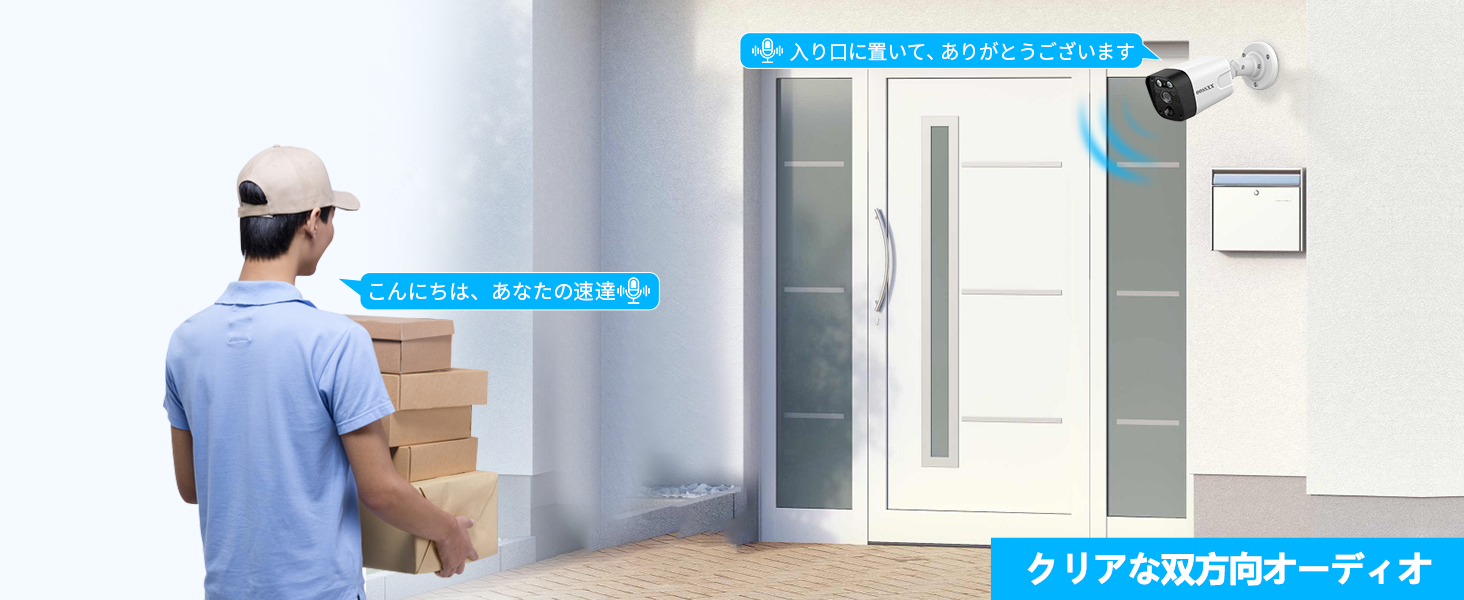
Image: An illustration showing the combined AI and PIR detection capabilities, focusing on human figures.
Plug & Play and Expandable
Installation is simplified with Plug & Play functionality. Cameras connect to the NVR using a single LAN cable, which also provides power (PoE). The system is expandable, supporting up to 8 cameras to meet your surveillance needs. Waterproof connectors on the LAN cables ensure outdoor reliability.
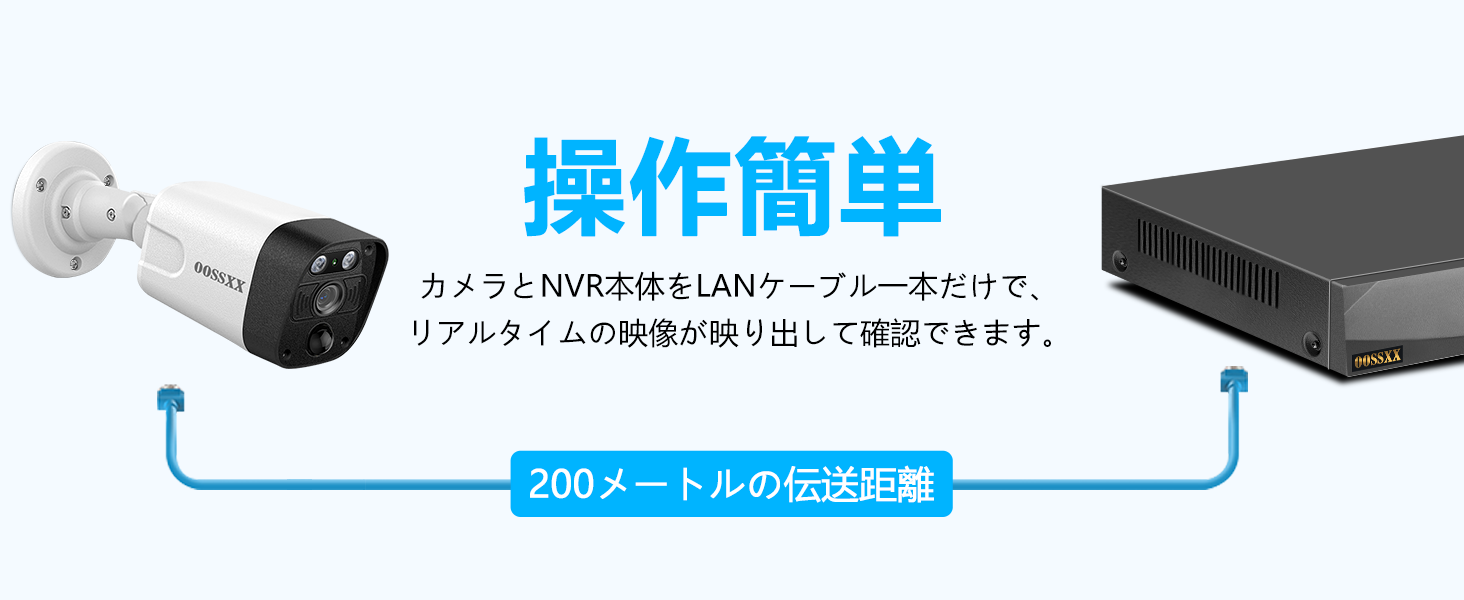
Image: The simple connection of a camera to the NVR using a single LAN cable for both data and power.
4K 8MP Ultra High Resolution
The cameras record in 4K (3264x2488) resolution, providing clear and detailed images for enhanced security. The IR-LED system automatically activates infrared mode in low-light conditions, allowing visibility up to 24 meters at night.

ചിത്രം: ഒരു മുൻ കാമുകൻample of the high-definition 4K 8MP video quality, highlighting clear image details.
Free APP & No Monthly Fees
Access your camera system remotely via the free 'Honestview' or 'Eseecloud' app, available on iOS and Android devices. There are no monthly subscription fees required to use the app's features.

Image: Remote access to the camera system via a smartphone app, showing compatibility with various devices.
Durable and Weatherproof Design
The cameras feature a robust aluminum housing with an IP66 waterproof rating, ensuring reliable operation in various weather conditions and temperatures ranging from -20°C to 60°C. The waterproof connectors further enhance outdoor durability.
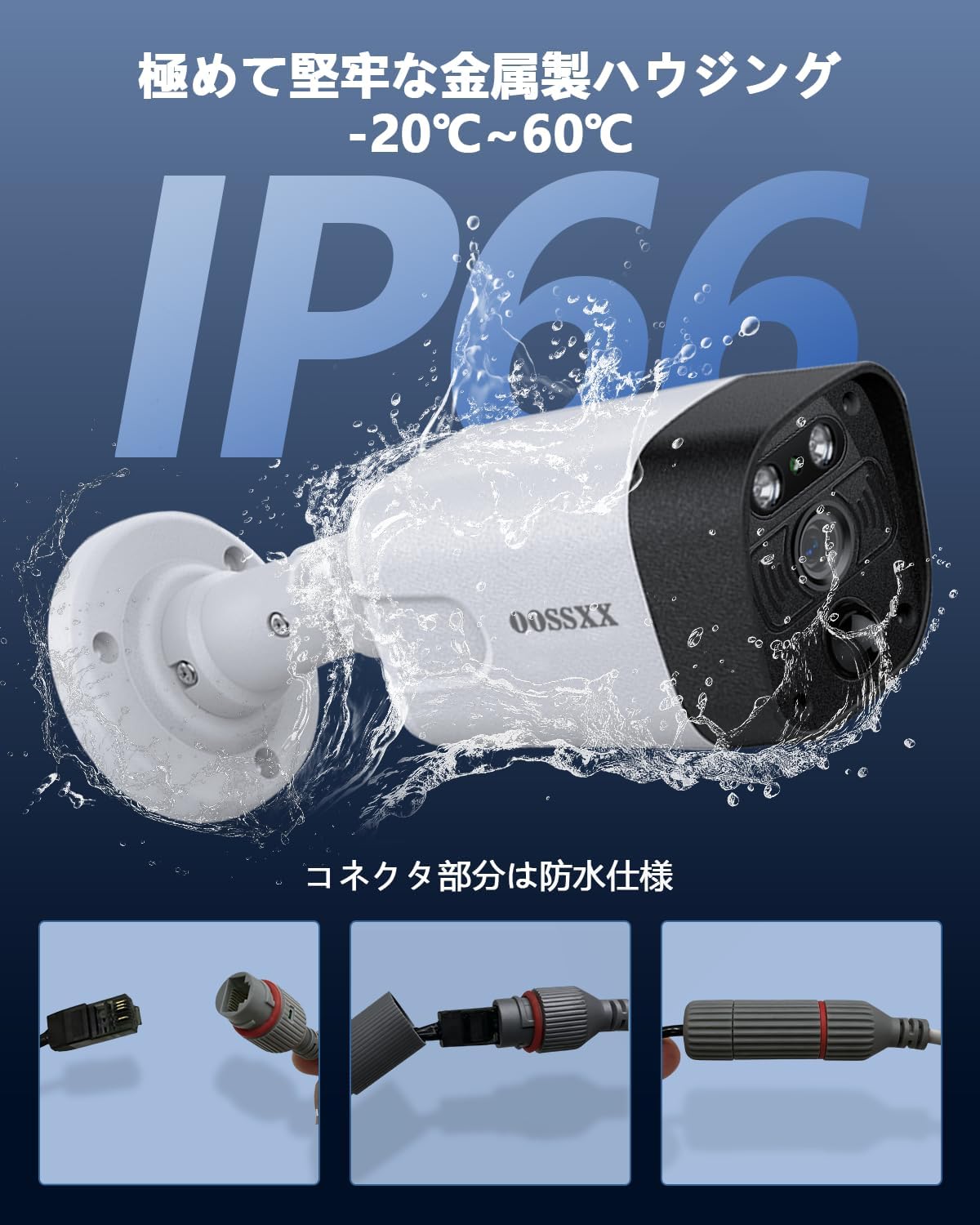
Image: The camera's IP66 waterproof rating and rugged metal construction, suitable for outdoor use.
H.265+ Video Compression
The system utilizes H.265+ video compression technology, which efficiently compresses video files without compromising quality. This allows for longer recording times and reduces storage space requirements compared to older compression standards like H.264.

Image: A visual representation of the efficiency of H.265+ video compression.
പാക്കേജ് ഉള്ളടക്കം
എല്ലാ ഇനങ്ങളും ഉണ്ടെന്ന് ഉറപ്പാക്കാൻ, രസീത് ലഭിക്കുമ്പോൾ പാക്കേജ് ഉള്ളടക്കങ്ങൾ പരിശോധിക്കുക:
- 1x 4K 8MP 8-Channel Network Video Recorder (NVR) with 6TB HDD
- 4x 4K 8MP Cameras
- 4x 18.2-meter LAN cables for cameras
- 1x ഇൻസ്ട്രക്ഷൻ മാനുവൽ
- 1x Warning Label
- 4x Camera Mounting Screw Packs
- 1x NVR Power Adapter (48V2A)
- 1x റിമോട്ട് കൺട്രോൾ
- 1x യുഎസ്ബി മൗസ്
- 1x 1-meter HDMI Cable
- 1x 1-meter LAN Cable
സജ്ജീകരണ ഗൈഡ്
ഘട്ടം 1: ഘടകങ്ങൾ അൺപാക്ക് ചെയ്ത് തിരിച്ചറിയുക
Carefully remove all items from the packaging. Verify that all components listed in the 'Package Contents' section are present and undamaged.
Step 2: Connect Cameras to NVR
Connect each camera to an available PoE port on the NVR using the provided LAN cables. The PoE ports supply both power and data to the cameras. Ensure the waterproof connectors are properly sealed if installing outdoors.
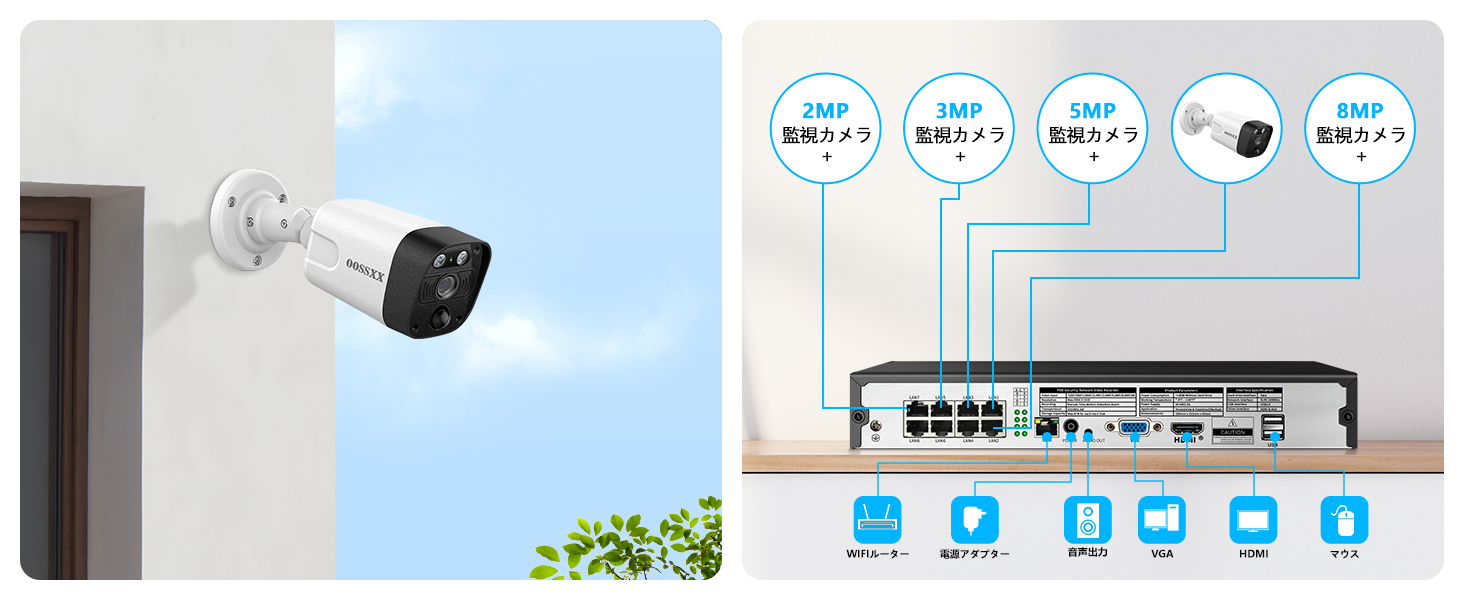
ചിത്രം: ഒരു ഓവർview of the NVR's rear panel with connection points for cameras, monitor, and other peripherals.
Step 3: Connect NVR to Monitor and Power
- Connect the NVR to a monitor using the HDMI cable.
- NVR-ലെ ഒരു USB പോർട്ടിലേക്ക് USB മൗസ് ബന്ധിപ്പിക്കുക.
- Connect the NVR power adapter to the NVR and then to a power outlet. The system will power on automatically.
Step 4: Initial System Configuration
Follow the on-screen prompts on the connected monitor to complete the initial setup, including setting up a password, time zone, and network settings. The NVR should automatically detect and display the connected cameras.
Step 5: Mobile App Setup
- Download the 'Honestview' or 'Eseecloud' app from your smartphone's app store.
- ഒരു അക്കൗണ്ട് രജിസ്റ്റർ ചെയ്ത് ലോഗിൻ ചെയ്യുക.
- Add your NVR device to the app by scanning the QR code displayed on the NVR's monitor or by manually entering the device ID.
- ചേർത്തുകഴിഞ്ഞാൽ, നിങ്ങൾക്ക് കഴിയും view live feeds, access recordings, and configure settings remotely.
പ്രവർത്തന നിർദ്ദേശങ്ങൾ
തത്സമയം View പ്രവേശനം
On the NVR, use the USB mouse to navigate the interface and select 'Live View' to see real-time footage from all connected cameras. Through the mobile app, select your device to view തത്സമയ സ്ട്രീമുകൾ.
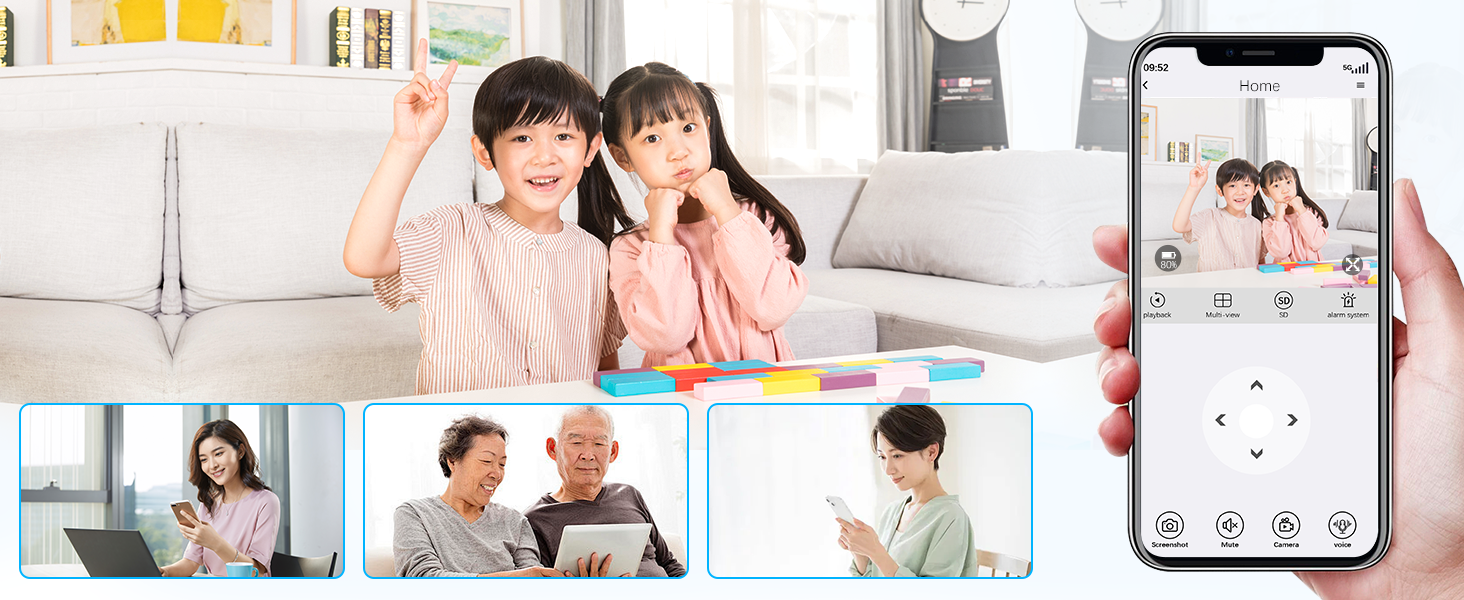
Image: Remote viewing of live camera feeds on a mobile device.
Two-Way Audio Function
To use two-way audio, open the mobile app, select the desired camera's live view, and tap the microphone icon to speak. Tap the speaker icon to listen to audio from the camera's location.
മോഷൻ ഡിറ്റക്ഷൻ ക്രമീകരണങ്ങൾ
Access the NVR's menu or the mobile app settings to configure motion detection. You can define specific detection zones to monitor critical areas and adjust sensitivity levels to prevent unwanted alerts. The PIR & AI dual detection helps in reducing false alarms.

Image: Customizing motion detection areas to focus on specific regions of interest.
പ്ലേബാക്ക് റെക്കോർഡിംഗ്
On the NVR, select 'Playback' from the main menu to review രേഖപ്പെടുത്തി footage. You can search by date, time, and event type. Through the mobile app, navigate to the 'Events' or 'Playback' section to access cloud or local recordings.
റിമോട്ട് ആക്സസ്
Once the mobile app is configured, you can remotely monitor your property from anywhere with an internet connection. This includes live viewing, playback of recordings, and receiving real-time alerts.
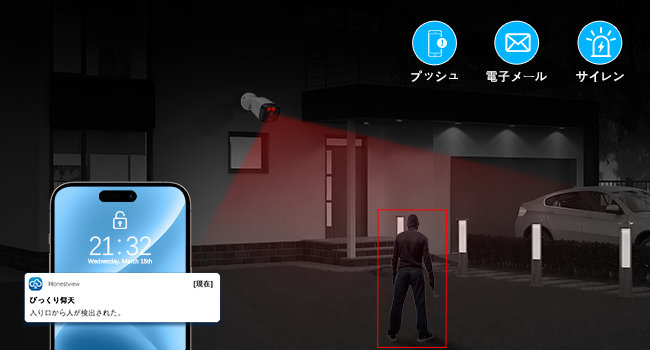
ചിത്രം: ഒരു മുൻ കാമുകൻampഒരു സ്മാർട്ട്ഫോണിൽ ലഭിക്കുന്ന തത്സമയ അലേർട്ട് അറിയിപ്പിന്റെ le.
മെയിൻ്റനൻസ്
- വൃത്തിയാക്കൽ: ക്യാമറ ലെൻസുകൾ പതിവായി സോഫ്റ്റ്, ഡി ക്ലീനർ ഉപയോഗിച്ച് വൃത്തിയാക്കുക.amp വ്യക്തമായ ചിത്ര നിലവാരം ഉറപ്പാക്കാൻ തുണി ഉപയോഗിക്കുക. കഠിനമായ രാസവസ്തുക്കൾ ഉപയോഗിക്കരുത്.
- ഫേംവെയർ അപ്ഡേറ്റുകൾ: Check the OOSSXX official website or the mobile app periodically for firmware updates. Keeping your system updated ensures optimal performance and security.
- സ്റ്റോറേജ് മാനേജ്മെന്റ്: NVR-ന്റെ 6TB HDD നൽകുന്നത് ample storage. Configure recording settings (e.g., continuous, motion-triggered) to manage storage efficiently. The system will automatically overwrite the oldest footagഡിസ്ക് നിറയുമ്പോൾ.
ട്രബിൾഷൂട്ടിംഗ്
| ഇഷ്യൂ | സാധ്യമായ കാരണം | പരിഹാരം |
|---|---|---|
| മോണിറ്ററിൽ ചിത്രമില്ല | Loose HDMI cable, NVR not powered, camera not connected. | Check HDMI connection, ensure NVR is powered, verify camera LAN connections. |
| ക്യാമറയിൽ നിന്ന് ഓഡിയോ ഇല്ല. | Microphone disabled, volume too low, network issue. | Enable microphone in settings, increase volume, check network stability. |
| പതിവ് തെറ്റായ അലാറങ്ങൾ | High sensitivity, detection zone too wide, environmental factors. | Adjust motion detection sensitivity, refine detection zones to exclude irrelevant areas. |
| Cannot connect to mobile app | Incorrect device ID, NVR not connected to internet, app version outdated. | Verify device ID, ensure NVR has internet access, update app to latest version. |
| Night vision unclear | Dirty lens, IR lights obstructed, insufficient ambient light. | Clean camera lens, ensure no obstructions blocking IR lights, consider adding external light if needed. |
സാങ്കേതിക സവിശേഷതകൾ
| ഫീച്ചർ | സ്പെസിഫിക്കേഷൻ |
|---|---|
| ബ്രാൻഡ് | OOSSXX |
| മോഡൽ നമ്പർ | OSX-JPPOE10-W8004-6TB |
| ശുപാർശ ചെയ്യുന്ന ഉപയോഗം | Home Security, Night Vision |
| കണക്റ്റിവിറ്റി ടെക്നോളജി | വയേർഡ് (PoE) |
| പ്രത്യേക സവിശേഷതകൾ | 130° Ultra-Wide Angle, 4K 8MP Resolution, Motion Sensor, Two-Way Audio, Free APP |
| അനുയോജ്യമായ ഉപകരണങ്ങൾ | Smartphones, Tablets, TVs, Desktops, Laptops |
| പവർ ഉറവിടം | എസി/ഡിസി |
| വീഡിയോ ക്യാപ്ചർ റെസല്യൂഷൻ | 3264×2488 (8 Million Pixels) |
| നിറം | 4K 8MP PoE 4-Camera White (6TB HDD Built-in) |
| ഇനങ്ങളുടെ എണ്ണം | 1 സെറ്റ് |
| ഉൽപ്പന്ന മെറ്റീരിയൽ | അലുമിനിയം |
| ആകൃതി | Straight (Bullet Camera) |
| വാട്ടർപ്രൂഫ് റേറ്റിംഗ് | IP66 |
| മാനേജ്മെൻ്റ് രീതി | റിമോട്ട് |
| വാല്യംtage | 110 വോൾട്ട് (എസി) |
| വാട്ട്tage | 60 W |
| ബാറ്ററികൾ ആവശ്യമാണ് | ഇല്ല |
| ഫ്രെയിം റേറ്റ് | 15 fps |
| ഫീൽഡ് View | 130 ഡിഗ്രി |
| ഉൽപ്പന്ന അളവുകൾ | 39 x 28 x 19 സെ.മീ |
| ഉൽപ്പന്ന ഭാരം | 6.1 കിലോഗ്രാം |
| ചാനലുകളുടെ എണ്ണം | 8 |
| വീഡിയോ ക്യാപ്ചർ ഫോർമാറ്റ് | MPEG H (H.265+) |
| നൈറ്റ് വിഷൻ റേഞ്ച് | 20 മീറ്റർ |
| നൈറ്റ് വിഷൻ തരം | 845nm 2 Infrared Dot Matrix Lamps Super Night Vision |
വാറൻ്റിയും ഉപഭോക്തൃ പിന്തുണയും
OOSSXX is committed to providing high-quality products and excellent customer service. We conduct strict quality control throughout manufacturing and inspection processes.
വാറൻ്റി
ഈ ഉൽപ്പന്നം എ 12 മാസത്തെ ഗുണനിലവാര വാറന്റി വാങ്ങിയ തീയതി മുതൽ. വാറന്റി ക്ലെയിമുകൾക്കായി നിങ്ങളുടെ വാങ്ങിയതിന്റെ തെളിവ് സൂക്ഷിക്കുക.

Image: Warranty information and contact details.
ഉപഭോക്തൃ പിന്തുണ
If you have any questions, concerns, or encounter any issues with your OOSSXX security camera system, please do not hesitate to contact our customer support team. We offer Japanese language support via email.
- ഇമെയിൽ: jp-info@oossxx.com (24 മണിക്കൂറിനുള്ളിൽ മറുപടി)
- Webസൈറ്റ്: jp.oossxx.com
- LINE Service: https://lin.ee/K941p57

Image: QR code for quick access to OOSSXX LINE customer service.
Our service center in Japan is located at: Rose Avenue Inage Tendai 1F, 5-8-9 Tendai, Inage-ku, Chiba City, Chiba Prefecture.