
1. ആമുഖം
This manual provides instructions for the safe and effective operation of your JYX Karaoke Machine, Model JYX-82. Please read this manual thoroughly before using the product and retain it for future reference.

Figure 1: JYX Karaoke Machine JYX-82
The JYX-82 is a portable PA system designed for karaoke, music playback, and public address. It features Bluetooth 5.0 connectivity, TWS (True Wireless Stereo) function, FM radio, recording capabilities, and supports various input methods including USB, TF card, and Aux-in. It comes with two UHF wireless microphones for enhanced vocal performance.
2. ഉൽപ്പന്നം കഴിഞ്ഞുview
2.1 ബോക്സിൽ എന്താണുള്ളത്

ചിത്രം 2: പാക്കേജ് ഉള്ളടക്കം
- JYX Karaoke Machine (JYX-82)
- 2 UHF വയർലെസ് മൈക്രോഫോണുകൾ
- പവർ അഡാപ്റ്റർ/ചാർജർ
- ഷോൾഡർ സ്ട്രാപ്പ്
- റിമോട്ട് കൺട്രോൾ
- ഉപയോക്തൃ മാനുവൽ
2.2 പ്രധാന സവിശേഷതകൾ

Figure 3: Feature Overview
- കരോക്കെ പ്രവർത്തനം: Integrated system for vocal performance.
- വോയ്സ് ചേഞ്ചർ: Multiple voice effects for entertainment.
- എഫ്എം റേഡിയോ: Built-in tuner for radio stations.
- ശബ്ദ റെക്കോർഡിംഗ്: Record audio directly to a USB drive or TF card.
- ബ്ലൂടൂത്ത് 5.0: അനുയോജ്യമായ ഉപകരണങ്ങളിൽ നിന്നുള്ള വയർലെസ് ഓഡിയോ സ്ട്രീമിംഗ്.
- TWS (ട്രൂ വയർലെസ് സ്റ്റീരിയോ): Connect two JYX-82 units for stereo sound.
- ഒന്നിലധികം ഇൻപുട്ടുകൾ: Supports USB, TF card, and Aux-in.
- പോർട്ടബിൾ ഡിസൈൻ: Compact with a handle and shoulder strap for easy transport.
- നീണ്ട ബാറ്ററി ലൈഫ്: 5200mAh battery provides extended playback.
3. സജ്ജീകരണം
3.1 ഉപകരണം ചാർജ് ചെയ്യുന്നു
- Connect the provided power adapter to the DC 5V charging port on the karaoke machine.
- ഒരു സാധാരണ മതിൽ let ട്ട്ലെറ്റിലേക്ക് അഡാപ്റ്റർ പ്ലഗ് ചെയ്യുക.
- The charging indicator light will illuminate. The device is fully charged when the light changes color or turns off (refer to specific indicator behavior in your manual).
3.2 പവർ ഓൺ/ഓഫ്
- To power on, press and hold the Power button on the control panel until the display illuminates.
- To power off, press and hold the Power button again until the display turns off.
3.3 മൈക്രോഫോൺ സജ്ജീകരണം
- Insert 2 AA batteries into each wireless microphone (batteries may be included).
- Turn on the microphone using its power switch. The microphone should automatically pair with the karaoke machine. If not, refer to the microphone pairing instructions in the full manual.
4. പ്രവർത്തന നിർദ്ദേശങ്ങൾ
4.1 മോഡ് തിരഞ്ഞെടുക്കൽ
Press the 'MODE' button on the control panel or remote control to switch between different input modes: Bluetooth, FM Radio, USB, TF Card, and AUX.
4.2 ബ്ലൂടൂത്ത് കണക്ഷൻ
- Turn on the JYX Karaoke Machine.
- Press the 'MODE' button until "BLUE" appears on the display, indicating Bluetooth mode.
- നിങ്ങളുടെ മൊബൈൽ ഉപകരണത്തിൽ, ബ്ലൂടൂത്ത് പ്രവർത്തനക്ഷമമാക്കി ലഭ്യമായ ഉപകരണങ്ങൾക്കായി തിരയുക.
- Select "JYX-82BT" from the list to pair. A confirmation tone will sound upon successful connection.
Video 1: Demonstrating Bluetooth connection and use of wireless microphone with the JYX Karaoke Machine.
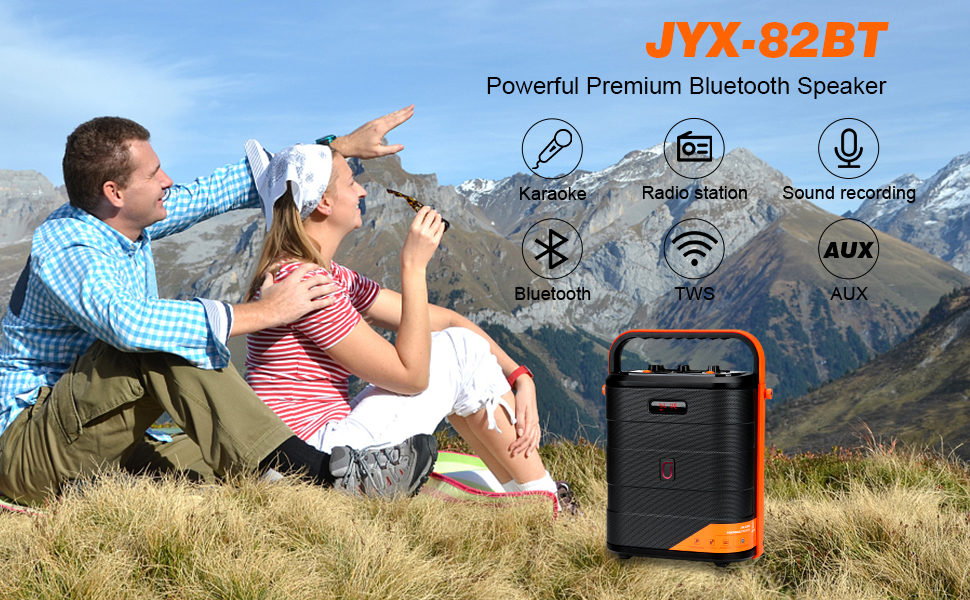
Figure 4: Connecting via Bluetooth
4.3 USB/TF കാർഡ് പ്ലേബാക്ക്
- Insert a USB flash drive or TF card into the corresponding slot.
- The machine will automatically switch to USB/TF card mode and begin playing audio files.
- Use the Play/Pause, Next, and Previous buttons on the control panel or remote to manage playback.
4.4 AUX-in Mode
- Connect an external audio device (e.g., smartphone, tablet, MP3 player) to the AUX-in port using a 3.5mm audio cable.
- Press the 'MODE' button until "AUX" appears on the display.
- Audio will now play through the karaoke machine from your connected device.
4.5 എഫ്എം റേഡിയോ പ്രവർത്തനം
- Press the 'MODE' button to select FM radio mode.
- ലഭ്യമായ എഫ്എം സ്റ്റേഷനുകൾ സ്വയമേവ സ്കാൻ ചെയ്ത് സംരക്ഷിക്കാൻ പ്ലേ/പോസ് ബട്ടൺ അമർത്തുക.
- Use the Next and Previous buttons to navigate through saved stations.
4.6 വയർലെസ് മൈക്രോഫോൺ ഉപയോഗം
- Ensure microphones are powered on and paired.
- Adjust microphone volume using the dedicated knob on the control panel.
- The microphones feature UHF technology for stable signal transmission.
4.7 TWS (ട്രൂ വയർലെസ് സ്റ്റീരിയോ) പ്രവർത്തനം
To connect two JYX-82 units for a stereo experience:
- Ensure both JYX-82 machines are powered on and in Bluetooth mode, but not connected to any device.
- On one of the machines, press and hold the TWS button (refer to the control panel diagram in the full manual for exact location).
- The two machines will automatically pair with each other. A confirmation tone will sound.
- Once paired, connect your mobile device to one of the JYX-82 units via Bluetooth. Audio will now play in stereo through both speakers.
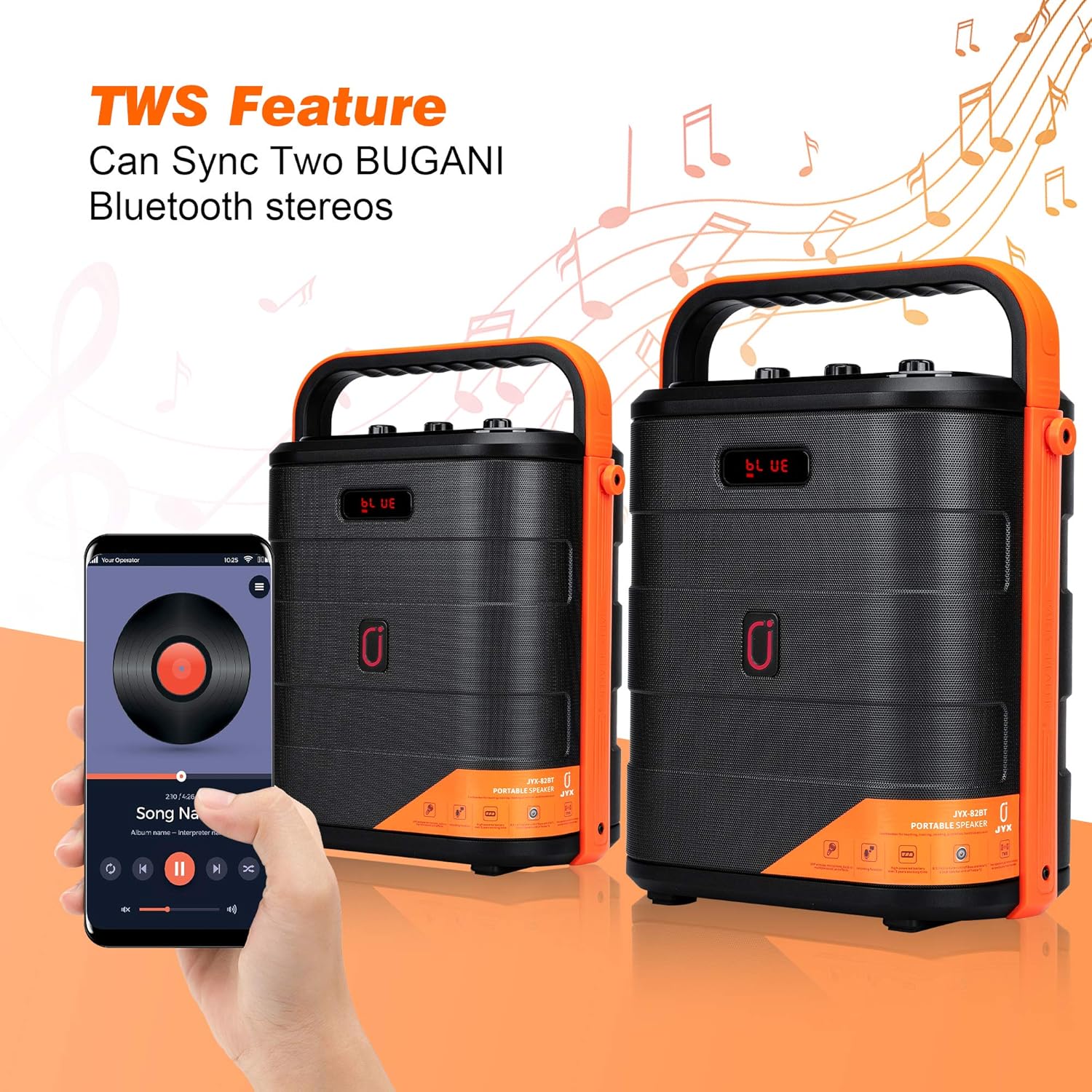
Figure 5: TWS Connection
4.8 റെക്കോർഡിംഗ് പ്രവർത്തനം
- Insert a USB flash drive or TF card into the corresponding slot.
- Press the 'REC' button on the control panel or remote control to start recording.
- Press 'REC' again to stop recording. Recordings will be saved to the inserted storage device.
4.9 Voice Changer Effects
The JYX-82 includes multiple voice changing effects for entertainment. Use the remote control to select different voice modes.

Figure 6: Remote Control with Voice Changer Options
- Press the dedicated voice effect buttons on the remote control to cycle through options such as Male, Female, Child, and Monster voices.
5. പരിപാലനം
- മൃദുവായതും ഉണങ്ങിയതുമായ തുണി ഉപയോഗിച്ച് ഉപകരണം വൃത്തിയാക്കുക. അബ്രസീവ് ക്ലീനറുകളോ ലായകങ്ങളോ ഉപയോഗിക്കരുത്.
- ഉപകരണം വെള്ളം, ഈർപ്പം, നേരിട്ടുള്ള സൂര്യപ്രകാശം എന്നിവയിൽ നിന്ന് അകറ്റി നിർത്തുക.
- ഉപയോഗത്തിലില്ലാത്തപ്പോൾ തണുത്തതും ഉണങ്ങിയതുമായ സ്ഥലത്ത് സൂക്ഷിക്കുക.
- അമിതമായി ചൂടാക്കുന്നത് തടയാൻ ഓപ്പറേഷൻ സമയത്ത് ശരിയായ വെന്റിലേഷൻ ഉറപ്പാക്കുക.
6. പ്രശ്നപരിഹാരം
| പ്രശ്നം | സാധ്യമായ കാരണം | പരിഹാരം |
|---|---|---|
| ശക്തിയില്ല | Battery depleted; Power adapter not connected. | Charge the device; Ensure power adapter is securely connected. |
| ശബ്ദമില്ല | ശബ്ദം വളരെ കുറവാണ്; തെറ്റായ ഇൻപുട്ട് മോഡ്; ഉപകരണം ജോടിയാക്കിയിട്ടില്ല (ബ്ലൂടൂത്ത്). | Increase volume; Select correct input mode; Re-pair Bluetooth device. |
| മൈക്രോഫോൺ പ്രവർത്തിക്കുന്നില്ല | Microphone off; Batteries depleted; Not paired. | Turn on microphone; Replace batteries; Refer to pairing instructions. |
| ബ്ലൂടൂത്ത് കണക്ഷൻ അസ്ഥിരമാണ് | ഉപകരണം വളരെ അകലെയാണ്; ഇടപെടൽ. | Move device closer to speaker; Avoid obstacles or other wireless devices. |
7 സ്പെസിഫിക്കേഷനുകൾ
- ബ്രാൻഡ്: JYX
- മോഡൽ നമ്പർ: ജെവൈഎക്സ്-82
- അളവുകൾ (L x W x H): 9.84 x 5.91 x 12.99 ഇഞ്ച്
- കണക്റ്റിവിറ്റി ടെക്നോളജി: AUX, ബ്ലൂടൂത്ത്, USB
- നിറം: Red (Note: Product color may vary)
- അനുയോജ്യമായ ഉപകരണങ്ങൾ: Radio, Smartphone, Tablet
- മൗണ്ടിംഗ് തരം: ടേബിൾടോപ്പ്
- ഊർജ്ജ സ്രോതസ്സ്: ബാറ്ററി പവർ
- കണക്റ്റർ തരം: Aux, USB
- ചാനലുകളുടെ എണ്ണം: 2
- ഔട്ട്പുട്ട് വാട്ട്tage: 15 വാട്ട്സ്
- അന്തർനിർമ്മിത മീഡിയ: Microphone, Remote
8. വാറൻ്റിയും പിന്തുണയും
For warranty information and customer support, please refer to the documentation included with your product packaging or visit the official JYX webസൈറ്റ്. വാറൻ്റി ക്ലെയിമുകൾക്കായി നിങ്ങളുടെ വാങ്ങൽ രസീത് സൂക്ഷിക്കുക.