
ആമുഖം
വാങ്ങിയതിന് നന്ദി.asing the Whirlpool 1.1 cu. ft. (30L) Microwave Oven, Model WM-1811B. This manual provides essential information for the safe and efficient operation, maintenance, and troubleshooting of your new appliance. Please read these instructions thoroughly before use and retain them for future reference.
പ്രധാനപ്പെട്ട സുരക്ഷാ നിർദ്ദേശങ്ങൾ
ഇലക്ട്രിക്കൽ ഉപകരണങ്ങൾ ഉപയോഗിക്കുമ്പോൾ, ഇനിപ്പറയുന്നവ ഉൾപ്പെടെ അടിസ്ഥാന സുരക്ഷാ മുൻകരുതലുകൾ പാലിക്കണം:
- ഉപകരണം ഉപയോഗിക്കുന്നതിന് മുമ്പ് എല്ലാ നിർദ്ദേശങ്ങളും വായിക്കുക.
- വാതിലോ വാതിൽ മുദ്രയോ കേടായെങ്കിൽ ഓവൻ പ്രവർത്തിപ്പിക്കരുത്.
- സ്ഫോടനത്തിന് സാധ്യതയുള്ളതിനാൽ ദ്രാവകങ്ങളോ മറ്റ് ഭക്ഷണങ്ങളോ അടച്ച പാത്രങ്ങളിൽ ചൂടാക്കരുത്.
- മതിയായ നിർദ്ദേശങ്ങൾ നൽകിയിട്ടുണ്ടെങ്കിൽ മാത്രം മേൽനോട്ടമില്ലാതെ കുട്ടികളെ അടുപ്പ് ഉപയോഗിക്കാൻ അനുവദിക്കുക.
- ഈ ഉപകരണത്തിൽ നശിപ്പിക്കുന്ന രാസവസ്തുക്കളോ നീരാവി ഉപയോഗിക്കരുത്.
- Do not use this microwave for commercial purposes. It is designed for household use only.
- പ്രവർത്തിക്കുന്നതിന് മുമ്പ് ടർടേബിളും റോളർ റിംഗും എല്ലായ്പ്പോഴും ശരിയായി സ്ഥാപിച്ചിട്ടുണ്ടെന്ന് ഉറപ്പാക്കുക.
WARNING: To reduce the risk of fire, electric shock, injury to persons or exposure to excessive microwave energy:
- വാതിൽ തുറന്ന് ഈ ഓവൻ പ്രവർത്തിപ്പിക്കാൻ ശ്രമിക്കരുത്.
- അടുപ്പിൻ്റെ മുൻഭാഗത്തിനും വാതിലിനുമിടയിൽ ഒരു വസ്തുവും സ്ഥാപിക്കരുത് അല്ലെങ്കിൽ സീലിംഗ് പ്രതലങ്ങളിൽ മണ്ണ് അല്ലെങ്കിൽ ക്ലീനർ അവശിഷ്ടങ്ങൾ അടിഞ്ഞുകൂടാൻ അനുവദിക്കരുത്.
- ഓവൻ കേടായാൽ പ്രവർത്തിപ്പിക്കരുത്.
പാക്കേജ് ഉള്ളടക്കം
എല്ലാ ഘടകങ്ങളും ഉണ്ടെന്നും കേടുപാടുകൾ സംഭവിച്ചിട്ടില്ലെന്നും ഉറപ്പാക്കുക:
- Whirlpool Microwave Oven Model WM-1811B
- ഗ്ലാസ് ടേൺടബിൾ
- റോളർ റിംഗ്
- ഉപയോക്തൃ മാനുവൽ (ഈ പ്രമാണം)
- വാറൻ്റി വിവരങ്ങൾ
സജ്ജീകരണവും ഇൻസ്റ്റാളേഷനും
- അൺപാക്ക് ചെയ്യുന്നു: Remove all packaging materials from inside and outside the microwave oven. Check for any damage such as dents or a misaligned door. Do not operate the oven if it is damaged.
- പ്ലേസ്മെൻ്റ്: Place the microwave on a flat, stable surface that can support its weight and the heaviest food item likely to be cooked in it. Ensure adequate ventilation by leaving at least 10 cm (4 inches) of space at the back, 20 cm (8 inches) at the top, and 5 cm (2 inches) on the sides. Do not block any ventilation openings.
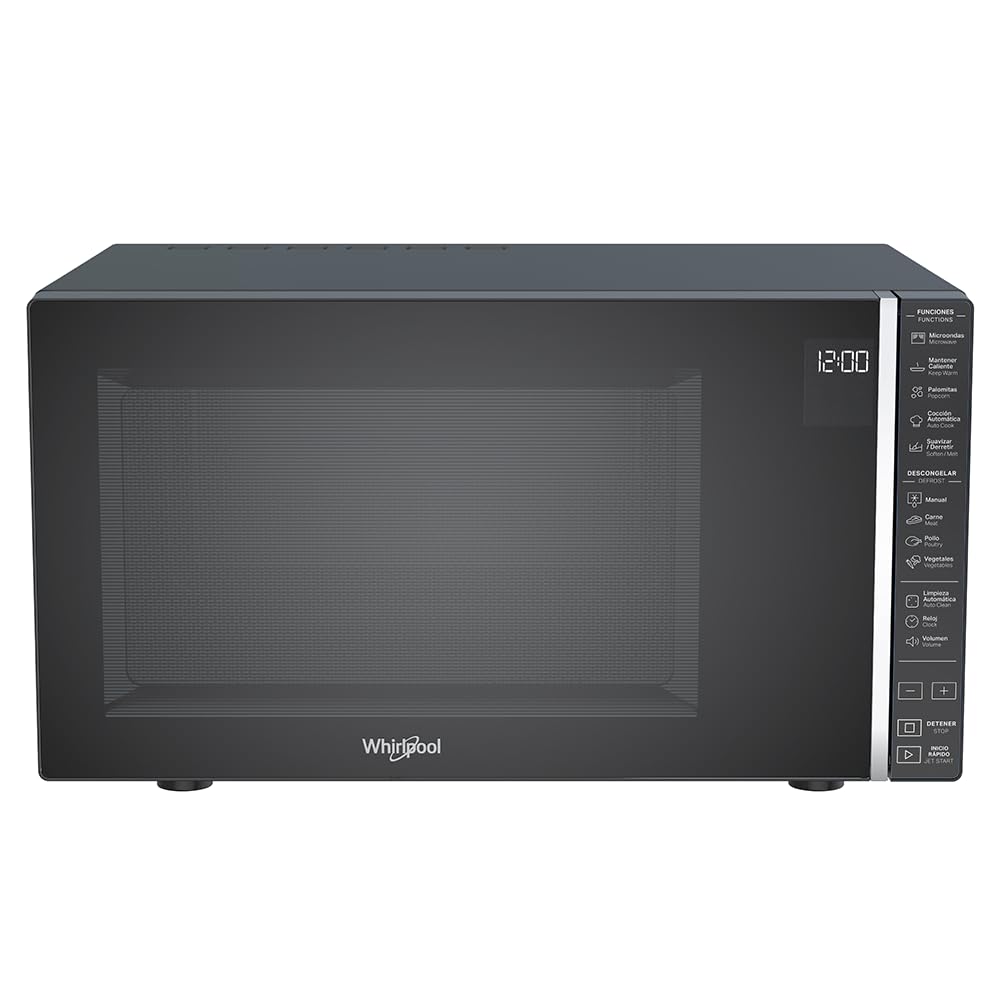
ചിത്രം 1: മുൻഭാഗം view of the Whirlpool WM-1811B Microwave Oven. Ensure proper clearance around the unit for ventilation.
- ടേൺടേബിൾ ഇൻസ്റ്റാളേഷൻ:
- ഓവൻ ക്യാവിറ്റി ഫ്ലോറിന്റെ മധ്യഭാഗത്ത് റോളർ റിംഗ് വയ്ക്കുക.
- റോളർ റിങ്ങിന് മുകളിൽ ഗ്ലാസ് ടേൺടേബിൾ വയ്ക്കുക, അങ്ങനെ അത് മധ്യ ഹബിൽ സുരക്ഷിതമായി ഇരിക്കുന്നുവെന്ന് ഉറപ്പാക്കുക.

ചിത്രം 2: ഇൻ്റീരിയർ view of the microwave with the door open, showing the glass turntable and roller ring in place.
- പവർ കണക്ഷൻ: Plug the microwave oven into a properly grounded electrical outlet. Do not use extension cords or adapters.
പ്രവർത്തന നിർദ്ദേശങ്ങൾ
Your Whirlpool WM-1811B microwave oven features a touch control panel and an LCD display for easy operation. It offers 7 power levels and 25 pre-programmed functions, including specialized options like Keep Warm and Automatic Cleaning.

ചിത്രം 3: വിശദമായി view of the touch control panel and LCD display.
ക്ലോക്ക് ക്രമീകരിക്കുന്നു
- "ക്ലോക്ക്" ബട്ടൺ അമർത്തുക.
- നിലവിലെ സമയം നൽകാൻ നമ്പർ പാഡുകൾ ഉപയോഗിക്കുക.
- സ്ഥിരീകരിക്കാൻ "ക്ലോക്ക്" ബട്ടൺ വീണ്ടും അമർത്തുക.
മൈക്രോവേവ് പാചകം
- ഗ്ലാസ് ടർടേബിളിൽ മൈക്രോവേവ്-സേഫ് കണ്ടെയ്നറിൽ ഭക്ഷണം വയ്ക്കുക.
- അടുപ്പിൻ്റെ വാതിൽ സുരക്ഷിതമായി അടയ്ക്കുക.
- നമ്പർ പാഡുകൾ ഉപയോഗിച്ച് ആവശ്യമുള്ള പാചക സമയം നൽകുക.
- Press the "Power Level" button repeatedly to select the desired power level (1-7). The default is usually P100 (full power).
- പാചകം ആരംഭിക്കാൻ "ആരംഭിക്കുക" അമർത്തുക.
Quick Start / Jet Start
For quick heating at full power, simply press the "Jet Start" button. Each press adds 30 seconds of cooking time at 100% power.
Automatic Cooking Programs (25 Pre-programmed Functions)
The microwave features 25 pre-programmed functions for various food types, ensuring optimal cooking results. Refer to the icons on the control panel for specific programs such as Popcorn, Pizza, Potato, Beverage, Reheat, etc.
- ഭക്ഷണം അടുപ്പത്തുവെച്ചു വയ്ക്കുക.
- Press the "Automatic Cooking" button or the specific program icon (e.g., "Popcorn").
- Select the desired quantity or weight if prompted (e.g., for popcorn, select bag size).
- Press "Start" to begin.
Defrosting (Manual and Automatic)
The microwave offers both manual and automatic defrosting options for meat, poultry, and vegetables.
- മാനുവൽ ഡിഫ്രോസ്റ്റ്:
- "ഡിഫ്രോസ്റ്റ്" ബട്ടൺ അമർത്തുക.
- ആവശ്യമുള്ള ഡീഫ്രോസ്റ്റിംഗ് സമയം നൽകുക.
- "ആരംഭിക്കുക" അമർത്തുക.
- ഓട്ടോമാറ്റിക് ഡിഫ്രോസ്റ്റ്:
- Press the specific defrost program icon (e.g., "Meat", "Poultry", "Vegetables").
- ഭക്ഷണത്തിന്റെ ഭാരം നൽകുക.
- Press "Start". The oven will automatically calculate the defrosting time and power level.
ഊഷ്മള പ്രവർത്തനം നിലനിർത്തുക
This specialized function helps maintain the temperature of cooked food without further cooking. Press the "Keep Warm" button and then "Start".

ചിത്രം 4: ഉദാample of food being heated inside the microwave oven.
പരിപാലനവും ശുചീകരണവും
പതിവായി വൃത്തിയാക്കലും അറ്റകുറ്റപ്പണികളും നിങ്ങളുടെ മൈക്രോവേവ് ഓവന്റെ ദീർഘായുസ്സും മികച്ച പ്രകടനവും ഉറപ്പാക്കും.
ബാഹ്യ ശുചീകരണം
- പരസ്യം ഉപയോഗിച്ച് പുറംഭാഗം തുടയ്ക്കുകamp തുണിയും മൃദുവായ ഡിറ്റർജൻ്റും.
- ഉരച്ചിലുകളുള്ള ക്ലീനറുകളോ സ്കോറിംഗ് പാഡുകളോ ഒഴിവാക്കുക.
ഇൻ്റീരിയർ ക്ലീനിംഗ്
- പൊതുവായ ശുചീകരണം: പരസ്യം ഉപയോഗിച്ച് അകത്തെ അറ തുടയ്ക്കുകamp ഓരോ ഉപയോഗത്തിനു ശേഷവും തുണിയിൽ തുടയ്ക്കുക. ഭക്ഷണത്തിന്റെ മങ്ങൽ സ്ഥിരമായി കണ്ടാൽ, നാരങ്ങ കഷ്ണങ്ങൾ ഉള്ള ഒരു പാത്രത്തിൽ വെള്ളം നിറച്ച്, അവശിഷ്ടങ്ങൾ അയവുവരുത്താൻ 2-3 മിനിറ്റ് മൈക്രോവേവിൽ വയ്ക്കുക, തുടർന്ന് തുടച്ചു വൃത്തിയാക്കുക.
- Glass Turntable and Roller Ring: These can be removed and washed in warm soapy water or in the dishwasher. Ensure they are dry before placing them back in the oven.
- ഓട്ടോമാറ്റിക് ക്ലീനിംഗ് ഫംഗ്ഷൻ: Your microwave features an auto-clean function. Consult the control panel for the specific icon and follow the on-screen instructions. This function typically uses steam to loosen food particles for easier wiping.
Door and Seal Cleaning
Keep the door seals and adjacent parts clean. Use a mild soap and water solution. Never use abrasive sprays or pads.
ട്രബിൾഷൂട്ടിംഗ്
ഉപഭോക്തൃ സേവനവുമായി ബന്ധപ്പെടുന്നതിന് മുമ്പ്, പൊതുവായ പ്രശ്നങ്ങൾക്ക് ഇനിപ്പറയുന്ന പരിഹാരങ്ങൾ പരീക്ഷിക്കുക:
| പ്രശ്നം | സാധ്യമായ കാരണം | പരിഹാരം |
|---|---|---|
| ഓവൻ ആരംഭിക്കുന്നില്ല. | പവർ കോർഡ് പ്ലഗ് ഇൻ ചെയ്തിട്ടില്ല; വാതിൽ ശരിയായി അടച്ചിട്ടില്ല; ഫ്യൂസ് പൊട്ടിത്തെറിച്ചു അല്ലെങ്കിൽ സർക്യൂട്ട് ബ്രേക്കർ ട്രിപ്പുചെയ്തു. | പവർ കോർഡ് പ്ലഗ് ഇൻ ചെയ്യുക; വാതിൽ സുരക്ഷിതമായി അടയ്ക്കുക; വീട്ടിലെ ഫ്യൂസ് പരിശോധിക്കുക അല്ലെങ്കിൽ സർക്യൂട്ട് ബ്രേക്കർ പുനഃസജ്ജമാക്കുക. |
| ഭക്ഷണം ചൂടാക്കുന്നില്ല. | തെറ്റായ പാചക സമയം/പവർ ലെവൽ സജ്ജീകരിച്ചിരിക്കുന്നു; വാതിൽ ശരിയായി അടച്ചിട്ടില്ല. | Adjust cooking time/power level; Ensure door is fully closed. |
| ടേൺടേബിൾ കറങ്ങുന്നില്ല. | Turntable or roller ring not correctly positioned; Obstruction under turntable. | ടേൺടേബിളും റോളർ റിംഗും പുനഃസ്ഥാപിക്കുക; തടസ്സങ്ങൾ ഉണ്ടെങ്കിൽ അവ നീക്കം ചെയ്യുക. |
| പ്രവർത്തന സമയത്ത് അസാധാരണമായ ശബ്ദങ്ങൾ. | ഓവൻ ഭിത്തികളിൽ സ്പർശിക്കുന്ന ഭക്ഷണ പാത്രം; ടേൺടേബിൾ മധ്യഭാഗത്തല്ല. | Ensure container is not touching walls; Center turntable. |
സ്പെസിഫിക്കേഷനുകൾ
| ബ്രാൻഡ് | വേൾപൂൾ |
| മോഡൽ നമ്പർ | WM1811B |
| ശേഷി | 1.1 ക്യുബിക് അടി (30 ലിറ്റർ) |
| നിറം | കറുപ്പ് |
| അളവുകൾ (D x W x H) | 40 cm x 53.9 cm x 30 cm (15.75 in x 21.22 in x 11.81 in) |
| ഭാരം | 17.7 കിലോഗ്രാം (39 പൗണ്ട്) |
| വാട്ട്tage | 1000 വാട്ട്സ് |
| പവർ ലെവലുകൾ | 7 |
| പ്രോഗ്രാമുകൾ | 25 (Pre-programmed functions) |
| നിയന്ത്രണ തരം | Touch Control / Touch Screen |
| പ്രത്യേക സവിശേഷതകൾ | Automatic Cleaning, Keep Warm Function, Timer Function |
| മെറ്റീരിയൽ | Plastic (Exterior and Interior) |
| ഇൻസ്റ്റലേഷൻ തരം | ഫ്രീസ്റ്റാൻഡിംഗ് |
| GTIN | 07501545633287 |
| മാതൃരാജ്യം | മെക്സിക്കോ |

Figure 5: Dimensional diagram of the microwave oven (Depth: 40 cm, Width: 53.9 cm, Height: 30 cm).
വാറൻ്റിയും പിന്തുണയും
Your Whirlpool WM-1811B Microwave Oven comes with a 12 മാസത്തെ നിർമ്മാതാവിന്റെ വാറന്റി. സാധാരണ ഉപയോഗത്തിലുള്ള മെറ്റീരിയലുകളിലെയും ജോലികളിലെയും വൈകല്യങ്ങൾ ഈ വാറന്റി ഉൾക്കൊള്ളുന്നു.
For warranty claims, technical support, or service inquiries, please contact Whirlpool customer service directly. Refer to the warranty card included in your package for specific contact details and terms.
Please have your model number (WM-1811B) and proof of purchase ready when contacting support.