
1. ആമുഖം
വാങ്ങിയതിന് നന്ദി.asing the Soundsation MIOMIX 404FXM 6-Channel Mixer. This versatile mixer is designed for a wide range of audio applications, including home recording, live performances, and podcasting. It combines professional audio quality with portability, featuring low-noise preamplifiers, digital effects, a USB media player/recorder, and Bluetooth connectivity. This manual provides essential information for safe operation, setup, and optimal use of your MIOMIX 404FXM mixer.
2. സുരക്ഷാ നിർദ്ദേശങ്ങൾ
WARNING: To reduce the risk of fire or electric shock, do not expose this equipment to rain or moisture.
- യൂണിറ്റ് പ്രവർത്തിപ്പിക്കുന്നതിന് മുമ്പ് ഈ നിർദ്ദേശങ്ങൾ ശ്രദ്ധാപൂർവ്വം വായിക്കുക.
- ഭാവി റഫറൻസിനായി ഈ മാനുവൽ സൂക്ഷിക്കുക.
- എല്ലാ മുന്നറിയിപ്പുകളും ശ്രദ്ധിക്കുകയും എല്ലാ നിർദ്ദേശങ്ങളും പാലിക്കുകയും ചെയ്യുക.
- വെള്ളത്തിനടുത്ത് ഈ ഉപകരണം ഉപയോഗിക്കരുത്.
- ഉണങ്ങിയ തുണി ഉപയോഗിച്ച് മാത്രം വൃത്തിയാക്കുക.
- വെന്റിലേഷൻ തുറസ്സുകളൊന്നും തടയരുത്. നിർമ്മാതാവിന്റെ നിർദ്ദേശങ്ങൾക്കനുസൃതമായി ഇൻസ്റ്റാൾ ചെയ്യുക.
- റേഡിയറുകൾ, ഹീറ്റ് രജിസ്റ്ററുകൾ, സ്റ്റൗകൾ, അല്ലെങ്കിൽ മറ്റ് ഉപകരണങ്ങൾ (ഉൾപ്പെടെ) പോലെയുള്ള താപ സ്രോതസ്സുകൾക്ക് സമീപം ഇൻസ്റ്റാൾ ചെയ്യരുത്. ampലൈഫയറുകൾ) ചൂട് ഉത്പാദിപ്പിക്കുന്നത്.
- പോളറൈസ്ഡ് അല്ലെങ്കിൽ ഗ്രൗണ്ടിംഗ്-ടൈപ്പ് പ്ലഗിൻ്റെ സുരക്ഷാ ഉദ്ദേശ്യത്തെ പരാജയപ്പെടുത്തരുത്. ധ്രുവീകരിക്കപ്പെട്ട പ്ലഗിന് രണ്ട് ബ്ലേഡുകൾ ഉണ്ട്, ഒന്ന് മറ്റൊന്നിനേക്കാൾ വീതിയുള്ളതാണ്. ഒരു ഗ്രൗണ്ടിംഗ്-ടൈപ്പ് പ്ലഗിന് രണ്ട് ബ്ലേഡുകളും മൂന്നാമത്തെ ഗ്രൗണ്ടിംഗ് പ്രോംഗും ഉണ്ട്. നിങ്ങളുടെ സുരക്ഷയ്ക്കായി വിശാലമായ ബ്ലേഡ് അല്ലെങ്കിൽ മൂന്നാമത്തെ പ്രോംഗ് നൽകിയിരിക്കുന്നു. നൽകിയിരിക്കുന്ന പ്ലഗ് നിങ്ങളുടെ ഔട്ട്ലെറ്റിൽ ചേരുന്നില്ലെങ്കിൽ, കാലഹരണപ്പെട്ട ഔട്ട്ലെറ്റ് മാറ്റിസ്ഥാപിക്കുന്നതിന് ഒരു ഇലക്ട്രീഷ്യനെ സമീപിക്കുക.
- പ്രത്യേകിച്ച് പ്ലഗുകൾ, കൺവീനിയൻസ് റെസെപ്റ്റക്കിളുകൾ, ഉപകരണത്തിൽ നിന്ന് പുറത്തുകടക്കുന്ന ഇടം എന്നിവയിൽ നടക്കുകയോ നുള്ളുകയോ ചെയ്യുന്നതിൽ നിന്ന് പവർ കോർഡ് സംരക്ഷിക്കുക.
- നിർമ്മാതാവ് വ്യക്തമാക്കിയ അറ്റാച്ച്മെൻ്റുകൾ/ആക്സസറികൾ മാത്രം ഉപയോഗിക്കുക.
- മിന്നൽ കൊടുങ്കാറ്റുകളുടെ സമയത്തോ ദീർഘനേരം ഉപയോഗിക്കാത്ത സമയത്തോ ഈ ഉപകരണം അൺപ്ലഗ് ചെയ്യുക.
- എല്ലാ സേവനങ്ങളും യോഗ്യതയുള്ള സേവന ഉദ്യോഗസ്ഥർക്ക് റഫർ ചെയ്യുക. പവർ സപ്ലൈ കോർഡ് അല്ലെങ്കിൽ പ്ലഗ് കേടാകുക, ദ്രാവകം ഒഴുകുകയോ ഉപകരണങ്ങൾ ഉപകരണത്തിലേക്ക് വീഴുകയോ ചെയ്യുക, ഉപകരണം മഴയോ ഈർപ്പമോ സമ്പർക്കം പുലർത്തുക, സാധാരണയായി പ്രവർത്തിക്കാത്തത് എന്നിങ്ങനെയുള്ള ഏതെങ്കിലും വിധത്തിൽ ഉപകരണത്തിന് കേടുപാടുകൾ സംഭവിക്കുമ്പോൾ സേവനം ആവശ്യമാണ്. , അല്ലെങ്കിൽ ഉപേക്ഷിച്ചു.
3. പാക്കേജ് ഉള്ളടക്കം
താഴെ ലിസ്റ്റ് ചെയ്തിരിക്കുന്ന എല്ലാ ഇനങ്ങളും പാക്കേജിൽ ഉൾപ്പെടുത്തിയിട്ടുണ്ടോ എന്ന് ദയവായി പരിശോധിക്കുക:
- Soundsation MIOMIX 404FXM Mixer
- പവർ അഡാപ്റ്റർ
- ഉപയോക്തൃ മാനുവൽ
4. ഉൽപ്പന്ന സവിശേഷതകൾ
- 6-channel mixer with digital multi-effect processor.
- Integrated USB player/recorder supporting WAV, MP3, WMA, and FLAC formats.
- Wireless Bluetooth audio streaming.
- 4 Mic/Line channels with low-noise preamps and Combo connectors.
- Selectable Hi-Z inputs for guitars and other high-impedance instruments.
- കണ്ടൻസർ മൈക്രോഫോണുകൾക്കുള്ള +48V ഫാന്റം പവർ.
- Peak indicators on input channels.
- 1 stereo line channel with 6.3mm jacks and +4/-10 dB pad adapter.
- 2-band EQ on channels 1-4.
- 24-bit/48 kHz digital effects processor with 16 presets (Reverb, Delay, Echo, Chorus, etc.) and TAP-Tempo function.
- USB player level control.
- ലെവൽ കൺട്രോൾ ഉള്ള ഹെഡ്ഫോൺ ഔട്ട്പുട്ട്.
- XLR main outputs with volume control.
- Stereo VU Meter with 2 x 6 LED bars.
5. നിയന്ത്രണങ്ങളും പ്രവർത്തനങ്ങളും
5.1 ഫ്രണ്ട് പാനൽ ഓവർview

Image: Front panel of the Soundsation MIOMIX 404FXM mixer, showing all input channels, EQ controls, effect section, USB/Bluetooth media player, and main output controls.
Input Channels (MIC/INST 1-4)
- MIC/INST Input (Combo Jack): Connect XLR microphones or 1/4" instrument/line cables.
- +48V ഫാൻ്റം പവർ: Activates phantom power for condenser microphones. Use with caution.
- ഹൈ-ഇസഡ് സ്വിച്ച്: Engages high impedance input for direct connection of guitars or basses.
- ഗെയിൻ നോബ്: Adjusts the input sensitivity for the connected microphone or instrument.
- ഉയർന്ന നോബ്: Adjusts the high-frequency equalization (treble).
- താഴ്ന്ന നോബ്: Adjusts the low-frequency equalization (bass).
- എഫ് എക്സ് നോബ്: Controls the amount of signal sent to the internal digital effects processor.
- പാൻ നോബ്: Adjusts the stereo position (left/right) of the channel.
- VOL നോബ്: Adjusts the output volume of the individual channel.
- PK (Peak) LED: ഇൻപുട്ട് സിഗ്നൽ വളരെ ഉയർന്നതായിരിക്കുമ്പോൾ പ്രകാശിക്കുന്നു, ഇത് ക്ലിപ്പിംഗ് സാധ്യതയെ സൂചിപ്പിക്കുന്നു.
Stereo Line Input (CH 5-6)
- L/Mono, R Inputs (1/4" Jacks): Connect stereo line-level devices (keyboards, CD players, DJ consoles, etc.). The L/Mono input can be used alone for a mono signal.
- +4/-10dB Switch: Adjusts input sensitivity for different line-level devices.
- പാൻ നോബ്: ചാനലിന്റെ സ്റ്റീരിയോ സ്ഥാനം ക്രമീകരിക്കുന്നു.
- VOL നോബ്: Adjusts the output volume of the stereo channel.
- PK (Peak) LED: Illuminates when the input signal is too high.
USB & Bluetooth Media Player
- USB പോർട്ട്: Connect a USB drive for playing audio files or recording.
- ഡിസ്പ്ലേ സ്ക്രീൻ: Shows current mode, track information, and settings.
- Up/Rewind Button: Navigates up in menus or rewinds current track.
- Down/Forward Button: Navigates down in menus or fast-forwards current track.
- Play/Pause/Enter Button: Plays/pauses audio or confirms menu selections.
- മെനു ബട്ടൺ: Accesses media player menu options (BT streaming, music player, audio recorder, selection).
- MP3 PLAYER LVL Knob: Controls the output level of the USB/Bluetooth media player.
Digital Effects Processor (24-bit/48 kHz)
- ഇഫക്റ്റ് ഡിസ്പ്ലേ: Shows the selected effect number and parameter values.
- പ്രോഗ്രാം നോബ്: Rotates to select one of the 16 built-in digital effects. Press to confirm selection.
- ടെമ്പോ ബട്ടൺ ടാപ്പ് ചെയ്യുക: Tap multiple times to set the tempo for time-based effects (e.g., Delay).
- ലെവൽ നോബ്: Adjusts the overall wet/dry mix of the effects.
Output & Monitoring Section
- PHONES Jack (1/4"): നിരീക്ഷണത്തിനായി ഹെഡ്ഫോണുകൾ ബന്ധിപ്പിക്കുക.
- PHONES LVL Knob: ഹെഡ്ഫോൺ ഔട്ട്പുട്ടിന്റെ വോളിയം ക്രമീകരിക്കുന്നു.
- MAIN OUT L/R (XLR): Balanced XLR outputs for connecting to powered speakers, ampലൈഫയറുകൾ, അല്ലെങ്കിൽ റെക്കോർഡിംഗ് ഉപകരണങ്ങൾ.
- മെയിൻ ഔട്ട് നോബ്: പ്രധാന മിശ്രിതത്തിന്റെ മൊത്തത്തിലുള്ള ഔട്ട്പുട്ട് വോളിയം നിയന്ത്രിക്കുന്നു.
- VU Meter (LED): Displays the stereo output level of the main mix.
5.2 പിൻ പാനൽ ഓവർview
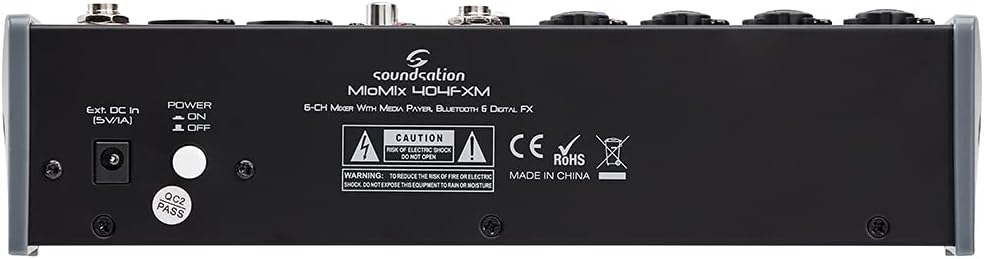
Image: Rear panel of the Soundsation MIOMIX 404FXM mixer, showing the power input, power switch, and main output connections.
- Ext. DC In (5V/1A): Power input for connecting the provided external power adapter.
- പവർ ഓൺ/ഓഫ് സ്വിച്ച്: Turns the mixer's power on or off.
- REC OUT L/R (RCA): Unbalanced RCA outputs for connecting to recording devices.
6. സജ്ജീകരണം
- മിക്സർ അൺപാക്ക് ചെയ്യുക: Carefully remove the MIOMIX 404FXM from its packaging.
- പ്ലേസ്മെൻ്റ്: Place the mixer on a stable, flat surface, ensuring adequate ventilation around the unit.
- പവർ കണക്ഷൻ: Ensure the mixer's POWER switch is in the OFF position. Connect the provided power adapter to the "Ext. DC In (5V/1A)" port on the rear panel, then plug the adapter into a suitable power outlet.
- പ്രാരംഭ പവർ ഓൺ: Flip the POWER switch to the ON position. The mixer's indicators should light up, and the display should activate.
- ഔട്ട്പുട്ടുകൾ ബന്ധിപ്പിക്കുക: Connect the MAIN OUT XLR outputs to your powered speakers, amplifier, or audio interface. Connect headphones to the PHONES jack for monitoring.
- ഇൻപുട്ടുകൾ ബന്ധിപ്പിക്കുക: Connect your microphones, instruments, and line-level devices to the appropriate input channels.
7. പ്രവർത്തന നിർദ്ദേശങ്ങൾ
7.1 ഓഡിയോ ഉറവിടങ്ങൾ ബന്ധിപ്പിക്കുന്നു
- മൈക്രോഫോണുകൾ: Connect dynamic microphones via XLR cables to the MIC/INST Combo jacks. For condenser microphones, connect via XLR and activate the +48V Phantom Power switch for the respective channel.
- Instruments (Guitars/Basses): Connect directly using a 1/4" TS cable to the MIC/INST Combo jack and engage the Hi-Z switch for that channel.
- Line-Level Devices (Keyboards, CD Players): Connect using 1/4" TS cables to the MIC/INST Combo jacks (for mono) or to the CH 5-6 L/Mono and R inputs (for stereo). Adjust the +4/-10dB switch on CH 5-6 as needed.
7.2 Adjusting Channel Levels and EQ
- Set all GAIN, VOL, and MAIN OUT knobs to their minimum positions before starting.
- Speak into the microphone or play your instrument. Slowly increase the GAIN knob for the respective channel until the PK LED flashes only occasionally during the loudest parts.
- Adjust the HIGH and LOW EQ knobs to shape the tone of your sound.
- Use the PAN knob to position the sound in the stereo field.
- Slowly increase the channel's VOL knob to blend it into the overall mix.
7.3 Using the USB Media Player/Recorder
- പ്ലേബാക്ക്: Insert a USB drive containing WAV, MP3, WMA, or FLAC files into the USB port. The display will show the file list. Use the Up/Down buttons to navigate and Play/Pause/Enter to select and play. Adjust the MP3 PLAYER LVL knob to control its volume in the mix.
- റെക്കോർഡിംഗ്: In the media player menu (accessed via MENU button), select the 'Audio Recorder' function. Ensure your USB drive has enough free space. Press Play/Pause/Enter to start and stop recording. The mixer records the main stereo mix.
7.4 ബ്ലൂടൂത്ത് കണക്റ്റിവിറ്റി
- Press the MENU button on the media player and select 'BT Streaming'. The display will show 'Bluetooth' and indicate it's searching.
- On your smartphone or Bluetooth device, search for available devices and select 'MIOMIX 404FXM'.
- Once paired, you can stream audio from your device to the mixer. Control the volume using your device and the MP3 PLAYER LVL knob on the mixer.
7.5 Applying Digital Effects
- Turn the FX knob on the desired input channel to send signal to the effects processor.
- Rotate the PROGRAM knob to browse through the 16 available effects. Press the PROGRAM knob to select an effect.
- Adjust the LEVEL knob in the FX section to control the overall amount of effect applied to the mix.
- For time-based effects, use the TAP TEMPO button to synchronize the effect to your music.
7.6 Monitoring and Main Output
- ഹെഡ്ഫോണുകൾ: Connect headphones to the PHONES jack and adjust the PHONES LVL knob for comfortable monitoring.
- പ്രധാന put ട്ട്പുട്ട്: Slowly increase the MAIN OUT knob to send the mixed audio to your connected speakers or amplifier. Monitor the VU Meter to ensure levels are not clipping (avoiding red LEDs).
8. പരിപാലനം
- വൃത്തിയാക്കൽ: മിക്സറിന്റെ പ്രതലം വൃത്തിയാക്കാൻ മൃദുവായതും ഉണങ്ങിയതുമായ തുണി ഉപയോഗിക്കുക. ലിക്വിഡ് ക്ലീനറുകളോ ലായകങ്ങളോ ഉപയോഗിക്കരുത്.
- സംഭരണം: ദീർഘനേരം ഉപയോഗിക്കാത്തപ്പോൾ, മിക്സർ തണുത്തതും വരണ്ടതുമായ സ്ഥലത്ത് സൂക്ഷിക്കുക, നേരിട്ടുള്ള സൂര്യപ്രകാശത്തിൽ നിന്നും കടുത്ത താപനിലയിൽ നിന്നും അകറ്റി നിർത്തുക.
- വെൻ്റിലേഷൻ: അമിതമായി ചൂടാക്കുന്നത് തടയാൻ വെൻ്റിലേഷൻ ഓപ്പണിംഗുകൾ തടഞ്ഞിട്ടില്ലെന്ന് ഉറപ്പാക്കുക.
9. പ്രശ്നപരിഹാരം
- സൗണ്ട് ഔട്ട്പുട്ട് ഇല്ല:
- Check all power connections and ensure the mixer is turned ON.
- Verify that all channel VOL knobs, MAIN OUT knob, and PHONES LVL knob are turned up.
- Ensure your speakers/amplifier are powered on and connected correctly.
- Check input source connections and ensure GAIN knobs are set appropriately.
- വികലമായ ശബ്ദം:
- ഇൻപുട്ട് ചാനലിനുള്ള GAIN നോബ് കുറയ്ക്കുക.
- Check if the PK LED is constantly lit; if so, reduce the input level.
- Lower the MAIN OUT volume if the VU Meter is consistently in the red.
- ഫാന്റം പവർ പ്രവർത്തിക്കുന്നില്ല:
- Ensure the +48V switch is engaged for the specific channel.
- Verify that you are using an XLR cable, as phantom power is only supplied via XLR.
- ബ്ലൂടൂത്ത് കണക്റ്റുചെയ്യുന്നില്ല:
- Ensure the mixer's media player is in 'BT Streaming' mode.
- Make sure your device's Bluetooth is enabled and it's searching for devices.
- ഉപകരണം ജോടി മാറ്റി വീണ്ടും ജോടിയാക്കാൻ ശ്രമിക്കുക.
- USB Playback/Recording Issues:
- Ensure the USB drive is formatted correctly (FAT32 is generally recommended).
- ഓഡിയോ പരിശോധിക്കുക files are in a supported format (WAV, MP3, WMA, FLAC).
- For recording, ensure the USB drive has sufficient free space.
10 സ്പെസിഫിക്കേഷനുകൾ
| ഫീച്ചർ | സ്പെസിഫിക്കേഷൻ |
|---|---|
| നിർമ്മാതാവ് | സൗണ്ട്സേഷൻ |
| മോഡൽ നമ്പർ | E923E |
| ചാനലുകളുടെ എണ്ണം | 6 |
| ഇനത്തിൻ്റെ ഭാരം | 1900 ഗ്രാം |
| കണക്റ്റിവിറ്റി ടെക്നോളജി | USB, ബ്ലൂടൂത്ത് |
| പവർ ഉറവിടം | ഇലക്ട്രിക് കേബിൾ |
| ഔട്ട്പുട്ട് കണക്റ്റർ തരം | XLR |
| ഓഡിയോ ഇൻപുട്ട് | XLR, 1/4" Jack |
| വാല്യംtage | 48 Volts (Phantom Power) |
| ഡിജിറ്റൽ ഇഫക്റ്റുകൾ | 16 Presets, 24-bit/48 kHz |
| Supported USB Audio Formats | WAV, MP3, WMA, FLAC |
11. വാറൻ്റിയും പിന്തുണയും
Soundsation products are designed and manufactured to the highest quality standards. For information regarding warranty coverage, service, or technical support, please refer to the warranty card included with your product or visit the official Soundsation webസൈറ്റ്. ഏതെങ്കിലും വാറന്റി ക്ലെയിമുകൾക്ക് വാങ്ങിയതിന്റെ തെളിവായി നിങ്ങളുടെ വാങ്ങൽ രസീത് സൂക്ഷിക്കുക.