
ആമുഖം
This manual provides detailed instructions for the safe and efficient operation of your DIGITNOW M513 Record Player. Please read this manual thoroughly before using the product and retain it for future reference. This record player features a belt-drive turntable, external stereo speakers, Bluetooth connectivity, and Vinyl-to-MP3 recording capabilities.
ഉൽപ്പന്നം കഴിഞ്ഞുview
Familiarize yourself with the components and controls of your record player.
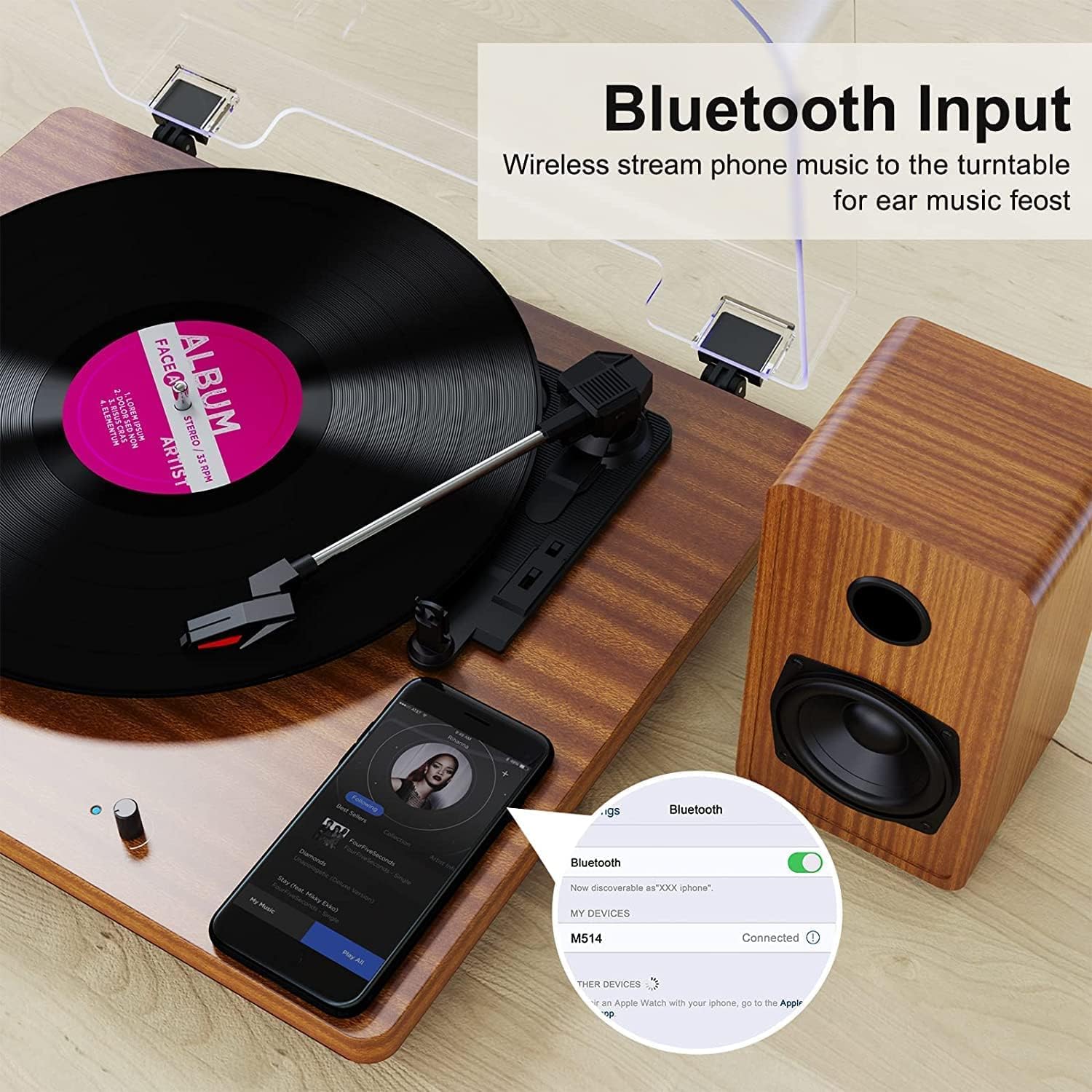
Figure 1: DIGITNOW M513 Record Player with external speakers and Bluetooth connectivity.
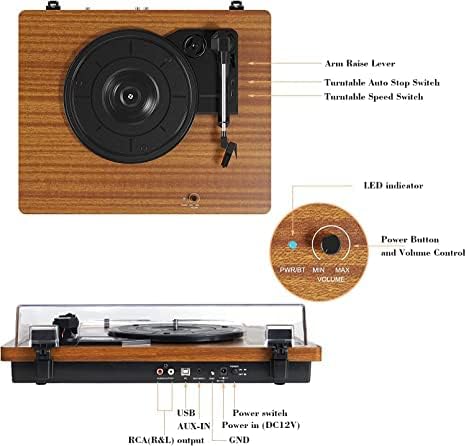
Figure 2: Top and rear panel controls including arm raise lever, auto stop switch, speed switch, power button, volume control, USB, AUX-IN, RCA(R&L) output, power input, and ground.
പ്രധാന ഘടകങ്ങൾ:
- ടേൺടേബിൾ പ്ലാറ്റർ: Where vinyl records are placed.
- ടോണെർം: സ്റ്റൈലസ് പിടിച്ച് റെക്കോർഡ് ഗ്രൂവുകൾ ട്രാക്ക് ചെയ്യുന്നു.
- സ്റ്റൈലസ് (സൂചി): റെക്കോർഡിൽ നിന്നുള്ള ഓഡിയോ വിവരങ്ങൾ വായിക്കുന്നു.
- External Stereo Speakers: ഓഡിയോ ഔട്ട്പുട്ട് നൽകുക.
- പൊടി കവർ: Protects the turntable from dust.
- നിയന്ത്രണ പാനൽ: Includes power, volume, speed selection, and input/output ports.
സജ്ജമാക്കുക
- അൺപാക്ക് ചെയ്യുന്നു: Carefully remove all components from the packaging. Ensure all accessories (dust cover, 45 RPM adapter, RCA output cables, ground wire, USB cable, user manual) are present.
- പ്ലേസ്മെൻ്റ്: Place the record player on a stable, level surface away from direct sunlight, heat sources, and excessive vibration. Position the external speakers for optimal sound distribution.
- സ്പീക്കറുകൾ ബന്ധിപ്പിക്കുക: Connect the provided external stereo speakers to the RCA output ports on the rear of the record player using the RCA cables. Ensure correct left (L) and right (R) connections.
- പവർ കണക്ഷൻ: Connect the DC 12V power adapter to the power input port on the rear of the unit, then plug the adapter into a wall outlet.
- പൊടി മൂടൽ ഇൻസ്റ്റാളേഷൻ: Attach the dust cover to the hinges at the back of the turntable.
പ്രവർത്തന നിർദ്ദേശങ്ങൾ
റെക്കോർഡുകൾ പ്ലേ ചെയ്യുന്നു
- പവർ ഓൺ: Turn the Power/Volume knob clockwise to power on the unit. The LED indicator will illuminate.
- വേഗത തിരഞ്ഞെടുക്കുക: Choose the appropriate speed (33, 45, or 78 RPM) using the speed switch located on the top panel. Use the 45 RPM adapter for 7-inch records with large center holes.
- സ്ഥല രേഖ: നിങ്ങളുടെ വിനൈൽ റെക്കോർഡ് ടർടേബിൾ പ്ലാറ്ററിൽ ശ്രദ്ധാപൂർവ്വം വയ്ക്കുക.
- ലിഫ്റ്റ് ടോൺ ആം: Use the arm raise lever to gently lift the tonearm.
- ടോൺആം സ്ഥാനം: റെക്കോർഡിന്റെ ആവശ്യമുള്ള ആരംഭ ട്രാക്കിന് മുകളിലൂടെ ടോൺആം നീക്കുക.
- താഴത്തെ ടോൺ ആം: Slowly lower the tonearm using the arm raise lever. The stylus will make contact with the record, and playback will begin.
- വോളിയം ക്രമീകരിക്കുക: പവർ/വോളിയം നോബ് ഉപയോഗിച്ച് വോളിയം ക്രമീകരിക്കുക.
- ഓട്ടോ സ്റ്റോപ്പ്: The record player features an auto-stop function. When enabled via the Auto Stop switch, the platter will stop spinning automatically when the record finishes. If disabled, the platter will continue to spin.
- പ്ലേബാക്ക് അവസാനിപ്പിക്കുക: At the end of the record, or when you wish to stop, use the arm raise lever to lift the tonearm, return it to the tonearm rest, and then lower the lever. Turn the Power/Volume knob counter-clockwise to power off the unit.

ചിത്രം 3: വിശദമായി view of the stylus, belt-driven design for smooth music, and 33/45/78 RPM speed options for various record sizes.
ബ്ലൂടൂത്ത് കണക്ഷൻ
The record player can receive audio wirelessly from your Bluetooth-enabled devices.
- ബ്ലൂടൂത്ത് മോഡ് സജീവമാക്കുക: Ensure the record player is powered on. The unit will automatically enter Bluetooth receiving mode if no record is playing or AUX input is not connected. The LED indicator may change color or blink to indicate Bluetooth mode.
- ഉപകരണത്തിൽ ബ്ലൂടൂത്ത് പ്രവർത്തനക്ഷമമാക്കുക: നിങ്ങളുടെ സ്മാർട്ട്ഫോണിലോ മറ്റ് ബ്ലൂടൂത്ത് ഉപകരണത്തിലോ, ബ്ലൂടൂത്ത് പ്രവർത്തനക്ഷമമാക്കി ലഭ്യമായ ഉപകരണങ്ങൾക്കായി തിരയുക.
- ഉപകരണം ജോടിയാക്കുക: Select "DIGITNOW" or a similar name from the list of available devices to pair. Once connected, you will hear a confirmation sound.
- ഓഡിയോ പ്ലേ ചെയ്യുക: Play music from your device, and it will stream through the record player's speakers.
Video 1: Demonstrates the setup and Bluetooth connection process for the DIGITNOW M513 Record Player, including placing a record and pairing with a smartphone.
വിനൈൽ-ടു-എംപി3 റെക്കോർഡിംഗ്
Convert your vinyl records to digital MP3 files via a USB connection to your computer.
- കമ്പ്യൂട്ടറുമായി ബന്ധിപ്പിക്കുക: Use the provided USB cable to connect the record player's USB port (PC OUT) to a USB port on your Mac or PC.
- സോഫ്റ്റ്വെയർ ഇൻസ്റ്റാൾ ചെയ്യുക: Refer to the detailed instructions in the included user manual for information on compatible recording software and installation.
- റെക്കോർഡിംഗ് ആരംഭിക്കുക: Follow the software's instructions to begin recording audio from your vinyl record to your computer.

Figure 4: Connection diagram illustrating USB for PC recording, AUX-IN for external audio sources like CD players, and RCA OUT for external speakers.
External Audio Connections
- AUX ഇൻപുട്ട്: Connect external audio sources (e.g., CD player, smartphone, digital media player) to the AUX-IN port on the rear panel using a 3.5mm audio cable. The record player will play audio from the connected device through its speakers.
- ആർസിഎ putട്ട്പുട്ട്: For enhanced or louder sound, connect the RCA(R&L) output ports to an external ampആർസിഎ കേബിളുകൾ ഉപയോഗിക്കുന്ന ലൈഫയർ അല്ലെങ്കിൽ പവർഡ് സ്പീക്കറുകൾ.
മെയിൻ്റനൻസ്
- സ്റ്റൈലസ് വൃത്തിയാക്കൽ: Gently clean the stylus regularly with a soft brush designed for stylus cleaning, brushing from back to front. Avoid touching the stylus with your fingers.
- യൂണിറ്റ് വൃത്തിയാക്കൽ: Wipe the record player and dust cover with a soft, dry cloth. Do not use abrasive cleaners or solvents.
- Belt Maintenance: The belt-drive system is designed for durability. If the platter does not spin or spins inconsistently, the drive belt may have slipped during shipping or use. Refer to the full user manual for instructions on how to re-seat or replace the drive belt.
- റെക്കോർഡ് കെയർ: Keep your records clean and free of dust to ensure optimal sound quality and prolong stylus life. Store records vertically in their sleeves.
ട്രബിൾഷൂട്ടിംഗ്
| പ്രശ്നം | സാധ്യമായ കാരണം | പരിഹാരം |
|---|---|---|
| ശക്തിയില്ല | പവർ അഡാപ്റ്റർ ബന്ധിപ്പിച്ചിട്ടില്ല അല്ലെങ്കിൽ ഔട്ട്ലെറ്റ് പ്രവർത്തിക്കുന്നില്ല. | Ensure power adapter is securely plugged into the unit and a working wall outlet. Check the power switch. |
| ശബ്ദമില്ല | Volume too low; speakers not connected; incorrect input mode. | Increase volume. Verify speaker connections. Ensure correct input mode (Phono, Bluetooth, AUX). |
| ശബ്ദം ഒഴിവാക്കൽ അല്ലെങ്കിൽ വികലമാക്കൽ | Dirty or damaged record; worn or dirty stylus; unit not level. | Clean record. Clean or replace stylus. Place unit on a level surface. |
| റെക്കോർഡ് വളരെ വേഗത്തിൽ/സാവധാനത്തിൽ പ്ലേ ചെയ്യുന്നു | തെറ്റായ വേഗത ക്രമീകരണം. | Adjust the speed switch to 33, 45, or 78 RPM as appropriate for the record. |
| ഹമ്മിംഗ് ശബ്ദം | ഗ്രൗണ്ട് വയർ ബന്ധിപ്പിച്ചിട്ടില്ല; മറ്റ് ഇലക്ട്രോണിക്സിൽ നിന്നുള്ള ഇടപെടൽ. | Ensure the ground wire is properly connected (if applicable). Move the unit away from other electronic devices. |
സ്പെസിഫിക്കേഷനുകൾ
- മോഡൽ: M513
- ബ്രാൻഡ്: ഡിജിറ്റ്നൗ
- ഉൽപ്പന്ന അളവുകൾ: 15 x 12.87 x 6.22 ഇഞ്ച്
- ഇനത്തിൻ്റെ ഭാരം: 11.77 പൗണ്ട്
- വേഗത: 33 1/3, 45, 78 ആർപിഎം
- ഡ്രൈവ് തരം: ബെൽറ്റ്-ഡ്രൈവ്
- മോട്ടോർ തരം: ഡിസി മോട്ടോർ
- കണക്റ്റിവിറ്റി: Bluetooth, AUX-IN, RCA Output, USB (for Vinyl-to-MP3 recording)
- ഉൾപ്പെടുത്തിയ ഘടകങ്ങൾ: Dust cover, 45 RPM adapter, RCA output cables, ground wire, USB cable, user manual
- മെറ്റീരിയൽ: പ്ലാസ്റ്റിക്, മരം
- പ്രത്യേക സവിശേഷതകൾ: Bluetooth Function, RCA Output, Vinyl-to-MP3 Recording, Auto Stop
വാറൻ്റിയും പിന്തുണയും
For warranty information, technical support, or service inquiries, please refer to the contact details provided in the original product packaging or visit the official DIGITNOW webവാറന്റി ക്ലെയിമുകൾക്കുള്ള വാങ്ങലിന്റെ തെളിവായി നിങ്ങളുടെ വാങ്ങൽ രസീത് സൂക്ഷിക്കുക.