
ആമുഖം
Thank you for choosing the Cellularline CORE True Wireless Bluetooth Earphones. These earphones are designed to provide a seamless audio experience with advanced features such as a charging case with an LED display, touch controls, and automatic pairing. This manual will guide you through the setup, operation, and maintenance of your new earphones.
ബോക്സിൽ എന്താണുള്ളത്
- Cellularline CORE True Wireless Bluetooth Earphones (Left and Right)
- LED ഡിസ്പ്ലേയുള്ള ചാർജിംഗ് കേസ്
- USB-C ചാർജിംഗ് കേബിൾ
- ഉപയോക്തൃ മാനുവൽ
ഉൽപ്പന്നം കഴിഞ്ഞുview
The Cellularline CORE earphones feature a compact design and a charging case with an integrated LED display to show the remaining battery percentage. They offer up to 16 hours of total play time with the charging case.

Image: Cellularline CORE True Wireless Bluetooth Earphones and Charging Case. The earphones are white and sit in an open white charging case.

Image: A close-up of the Cellularline CORE charging case with an LED display showing '100', indicating full battery. The earphones are inside the case.
The LED display on the charging case provides real-time battery status, ensuring you are always aware of the remaining charge.
സജ്ജമാക്കുക
1. ഇയർഫോണുകളും കേസും ചാർജ് ചെയ്യുന്നു
- Place both earphones into the charging case. Ensure they are correctly seated in their respective slots.
- Connect the provided USB-C cable to the charging port on the case and plug the other end into a USB power adapter (not included) or a computer's USB port.
- The LED display on the charging case will show the current battery percentage during charging. A full charge typically takes approximately 4 hours for the case and earphones.
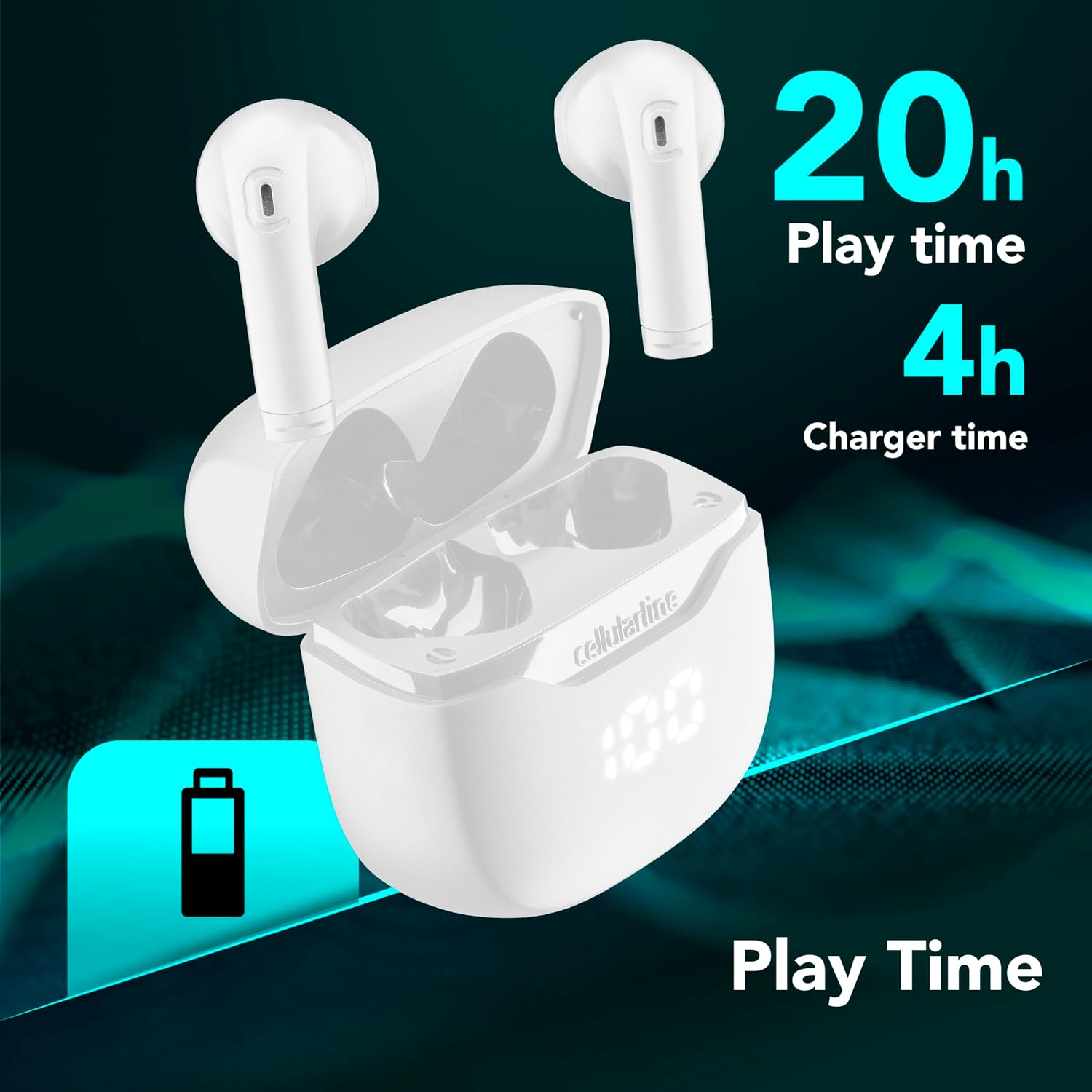
Image: The Cellularline CORE earphones and charging case, highlighting 20 hours of total play time and 4 hours of charging time for the case.
2. Initial Pairing (Autopairing)
- ഇയർഫോണുകൾ ചാർജ് ചെയ്തിട്ടുണ്ടെന്ന് ഉറപ്പാക്കുക.
- ചാർജിംഗ് കേസ് തുറക്കുക. ഇയർഫോണുകൾ സ്വയമേവ ഓണാകുകയും ജോടിയാക്കൽ മോഡിലേക്ക് പ്രവേശിക്കുകയും ചെയ്യും.
- നിങ്ങളുടെ സ്മാർട്ട്ഫോണിലോ ബ്ലൂടൂത്ത് പ്രവർത്തനക്ഷമമാക്കിയ ഉപകരണത്തിലോ, ബ്ലൂടൂത്ത് ക്രമീകരണങ്ങളിലേക്ക് പോകുക.
- ഇതിനായി തിരയുക available devices and select "Cellularline CORE" from the list.
- Once connected, you will hear an audible confirmation, and the earphones are ready for use.

Image: Cellularline CORE earphones and charging case next to a smartphone displaying a music application, with a Bluetooth icon indicating successful pairing.
The Autopairing function ensures that once paired, the earphones will automatically connect to your last paired device when removed from the case.
പ്രവർത്തന നിർദ്ദേശങ്ങൾ
ടച്ച് നിയന്ത്രണങ്ങൾ
The Cellularline CORE earphones feature intuitive touch controls on each earbud for managing calls, music, and voice assistant functions.
| ഫംഗ്ഷൻ | ആക്ഷൻ |
|---|---|
| സംഗീതം പ്ലേ ചെയ്യുക/താൽക്കാലികമായി നിർത്തുക | ഏതെങ്കിലും ഇയർബഡിൽ ഒറ്റ ടാപ്പ് ചെയ്യുക |
| അടുത്ത ട്രാക്ക് | വലതുവശത്തെ ഇയർബഡിൽ രണ്ടുതവണ ടാപ്പ് ചെയ്യുക |
| മുമ്പത്തെ ട്രാക്ക് | ഇടതുവശത്തെ ഇയർബഡിൽ രണ്ടുതവണ ടാപ്പ് ചെയ്യുക |
| ഉത്തരം / കോൾ അവസാനിപ്പിക്കുക | ഏതെങ്കിലും ഇയർബഡിൽ ഒറ്റ ടാപ്പ് ചെയ്യുക |
| കോൾ നിരസിക്കുക | ഏതെങ്കിലും ഇയർബഡിൽ 2 സെക്കൻഡ് അമർത്തിപ്പിടിക്കുക |
| വോയ്സ് അസിസ്റ്റൻ്റ് സജീവമാക്കുക | ഇയർബഡുകളിലൊന്നിൽ മൂന്ന് തവണ ടാപ്പ് ചെയ്യുക |
| വോളിയം കൂട്ടുക | Press and hold the right earbud |
| വോളിയം ഡൗൺ | ഇടതുവശത്തെ ഇയർബഡ് അമർത്തിപ്പിടിക്കുക |
Double Master Function
The Double Master function allows you to use either the left or right earbud independently for calls. Simply remove one earbud from the case, and it will automatically connect. You can answer calls by tapping the active earbud.
മെയിൻ്റനൻസ്
വൃത്തിയാക്കൽ
- ഇയർഫോണുകളും ചാർജിംഗ് കെയ്സും മൃദുവായതും ഉണങ്ങിയതും ലിന്റ് രഹിതവുമായ തുണി ഉപയോഗിച്ച് പതിവായി വൃത്തിയാക്കുക.
- അബ്രാസീവ് ക്ലീനറുകൾ, ലായകങ്ങൾ, എയറോസോൾ സ്പ്രേകൾ എന്നിവ ഉപയോഗിക്കരുത്.
- ശരിയായ ചാർജിംഗ് നിലനിർത്താൻ ഇയർഫോണുകളിലെയും കേസിലെയും ചാർജിംഗ് കോൺടാക്റ്റുകൾ വൃത്തിയുള്ളതും അവശിഷ്ടങ്ങളില്ലാത്തതുമാണെന്ന് ഉറപ്പാക്കുക.
സംഭരണം
- ഉപയോഗത്തിലില്ലാത്തപ്പോൾ, ഇയർഫോണുകൾ സംരക്ഷിക്കുന്നതിനും ചാർജ് ചെയ്ത നിലയിൽ നിലനിർത്തുന്നതിനും ചാർജിംഗ് കേസിൽ സൂക്ഷിക്കുക.
- തീവ്രമായ താപനിലയിൽ നിന്നും നേരിട്ടുള്ള സൂര്യപ്രകാശത്തിൽ നിന്നും അകന്ന്, തണുത്തതും വരണ്ടതുമായ സ്ഥലത്ത് ഉപകരണം സൂക്ഷിക്കുക.

Image: A hand placing the compact Cellularline CORE charging case into the pocket of a pair of jeans, demonstrating its portable size.
ട്രബിൾഷൂട്ടിംഗ്
| പ്രശ്നം | സാധ്യമായ പരിഹാരം |
|---|---|
| ഇയർഫോണുകൾ ഓണാകുന്നില്ല. | Ensure the earphones and charging case are fully charged. Place earphones in the case and close it, then open it again. |
| Earphones do not pair with device. | Make sure Bluetooth is enabled on your device. Forget the device in your Bluetooth settings and try pairing again. Ensure earphones are in pairing mode (LED indicator blinking). |
| ഒരു ഇയർഫോൺ മാത്രമേ പ്രവർത്തിക്കുന്നുള്ളൂ. | Place both earphones back into the charging case, close the lid, wait a few seconds, then open it again. This should re-sync them. If the issue persists, try resetting the earphones (refer to manufacturer's webമാനുവലിൽ ഇല്ലെങ്കിൽ നിർദ്ദിഷ്ട റീസെറ്റ് നിർദ്ദേശങ്ങൾക്കായി സൈറ്റ് സന്ദർശിക്കുക). |
| കുറഞ്ഞ വോളിയം അല്ലെങ്കിൽ മോശം ശബ്ദ നിലവാരം. | Adjust the volume on both your device and the earphones. Ensure the earphones are clean and properly seated in your ears. Check for any obstructions in the earbud speakers. |
| Charging case LED display is not working. | Ensure the charging cable is securely connected and the power source is active. If the issue persists, contact customer support. |
സ്പെസിഫിക്കേഷനുകൾ
- മോഡലിൻ്റെ പേര്: BTCORETWSW
- ബ്രാൻഡ്: സെല്ലുലാർലൈൻ
- നിറം: വെള്ള
- ചെവി സ്ഥാപിക്കൽ: ചെവിയിൽ
- ഫോം ഘടകം: ചെവിയിൽ
- കണക്റ്റിവിറ്റി ടെക്നോളജി: വയർലെസ്
- വയർലെസ് സാങ്കേതികവിദ്യ: ബ്ലൂടൂത്ത്
- ബ്ലൂടൂത്ത് പതിപ്പ്: 5.0
- പ്രതിരോധം: 16 ഓം
- ശബ്ദ നിയന്ത്രണം: സൗണ്ട് ഐസൊലേഷൻ
- ഫ്രീക്വൻസി പ്രതികരണം: 20 ഹെർട്സ് - 20,000 ഹെർട്സ്
- സംവേദനക്ഷമത: 100 ഡി.ബി
- നിയന്ത്രണ തരം: സ്പർശിക്കുക
- ഡ്രൈവർ തരം: ഡൈനാമിക് ഡ്രൈവർ
- മെറ്റീരിയൽ: പ്ലാസ്റ്റിക്
- ശരാശരി ബാറ്ററി ലൈഫ്: 16 മണിക്കൂർ (ചാർജിംഗ് കേസിനൊപ്പം)
- ജല പ്രതിരോധ നില: Waterproof (Note: Refer to product packaging for specific IP rating if available)
- ഫീച്ചറുകൾ: True Wireless Technology, Automatic Pairing, Touch Controls, LED Display
- അനുയോജ്യമായ ഉപകരണങ്ങൾ: ബ്ലൂടൂത്ത് പ്രവർത്തനക്ഷമമാക്കിയ ഉപകരണങ്ങൾ
- മാതൃരാജ്യം: ചൈന
വാറൻ്റി വിവരങ്ങൾ
The Cellularline CORE True Wireless Bluetooth Earphones come with a 2 വർഷത്തെ നിർമ്മാതാവിന്റെ വാറന്റി വാങ്ങിയ തീയതി മുതൽ. സാധാരണ ഉപയോഗത്തിലുള്ള മെറ്റീരിയലുകളിലും നിർമ്മാണത്തിലും ഉണ്ടാകുന്ന തകരാറുകൾ ഈ വാറന്റി ഉൾക്കൊള്ളുന്നു. ദുരുപയോഗം, അപകടങ്ങൾ, അനധികൃത പരിഷ്കാരങ്ങൾ, അല്ലെങ്കിൽ സാധാരണ തേയ്മാനം എന്നിവ മൂലമുണ്ടാകുന്ന നാശനഷ്ടങ്ങൾക്ക് ഇത് പരിരക്ഷ നൽകുന്നില്ല.
Please retain your proof of purchase for warranty claims. For detailed warranty terms and conditions, please visit the official Cellularline webസൈറ്റ് അല്ലെങ്കിൽ ഉപഭോക്തൃ പിന്തുണയുമായി ബന്ധപ്പെടുക.
പിന്തുണ
For further assistance, technical support, or warranty inquiries, please contact Cellularline customer service through their official webസൈറ്റ്:
Webസൈറ്റ്: www.cellularline.com
You may also find FAQs and additional support resources on their webസൈറ്റ്.