
1. ആമുഖം
Thank you for choosing the Dacom K6H Pro Bluetooth 5.0 Earphones. This manual provides detailed instructions on how to set up, operate, and maintain your earphones to ensure optimal performance and longevity. Please read this manual thoroughly before using the product.
2. പാക്കേജ് ഉള്ളടക്കം
- Dacom K6H Pro Wireless Earbuds (Left and Right)
- ചാർജിംഗ് കേസ്
- ഉപയോക്തൃ മാനുവൽ
3. ഉൽപ്പന്നം കഴിഞ്ഞുview
Familiarize yourself with the components of your Dacom K6H Pro earphones and charging case.
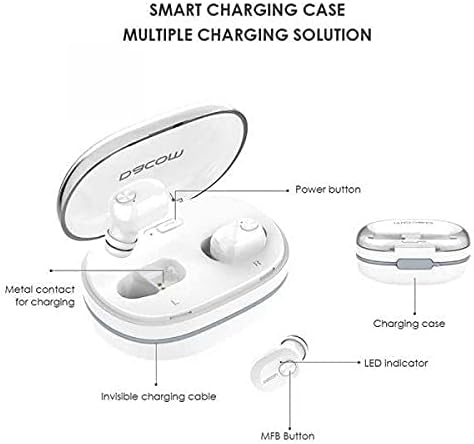
ചിത്രം 3.1: Diagram illustrating the Dacom K6H Pro earphones and charging case components. The image highlights the power button, metal contacts for charging, invisible charging cable, LED indicator, and Multi-Function Button (MFB) on the earbud.
പ്രധാന ഘടകങ്ങൾ:
- ചാർജിംഗ് കേസ്: Stores and charges the earbuds. Features a power button and metal contacts for earbud charging.
- Invisible Charging Cable: Integrated USB charging cable for convenient power replenishment.
- Earbuds (Left & Right): Each earbud has an LED indicator and a Multi-Function Button (MFB) for control.

ചിത്രം 3.2: The Dacom K6H Pro wireless earphones, showing both the charging case with one earbud inserted and the other earbud removed, ready for use. The case is open, revealing the earbud compartments.
4. ചാർജിംഗ്
Ensure your Dacom K6H Pro earphones and charging case are fully charged before first use.
4.1 ഇയർബഡുകൾ ചാർജ് ചെയ്യുന്നു
- ചാർജിംഗ് കെയ്സിൽ ഇയർബഡുകൾ അവയുടെ സ്ലോട്ടുകളിൽ സ്ഥാപിക്കുക.
- ചാർജിംഗ് കെയ്സ് ലിഡ് അടയ്ക്കുക. ഇയർബഡുകൾ സ്വയമേവ ചാർജ് ചെയ്യാൻ തുടങ്ങും.
- The LED indicator on the earbuds will show charging status (refer to LED indicator section for details).
4.2 കേസ് ചാർജ് ചെയ്യൽ
The charging case features a hidden, integrated USB charging cable for convenience.
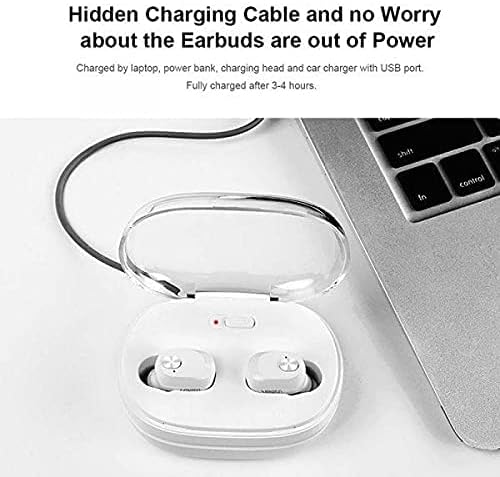
ചിത്രം 4.1: The Dacom K6H Pro charging case connected to a laptop via its integrated USB charging cable. The earbuds are inside the case, and a red LED indicator on the case is visible, signifying charging in progress.
- Locate the integrated USB charging cable on the charging case.
- Connect the USB cable to a power source such as a laptop, power bank, charging head, or car charger with a USB port.
- The charging case LED indicator will illuminate to show charging status.
- സാധാരണയായി ഒരു പൂർണ്ണ ചാർജ് ഏകദേശം 3-4 മണിക്കൂർ എടുക്കും.
5. സജ്ജീകരണവും ജോടിയാക്കലും
Follow these steps to pair your Dacom K6H Pro earphones with your device.
5.1 പ്രാരംഭ ജോടിയാക്കൽ
- ഇയർബഡുകൾ ചാർജ്ജ് ചെയ്തിട്ടുണ്ടെന്ന് ഉറപ്പാക്കുക.
- ചാർജിംഗ് കേസ് തുറക്കുക. ഇയർബഡുകൾ സ്വയമേവ ഓണാകുകയും ജോടിയാക്കൽ മോഡിലേക്ക് പ്രവേശിക്കുകയും ചെയ്യും.
- On your smartphone (iPhone or Android) or other Bluetooth-enabled device, go to the Bluetooth settings.
- ഇതിനായി തിരയുക available devices and select "Dacom K6H Pro" from the list.
- കണക്റ്റുചെയ്തുകഴിഞ്ഞാൽ, ഒരു വോയ്സ് പ്രോംപ്റ്റ് വിജയകരമായ ജോടിയാക്കൽ സ്ഥിരീകരിക്കും.
5.2 വീണ്ടും ബന്ധിപ്പിക്കുന്നു
After initial pairing, the earbuds will automatically reconnect to the last paired device when removed from the charging case and the device's Bluetooth is active.
6. പ്രവർത്തന നിയന്ത്രണങ്ങൾ
The Dacom K6H Pro earphones feature touch controls via the Multi-Function Button (MFB) on each earbud.
- പ്ലേ/താൽക്കാലികമായി നിർത്തുക: Single tap on either MFB.
- അടുത്ത ട്രാക്ക്: Double tap the MFB on the right earbud.
- മുമ്പത്തെ ട്രാക്ക്: Double tap the MFB on the left earbud.
- ഉത്തരം/അവസാന കോൾ: Single tap on either MFB during an incoming call.
- കോൾ നിരസിക്കുക: Press and hold either MFB for 2 seconds during an incoming call.
- വോയ്സ് അസിസ്റ്റന്റിനെ സജീവമാക്കുക: Triple tap on either MFB.
- വോളിയം നിയന്ത്രണം: Volume is typically controlled via the connected device.
7. പരിപാലനം
ശരിയായ അറ്റകുറ്റപ്പണി നിങ്ങളുടെ ഇയർഫോണുകളുടെ ദീർഘായുസ്സും പ്രകടനവും ഉറപ്പാക്കുന്നു.
- വൃത്തിയാക്കൽ: ഇയർബഡുകളും ചാർജിംഗ് കെയ്സും മൃദുവായതും ഉണങ്ങിയതും ലിന്റ് രഹിതവുമായ തുണി ഉപയോഗിച്ച് പതിവായി വൃത്തിയാക്കുക. കഠിനമായ രാസവസ്തുക്കളോ ഉരച്ചിലുകളോ ഉള്ള വസ്തുക്കൾ ഉപയോഗിക്കരുത്.
- സംഭരണം: ഉപയോഗത്തിലില്ലാത്തപ്പോൾ, പൊടിയിൽ നിന്നും കേടുപാടുകളിൽ നിന്നും സംരക്ഷിക്കാൻ ഇയർഫോണുകൾ അവയുടെ ചാർജിംഗ് കേസിൽ സൂക്ഷിക്കുക.
- വെള്ളം ഒഴിവാക്കുക: ഇയർഫോണുകൾ വാട്ടർപ്രൂഫ് അല്ല. വെള്ളം, ഈർപ്പം, അല്ലെങ്കിൽ ഉയർന്ന താപനില എന്നിവയിൽ സമ്പർക്കം പുലർത്തുന്നത് ഒഴിവാക്കുക.
- ചാർജിംഗ് കോൺടാക്റ്റുകൾ: Ensure the metal charging contacts on both the earbuds and the case are clean and free of debris for effective charging.
8. പ്രശ്നപരിഹാരം
If you encounter issues with your Dacom K6H Pro earphones, refer to the following common solutions.
- ഇയർബഡുകൾ ജോടിയാക്കുന്നില്ല:
- രണ്ട് ഇയർബഡുകളും ചാർജ്ജ് ചെയ്തിട്ടുണ്ടെന്ന് ഉറപ്പാക്കുക.
- നിങ്ങളുടെ ഉപകരണത്തിൽ Bluetooth ഓഫാക്കുക, തുടർന്ന് അത് വീണ്ടും ഓണാക്കുക.
- Forget/delete "Dacom K6H Pro" from your device's Bluetooth list and attempt to pair again.
- ഇയർബഡുകൾ കെയ്സിൽ തിരികെ വയ്ക്കുക, ലിഡ് അടയ്ക്കുക, കുറച്ച് സെക്കൻഡ് കാത്തിരിക്കുക, തുടർന്ന് ജോടിയാക്കൽ മോഡിൽ വീണ്ടും പ്രവേശിക്കാൻ തുറക്കുക.
- ഒരു ഇയർബഡ് മാത്രമേ പ്രവർത്തിക്കുന്നുള്ളൂ:
- രണ്ട് ഇയർബഡുകളും ചാർജ്ജ് ചെയ്തിട്ടുണ്ടെന്ന് ഉറപ്പാക്കുക.
- Try resetting the earbuds (refer to manufacturer's specific reset instructions if available, otherwise try placing both in case, closing, and reopening).
- ഇയർബഡുകളിലെയും കെയ്സിലെയും ചാർജിംഗ് കോൺടാക്റ്റുകൾ വൃത്തിയാക്കുക.
- ഇയർബഡുകൾ ചാർജ് ചെയ്യുന്നില്ല:
- ചാർജിംഗ് കേസ് തന്നെ ചാർജ് ചെയ്തിട്ടുണ്ടെന്ന് ഉറപ്പാക്കുക.
- Verify the earbuds are correctly seated in the charging case.
- ഇയർബഡുകളിലെയും കെയ്സിലെയും ചാർജിംഗ് കോൺടാക്റ്റുകൾ വൃത്തിയാക്കുക.
- Try a different USB power source for the charging case.
- മോശം ശബ്ദ നിലവാരം:
- ഇയർബഡുകൾ നിങ്ങളുടെ ചെവിയിൽ ശരിയായി ഘടിപ്പിച്ചിട്ടുണ്ടെന്ന് ഉറപ്പാക്കുക.
- Check the audio source and volume levels on your connected device.
- തടസ്സങ്ങൾ ഒഴിവാക്കാൻ നിങ്ങളുടെ കണക്റ്റുചെയ്ത ഉപകരണത്തിന് അടുത്തേക്ക് നീങ്ങുക.
9 സ്പെസിഫിക്കേഷനുകൾ
| ബ്രാൻഡ് | ഡാകോം |
| മോഡൽ നമ്പർ | K6H Pro |
| കണക്റ്റിവിറ്റി | വയർലെസ്, ബ്ലൂടൂത്ത് 5.0 |
| ഇയർഫോൺ തരം | ഇൻ-ഇയർ |
| മൈക്രോഫോൺ | ഉൾപ്പെടുത്തിയിട്ടുണ്ട് |
| ശബ്ദ നിയന്ത്രണം | സജീവ നോയ്സ് റദ്ദാക്കൽ |
| നിയന്ത്രണ തരം | മീഡിയ നിയന്ത്രണം, ടച്ച് |
| കേബിൾ സവിശേഷത | Without Cable (integrated USB for case) |
| അനുയോജ്യമായ ഉപകരണങ്ങൾ | Multi (iPhone & Android) |
| നിറം | വെള്ള |
| പാക്കേജ് അളവുകൾ | 17.2 x 10.2 x 3.8 സെ.മീ |
| ഇനത്തിൻ്റെ ഭാരം | 120 ഗ്രാം |
10. വാറൻ്റിയും പിന്തുണയും
Dacom products are designed for reliability and performance. For warranty information, please refer to the warranty card included in your product packaging or visit the official Dacom website. For technical support or further assistance, please contact Dacom customer service through the channels provided on their official webസൈറ്റ്.