
ആമുഖം
Welcome to the user manual for your new Other T11 Smart Watch. This device is designed to enhance your daily life with features such as fitness tracking, health monitoring, and smart notifications. Please read this manual carefully to understand the functions and proper operation of your smartwatch. This watch is compatible with both Android and iOS devices.
സജ്ജമാക്കുക
1. സ്മാർട്ട് വാച്ച് ചാർജ് ചെയ്യുന്നു
Before initial use, fully charge your T11 Smart Watch. Connect the provided charging cable to the charging port on the back of the watch and plug the USB end into a standard USB power adapter (not included) or a computer USB port. The watch display will indicate charging status.
2. കമ്പാനിയൻ ആപ്പ് ഡൗൺലോഡ് ചെയ്യുന്നു
To unlock all features and synchronize data, download the dedicated companion app on your smartphone. ഇതിനായി തിരയുക the app name (usually indicated in the quick start guide or on the watch packaging) in the Apple App Store (for iOS) or Google Play Store (for Android).
3. നിങ്ങളുടെ സ്മാർട്ട്ഫോണുമായി ജോടിയാക്കൽ
- നിങ്ങളുടെ സ്മാർട്ട്ഫോണിൽ ബ്ലൂടൂത്ത് പ്രവർത്തനക്ഷമമാക്കിയിട്ടുണ്ടെന്ന് ഉറപ്പാക്കുക.
- നിങ്ങളുടെ സ്മാർട്ട്ഫോണിൽ കമ്പാനിയൻ ആപ്പ് തുറക്കുക.
- Follow the in-app instructions to search for and connect to your T11 Smart Watch. The watch name should appear in the list of available devices.
- ആവശ്യപ്പെടുകയാണെങ്കിൽ, നിങ്ങളുടെ ഫോണിലും വാച്ചിലും ജോടിയാക്കൽ അഭ്യർത്ഥന സ്ഥിരീകരിക്കുക.
പ്രവർത്തന നിർദ്ദേശങ്ങൾ
അടിസ്ഥാന നാവിഗേഷൻ
The T11 Smart Watch features a full touch screen for easy navigation. Swipe left, right, up, or down to access different menus and functions. Tap to select an option or confirm an action.
Changing Watch Dials
The T11 Smart Watch offers various beautiful dials to personalize your experience. You can change the watch face directly by touching and holding the screen, then swiping to browse available options and tapping to select. No phone connection is needed for this function.

Image: The T11 Smart Watch allows users to easily change between various pre-installed watch faces by interacting directly with the touch screen.
Real-time Information Reminders
Once paired with your smartphone via Bluetooth, the T11 Smart Watch can provide real-time reminders for calls and messages. Ensure your phone's Bluetooth is active and the companion app is running in the background. The watch will vibrate to alert you, displaying the content of messages or caller ID directly on the screen.
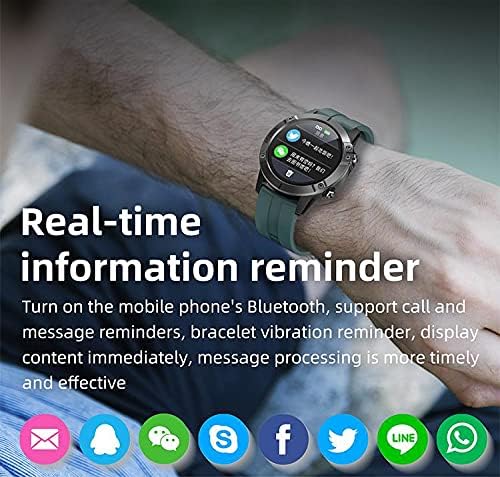
Image: The T11 Smart Watch on a wrist, showing notifications from various social media and messaging applications.
ഒന്നിലധികം സ്പോർട്സ് മോഡുകൾ
The T11 Smart Watch supports multiple sports modes to track your physical activities. These modes include hiking, climbing, running, swimming, cycling, walking, football, basketball, badminton, and more. Select the appropriate mode before starting your activity for accurate data recording.

Image: A visual representation of the T11 Smart Watch's multiple sports modes, including walking, running, riding, climbing, football, basketball, table tennis, and badminton.
ആരോഗ്യ നിരീക്ഷണം
The watch includes several health monitoring features:
- Heart Rate Tracker: ദിവസം മുഴുവൻ നിങ്ങളുടെ ഹൃദയമിടിപ്പ് നിരീക്ഷിക്കുന്നു.
- രക്ത ഓക്സിജൻ മോണിറ്റർ: നിങ്ങളുടെ രക്തത്തിലെ ഓക്സിജൻ സാച്ചുറേഷൻ അളവ് അളക്കുന്നു.
- സ്ലീപ്പ് ട്രാക്കർ: Analyzes your sleep patterns, including deep sleep and light sleep.
- ഫിറ്റ്നസ് ട്രാക്കർ: ചുവടുകൾ, ദൂരം, കത്തിച്ച കലോറികൾ എന്നിവ രേഖപ്പെടുത്തുന്നു.
അധിക സവിശേഷതകൾ
- സംഗീത നിയന്ത്രണം: വാച്ചിൽ നിന്ന് നേരിട്ട് നിങ്ങളുടെ സ്മാർട്ട്ഫോണിൽ സംഗീത പ്ലേബാക്ക് നിയന്ത്രിക്കുക.
- റിമോട്ട് ക്യാമറ: Use the watch as a remote shutter for your smartphone's camera.
- അലാറം ക്ലോക്ക്: Set alarms to wake you up or remind you of tasks.
- Mood Tracker: (Functionality may vary, refer to app for details).

ചിത്രം: ഒരു ഓവർview of the T11 Smart Watch's key features: full touch screen, sport pedometer, music control, multiple sports modes, health assistant, large-capacity battery, and remote camera.
മെയിൻ്റനൻസ്
ജല പ്രതിരോധം (IP67)
The T11 Smart Watch is IP67 water-resistant, meaning it is protected against dust and can withstand immersion in water up to 1 meter for 30 minutes. It is suitable for daily use and activities like hand washing or light rain. However, it is not recommended for swimming, diving, or hot water activities.
വൃത്തിയാക്കൽ
മൃദുവായതും ഉണങ്ങിയതുമായ തുണി ഉപയോഗിച്ച് നിങ്ങളുടെ വാച്ചും സ്ട്രാപ്പും പതിവായി വൃത്തിയാക്കുക. ആവശ്യമെങ്കിൽ, അല്പം ഡി-ക്ലിപ്പ് ഉപയോഗിക്കുക.amp cloth and then dry thoroughly. Avoid using harsh chemicals or abrasive materials, as these can damage the device.
ബാറ്ററി കെയർ
To prolong battery life, avoid fully discharging the watch frequently. Charge it regularly, especially if you plan not to use it for an extended period.
ട്രബിൾഷൂട്ടിംഗ്
വാച്ച് ഓണാക്കുന്നില്ല
- വാച്ച് പൂർണ്ണമായും ചാർജ് ചെയ്തിട്ടുണ്ടെന്ന് ഉറപ്പാക്കുക. കുറഞ്ഞത് 30 മിനിറ്റെങ്കിലും ചാർജറുമായി ബന്ധിപ്പിക്കുക.
- Press and hold the power button (if available) for several seconds.
സ്മാർട്ട്ഫോണുമായി ജോടിയാക്കാൻ കഴിയില്ല
- നിങ്ങളുടെ സ്മാർട്ട്ഫോണിൽ ബ്ലൂടൂത്ത് പ്രവർത്തനക്ഷമമാക്കിയിട്ടുണ്ടെന്ന് ഉറപ്പാക്കുക.
- Ensure the watch is within the Bluetooth range of your phone (typically 10 meters).
- നിങ്ങളുടെ സ്മാർട്ട്ഫോണും വാച്ചും പുനരാരംഭിക്കുക.
- Clear the Bluetooth cache on your phone or forget the device and try pairing again.
- കമ്പാനിയൻ ആപ്പ് ഏറ്റവും പുതിയ പതിപ്പിലേക്ക് അപ്ഡേറ്റ് ചെയ്തിട്ടുണ്ടെന്ന് ഉറപ്പാക്കുക.
കൃത്യമല്ലാത്ത ആരോഗ്യ ഡാറ്റ
- വാച്ച് നിങ്ങളുടെ കൈത്തണ്ടയിൽ നന്നായി ധരിക്കുന്നുണ്ടെന്ന് ഉറപ്പാക്കുക, അധികം ഇറുകിയതോ അധികം അയഞ്ഞതോ അല്ല.
- വാച്ചിന്റെ പിൻഭാഗത്തുള്ള സെൻസറുകൾ വൃത്തിയാക്കുക.
- Avoid excessive movement during measurements for better accuracy.
അറിയിപ്പുകൾ ദൃശ്യമാകുന്നില്ല
- Check notification permissions for the companion app in your phone's settings.
- ആപ്പ് പശ്ചാത്തലത്തിൽ പ്രവർത്തിക്കുന്നുണ്ടെന്നും നിങ്ങളുടെ ഫോണിന്റെ പവർ ലാഭിക്കൽ സവിശേഷതകൾ അത് അടയ്ക്കുന്നില്ലെന്നും ഉറപ്പാക്കുക.
- Verify that notifications are enabled within the companion app settings.
സാങ്കേതിക സവിശേഷതകൾ
| ഫീച്ചർ | സ്പെസിഫിക്കേഷൻ |
|---|---|
| മോഡലിൻ്റെ പേര് | T11 |
| ബ്രാൻഡ് നാമം | മറ്റുള്ളവ |
| ഓപ്പറേറ്റിംഗ് സിസ്റ്റം | ഒന്നിലധികം |
| അനുയോജ്യമായ ഓപ്പറേറ്റിംഗ് സിസ്റ്റങ്ങൾ | ആൻഡ്രോയിഡ്, ഐഒഎസ് |
| ഡിസ്പ്ലേ തരം | എൽസിഡി |
| സ്ക്രീൻ വലിപ്പം | 1.3 ഇഞ്ച് |
| റെസലൂഷൻ | 320 x 240 |
| ഹ്യൂമൻ ഇന്റർഫേസ് ഇൻപുട്ട് | ടച്ച് നിയന്ത്രണം |
| കണക്റ്റിവിറ്റി ടെക്നോളജി | വയർലെസ് |
| വയർലെസ് കമ്മ്യൂണിക്കേഷൻ സ്റ്റാൻഡേർഡ് | ബ്ലൂടൂത്ത് 4.0 |
| ബാറ്ററി ശേഷി | 280 mAh |
| സ്റ്റാൻഡ്ബൈ സമയം | ഏകദേശം. 35 ദിവസം |
| ജോലി സമയം | 7-10 ദിവസം |
| അന്താരാഷ്ട്ര സംരക്ഷണ റേറ്റിംഗ് | IP67 (ജല പ്രതിരോധം) |
| ജല പ്രതിരോധ ആഴം | 1 മീറ്റർ |
| ബാൻഡ് മെറ്റീരിയൽ തരം | സിലിക്കൺ |
| Case Material Type | പ്ലാസ്റ്റിക് |
| നിറം | കറുപ്പ് |
| ഉൾപ്പെടുത്തിയ ഘടകങ്ങൾ | Silicone bracelet (black), 280 mAh battery, 280 mAh battery charger |
വാറൻ്റിയും പിന്തുണയും
വാറന്റി വിവരങ്ങൾക്കും ഉപഭോക്തൃ പിന്തുണയ്ക്കും, നിങ്ങളുടെ വാങ്ങലിനൊപ്പം നൽകിയിരിക്കുന്ന ഡോക്യുമെന്റേഷൻ പരിശോധിക്കുകയോ റീട്ടെയിലറെ ബന്ധപ്പെടുകയോ ചെയ്യുക. ഏതെങ്കിലും വാറന്റി ക്ലെയിമുകൾക്കായി നിങ്ങളുടെ വാങ്ങിയതിന്റെ തെളിവ് സൂക്ഷിക്കുക.