
1. ആമുഖം
This manual provides essential information for the safe and efficient operation of your AstroAI 20V MAX Li-ion Battery Charger. This charger is designed to provide quick and reliable power to compatible AstroAI 20V MAX Li-ion battery packs, ensuring optimal performance for your tools.
ഉപയോഗിക്കുന്നതിന് മുമ്പ് ദയവായി ഈ മാനുവൽ നന്നായി വായിക്കുകയും ഭാവി റഫറൻസിനായി സൂക്ഷിക്കുകയും ചെയ്യുക.
2 പ്രധാനപ്പെട്ട സുരക്ഷാ വിവരങ്ങൾ
WARNING: To reduce the risk of injury, please read the user manual carefully before use.
- ETL സാക്ഷ്യപ്പെടുത്തിയത്: This charger is ETL certified, ensuring high quality, safety, and reliability.
- ബിൽറ്റ്-ഇൻ പരിരക്ഷകൾ: The charger features multiple safety mechanisms including Overheat Protection, Overcharge Protection, and Short-Circuit Protection to safeguard both the charger and the battery.
- അനുയോജ്യത: This charger is compatible with AstroAI 20V MAX battery packs, AstroAI handheld battery-powered air compressors, and AstroAI multifunctional air pumps. It is അല്ല available for model LS40791(C1).
- ചാർജർ മഴയിലോ നനഞ്ഞ അവസ്ഥയിലോ വെക്കരുത്.
- ചാർജറിന് ശക്തമായ പ്രഹരം ഏൽക്കുകയോ, താഴെ വീഴുകയോ, അല്ലെങ്കിൽ മറ്റെന്തെങ്കിലും കേടുപാടുകൾ സംഭവിക്കുകയോ ചെയ്താൽ അത് പ്രവർത്തിപ്പിക്കരുത്.
- Always unplug the charger from the power outlet before attempting any cleaning or maintenance.

3. പാക്കേജ് ഉള്ളടക്കം
അൺപാക്ക് ചെയ്യുമ്പോൾ, താഴെ പട്ടികപ്പെടുത്തിയിരിക്കുന്ന എല്ലാ ഇനങ്ങളും ഉണ്ടെന്നും നല്ല നിലയിലാണെന്നും ഉറപ്പാക്കുക:
- AstroAI 20V MAX Li-ion Battery Charger
- ഉപയോക്തൃ മാനുവൽ
- നന്ദി കാർഡ്

4. ഉൽപ്പന്ന സവിശേഷതകൾ
- High Power + Fast Charging: Delivers 1.7A power and 21V voltage, allowing a full charge of the battery pack in approximately one hour.
- LED സൂചകങ്ങൾ: Integrated LED indicators clearly display the current charging status of the battery.
- മോടിയുള്ള ഡിസൈൻ: Features a US standard plug, oxidation-resistance connector, flexible PVC cable line, and an anti-bend cable tail for enhanced durability and longevity.

5. സജ്ജീകരണം
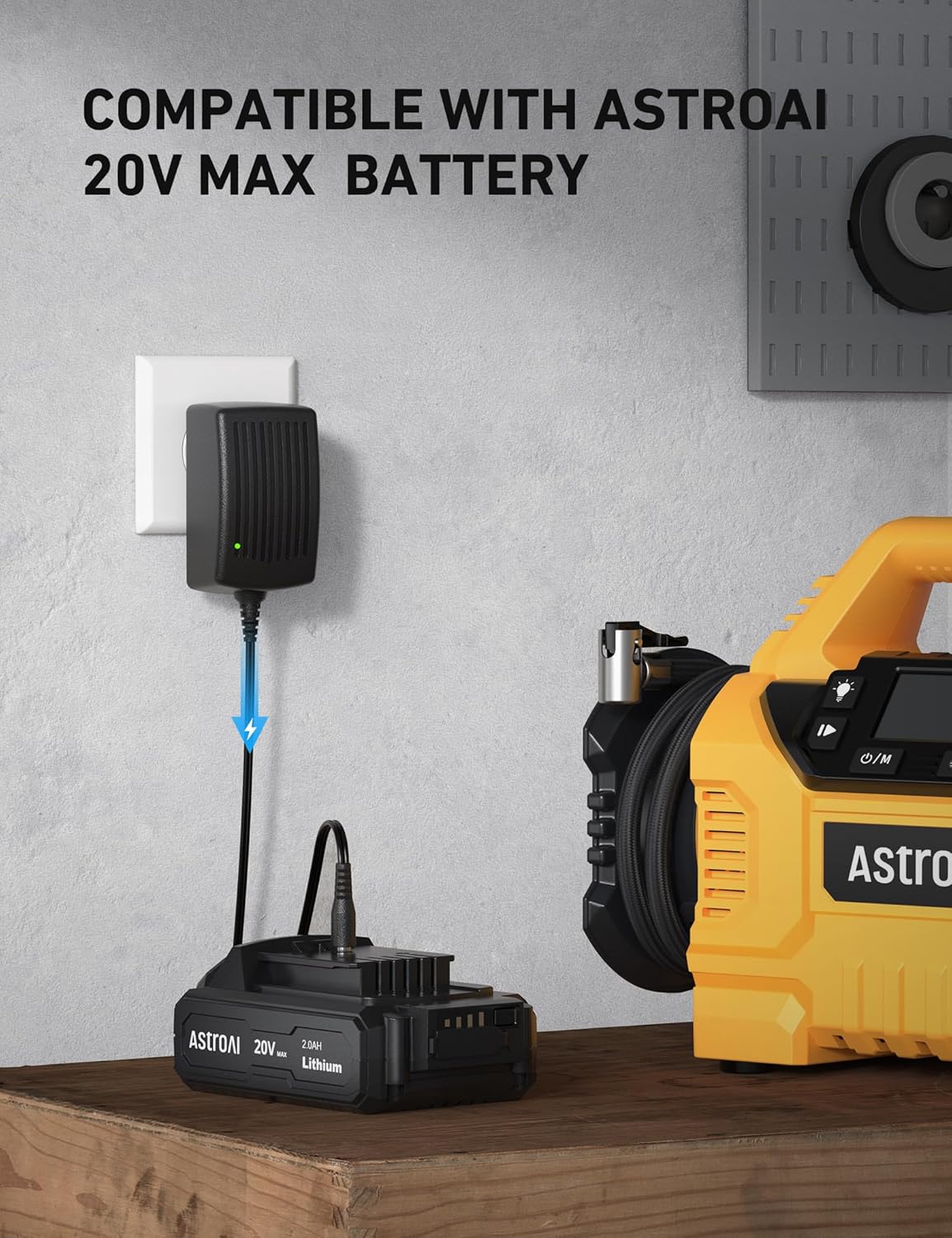
- പവറിലേക്ക് ബന്ധിപ്പിക്കുക: Plug the AstroAI 20V MAX Battery Charger into a standard wall outlet. The LED indicator on the charger will illuminate to show it is receiving power.
- ബാറ്ററി ബന്ധിപ്പിക്കുക: Insert the compatible AstroAI 20V MAX Li-ion battery pack into the charging port of the charger. Ensure a secure connection.
6. പ്രവർത്തന നിർദ്ദേശങ്ങൾ
Once the battery is connected to the charger and the charger is plugged into a power source, the charging process will begin automatically. The LED indicators on the battery pack will show the charging status:
- ചാർജിംഗ്: The LED indicators will typically flash or light up sequentially to indicate that the battery is charging.
- പൂർണ്ണമായി ചാർജ്ജ് ചെയ്തത്: All LED indicators will remain solid when the battery is fully charged.
A full charge for a depleted battery pack takes approximately one hour.

7. പരിപാലനം
- വൃത്തിയാക്കൽ: Keep the charger and battery contacts clean and free of debris. Use a dry cloth to wipe down the surfaces.
- സംഭരണം: Store the charger and battery in a cool, dry place away from direct sunlight and extreme temperatures.
- ദീർഘകാല സംഭരണം: If the battery will not be used for an extended period, remove it from the charger and store it with a partial charge. Recharge the battery every 3 months to maintain its lifespan.
8. പ്രശ്നപരിഹാരം
| പ്രശ്നം | സാധ്യമായ കാരണം | പരിഹാരം |
|---|---|---|
| Charger LED indicators not lighting up. | No power to the charger or faulty connection. | Ensure the charger is securely plugged into a working power outlet. Check the power outlet with another device. |
| ബാറ്ററി ചാർജ് ചെയ്യുന്നില്ല. | Battery not properly seated, battery is too hot/cold, or battery is faulty. | Ensure the battery is fully inserted into the charger. Allow the battery to reach room temperature before charging. If the issue persists, the battery may need replacement. |
| Charger stops charging prematurely. | Overheat protection activated or overcharge protection. | Allow the charger and battery to cool down. Ensure proper ventilation around the charger. The charger is designed to stop charging once the battery is full to prevent overcharging. |
| Unusual smell or smoke from charger. | Internal fault or short-circuit. | Immediately unplug the charger from the power outlet and disconnect the battery. Do not use the charger again. Contact AstroAI customer support. |
9 സ്പെസിഫിക്കേഷനുകൾ
- Putട്ട്പുട്ട് വോളിയംtage: 20 വോൾട്ട്
- പവർ ഔട്ട്പുട്ട്: 1.7എ
- ചാർജിംഗ് സമയം: Approximately 1 hour for a full charge
- പാക്കേജ് അളവുകൾ: 4.69 x 3.27 x 2.4 ഇഞ്ച്
- ഇനത്തിൻ്റെ ഭാരം: 5.9 ഔൺസ് (0.17 കിലോഗ്രാം)
- നിറം: കറുപ്പ്
- സർട്ടിഫിക്കേഷൻ: ETL സാക്ഷ്യപ്പെടുത്തിയത്
10. വാറൻ്റിയും പിന്തുണയും
AstroAI is committed to providing high-quality products and excellent customer service. If you have any questions, concerns, or require assistance with your AstroAI 20V MAX Li-ion Battery Charger, please do not hesitate to contact our customer support team.
For support, please visit the AstroAI webസൈറ്റ് അല്ലെങ്കിൽ നിങ്ങളുടെ ഉൽപ്പന്ന പാക്കേജിംഗിൽ നൽകിയിരിക്കുന്ന കോൺടാക്റ്റ് വിവരങ്ങൾ റഫർ ചെയ്യുക.