
hohem X2
hohem iSteady X2 3-Axis Gimbal Stabilizer User Manual
മോഡൽ: എക്സ് 2
1. ആമുഖം
Thank you for choosing the hohem iSteady X2 3-Axis Gimbal Stabilizer. This manual provides essential information for the safe and effective operation of your device. Please read it thoroughly before use and retain it for future reference.
പാക്കേജ് ഉള്ളടക്കം
- hohem iSteady X2 Gimbal Stabilizer
- വയർലെസ് റിമോട്ട് കൺട്രോൾ
- മിനി ട്രൈപോഡ്
- USB-C ചാർജിംഗ് കേബിൾ
- സ്റ്റോറേജ് പൗച്ച്
- ഉപയോക്തൃ മാനുവൽ (ഈ പ്രമാണം)
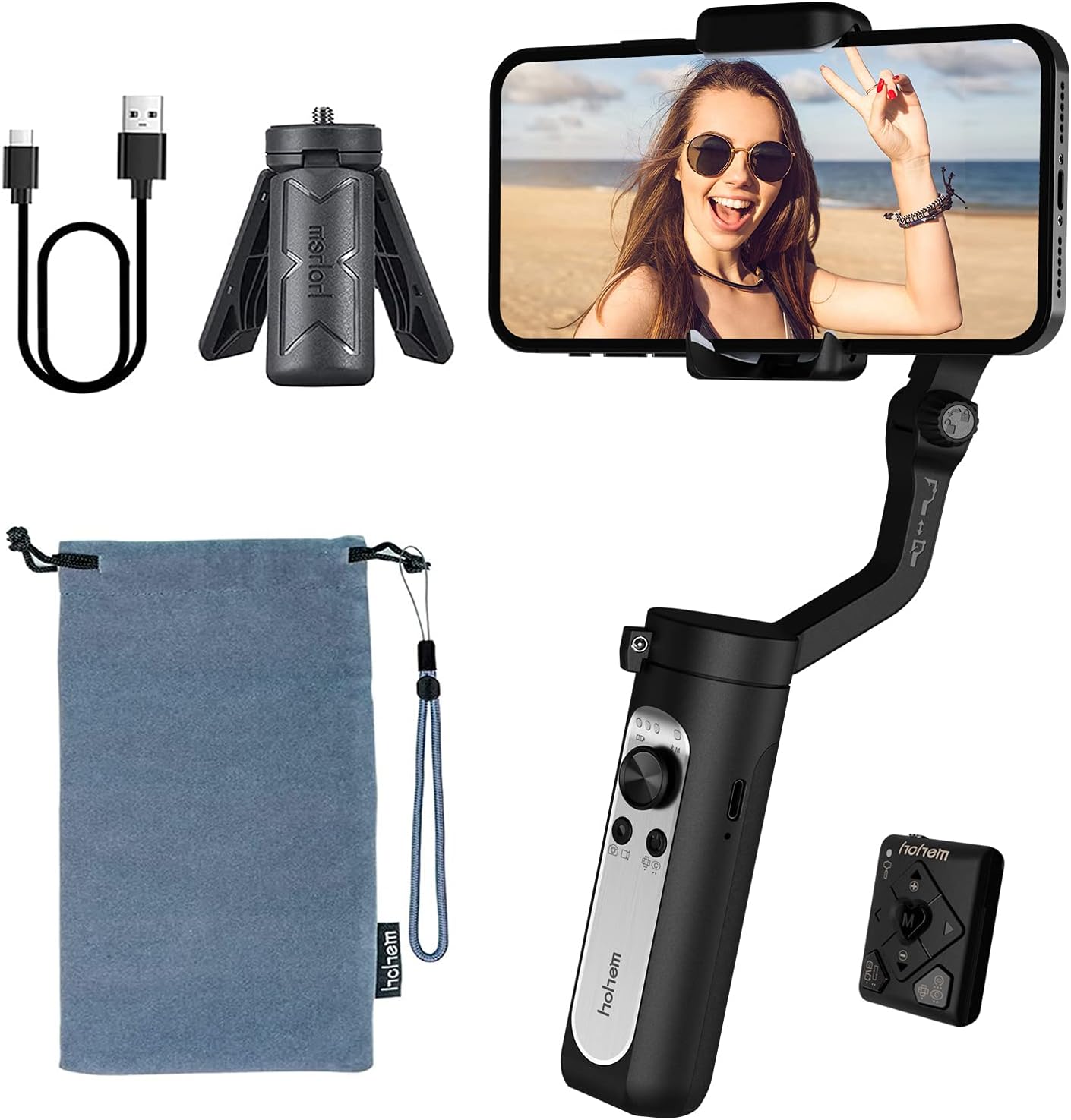
The image above displays the hohem iSteady X2 gimbal stabilizer along with its standard accessories. These include the main gimbal unit, a compact wireless remote control, a mini tripod for stable placement, a USB-C cable for charging, and a soft storage pouch for portability.
2 സുരക്ഷാ വിവരങ്ങൾ
To ensure safe operation and prevent damage to the device or injury to yourself or others, please observe the following safety precautions:
- Do not disassemble, repair, or modify the gimbal.
- Keep the gimbal away from water and other liquids.
- ഗിംബൽ താഴെയിടുകയോ ശക്തമായ ആഘാതങ്ങൾക്ക് വിധേയമാക്കുകയോ ചെയ്യുന്നത് ഒഴിവാക്കുക.
- Do not expose the gimbal to extreme temperatures or direct sunlight for prolonged periods.
- Ensure your smartphone is securely mounted before powering on the gimbal.
- പ്രവർത്തിക്കുമ്പോൾ വിരലുകൾ ചലിക്കുന്ന ഭാഗങ്ങളിൽ നിന്ന് അകറ്റി നിർത്തുക.
- നൽകിയിരിക്കുന്ന ചാർജിംഗ് കേബിളും അനുയോജ്യമായ ഒരു പവർ അഡാപ്റ്ററും മാത്രം ഉപയോഗിക്കുക.
3. ഉൽപ്പന്നം കഴിഞ്ഞുview
The hohem iSteady X2 is a compact and lightweight 3-axis gimbal stabilizer designed for smartphones, offering enhanced stability and creative shooting modes. It features a foldable design for easy portability and comes with a wireless remote control.

This image illustrates the primary features of the hohem iSteady X2, including its ultralight design (259g), 3-axis stabilization for smooth footage, wireless remote control capability, advanced face tracking, various Moment Modes for creative shots, emergency power bank function for charging your phone, and a quick roll switch for easy orientation changes.
ഘടകങ്ങളും നിയന്ത്രണങ്ങളും
- ഫോൺ Clamp: നിങ്ങളുടെ സ്മാർട്ട്ഫോൺ സുരക്ഷിതമായി സൂക്ഷിക്കുന്നു.
- Roll Axis Motor: Controls the roll movement for horizontal stability.
- Pan Axis Motor: Controls the pan movement for horizontal rotation.
- Tilt Axis Motor: Controls the tilt movement for vertical stability.
- ജോയ്സ്റ്റിക്ക്: Controls pan and tilt movements manually.
- മോഡ് ബട്ടൺ (M): Switches between different working modes.
- പവർ ബട്ടൺ: Powers the gimbal on/off.
- ഷട്ടർ ബട്ടൺ: Triggers photo/video recording via Bluetooth.
- സൂം സ്ലൈഡർ: Controls digital zoom in the Hohem Pro app.
- യുഎസ്ബി-സി പോർട്ട്: For charging the gimbal and emergency phone charging.
- 1/4-inch Screw Hole: For mounting the tripod or other accessories.

This image highlights some of the creative shooting modes accessible through the Hohem Pro app, including Inception Mode for rotating shots, Dolly Zoom for dramatic effects, Timelapse for accelerated video, and Panoramic for wide-angle captures. These modes enhance the versatility of the gimbal for various content creation needs.
4. സജ്ജീകരണം
4.1 ഗിംബലിന്റെ മടക്കൽ
- Gently unfold the gimbal arm until it locks into place.
- ഫോൺ cl നീട്ടുകamp.

The image above demonstrates the compact, folded state of the hohem iSteady X2, showing how easily it fits into a pocket. This highlights its lightweight design, weighing only 0.57 lbs, making it highly portable for on-the-go use.
4.2 നിങ്ങളുടെ സ്മാർട്ട്ഫോൺ മൌണ്ട് ചെയ്യുകയും ബാലൻസ് ചെയ്യുകയും ചെയ്യുന്നു
Proper balancing is crucial for optimal performance and battery life.
- Place your smartphone firmly into the phone clamp. Ensure the phone is centered and snug.
- Adjust the phone's position within the clamp until it remains level when the gimbal is powered off. If the phone tilts to one side, adjust its position slightly until it stays horizontal.

This image visually represents the 3-axis stabilization capability of the hohem iSteady X2. It shows a smartphone mounted on the gimbal, with arrows indicating the three axes of movement (pan, tilt, and roll) that work together using the 4.0 anti-shake algorithm system to ensure smooth and stable video footage, even during dynamic movements.
4.3 App Installation (Hohem Pro)
For full functionality and advanced features, download the "Hohem Pro" app from your smartphone's app store (iOS App Store or Google Play Store).
- ഇതിനായി തിരയുക "Hohem Pro".
- ആപ്പ് ഇൻസ്റ്റാൾ ചെയ്ത് ആവശ്യമായ അനുമതികൾ നൽകുക.
5. പ്രവർത്തന നിർദ്ദേശങ്ങൾ
5.1 പവർ ഓൺ/ഓഫ്
- പവർ ഓൺ: 3 സെക്കൻഡ് നേരത്തേക്ക് പവർ ബട്ടൺ അമർത്തിപ്പിടിക്കുക.
- പവർ ഓഫ്: 3 സെക്കൻഡ് നേരത്തേക്ക് പവർ ബട്ടൺ അമർത്തിപ്പിടിക്കുക.
5.2 ബ്ലൂടൂത്ത് കണക്ഷൻ
- Ensure the gimbal is powered on.
- നിങ്ങളുടെ സ്മാർട്ട്ഫോണിൽ ബ്ലൂടൂത്ത് പ്രവർത്തനക്ഷമമാക്കുക.
- Open the Hohem Pro app. The app will automatically search for and connect to the gimbal.
- If prompted, confirm the pairing.
5.3 ഗിംബൽ മോഡുകൾ
Press the Mode Button (M) to cycle through the following modes:
- Pan & Tilt Follow (PF): The pan and tilt axes follow your movements, while the roll axis remains locked.
- പാൻ ഫോളോ (PF): Only the pan axis follows your movements.
- ഓൾ ലോക്ക് (AL): മൂന്ന് അക്ഷങ്ങളും ലോക്ക് ചെയ്തിരിക്കുന്നു, ക്യാമറ ഒരു നിശ്ചിത ദിശയിലേക്ക് നയിക്കുന്നു.
- POV (പോയിന്റ് ഓഫ് View): All three axes follow your movements, providing a first-person perspective.
- ആരംഭ മോഡ്: Rotates the phone 360 degrees along the roll axis.
5.4 വയർലെസ് വിദൂര നിയന്ത്രണം
The iSteady X2 comes with a dedicated wireless remote control for convenient operation.

This image highlights the convenience of the wireless remote control. It shows the gimbal set up with a smartphone, and a hand holding the remote, enabling users to capture photos or videos from a distance, perfect for group shots or when you need to be in the frame yourself.
- പവർ ബട്ടൺ: Power on/off the remote.
- ഷട്ടർ ബട്ടൺ: Take photos or start/stop video recording.
- ജോയ്സ്റ്റിക്ക്: Control gimbal movement (pan/tilt).
- മോഡ് ബട്ടൺ: Switch gimbal modes.
- സൂം ഇൻ/ഔട്ട്: Control digital zoom.
5.5 എമർജൻസി പവർ ബാങ്ക് പ്രവർത്തനം
The iSteady X2 features a built-in 2800mAh battery that can also serve as an emergency power bank for your smartphone via the USB-C port.

This image demonstrates the hohem iSteady X2's capability to act as an emergency power bank. It shows a smartphone connected to the gimbal via a USB-C cable, indicating that the gimbal's internal 2800mAh battery can provide power to charge your phone when needed, extending your shooting time.
5.6 ഔദ്യോഗിക ഉൽപ്പന്ന വീഡിയോ
The embedded video showcases the hohem iSteady X2, emphasizing its lightweight design and various functionalities. It demonstrates the gimbal's ease of use, portability, and some of its advanced features in action, providing a visual guide to its capabilities.
6. പരിപാലനം
- വൃത്തിയാക്കൽ: ജിംബൽ വൃത്തിയാക്കാൻ മൃദുവായതും ഉണങ്ങിയതുമായ തുണി ഉപയോഗിക്കുക. ലിക്വിഡ് ക്ലീനറുകളോ ലായകങ്ങളോ ഉപയോഗിക്കരുത്.
- സംഭരണം: Store the gimbal in its provided storage pouch in a cool, dry place away from direct sunlight.
- ബാറ്ററി കെയർ: For long-term storage, charge the battery to approximately 50-60% every three months to prevent over-discharge.
7. പ്രശ്നപരിഹാരം
| പ്രശ്നം | സാധ്യമായ കാരണം | പരിഹാരം |
|---|---|---|
| ഗിംബാൽ പവർ ഓൺ ചെയ്യുന്നില്ല. | കുറഞ്ഞ ബാറ്ററി. | ജിംബൽ പൂർണ്ണമായും ചാർജ് ചെയ്യുക. |
| Gimbal unstable or vibrating. | Smartphone not balanced correctly. | Re-balance the smartphone in the clamp. |
| ബ്ലൂടൂത്ത് കണക്ഷൻ പ്രശ്നങ്ങൾ. | Bluetooth off on phone, app not open, interference. | Ensure Bluetooth is on, open Hohem Pro app, restart gimbal and phone. |
| റിമോട്ട് കൺട്രോൾ പ്രവർത്തിക്കുന്നില്ല. | Remote battery low, not paired. | Ensure remote is charged/has fresh batteries, re-pair with gimbal. |
8 സ്പെസിഫിക്കേഷനുകൾ
| ഫീച്ചർ | വിശദാംശങ്ങൾ |
|---|---|
| മോഡൽ | X2 |
| ഉൽപ്പന്ന അളവുകൾ | 7.05 x 3.11 x 1.54 ഇഞ്ച് (മടക്കിയത്) |
| ഇനത്തിൻ്റെ ഭാരം | 9.1 ഔൺസ് (ഏകദേശം 259 ഗ്രാം) |
| പരമാവധി ഭാരം ശുപാർശ | 280 ഗ്രാം (0.62 പൗണ്ട്) |
| ബാറ്ററി തരം | ലിഥിയം അയോൺ |
| ബാറ്ററി ശേഷി | 2800mAh (approx. 10 hours battery life) |
| ചാർജിംഗ് പോർട്ട് | USB-C (supports two-way charging) |
| സ്ഥിരത | 3-Axis (Pan, Tilt, Roll) with 4.0 anti-shake algorithm |
| അനുയോജ്യമായ ഉപകരണങ്ങൾ | iPhone 12/12mini/12pro/12pro max/11/11 pro max/Xs max/xs/x, Samsung Galaxy s10e/s10 plus/Note10, Huawei P40/P40+/P30/mate 30, Google Pixel 4/4XL |
| യു.പി.സി | 673400922373 |
9. വാറൻ്റിയും പിന്തുണയും
hohem products are designed and manufactured to the highest quality standards. For warranty information and technical support, please refer to the official hohem webസൈറ്റ് അല്ലെങ്കിൽ അവരുടെ ഉപഭോക്തൃ സേവനവുമായി നേരിട്ട് ബന്ധപ്പെടുക.
- ഉദ്യോഗസ്ഥൻ Webസൈറ്റ്: www.hohem.com
- കസ്റ്റമർ സർവീസ്: Refer to the contact information provided on the product packaging or official webസൈറ്റ്.
- ഉപയോക്തൃ മാനുവൽ (PDF): ഉപയോക്തൃ മാനുവലിന്റെ ഡൗൺലോഡ് ചെയ്യാവുന്ന PDF പതിപ്പ് ഇവിടെ ലഭ്യമായേക്കാം ഈ ലിങ്ക്.
വാറൻ്റി ക്ലെയിമുകൾക്കായി നിങ്ങളുടെ വാങ്ങിയതിൻ്റെ തെളിവ് സൂക്ഷിക്കുക.
Ask a question about this manual
Ask about setup, troubleshooting, compatibility, parts, safety, or missing instructions. Manuals+ will review the question and use this page’s manual context to help answer it.