
1. ആമുഖം
വാങ്ങിയതിന് നന്ദി.asing the ANESOK 3-Speed Bluetooth Turntable. This manual provides essential information for the proper setup, operation, and maintenance of your new record player. Please read these instructions thoroughly before use to ensure optimal performance and longevity of the device. Keep this manual for future reference.
2. സുരക്ഷാ നിർദ്ദേശങ്ങൾ
- ഊർജ്ജ സ്രോതസ്സ്: നൽകിയിരിക്കുന്ന പവർ അഡാപ്റ്റർ മാത്രം ഉപയോഗിക്കുക. വോളിയം ഉറപ്പാക്കുകtagഇ നിങ്ങളുടെ പ്രാദേശിക വൈദ്യുതി വിതരണവുമായി പൊരുത്തപ്പെടുന്നു.
- ജലവും ഈർപ്പവും: യൂണിറ്റ് മഴയിലോ ഈർപ്പത്തിലോ ദ്രാവകങ്ങളിലോ വയ്ക്കരുത്. പാത്രങ്ങൾ പോലുള്ള ദ്രാവകങ്ങൾ നിറച്ച വസ്തുക്കൾ യൂണിറ്റിൽ വയ്ക്കുന്നത് ഒഴിവാക്കുക.
- ചൂട്: റേഡിയേറ്ററുകൾ, ഹീറ്റ് രജിസ്റ്ററുകൾ, സ്റ്റൗകൾ അല്ലെങ്കിൽ മറ്റ് ഉപകരണങ്ങൾ (ഉൾപ്പെടെ) പോലുള്ള താപ സ്രോതസ്സുകളിൽ നിന്ന് യൂണിറ്റ് അകറ്റി നിർത്തുക. ampലൈഫയറുകൾ) ചൂട് ഉത്പാദിപ്പിക്കുന്നത്.
- വെൻ്റിലേഷൻ: ശരിയായ വായുസഞ്ചാരം ഉറപ്പാക്കുക. വായുസഞ്ചാര ദ്വാരങ്ങളൊന്നും തടയരുത്.
- വൃത്തിയാക്കൽ: വൃത്തിയാക്കുന്നതിന് മുമ്പ് വാൾ ഔട്ട്ലെറ്റിൽ നിന്ന് യൂണിറ്റ് പ്ലഗ് ഊരിയിടുക. മൃദുവായതും ഉണങ്ങിയതുമായ തുണി ഉപയോഗിക്കുക. ലിക്വിഡ് ക്ലീനറുകളോ എയറോസോൾ ക്ലീനറുകളോ ഉപയോഗിക്കരുത്.
- സേവനം: ഈ ഉൽപ്പന്നം സ്വയം സേവിക്കാൻ ശ്രമിക്കരുത്. യോഗ്യതയുള്ള സേവന ഉദ്യോഗസ്ഥർക്ക് എല്ലാ സേവനങ്ങളും റഫർ ചെയ്യുക.
- പ്ലേസ്മെൻ്റ്: കേടുപാടുകൾ വീഴാതിരിക്കാൻ യൂണിറ്റ് ഒരു സ്ഥിരതയുള്ള, നിരപ്പായ പ്രതലത്തിൽ വയ്ക്കുക.
3. പാക്കേജ് ഉള്ളടക്കം
താഴെ പട്ടികപ്പെടുത്തിയിരിക്കുന്ന എല്ലാ ഇനങ്ങളും നിങ്ങളുടെ പാക്കേജിൽ ഉൾപ്പെടുത്തിയിട്ടുണ്ടോയെന്ന് ദയവായി പരിശോധിക്കുക:
- ANESOK 3-Speed Bluetooth Turntable
- പവർ അഡാപ്റ്റർ
- 45 ആർപിഎം അഡാപ്റ്റർ
- ഇൻസ്ട്രക്ഷൻ മാനുവൽ
- പൊടി കവർ
4. ഉൽപ്പന്നം കഴിഞ്ഞുview
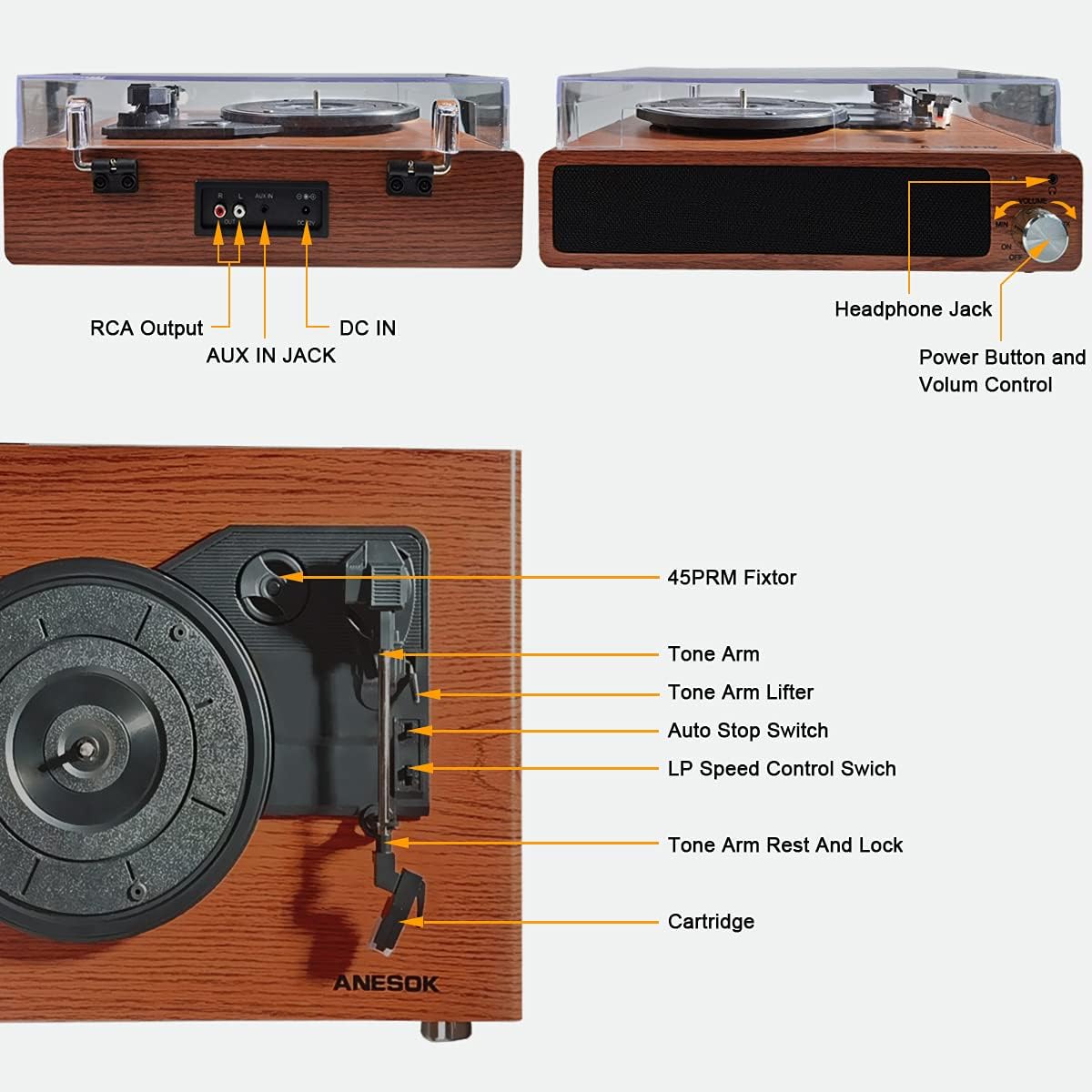
ചിത്രം 1: A comprehensive diagram pointing out all the essential parts and connection ports of the ANESOK record player, including inputs, outputs, and operational controls.
- 45 RPM Fixtor: Used for playing 7-inch records with a large center hole.
- ടോൺ ആം: കാട്രിഡ്ജും സ്റ്റൈലസും പിടിക്കുന്നു.
- Tone Arm Lifter: ടോൺ ആം സൌമ്യമായി ഉയർത്തുകയും താഴ്ത്തുകയും ചെയ്യുന്നു.
- ഓട്ടോ സ്റ്റോപ്പ് സ്വിച്ച്: Toggles the automatic stop function for vinyl playback.
- LP Speed Control Switch: Selects playback speeds (33, 45, 78 RPM).
- Tone Arm Rest and Lock: Secures the tone arm when not in use.
- കാട്രിഡ്ജ്: Contains the stylus that reads the record grooves.
- ഹെഡ്ഫോൺ ജാക്ക്: ഹെഡ്ഫോണുകൾ ഉപയോഗിച്ച് സ്വകാര്യ ശ്രവണത്തിനായി.
- Power Button and Volume Control: യൂണിറ്റ് ഓൺ/ഓഫ് ചെയ്ത് സ്പീക്കർ വോളിയം ക്രമീകരിക്കുന്നു.
- ആർസിഎ putട്ട്പുട്ട്: ബാഹ്യ ഉപകരണങ്ങളുമായി ബന്ധിപ്പിക്കുന്നു ampലൈഫറുകൾ അല്ലെങ്കിൽ പവർ സ്പീക്കറുകൾ.
- ജാക്സിലെ ഓക്സ്: Connects external audio devices via a 3.5mm cable.
- DC IN: Power input for the adapter.
5. സജ്ജീകരണം
5.1 അൺപാക്കിംഗും പ്ലേസ്മെന്റും
- ടേൺടേബിൾ അതിന്റെ പാക്കേജിംഗിൽ നിന്ന് ശ്രദ്ധാപൂർവ്വം നീക്കം ചെയ്യുക.
- Place the unit on a flat, stable, and level surface to prevent vibrations and ensure proper playback.
- Avoid placing the unit near strong magnetic fields or direct sunlight.
5.2 Dust Cover Installation
- Align the hinges of the dust cover with the corresponding slots on the back of the turntable.
- Gently push down to secure the dust cover. Ensure it opens and closes smoothly.
5.3 പവർ കണക്ഷൻ
- Connect the DC plug of the power adapter to the DC IN jack on the back of the turntable.
- എസി അഡാപ്റ്റർ ഒരു വാൾ ഔട്ട്ലെറ്റിൽ പ്ലഗ് ചെയ്യുക.
6. പ്രവർത്തന നിർദ്ദേശങ്ങൾ
6.1 വിനൈൽ റെക്കോർഡുകൾ പ്ലേ ചെയ്യുന്നു

ചിത്രം 2: ഫ്രണ്ട് view of the ANESOK record player, showcasing its walnut wood finish, built-in speakers, and control knob. A vinyl record is currently playing on the platter.
- പവർ ഓൺ: Turn the Power Button/Volume Control knob clockwise to power on the unit. The indicator light will illuminate.
- വേഗത തിരഞ്ഞെടുക്കുക: Set the LP Speed Control Switch to the appropriate speed (33, 45, or 78 RPM) for your record. Use the 45 RPM adapter for 7-inch singles with large center holes.
- സ്ഥല രേഖ: നിങ്ങളുടെ വിനൈൽ റെക്കോർഡ് ടർടേബിൾ പ്ലാറ്ററിൽ ശ്രദ്ധാപൂർവ്വം വയ്ക്കുക.
- ടോൺ ആം അൺലോക്ക് ചെയ്യുക: Release the Tone Arm Rest and Lock.
- Lift Tone Arm: Use the Tone Arm Lifter to gently raise the tone arm.
- സ്ഥാനം ടോൺ ആം: Move the tone arm over the desired starting track of the record.
- താഴ്ന്ന ടോൺ ആം: Gently lower the tone arm onto the record using the Tone Arm Lifter. The record will begin to play.
- വോളിയം ക്രമീകരിക്കുക: Rotate the Power Button/Volume Control knob to adjust the sound level from the built-in speakers.
- ഓട്ടോ സ്റ്റോപ്പ്: If the Auto Stop Switch is set to ON, the turntable will automatically stop spinning when the record finishes playing. If set to OFF, the platter will continue to spin.
- പ്ലേബാക്ക് അവസാനിപ്പിക്കുക: When finished, use the Tone Arm Lifter to raise the tone arm, return it to the Tone Arm Rest, and secure it with the lock. Turn the Power Button/Volume Control knob counter-clockwise to power off the unit.

ചിത്രം 3: An illustration detailing the turntable's versatility, supporting three common record sizes (7", 10", 12") and three playback speeds (33, 45, 78 RPM).
6.2 ബ്ലൂടൂത്ത് കണക്ഷൻ

ചിത്രം 4: The record player is shown connected to a smartphone, demonstrating its Bluetooth capability for streaming music from external devices through the turntable's speakers.
- Turn on the turntable. The Bluetooth indicator light will flash, indicating it is in pairing mode.
- നിങ്ങളുടെ സ്മാർട്ട്ഫോണിലോ, ടാബ്ലെറ്റിലോ, അല്ലെങ്കിൽ മറ്റ് ബ്ലൂടൂത്ത് പ്രവർത്തനക്ഷമമാക്കിയ ഉപകരണത്തിലോ ബ്ലൂടൂത്ത് പ്രവർത്തനക്ഷമമാക്കുക.
- ഇതിനായി തിരയുക "ANESOK" in your device's Bluetooth settings and select it to pair.
- Once paired, the Bluetooth indicator light on the turntable will stop flashing and remain solid.
- You can now play audio from your device through the turntable's built-in speakers. Adjust volume using the turntable's volume knob or your connected device.
6.3 ഓക്സ്-ഇൻ കണക്ഷൻ
- Connect one end of a 3.5mm audio cable (not included) to the AUX IN jack on the back of the turntable.
- Connect the other end of the cable to the audio output of your external device (e.g., MP3 player, CD player).
- Turn on the turntable and your external device. The audio from your external device will play through the turntable's speakers.
- Adjust volume using the turntable's volume knob or your connected device.
6.4 ഹെഡ്ഫോൺ ജാക്ക്
- Plug your headphones into the Headphone Jack on the front of the turntable for private listening.
- The built-in speakers will automatically mute when headphones are connected.
6.5 RCA ഔട്ട്പുട്ട്
- Connect an RCA cable (not included) to the RCA Output jacks on the back of the turntable.
- Connect the other end of the RCA cable to the audio input of an external ampലൈഫയർ അല്ലെങ്കിൽ പവർഡ് സ്പീക്കറുകൾ.
- Ensure the external audio system is set to the correct input.
- Adjust volume through your external audio system.
7. പരിപാലനം
7.1 യൂണിറ്റ് വൃത്തിയാക്കൽ
- വൃത്തിയാക്കുന്നതിന് മുമ്പ് എല്ലായ്പ്പോഴും പവർ ഔട്ട്ലെറ്റിൽ നിന്ന് ടർടേബിൾ അഴിക്കുക.
- പുറംഭാഗങ്ങൾ തുടയ്ക്കാൻ മൃദുവായതും ഉണങ്ങിയതും ലിന്റ് രഹിതവുമായ ഒരു തുണി ഉപയോഗിക്കുക.
- അബ്രാസീവ് ക്ലീനറുകൾ, മെഴുക് അല്ലെങ്കിൽ ലായകങ്ങൾ എന്നിവ ഉപയോഗിക്കരുത്, കാരണം അവ ഫിനിഷിന് കേടുവരുത്തും.
7.2 സ്റ്റൈലസ് കെയർ
- സ്റ്റൈലസ് അതിലോലമാണ്. ശ്രദ്ധയോടെ കൈകാര്യം ചെയ്യുക.
- Clean the stylus periodically using a soft brush (not included) in a back-to-front motion.
- A worn stylus can damage records and degrade sound quality. Replace the stylus when signs of wear appear (typically after 300-500 hours of play).
7.3 പൊടി മൂടൽ സംരക്ഷണം
- Wipe the dust cover with a soft, damp തുണി. കഠിനമായ രാസവസ്തുക്കൾ ഒഴിവാക്കുക.
- The dust cover protects your records and turntable from dust when not in use.
8. പ്രശ്നപരിഹാരം
| പ്രശ്നം | സാധ്യമായ കാരണം | പരിഹാരം |
|---|---|---|
| ശക്തിയില്ല | പവർ അഡാപ്റ്റർ ബന്ധിപ്പിച്ചിട്ടില്ല അല്ലെങ്കിൽ തകരാറുണ്ട്. | Ensure the power adapter is securely connected to the unit and a working wall outlet. Try a different outlet. |
| സ്പീക്കറുകളിൽ നിന്ന് ശബ്ദമില്ല | Volume too low; headphones connected; external speakers not connected/powered. | Increase volume. Disconnect headphones. If using RCA output, ensure external speakers are connected, powered, and selected as input. |
| റെക്കോർഡ് ഒഴിവാക്കൽ | Record is dirty or scratched; stylus is dirty or worn; turntable not level. | Clean the record. Clean or replace the stylus. Ensure the turntable is on a stable, level surface. |
| ബ്ലൂടൂത്ത് ജോടിയാക്കുന്നില്ല | ടേൺടേബിൾ ജോടിയാക്കൽ മോഡിൽ അല്ല; ഉപകരണം വളരെ അകലെയാണ്; ഇടപെടൽ. | Ensure turntable is on and Bluetooth indicator is flashing. Move device closer. Turn off other Bluetooth devices. |
| Dust cover hinges stiff or broken | Over-tightened during assembly or manufacturing defect. | Apply gentle pressure when installing. If hinges are too stiff or broken, contact customer support for assistance. Do not force. |
9 സ്പെസിഫിക്കേഷനുകൾ
- ബ്രാൻഡ്: അനെസോക്ക്
- മോഡൽ നമ്പർ: LPTurntableHUTAO2
- പ്ലേബാക്ക് വേഗത: 33 1/3, 45, 78 ആർപിഎം
- ഡ്രൈവ് തരം: ബെൽറ്റ് ഡ്രൈവ്
- മോട്ടോർ തരം: എസി മോട്ടോർ
- കണക്റ്റിവിറ്റി: Bluetooth, 3.5mm Aux-in, RCA Output, Headphone Jack
- സ്പീക്കറുകൾ: Dual Built-in Stereo Speakers
- പ്രത്യേക സവിശേഷത: Portable, Auto-stop function
- മെറ്റീരിയൽ: Plastic, Wood (Walnut Wood finish)
- ഇനത്തിൻ്റെ ഭാരം: 7.26 പൗണ്ട്
- പാക്കേജ് അളവുകൾ: 16.69 x 13.74 x 7.6 ഇഞ്ച്
10. വാറൻ്റിയും പിന്തുണയും
For warranty information or technical support, please refer to the documentation provided at the time of purchase or contact ANESOK customer service through the retailer where the product was acquired. Please have your model number (LPTurntableHUTAO2) and purchase date available when contacting support.