
1. ആമുഖം
വാങ്ങിയതിന് നന്ദി.asing the ANESOK 3-Speed Bluetooth Turntable. This manual provides essential information for the safe and correct use of your new record player. Please read it thoroughly before use and retain it for future reference.
This turntable features a 3-speed belt drive system, built-in stereo speakers, Bluetooth connectivity for wireless audio streaming, and multiple output options including Aux-in, Headphone Jack, and RCA output. Enjoy your vinyl collection and digital music with this versatile device.
2. പ്രധാന സുരക്ഷാ നിർദ്ദേശങ്ങൾ
- നിർദ്ദേശങ്ങൾ വായിക്കുക: ഉൽപ്പന്നം ഉപയോഗിക്കുന്നതിന് മുമ്പ് എല്ലാ സുരക്ഷാ, പ്രവർത്തന നിർദ്ദേശങ്ങളും വായിക്കുക.
- നിർദ്ദേശങ്ങൾ നിലനിർത്തുക: ഭാവി റഫറൻസിനായി സുരക്ഷയും പ്രവർത്തന നിർദ്ദേശങ്ങളും സൂക്ഷിക്കുക.
- മുന്നറിയിപ്പുകൾ ശ്രദ്ധിക്കുക: ഉൽപ്പന്നത്തിലെയും പ്രവർത്തന നിർദ്ദേശങ്ങളിലെയും എല്ലാ മുന്നറിയിപ്പുകളും പാലിക്കുക.
- നിർദ്ദേശങ്ങൾ പാലിക്കുക: എല്ലാ പ്രവർത്തനങ്ങളും ഉപയോഗ നിർദ്ദേശങ്ങളും പാലിക്കുക.
- ജലവും ഈർപ്പവും: Do not use this apparatus near water (e.g., bathtub, washbowl, kitchen sink, laundry tub, wet basement, or swimming pool).
- വൃത്തിയാക്കൽ: ഉണങ്ങിയ തുണി ഉപയോഗിച്ച് മാത്രം വൃത്തിയാക്കുക.
- വെൻ്റിലേഷൻ: വെന്റിലേഷൻ തുറസ്സുകളൊന്നും തടയരുത്. നിർമ്മാതാവിന്റെ നിർദ്ദേശങ്ങൾക്കനുസൃതമായി ഇൻസ്റ്റാൾ ചെയ്യുക.
- ചൂട്: റേഡിയറുകൾ, ഹീറ്റ് രജിസ്റ്ററുകൾ, സ്റ്റൗകൾ, അല്ലെങ്കിൽ മറ്റ് ഉപകരണങ്ങൾ (ഉൾപ്പെടെ) പോലെയുള്ള താപ സ്രോതസ്സുകൾക്ക് സമീപം ഇൻസ്റ്റാൾ ചെയ്യരുത്. ampലൈഫയറുകൾ) ചൂട് ഉത്പാദിപ്പിക്കുന്നത്.
- പവർ കോർഡ് സംരക്ഷണം: പ്രത്യേകിച്ച് പ്ലഗുകൾ, കൺവീനിയൻസ് റെസെപ്റ്റക്കിളുകൾ, ഉപകരണത്തിൽ നിന്ന് പുറത്തുകടക്കുന്ന ഇടം എന്നിവയിൽ നടക്കുകയോ നുള്ളുകയോ ചെയ്യുന്നതിൽ നിന്ന് പവർ കോർഡ് സംരക്ഷിക്കുക.
- അറ്റാച്ചുമെന്റുകൾ/ആക്സസറികൾ: നിർമ്മാതാവ് വ്യക്തമാക്കിയ അറ്റാച്ച്മെൻ്റുകൾ/ആക്സസറികൾ മാത്രം ഉപയോഗിക്കുക.
- മിന്നൽ: മിന്നൽ കൊടുങ്കാറ്റുകളുടെ സമയത്തോ ദീർഘനേരം ഉപയോഗിക്കാത്ത സമയത്തോ ഈ ഉപകരണം അൺപ്ലഗ് ചെയ്യുക.
- സേവനം: എല്ലാ സേവനങ്ങളും യോഗ്യതയുള്ള സേവന ഉദ്യോഗസ്ഥർക്ക് റഫർ ചെയ്യുക. പവർ സപ്ലൈ കോർഡ് അല്ലെങ്കിൽ പ്ലഗ് കേടാകുക, ദ്രാവകം ഒഴുകുകയോ ഉപകരണങ്ങൾ ഉപകരണത്തിലേക്ക് വീഴുകയോ ചെയ്യുക, ഉപകരണം മഴയോ ഈർപ്പമോ സമ്പർക്കം പുലർത്തുക, സാധാരണയായി പ്രവർത്തിക്കാത്തത് എന്നിങ്ങനെയുള്ള ഏതെങ്കിലും വിധത്തിൽ ഉപകരണത്തിന് കേടുപാടുകൾ സംഭവിക്കുമ്പോൾ സേവനം ആവശ്യമാണ്. , അല്ലെങ്കിൽ ഉപേക്ഷിച്ചു.
3. ഉൽപ്പന്ന ഘടകങ്ങളും നിയന്ത്രണങ്ങളും
Familiarize yourself with the various parts of your ANESOK turntable.

Image: Detailed diagram of the ANESOK turntable highlighting the RCA Output, AUX IN Jack, DC IN, Headphone Jack, Power Button, Volume Control, 45RPM Fixtor, Tone Arm, Tone Arm Lifter, Auto Stop Switch, LP Speed Control Switch, Tone Arm Rest And Lock, and Cartridge.
- പൊടി കവർ: Protects the turntable from dust.
- പ്ലേറ്റർ: റെക്കോർഡ് എവിടെയാണ് കിടക്കുന്നത്.
- സ്പിൻഡിൽ: റെക്കോർഡ് സ്ഥാനത്ത് നിലനിർത്തുന്നു.
- ടോൺ ആം: കാട്രിഡ്ജും സ്റ്റൈലസും പിടിക്കുന്നു.
- Tone Arm Lifter: ടോൺ ആം സൌമ്യമായി ഉയർത്തുകയും താഴ്ത്തുകയും ചെയ്യുന്നു.
- Cartridge with Stylus: റെക്കോർഡിലെ ഗ്രൂവുകൾ വായിക്കുന്നു.
- 45 RPM അഡാപ്റ്റർ: വലിയ മധ്യ ദ്വാരങ്ങളുള്ള 7 ഇഞ്ച് റെക്കോർഡുകൾ പ്ലേ ചെയ്യാൻ ഉപയോഗിക്കുന്നു.
- സ്പീഡ് സെലക്ടർ സ്വിച്ച്: Allows selection of 33, 45, or 78 RPM.
- ഓട്ടോ സ്റ്റോപ്പ് സ്വിച്ച്: ഓട്ടോ-സ്റ്റോപ്പ് ഫംഗ്ഷൻ പ്രവർത്തനക്ഷമമാക്കുന്നു അല്ലെങ്കിൽ പ്രവർത്തനരഹിതമാക്കുന്നു.
- പവർ/വോളിയം നോബ്: Turns the unit on/off and adjusts the volume.
- മോഡ് ഇൻഡിക്കേറ്റർ ലൈറ്റ്: Shows current operating mode (e.g., Bluetooth, Phono).
- ഹെഡ്ഫോൺ ജാക്ക്: ഹെഡ്ഫോണുകൾ ഉപയോഗിച്ച് സ്വകാര്യ ശ്രവണത്തിനായി.
- ജാക്സിലെ ഓക്സ്: ബാഹ്യ ഓഡിയോ ഉപകരണങ്ങൾ ബന്ധിപ്പിക്കുക.
- ആർസിഎ putട്ട്പുട്ട്: ബാഹ്യമായി ബന്ധിപ്പിക്കുക ampലൈഫറുകൾ അല്ലെങ്കിൽ പവർ സ്പീക്കറുകൾ.
- ഡിസി ഇൻ ജാക്ക്: പവർ അഡാപ്റ്റർ ബന്ധിപ്പിക്കുക.
- ബിൽറ്റ്-ഇൻ സ്റ്റീരിയോ സ്പീക്കറുകൾ: നേരിട്ടുള്ള ഓഡിയോ പ്ലേബാക്കിനായി.

ചിത്രം: ക്ലോസ്-അപ്പ് views highlighting the well-designed cartridge, the pure hand-made PVC/leather finishing, and the high-quality metal tone-arm, contributing to sound quality and product aesthetics.
4. സജ്ജീകരണ ഗൈഡ്
4.1 അൺപാക്കിംഗ്
- ടേൺടേബിൾ അതിന്റെ പാക്കേജിംഗിൽ നിന്ന് ശ്രദ്ധാപൂർവ്വം നീക്കം ചെയ്യുക.
- Remove all protective materials and packaging.
- സെക്ഷൻ 3 ൽ പട്ടികപ്പെടുത്തിയിരിക്കുന്ന എല്ലാ ഘടകങ്ങളും ഉണ്ടെന്ന് ഉറപ്പാക്കുക.
4.2 പ്ലേസ്മെൻ്റ്
- Place the turntable on a flat, stable surface away from direct sunlight, heat sources, and excessive vibration.
- യൂണിറ്റിന് ചുറ്റും മതിയായ വായുസഞ്ചാരം ഉറപ്പാക്കുക.
4.3 പവർ കണക്ഷൻ
- Connect the DC power adapter to the DC IN jack on the back of the turntable.
- അനുയോജ്യമായ ഒരു മതിൽ ഔട്ട്ലെറ്റിലേക്ക് അഡാപ്റ്റർ പ്ലഗ് ചെയ്യുക.
5. പ്രവർത്തന നിർദ്ദേശങ്ങൾ
5.1 ഒരു വിനൈൽ റെക്കോർഡ് പ്ലേ ചെയ്യുന്നു
- പവർ ഓൺ: Turn the Power/Volume knob clockwise to turn on the turntable. The mode indicator light will illuminate.
- വേഗത തിരഞ്ഞെടുക്കുക: Set the speed selector switch to the appropriate speed (33, 45, or 78 RPM) for your record. Use the 45 RPM adapter if necessary for 7-inch records.
- സ്ഥല രേഖ: ഒരു വിനൈൽ റെക്കോർഡ് പ്ലേറ്ററിൽ വയ്ക്കുക.
- സ്റ്റൈലസ് പ്രൊട്ടക്ടർ നീക്കം ചെയ്യുക: കാട്രിഡ്ജിൽ നിന്ന് സ്റ്റൈലസ് പ്രൊട്ടക്ടർ സൌമ്യമായി നീക്കം ചെയ്യുക.
- ടോൺ ആം അൺലോക്ക് ചെയ്യുക: ടോൺ ആം ലോക്ക് റിലീസ് ചെയ്യുക.
- സ്ഥാനം ടോൺ ആം: Use the tone arm lifter to raise the tone arm. Manually move the tone arm over the desired track on the record.
- താഴ്ന്ന ടോൺ ആം: Gently lower the tone arm onto the record using the tone arm lifter. The record will begin to play.
- വോളിയം ക്രമീകരിക്കുക: പവർ/വോളിയം നോബ് ഉപയോഗിച്ച് വോളിയം ക്രമീകരിക്കുക.
- ഓട്ടോ സ്റ്റോപ്പ് ഫംഗ്ഷൻ: ഓട്ടോ സ്റ്റോപ്പ് സ്വിച്ച് ഓൺ ആണെങ്കിൽ, റെക്കോർഡിംഗ് പൂർത്തിയാകുമ്പോൾ പ്ലാറ്റർ യാന്ത്രികമായി കറങ്ങുന്നത് നിർത്തും. ഓഫ് ആണെങ്കിൽ, പ്ലാറ്റർ കറങ്ങുന്നത് തുടരും.
- പ്ലേബാക്കിന് ശേഷം: When the record finishes, use the tone arm lifter to raise the tone arm, return it to the tone arm rest, and secure it with the lock. Turn off the unit by rotating the Power/Volume knob counter-clockwise.

Image: The ANESOK turntable playing a record, highlighting the dual built-in stereo speakers for full-range sound reproduction.
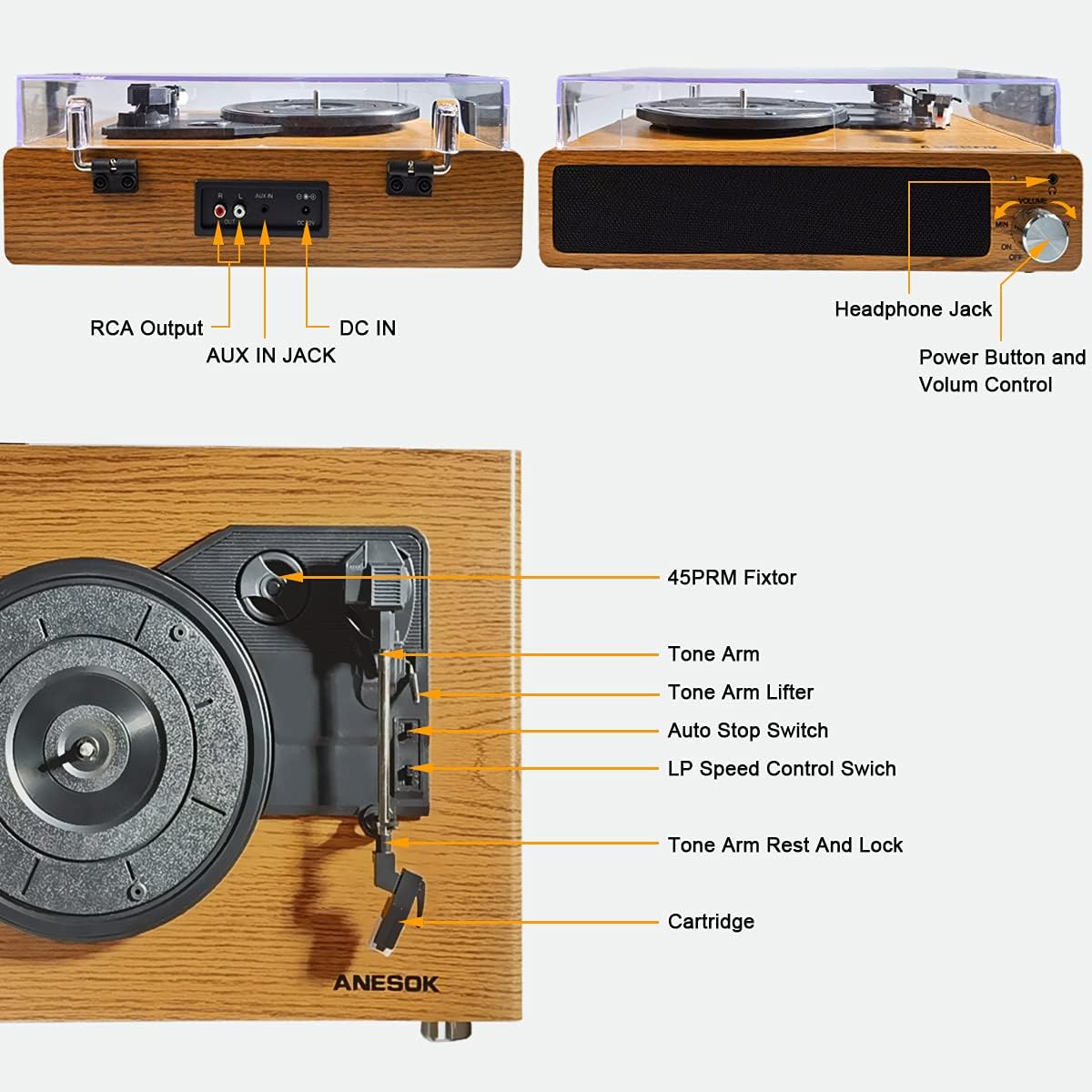
Image: Visual guide for selecting the correct playback speed (33, 45, or 78 RPM) for 7, 10, and 12-inch records.
5.2 ബ്ലൂടൂത്ത് പ്രവർത്തനം
The turntable can receive audio wirelessly from Bluetooth-enabled devices.
- പവർ ഓൺ: Turn the Power/Volume knob clockwise to turn on the turntable.
- ബ്ലൂടൂത്ത് മോഡ്: The turntable will automatically enter Bluetooth pairing mode. The mode indicator light will flash blue.
- ഉപകരണം ജോടിയാക്കുക: On your Bluetooth-enabled device (smartphone, tablet, etc.), enable Bluetooth and search for "ANESOK" in the list of available devices.
- ബന്ധിപ്പിക്കുക: Select "ANESOK" to pair. Once connected, the mode indicator light will stop flashing and remain solid blue.
- ഓഡിയോ പ്ലേ ചെയ്യുക: You can now play music from your device through the turntable's speakers. Adjust volume on both your device and the turntable.

Image: Illustration of the wireless connection feature, demonstrating how to pair a smartphone or other digital audio player with the turntable via Bluetooth.
5.3 AUX IN Connection
Connect external audio sources using the AUX IN jack.
- കേബിൾ ബന്ധിപ്പിക്കുക: Plug a 3.5mm audio cable (not included) into the AUX IN jack on the back of the turntable.
- ഉപകരണം ബന്ധിപ്പിക്കുക: Connect the other end of the cable to the headphone output or line-out jack of your external audio device (e.g., MP3 player, CD player).
- പവർ ഓൺ: Turn on the turntable and your external audio device.
- ഓഡിയോ പ്ലേ ചെയ്യുക: Play audio from your external device. The sound will be routed through the turntable's speakers. Adjust volume on both devices.
5.4 ഹെഡ്ഫോൺ ഔട്ട്പുട്ട്
For private listening, connect headphones to the dedicated jack.
- Plug your headphones into the Headphone Jack on the front of the turntable.
- The built-in speakers will automatically mute when headphones are connected.
- പവർ/വോളിയം നോബ് ഉപയോഗിച്ച് വോളിയം ക്രമീകരിക്കുക.
5.5 RCA ഔട്ട്പുട്ട്
ടർടേബിൾ ഒരു ബാഹ്യ ഉപകരണവുമായി ബന്ധിപ്പിക്കുക ampമെച്ചപ്പെടുത്തിയ ശബ്ദത്തിനായി ലിഫയർ അല്ലെങ്കിൽ പവർഡ് സ്പീക്കറുകൾ.
- Connect an RCA cable (not included) to the RCA Output jacks (Red for Right, White for Left) on the back of the turntable.
- Connect the other end of the RCA cable to the corresponding input jacks on your ampലൈഫയർ അല്ലെങ്കിൽ പവർഡ് സ്പീക്കറുകൾ.
- നിങ്ങളുടെ ബാഹ്യ ഓഡിയോ സിസ്റ്റം ശരിയായ ഇൻപുട്ടിലേക്ക് സജ്ജീകരിച്ചിട്ടുണ്ടെന്ന് ഉറപ്പാക്കുക.
- Adjust the volume using your external audio system's controls.
6. പരിപാലനവും പരിചരണവും
6.1 ടേൺടേബിൾ വൃത്തിയാക്കൽ
- മൃദുവായതും ഉണങ്ങിയതുമായ തുണി ഉപയോഗിച്ച് യൂണിറ്റിന്റെ പുറംഭാഗം തുടയ്ക്കുക.
- കഠിനമായ രാസവസ്തുക്കൾ, ക്ലീനിംഗ് ലായകങ്ങൾ അല്ലെങ്കിൽ ശക്തമായ ഡിറ്റർജന്റുകൾ ഉപയോഗിക്കരുത്.
- പൊടി അടിഞ്ഞുകൂടുന്നത് തടയാൻ ഉപയോഗത്തിലില്ലാത്തപ്പോൾ പൊടി കവർ അടച്ചിടുക.
6.2 സ്റ്റൈലസ് കെയർ
- സ്റ്റൈലസ് അതിലോലമാണ്. ശ്രദ്ധയോടെ കൈകാര്യം ചെയ്യുക.
- മൃദുവായ ബ്രഷ് ഉപയോഗിച്ച് സ്റ്റൈലസ് ഇടയ്ക്കിടെ വൃത്തിയാക്കുക, പിന്നിൽ നിന്ന് മുന്നിലേക്ക് സൌമ്യമായി ബ്രഷ് ചെയ്യുക.
- Replace the stylus when you notice a degradation in sound quality or visible wear.


ചിത്രം: ക്ലോസ്-അപ്പ് views of the cartridge and tone arm, illustrating the delicate components that require careful handling and maintenance.
7. പ്രശ്നപരിഹാരം
| പ്രശ്നം | സാധ്യമായ കാരണം | പരിഹാരം |
|---|---|---|
| ശക്തിയില്ല | പവർ അഡാപ്റ്റർ ബന്ധിപ്പിച്ചിട്ടില്ല അല്ലെങ്കിൽ ഔട്ട്ലെറ്റ് പ്രവർത്തിക്കുന്നില്ല. | Ensure the power adapter is securely connected to the turntable and a live power outlet. |
| സ്പീക്കറുകളിൽ നിന്ന് ശബ്ദമില്ല | Volume too low; headphones connected; external amplifier not connected or set incorrectly. | Increase volume. Disconnect headphones. Check RCA connections and external ampലൈഫയർ ക്രമീകരണങ്ങൾ. |
| റെക്കോർഡ് സ്കിപ്പുകൾ | Record is dirty or scratched; stylus is worn or dirty; turntable not on a stable surface. | Clean the record. Clean or replace the stylus. Place the turntable on a stable, level surface. |
| ബ്ലൂടൂത്ത് കണക്റ്റ് ചെയ്യുന്നില്ല | Turntable not in Bluetooth mode; device too far; device already connected to another Bluetooth device. | Ensure the turntable is in Bluetooth pairing mode (flashing blue light). Move device closer. Disconnect from other Bluetooth devices. |
| റെക്കോർഡ് വളരെ വേഗത്തിൽ/സാവധാനത്തിൽ പ്ലേ ചെയ്യുന്നു | തെറ്റായ വേഗത തിരഞ്ഞെടുത്തു. | Adjust the speed selector switch to 33, 45, or 78 RPM as appropriate for the record. |
8 സാങ്കേതിക സവിശേഷതകൾ
- മോഡൽ: LPTurntableYUANMU2
- ബ്രാൻഡ്: അനെസോക്ക്
- വേഗത: 33 1/3, 45, 78 ആർപിഎം
- ഡ്രൈവ് തരം: ബെൽറ്റ് ഡ്രൈവ്
- മോട്ടോർ തരം: എസി മോട്ടോർ
- കണക്റ്റിവിറ്റി: Bluetooth, AUX-in, RCA Output, Headphone Jack
- സ്പീക്കറുകൾ: ബിൽറ്റ്-ഇൻ സ്റ്റീരിയോ സ്പീക്കറുകൾ
- മെറ്റീരിയൽ: പ്ലാസ്റ്റിക്, മരം
- നിറം: ബ്രൗൺ
- പ്രത്യേക സവിശേഷത: പോർട്ടബിൾ
- പാക്കേജ് അളവുകൾ: 16.61 x 13.54 x 7.64 ഇഞ്ച്
- ഇനത്തിൻ്റെ ഭാരം: 6.67 പൗണ്ട്
- സിഗ്നൽ ഫോർമാറ്റ്: ലൈൻ-ലെവൽ
- ആദ്യം ലഭ്യമായ തീയതി: ഓഗസ്റ്റ് 16, 2021
9. വാറൻ്റിയും പിന്തുണയും
This ANESOK product is covered by a manufacturer's warranty. Please refer to the warranty card included in your packaging for specific terms and conditions, including warranty duration and coverage details.
For technical support, troubleshooting assistance, or warranty claims, please contact ANESOK customer service. Contact information can typically be found on the product packaging, the official ANESOK webസൈറ്റ്, അല്ലെങ്കിൽ നിങ്ങളുടെ വാങ്ങൽ രസീത്.
Please note: Keep your proof of purchase for warranty validation.