
1. ആമുഖം
Thank you for choosing the LUXCEO P200 RGB LED Video Light. This portable and versatile lighting tool is designed for various photography and videography applications, offering full-color control, adjustable brightness, and multiple mounting options. Please read this manual thoroughly before use to ensure proper operation and to maximize the lifespan of your device.

Image 1: The LUXCEO P200 RGB LED Video Light, showcasing its sleek design and vibrant color capabilities.
2. സുരക്ഷാ നിർദ്ദേശങ്ങൾ
- Do not disassemble or modify the device. Unauthorized modifications can lead to electric shock, fire, or product damage.
- ഉപകരണത്തെ തീവ്രമായ താപനില, നേരിട്ടുള്ള സൂര്യപ്രകാശം, ഉയർന്ന ഈർപ്പം എന്നിവയിൽ നിന്ന് അകറ്റി നിർത്തുക.
- Use only the provided USB-C cable and a 5V2A charger for charging. Using incompatible chargers may damage the battery.
- Although the device is IP67 waterproof, ensure the charging port cover is securely closed before exposing it to water. Avoid prolonged submersion in deep water.
- അമിതമായി ചൂടാകുന്നത് തടയാൻ പ്രവർത്തന സമയത്ത് വെന്റിലേഷൻ തുറസ്സുകൾ തടയരുത്.
- കുട്ടികൾക്ക് ലഭ്യമാകാതെ സൂക്ഷിക്കുക.
- പ്രാദേശിക നിയന്ത്രണങ്ങൾ അനുസരിച്ച് ഉൽപ്പന്നവും അതിന്റെ ബാറ്ററിയും ഉത്തരവാദിത്തത്തോടെ നിർമാർജനം ചെയ്യുക.
3. പാക്കേജ് ഉള്ളടക്കം
എല്ലാ ഇനങ്ങളും നല്ല നിലയിലാണെന്നും ഉറപ്പാക്കാൻ പാക്കേജ് തുറക്കുമ്പോൾ അതിന്റെ ഉള്ളടക്കം പരിശോധിക്കുക.

Image 2: Visual representation of all items included in the LUXCEO P200 product package.
- RGB Tube Light (P200) x 1
- ബാഗ് x 1 വഹിക്കുന്നു
- Iron Bar x 1
- USB-C കേബിൾ x 1
- ലാനിയാർഡുകൾ x 2
- വിദൂര നിയന്ത്രണം x 1
- ഉപയോക്തൃ മാനുവൽ x 1
4. ഉൽപ്പന്നം കഴിഞ്ഞുview
4.1 ഭൗതിക ഘടകങ്ങൾ

ചിത്രം 3: ക്ലോസ്-അപ്പ് view highlighting the dimensions, light transmission, 1/4" screw hole, and USB-C/USB-A ports of the P200 light.
- ലൈറ്റ് ട്യൂബ്: Main light source with high light transmission soft lampതണൽ.
- പവർ ബട്ടൺ: Located on one end for turning the device on/off.
- USB-C ചാർജിംഗ് പോർട്ട്: ആന്തരിക ബാറ്ററി ചാർജ് ചെയ്യുന്നതിന്.
- USB ഔട്ട്പുട്ട് പോർട്ട്: Functions as a power bank to charge other devices.
- 1/4" Standard Nut Hole: Located at the bottom for mounting on tripods or light stands.
- ബിൽറ്റ്-ഇൻ കാന്തങ്ങൾ: Two magnets on both ends for quick attachment to metal surfaces.
4.2 പ്രധാന സവിശേഷതകൾ
- Full RGB Color: Offers 360° full-color adjustment with 0-100 adjustable saturation and 1%-100% adjustable brightness.
- ക്രമീകരിക്കാവുന്ന വർണ്ണ താപനില: Seamlessly adjust from 3000K (warm white) to 6000K (cool white).
- ഉയർന്ന CRI: Ra>95+ for accurate color rendering.
- IP67 വാട്ടർപ്രൂഫ്: Designed to be resistant to dust and water immersion up to 1 meter for 30 minutes.
- ബിൽറ്റ്-ഇൻ 4000mAh ബാറ്ററി: Provides up to 150-360 minutes of operation depending on brightness. Functions as a power bank.
- ഒന്നിലധികം നിയന്ത്രണ രീതികൾ: Control via integrated buttons, remote control, or smartphone application.
- ബഹുമുഖ മൗണ്ടിംഗ്: Features a 1/4" screw hole and built-in magnets for flexible placement.

Image 4: The LUXCEO P200 demonstrating its IP67 waterproof capability by being submerged in water.
5. സജ്ജീകരണം
5.1 പ്രാരംഭ ചാർജിംഗ്
Before first use, fully charge the LUXCEO P200.
- നൽകിയിരിക്കുന്ന USB-C കേബിൾ ലൈറ്റിലെ ചാർജിംഗ് പോർട്ടുമായി ബന്ധിപ്പിക്കുക.
- Connect the other end of the USB-C cable to a 5V2A USB power adapter (not included).
- The charging indicator light will show charging status. A full charge typically takes about 3 hours.
- ചാർജ് ചെയ്യുമ്പോൾ ഉപകരണം ഉപയോഗിക്കാം.
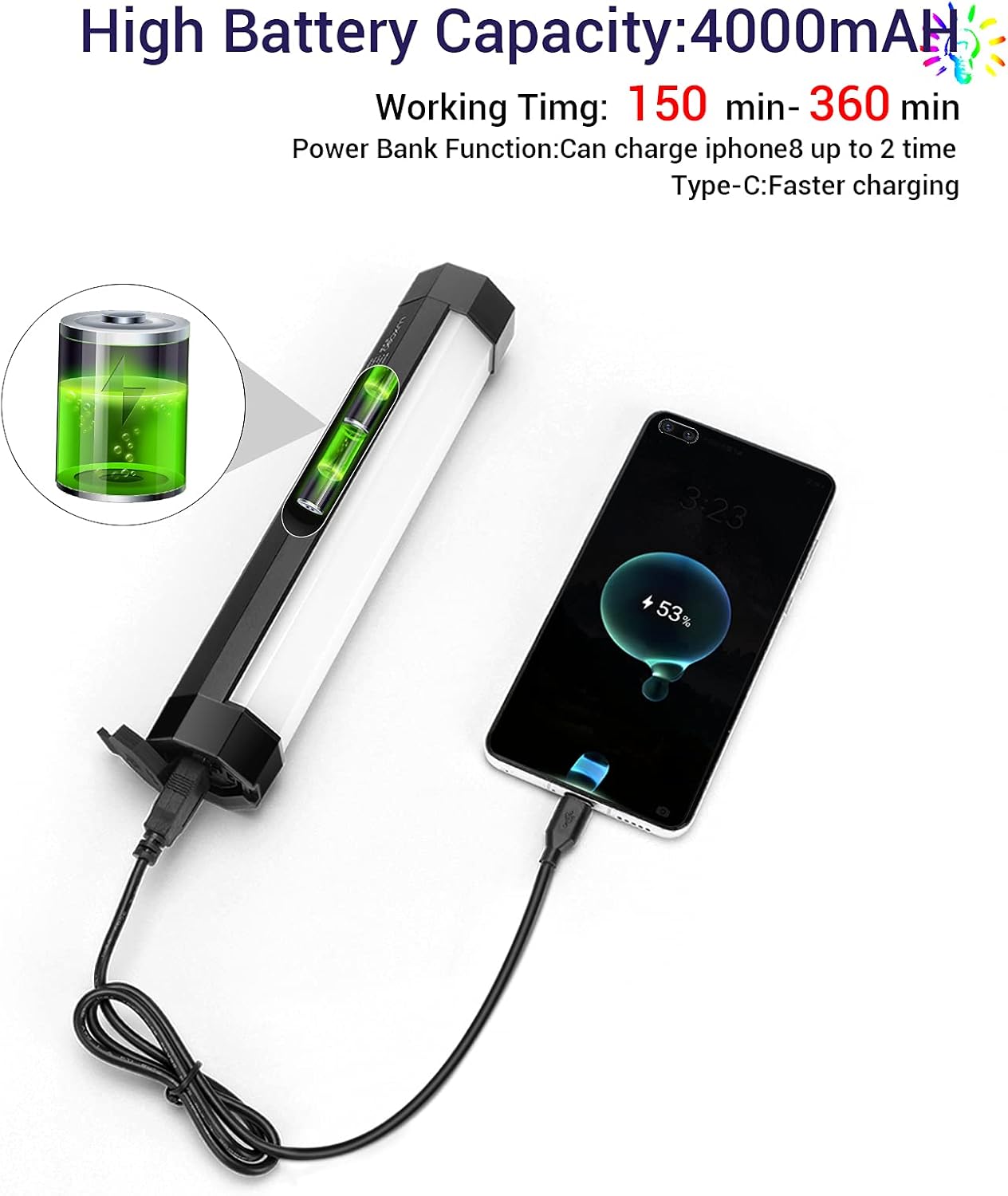
Image 5: The LUXCEO P200 light connected via USB-C cable, demonstrating its power bank functionality by charging a smartphone.
5.2 പവർ ഓൺ/ഓഫ്
- To power on, press and hold the power button located on one end of the light until the light illuminates.
- To power off, press and hold the power button again until the light turns off.
6. ഓപ്പറേഷൻ
6.1 മാനുവൽ നിയന്ത്രണങ്ങൾ
The LUXCEO P200 features integrated buttons for basic adjustments. Refer to the specific button functions on the device for detailed control.
6.2 വിദൂര നിയന്ത്രണം
The included remote control provides convenient access to various lighting modes and settings.

Image 6: The LUXCEO P200 light shown alongside its remote control and the smartphone application interface, illustrating multiple control options.
- പവർ ബട്ടൺ: ലൈറ്റ് ഓണാക്കുകയോ ഓഫാക്കുകയോ ചെയ്യുക.
- മോഡ് ബട്ടൺ: Cycle through different lighting modes (e.g., CCT, RGB, Scene Effects).
- തെളിച്ച ക്രമീകരണം: Increase or decrease light intensity.
- Color/Temperature Adjustment: Change color hue in RGB mode or color temperature in CCT mode.
- Saturation Adjustment: Control the intensity of the color in RGB mode.
6.3 ആപ്പ് നിയന്ത്രണം
For advanced control and features, download the LUXCEO app on your smartphone.
- Download the official LUXCEO app from your device's app store.
- നിങ്ങളുടെ സ്മാർട്ട്ഫോണിൽ ബ്ലൂടൂത്ത് പ്രവർത്തനക്ഷമമാക്കുക.
- Open the app and follow the on-screen instructions to connect to your P200 light. Multiple LUXCEO lights can be controlled simultaneously.
- The app allows for precise control over color, brightness, saturation, and offers additional features such as:
- Music Rhythm Mode: Changes lighting color according to music.
- Customizable Scene Effects: Create and save personalized lighting scenarios.

Image 7: Screenshot of the LUXCEO app interface, demonstrating options for music sync, scene settings, color temperature, and full-color selection.
6.4 മൗണ്ടിംഗ് ഓപ്ഷനുകൾ
- 1/4" സ്ക്രൂ ദ്വാരം: Mount the light onto any standard tripod, light stand, or camera accessory with a 1/4" thread.
- ബിൽറ്റ്-ഇൻ കാന്തങ്ങൾ: The magnets on both ends allow for quick attachment to metal surfaces. Use the included iron bar to attach the light to non-metallic surfaces like curtains or tents.

Image 8: The LUXCEO P200 light illustrating its magnetic attachment capabilities to various surfaces, including with the use of an iron bar.
7. പരിപാലനം
- വൃത്തിയാക്കൽ: Wipe the light with a soft, dry cloth. Do not use harsh chemicals or abrasive materials.
- സംഭരണം: When not in use for extended periods, store the light in its carrying bag in a cool, dry place. Charge the battery at least once every three months to maintain battery health.
- ബാറ്ററി കെയർ: Avoid fully discharging the battery frequently. For optimal battery life, keep the charge between 20% and 80%.
8. പ്രശ്നപരിഹാരം
If you encounter issues with your LUXCEO P200, refer to the following common problems and solutions:
- Q: Why is the light not turning on?
- A: Ensure the battery is charged. Connect the light to a power source using the USB-C cable and check if the charging indicator activates. If the light still does not turn on after charging, contact customer support.
- Q: Why does the light flicker?
- A: The LUXCEO P200 uses a constant current analog dimming mechanism designed to eliminate flicker. If flickering occurs, ensure the light is fully charged and try resetting it by powering off and on. If the issue persists, contact customer support.
- Q: The remote control is not working.
- A: Check if the remote control's battery needs replacement. Ensure there are no obstructions between the remote and the light. For initial pairing, follow the instructions in the remote control's specific guide.
- Q: The app cannot connect to the light.
- A: Ensure Bluetooth is enabled on your smartphone and the light is powered on. Try restarting both the app and the light. If the problem persists, try reinstalling the app.
- ചോദ്യം: ചാർജ് ചെയ്യുമ്പോൾ ലൈറ്റ് ഉപയോഗിക്കാമോ?
- A: Yes, the light can be used while charging. For best results, use the original charging cable and a 5V2A charger.
- ചോദ്യം: ലൈറ്റ് വാട്ടർപ്രൂഫ് ആണോ?
- A: Yes, the LUXCEO P200 is IP67 waterproof. Ensure the charging port cover is sealed properly before exposing it to water.
9 സ്പെസിഫിക്കേഷനുകൾ
| മോഡൽ | P200 |
| ഉൽപ്പന്ന അളവുകൾ | 7.93 x 1.48 x 1.48 ഇഞ്ച് (1.47"L x 1.47"W x 7.93"H) |
| ഇനത്തിൻ്റെ ഭാരം | 13.7 ഔൺസ് |
| ബാറ്ററി തരം | 1 ലിഥിയം അയോൺ ബാറ്ററി (ഉൾപ്പെടുത്തിയിരിക്കുന്നു) |
| ബാറ്ററി ശേഷി | 4000mAh |
| Battery Life (Brightest Mode) | Approx. 150 minutes (2.5 hours) |
| ചാർജിംഗ് സമയം | Approx. 3 hours (with 5V2A charger) |
| വർണ്ണ താപനില പരിധി | 3000 കെ - 6000 കെ |
| തെളിച്ചം ക്രമീകരിക്കൽ | 1% - 100% |
| കളർ റെൻഡറിംഗ് ഇൻഡക്സ് (CRI) | Ra>95+ |
| വാട്ടർപ്രൂഫ് റേറ്റിംഗ് | IP67 |
| കണക്റ്റിവിറ്റി ടെക്നോളജി | Remote Control, Bluetooth (App Control) |
| ഹാർഡ്വെയർ ഇന്റർഫേസ് | USB Type C (charging), USB Type A (power bank output) |
| നിർമ്മാതാവ് | LUXCEO |
10. വാറൻ്റിയും പിന്തുണയും
The LUXCEO P200 RGB LED Video Light comes with a 1 വർഷത്തെ വാറൻ്റി വാങ്ങിയ തീയതി മുതൽ. കൂടാതെ, ഒരു 30 ദിവസത്തെ പണം തിരികെ നൽകാനുള്ള ഗ്യാരണ്ടി വാഗ്ദാനം ചെയ്യുന്നു.
If you experience any issues with your product or require assistance, please do not hesitate to contact LUXCEO customer support. Refer to the contact information provided on the product packaging or the official LUXCEO website for support channels.