
1. ആമുഖം
വാങ്ങിയതിന് നന്ദി.asing the EARISE D61 Plus Bluetooth Speaker. This manual provides important information regarding the safe operation, setup, and maintenance of your device. Please read it thoroughly before use and retain it for future reference.

Image 1.1: The EARISE D61 Plus Bluetooth Speaker, showcasing its portable design and integrated RGB lighting.
2 പ്രധാനപ്പെട്ട സുരക്ഷാ വിവരങ്ങൾ
- Do not expose the speaker to water or excessive moisture, as it is not waterproof.
- Avoid extreme temperatures, direct sunlight, or heat sources.
- Do not disassemble, repair, or modify the device. Refer all servicing to qualified personnel.
- നിർദ്ദിഷ്ട ചാർജിംഗ് കേബിളും പവർ അഡാപ്റ്ററും മാത്രം ഉപയോഗിക്കുക.
- കുട്ടികളിൽ നിന്നും വളർത്തുമൃഗങ്ങളിൽ നിന്നും സ്പീക്കർ അകറ്റി നിർത്തുക.
- Do not operate the speaker at excessively high volumes for prolonged periods to prevent hearing damage.
3. പാക്കേജ് ഉള്ളടക്കം
പാക്കേജിൽ ഇനിപ്പറയുന്ന ഇനങ്ങൾ ഉണ്ടോ എന്ന് പരിശോധിക്കുക:
- EARISE D61 Plus Bluetooth Speaker
- യുഎസ്ബി ചാർജിംഗ് കേബിൾ
- ഉപയോക്തൃ മാനുവൽ (ഈ പ്രമാണം)
ഏതെങ്കിലും ഇനങ്ങൾ നഷ്ടപ്പെട്ടാലോ കേടുപാടുകൾ സംഭവിച്ചാലോ, ദയവായി ഉപഭോക്തൃ പിന്തുണയുമായി ബന്ധപ്പെടുക.
4. ഉൽപ്പന്നം കഴിഞ്ഞുview
സ്പീക്കറിന്റെ ഘടകങ്ങളും നിയന്ത്രണങ്ങളും സ്വയം പരിചയപ്പെടുത്തുക.
ചിത്രം 4.1: മുൻഭാഗം view of the EARISE D61 Plus speaker, highlighting the control panel and speaker grille.
4.1 നിയന്ത്രണ പാനലും പോർട്ടുകളും

Image 4.2: Diagram illustrating the various input options and features of the speaker, including USB, TF card, AUX, Microphone, Bluetooth, and FM radio.
- മോഡ്/ലൈറ്റ് ബട്ടൺ: Short press to switch between input modes (Bluetooth, AUX, USB, TF, FM). Long press to change light effects.
- M-/V- Button: Short press for previous track (in music modes) or previous station (in FM mode). Long press to decrease volume.
- MSCAN/TWS Button: Short press to Play/Pause (in music modes) or auto-scan FM stations (in FM mode). Long press to activate TWS pairing.
- M+/V+ Button: Short press for next track (in music modes) or next station (in FM mode). Long press to increase volume.
- USB പോർട്ട്: യുഎസ്ബി ഫ്ലാഷ് ഡ്രൈവ് പ്ലേബാക്കിനായി.
- ടിഎഫ് കാർഡ് സ്ലോട്ട്: TF (മൈക്രോ എസ്ഡി) കാർഡ് പ്ലേബാക്കിനായി.
- AUX ഇൻപുട്ട്: 3.5mm ഓഡിയോ കേബിൾ വഴി ബാഹ്യ ഓഡിയോ ഉപകരണങ്ങൾ ബന്ധിപ്പിക്കുന്നതിന്.
- MIC ഇൻപുട്ട്: ഒരു മൈക്രോഫോൺ ബന്ധിപ്പിക്കുന്നതിന്.
- ചാർജിംഗ് പോർട്ട്: സ്പീക്കറിന്റെ ആന്തരിക ബാറ്ററി ചാർജ് ചെയ്യുന്നതിന്.
5. സജ്ജീകരണം
5.1 സ്പീക്കർ ചാർജ് ചെയ്യുന്നു
Before first use, fully charge the speaker. Connect the provided USB charging cable to the speaker's charging port and the other end to a USB power adapter (not included) or a computer's USB port. The charging indicator will illuminate during charging and turn off when fully charged.

Image 5.1: Visual representation of the speaker being charged, indicating battery status.
5.2 പവർ ഓൺ/ഓഫ്
Press and hold the Power button (often integrated with the MODE button or a separate switch, refer to physical device for exact location) to turn the speaker ON or OFF. A sound prompt will indicate the power status.
5.3 ബ്ലൂടൂത്ത് ജോടിയാക്കൽ
- Ensure the speaker is powered on and in Bluetooth mode (indicated by a voice prompt or flashing LED). If not, short press the MODE/LIGHT button to switch to Bluetooth mode.
- നിങ്ങളുടെ മൊബൈൽ ഉപകരണത്തിൽ (സ്മാർട്ട്ഫോൺ, ടാബ്ലെറ്റ് മുതലായവ) ബ്ലൂടൂത്ത് പ്രവർത്തനക്ഷമമാക്കുക.
- ഇതിനായി തിരയുക available Bluetooth devices. You should see "EARISE D61 Plus" in the list.
- Select "EARISE D61 Plus" to connect. Once paired, a confirmation sound will be heard.
- The speaker will automatically reconnect to the last paired device when in Bluetooth mode, if the device is within range and Bluetooth is enabled.
5.4 TWS (ട്രൂ വയർലെസ് സ്റ്റീരിയോ) ജോടിയാക്കൽ
To achieve stereo sound, you can pair two EARISE D61 Plus speakers together.

Image 5.2: Illustration of two EARISE D61 Plus speakers connected via TWS for a stereo audio experience, controlled by a single smartphone.
- Ensure both EARISE D61 Plus speakers are powered on and in Bluetooth mode, but not yet connected to any device.
- On one of the speakers (this will be the primary speaker), long press the MSCAN/TWS button. You will hear a prompt indicating TWS pairing mode.
- രണ്ട് സ്പീക്കറുകളും യാന്ത്രികമായി പരസ്പരം തിരയുകയും ബന്ധിപ്പിക്കുകയും ചെയ്യും. ഒരു സ്ഥിരീകരണ ശബ്ദം വിജയകരമായ TWS ജോടിയാക്കലിനെ സൂചിപ്പിക്കും.
- Once paired, the primary speaker will be ready for Bluetooth connection to your mobile device. Follow the steps in "5.3 Bluetooth Pairing" to connect your device to the primary speaker.
- രണ്ട് സ്പീക്കറുകളിലൂടെയും ഓഡിയോ ഇപ്പോൾ സ്റ്റീരിയോയിൽ പ്ലേ ചെയ്യും.
- To disconnect TWS, long press the MSCAN/TWS button on either speaker.
6. പ്രവർത്തന നിർദ്ദേശങ്ങൾ
6.1 മോഡ് തിരഞ്ഞെടുക്കൽ
ഷോർട്ട് അമർത്തുക മോഡ്/ലൈറ്റ് button to cycle through available input modes: Bluetooth, AUX, USB, TF Card, FM Radio.
6.2 Audio Playback (Bluetooth, USB, TF Card, AUX)
- പ്ലേ/താൽക്കാലികമായി നിർത്തുക: ഷോർട്ട് അമർത്തുക MSCAN/TWS ബട്ടൺ.
- അടുത്ത ട്രാക്ക്: ഷോർട്ട് അമർത്തുക M+/V+ ബട്ടൺ.
- മുമ്പത്തെ ട്രാക്ക്: ഷോർട്ട് അമർത്തുക M-/V- ബട്ടൺ.
- വോളിയം കൂട്ടുക: ദീർഘനേരം അമർത്തുക M+/V+ ബട്ടൺ.
- വോളിയം താഴേക്ക്: ദീർഘനേരം അമർത്തുക M-/V- ബട്ടൺ.
6.3 എഫ്എം റേഡിയോ പ്രവർത്തനം
- ഉപയോഗിച്ച് FM മോഡിലേക്ക് മാറുക മോഡ്/ലൈറ്റ് ബട്ടൺ.
- ഷോർട്ട് അമർത്തുക MSCAN/TWS button to automatically scan and save available FM stations. The speaker will play the first saved station.
- ഷോർട്ട് പ്രസ്സ് M+/V+ or M-/V- സംരക്ഷിച്ച സ്റ്റേഷനുകൾക്കിടയിൽ നാവിഗേറ്റ് ചെയ്യാൻ.
6.4 RGB Light Effects
The speaker features dynamic RGB lighting. Long press the മോഡ്/ലൈറ്റ് വ്യത്യസ്ത ലൈറ്റ് മോഡുകളിലൂടെ സൈക്കിൾ ചെയ്യാനോ ലൈറ്റുകൾ ഓഫ് ചെയ്യാനോ ബട്ടൺ അമർത്തുക.
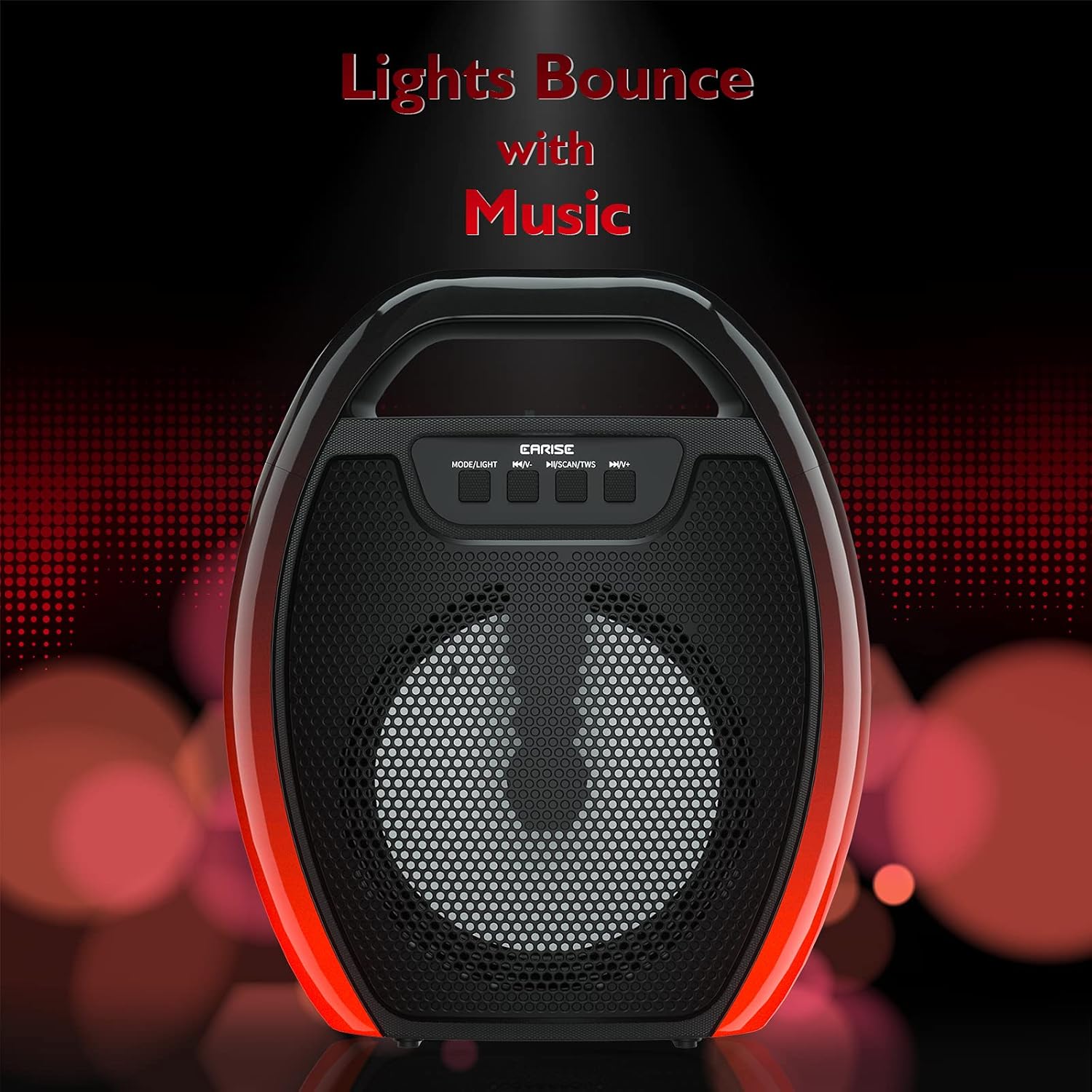
Image 6.1: The speaker displaying its light effects, which can synchronize with music playback.
6.5 മൈക്രോഫോൺ ഇൻപുട്ട്
Connect a wired microphone (not included) to the MIC input port for karaoke or public address functions. Adjust the microphone volume using the connected microphone's controls or the speaker's main volume controls.
7. പരിപാലനം
- വൃത്തിയാക്കൽ: സ്പീക്കർ വൃത്തിയാക്കാൻ മൃദുവായതും ഉണങ്ങിയതുമായ തുണി ഉപയോഗിക്കുക. ലിക്വിഡ് ക്ലീനറുകളോ എയറോസോളുകളോ ഉപയോഗിക്കരുത്.
- സംഭരണം: നേരിട്ടുള്ള സൂര്യപ്രകാശത്തിൽ നിന്നും കടുത്ത താപനിലയിൽ നിന്നും മാറി തണുത്തതും വരണ്ടതുമായ സ്ഥലത്ത് സ്പീക്കർ സൂക്ഷിക്കുക.
- ബാറ്ററി കെയർ: To prolong battery life, fully charge the speaker before long periods of inactivity and recharge it at least once every three months. Avoid completely draining the battery frequently.
8. പ്രശ്നപരിഹാരം
| പ്രശ്നം | സാധ്യമായ കാരണം | പരിഹാരം |
|---|---|---|
| സ്പീക്കർ പവർ ഓൺ ചെയ്യുന്നില്ല. | ബാറ്ററി ചാർജ് കുറവാണ്; പവർ ബട്ടൺ ശരിയായി അമർത്തിയിട്ടില്ല. | Charge the speaker; Press and hold the Power button for a few seconds. |
| ബ്ലൂടൂത്ത് വഴി ജോടിയാക്കാൻ കഴിയില്ല. | സ്പീക്കർ ജോടിയാക്കൽ മോഡിൽ ഇല്ല; ഉപകരണ ബ്ലൂടൂത്ത് ഓഫാണ്; സ്പീക്കർ ഉപകരണത്തിൽ നിന്ന് വളരെ അകലെയാണ്; ഇതിനകം മറ്റൊരു ഉപകരണത്തിലേക്ക് കണക്റ്റുചെയ്തിരിക്കുന്നു. | Ensure speaker is in Bluetooth pairing mode; Turn on Bluetooth on your device; Move device closer to speaker; Disconnect from other devices. |
| ശബ്ദമില്ല. | ശബ്ദം വളരെ കുറവാണ്; തെറ്റായ ഇൻപുട്ട് മോഡ്; ഉപകരണം ഓഡിയോ പ്ലേ ചെയ്യുന്നില്ല. | Increase speaker and device volume; Switch to correct input mode (Bluetooth, AUX, etc.); Ensure audio is playing on your device. |
| TWS ജോടിയാക്കൽ പരാജയപ്പെടുന്നു. | Speakers too far apart; One speaker already paired to a device; Not in TWS pairing mode. | Ensure speakers are close; Disconnect both speakers from any devices; Long press MSCAN/TWS on one speaker to initiate TWS pairing. |
| RGB ലൈറ്റുകൾ പ്രവർത്തിക്കുന്നില്ല. | ലൈറ്റുകൾ ഓഫായി; തകരാറ്. | Long press MODE/LIGHT button to cycle through light modes; If issue persists, contact support. |
9 സ്പെസിഫിക്കേഷനുകൾ
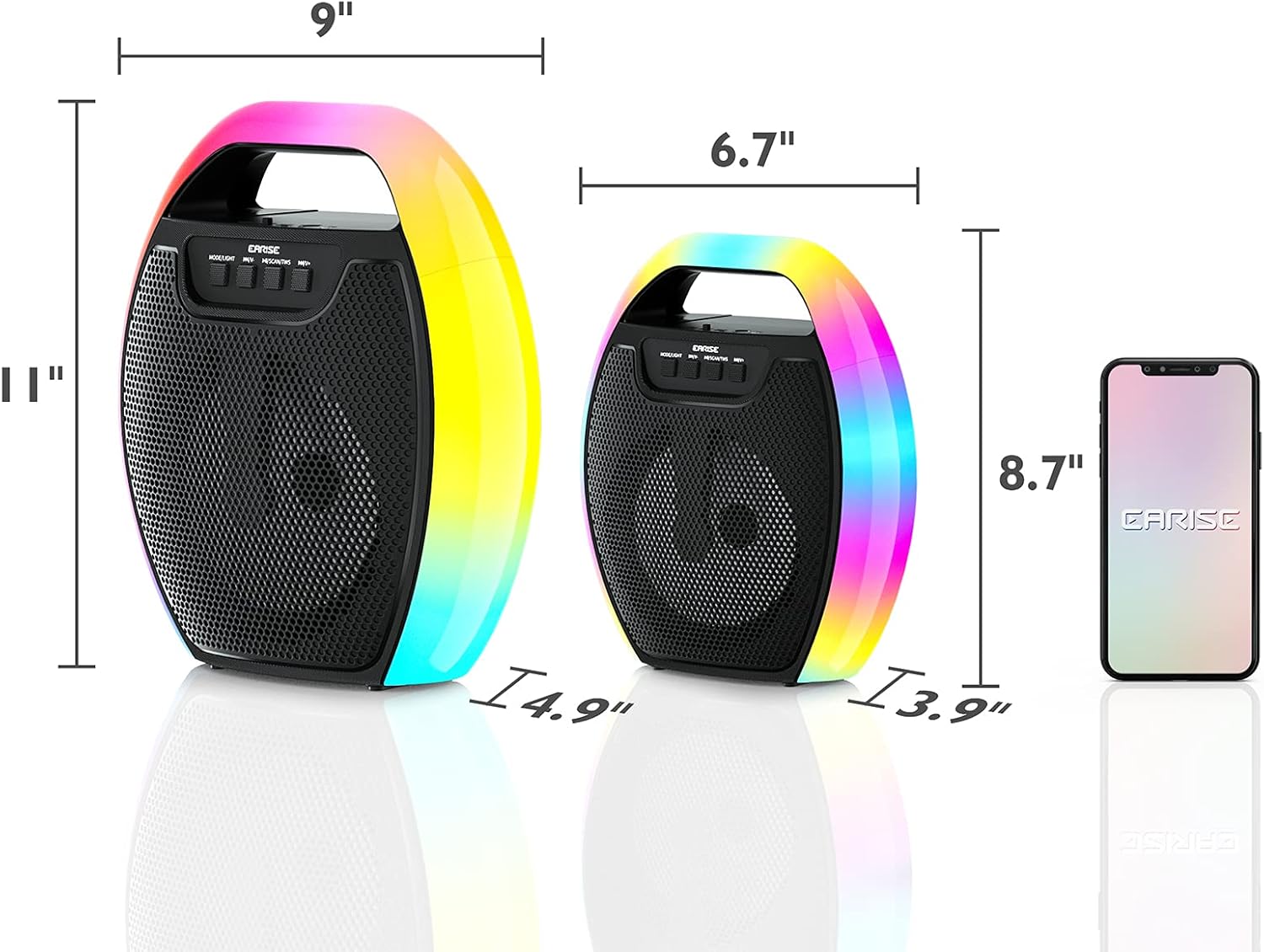
Image 9.1: Product dimensions of the EARISE D61 Plus speaker.
| ഫീച്ചർ | വിശദാംശങ്ങൾ |
|---|---|
| മോഡലിൻ്റെ പേര് | D61 പ്ലസ് |
| ബ്രാൻഡ് | EARISE |
| കണക്റ്റിവിറ്റി ടെക്നോളജി | Bluetooth, Auxiliary (3.5mm), USB, TF Card, FM Radio |
| ഓഡിയോ put ട്ട്പുട്ട് മോഡ് | സ്റ്റീരിയോ (TWS ഉള്ളത്) |
| സ്പീക്കർ തരം | പോർട്ടബിൾ ഔട്ട്ഡോർ സ്പീക്കർ |
| സ്പീക്കർ വലിപ്പം | 4 ഇഞ്ച് |
| പവർ ഉറവിടം | ബാറ്ററി പവർ |
| ബാറ്ററി ലൈഫ് | Up to 12 Hours (actual playtime varies with volume and light usage) |
| വാട്ടർപ്രൂഫ് | ഇല്ല |
| ഉൽപ്പന്ന അളവുകൾ | 9 x 5 x 11 ഇഞ്ച് (L x W x H) |
| ഇനത്തിൻ്റെ ഭാരം | 2.28 പൗണ്ട് |
| പ്രത്യേക സവിശേഷതകൾ | RGB Lights, TWS Pairing, Portable |
10. വാറൻ്റിയും പിന്തുണയും
EARISE products are designed and manufactured to the highest quality standards. For information regarding warranty coverage, technical support, or service inquiries, please refer to the warranty card included with your purchase or visit the official EARISE webസൈറ്റ്.
വാറൻ്റി ക്ലെയിമുകൾക്കായി നിങ്ങളുടെ വാങ്ങിയതിൻ്റെ തെളിവ് സൂക്ഷിക്കുക.