
ആമുഖം
The Platinum Tools TPS200C is a compact, easy-to-use tester designed for Power over Ethernet (PoE) systems. It accurately measures PoE parameters up to 56 volts and 280 watts. This device operates without internal batteries, drawing power directly from the PoE circuit. It can be used in-line to monitor current flow to an active PoE device or in Powered Device (PD) Simulation mode to determine the maximum power available from a PoE source.
പ്രധാന സവിശേഷതകൾ:
- Bright, scrolling OLED display for clear readings.
- Tests PoE on active data cables without interrupting data transmission.
- Automatic mode and polarity detection.
സുരക്ഷാ വിവരങ്ങൾ
Always handle the device with care. Do not expose the tester to extreme temperatures or moisture. Ensure proper connections to avoid damage to the tester or connected equipment. This device is intended for testing Power over Ethernet circuits and should not be used for other electrical measurements unless specified.
പാക്കേജ് ഉള്ളടക്കം
- Platinum Tools PoE++ Tester TPS200C
- നിർദ്ദേശ മാനുവൽ (ഈ പ്രമാണം)
- Note: Additional accessories such as patch cords or DC test cords may be included depending on the specific product package.
ഉപകരണം കഴിഞ്ഞുview
The TPS200C features an OLED display, PoE input and output ports, and a DC input/output port. A switch allows for toggling between active testing and PD simulation modes.
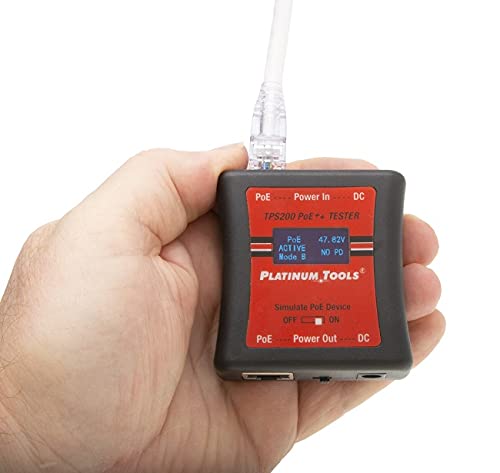
Image: The Platinum Tools TPS200C PoE++ Tester in use, displaying active PoE measurements. The compact size is evident as it fits comfortably in one hand.
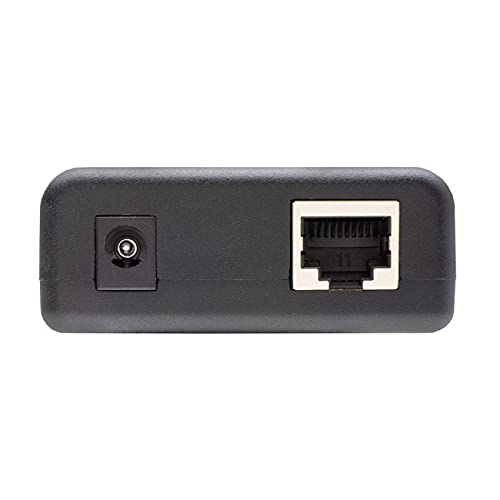
Image: Top end of the TPS200C tester, featuring the DC power input and the RJ45 Ethernet port for PoE connection.
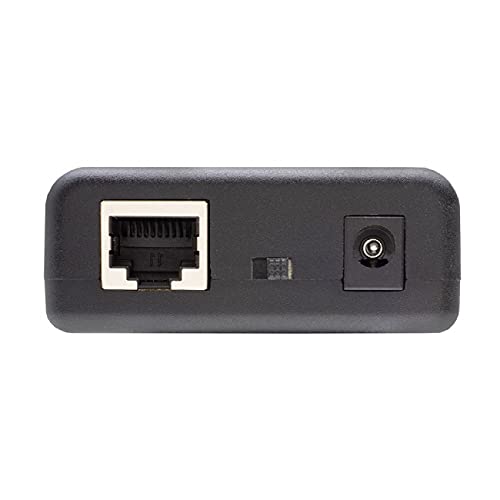
Image: Bottom end of the TPS200C tester, showing the RJ45 Ethernet port, DC power output, and the "Simulate PoE Device" toggle switch.
സജ്ജീകരണവും കണക്ഷനും
- ഊർജ്ജ സ്രോതസ്സ്: The TPS200C is powered by the PoE circuit it is testing. No external batteries are required.
- In-line Testing:
- Connect the PoE source (e.g., PoE switch or injector) to the "PoE Power In" RJ45 port on the tester.
- Connect the PoE powered device (e.g., IP camera, access point) to the "PoE Power Out" RJ45 port on the tester.
- Ensure the "Simulate PoE Device" switch is set to ഓഫ്.
- The tester will automatically detect the PoE type and display voltagഇ, കറന്റ്, വാട്ട്tage.
- PD Simulation Mode:
- Connect the PoE source to the "PoE Power In" RJ45 port on the tester.
- Set the "Simulate PoE Device" switch to ON.
- The tester will simulate a Powered Device (PD) and display the maximum power available from the PoE source.
- DC Power Testing:
- The DC input/output ports can be used with an optional DC test cord (not included) to test DC power sources or devices.
പ്രവർത്തന നിർദ്ദേശങ്ങൾ
Once connected, the bright OLED display will show real-time measurements. The display scrolls through various parameters, including:
- PoE നില: Indicates if PoE is Active or Passive.
- വാല്യംtagഇ (വി): The detected PoE voltage.
- നിലവിലെ (എ): The current being drawn by the connected device or simulated load.
- വാട്ട്tagഇ (W): The power consumption in watts.
- മോഡ്: Indicates the PoE mode (e.g., Mode A, Mode B).
The tester automatically detects the PoE mode and polarity. Allow a few seconds for the display to stabilize after connecting to a PoE port.
Important Note on "Simulate PoE Device" Switch: When switching this toggle from ON to OFF (or vice-versa) during an active connection, the device under test may reboot as the power negotiation changes.
മെയിൻ്റനൻസ്
- വൃത്തിയാക്കൽ: ടെസ്റ്ററിന്റെ പുറംഭാഗം വൃത്തിയാക്കാൻ മൃദുവായതും ഉണങ്ങിയതുമായ തുണി ഉപയോഗിക്കുക. അബ്രാസീവ് ക്ലീനറുകളോ ലായകങ്ങളോ ഉപയോഗിക്കരുത്.
- സംഭരണം: Store the tester in a cool, dry place away from direct sunlight and extreme temperatures.
- സംരക്ഷണം: To prevent scratches to the display, especially when stored in a toolbox, consider using a protective pouch or ensuring the display faces upwards.
ട്രബിൾഷൂട്ടിംഗ്
| പ്രശ്നം | സാധ്യമായ കാരണം | പരിഹാരം |
|---|---|---|
| ഡിസ്പ്ലേ ഓണാക്കുന്നില്ല. | No PoE power detected or insufficient power. | Verify the PoE source is active and providing power. Check cable connections. Allow a few seconds for the display to initialize. |
| തെറ്റായ വായനകൾ. | Loose connections, faulty cable, or incorrect mode selection. | Ensure all cables are securely connected. Test with a known good cable. Verify the "Simulate PoE Device" switch is in the correct position for your test. |
| Device under test reboots when changing modes. | Expected behavior when switching "Simulate PoE Device" toggle. | This is normal. Plan mode changes accordingly to avoid interrupting critical operations. |
സ്പെസിഫിക്കേഷനുകൾ
- മോഡൽ: TPS200C
- ഊർജ്ജ സ്രോതസ്സ്: PoE പവർഡ്
- അളവെടുപ്പ് തരം: Voltmeter, Wattmeter
- പരമാവധി വോളിയംtage: 56 വോൾട്ട് വരെ
- പരമാവധി ശക്തി: 280 വാട്ട് വരെ
- മിനിമം ഓപ്പറേറ്റിംഗ് വോളിയംtage: 3.5 വോൾട്ട്
- ഉയർന്ന താപനില റേറ്റിംഗ്: 160 ഡിഗ്രി ഫാരൻഹീറ്റ്
- അളവുകൾ (L x W x H): 8 x 15 x 1 ഇഞ്ച് (ഉൽപ്പന്ന അളവുകൾ)
- ഇനത്തിൻ്റെ ഭാരം: 3.2 ഔൺസ്
- കനം: 5.5 mm (as per feature bullets)
- ഡിസ്പ്ലേ: Easy-to-read, bright, scrolling OLED
- ഫീച്ചറുകൾ: Automatic mode and polarity detection, tests on active data cables without interrupting data flow.
വാറൻ്റിയും പിന്തുണയും
For warranty information and technical support, please contact Platinum Tools directly or refer to their official webസൈറ്റ്. വാറൻ്റി ക്ലെയിമുകൾക്കായി നിങ്ങളുടെ വാങ്ങൽ രസീത് സൂക്ഷിക്കുക.
നിർമ്മാതാവ്: പ്ലാറ്റിനം ഉപകരണങ്ങൾ