
ആമുഖം
Thank you for choosing the iHome XT-60 True Wireless Earbuds. This manual provides essential information for setting up, operating, and maintaining your earbuds to ensure optimal performance and longevity. Please read these instructions carefully before use.
പാക്കേജ് ഉള്ളടക്കം
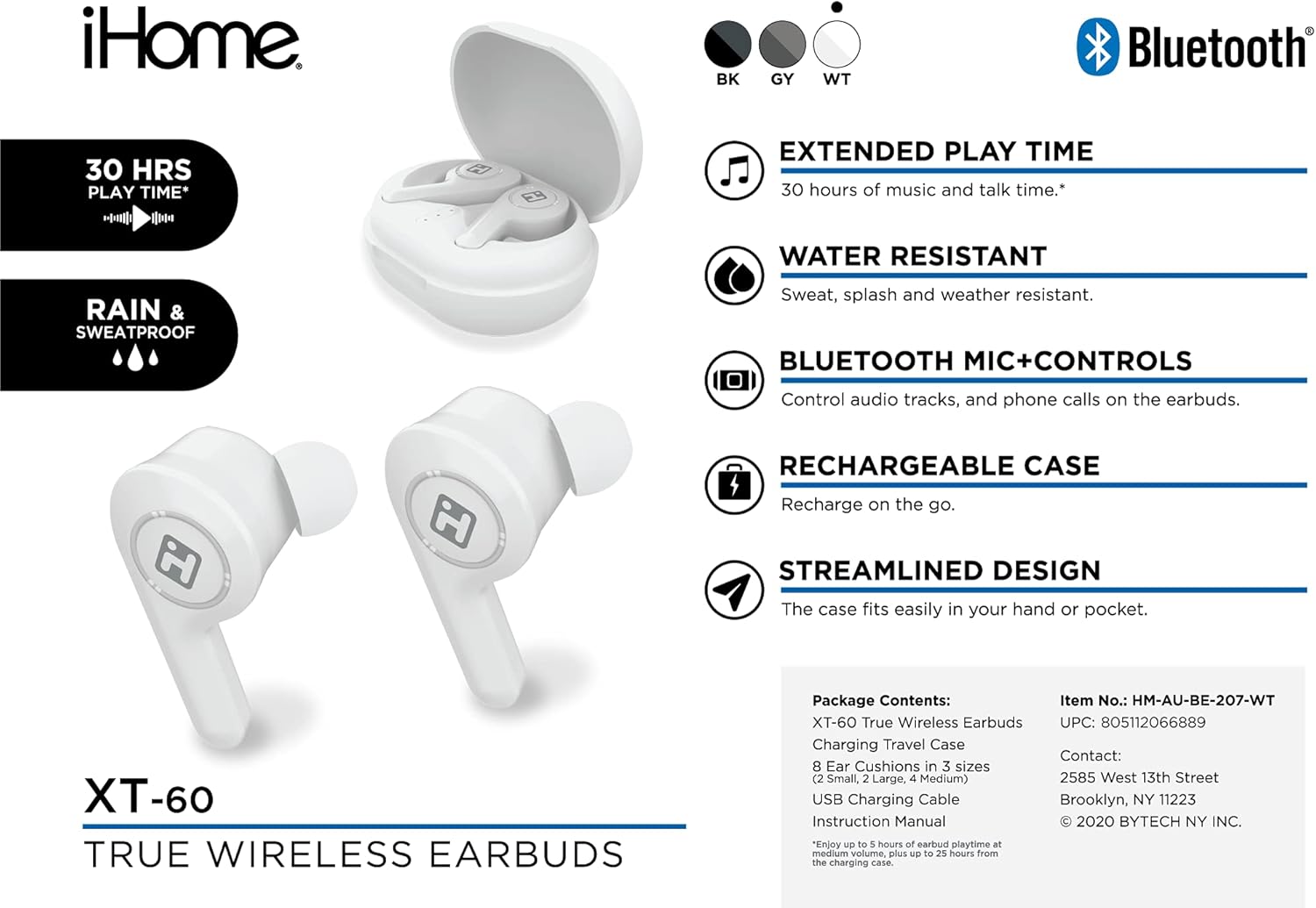
Image: The iHome XT-60 True Wireless Earbuds and their accessories, including the charging case, ear cushions, and USB charging cable, laid out on a white background.
- XT-60 ട്രൂ വയർലെസ് ഇയർബഡുകൾ
- യാത്രാ കേസ് ചാർജുചെയ്യുന്നു
- 8 Ear Cushions in 3 Sizes (2 Small, 2 Large, 4 Medium)
- യുഎസ്ബി ചാർജിംഗ് കേബിൾ
- നിർദ്ദേശ മാനുവൽ (ഈ പ്രമാണം)
സജ്ജമാക്കുക
1. ഇയർബഡുകളും കേസും ചാർജ് ചെയ്യുന്നു
Before first use, fully charge the earbuds and the charging case. The charging case provides additional battery life for your earbuds, offering up to 30 hours of total play time.
- ഇയർബഡുകൾ ചാർജിംഗ് കേസിൽ വയ്ക്കുക. അവ ശരിയായി സ്ഥാപിച്ചിട്ടുണ്ടെന്ന് ഉറപ്പാക്കുക.
- യുഎസ്ബി ചാർജിംഗ് കേബിൾ കേസിലെ ചാർജിംഗ് പോർട്ടിലേക്കും ഒരു യുഎസ്ബി പവർ സ്രോതസ്സിലേക്കും ബന്ധിപ്പിക്കുക.
- The indicator lights on the case and earbuds will show charging status. Refer to the case for specific light indicators.
- പൂർണ്ണമായി ചാർജ് ചെയ്തുകഴിഞ്ഞാൽ, ചാർജിംഗ് കേബിൾ വിച്ഛേദിക്കുക.

Image: The iHome XT-60 True Wireless Earbuds resting inside their open charging case, ready for charging or use.
2. ബ്ലൂടൂത്ത് ഉപകരണവുമായി ജോടിയാക്കുന്നു
The XT-60 earbuds use Bluetooth 5.0 for a stable wireless connection.
- Remove both earbuds from the charging case. They will automatically power on and enter pairing mode.
- നിങ്ങളുടെ ഉപകരണത്തിൽ (സ്മാർട്ട്ഫോൺ, ടാബ്ലെറ്റ് മുതലായവ), ബ്ലൂടൂത്ത് ക്രമീകരണങ്ങളിലേക്ക് പോകുക.
- ഇതിനായി തിരയുക available devices and select "iHome XT-60" from the list.
- Once connected, you will hear an audio confirmation, and the earbud indicator lights will change.
കുറിപ്പ്: കേസിൽ നിന്ന് നീക്കം ചെയ്യുമ്പോൾ ഇയർബഡുകൾ അവസാനമായി ജോടിയാക്കിയ ഉപകരണത്തിലേക്ക് വീണ്ടും കണക്റ്റുചെയ്യാൻ ശ്രമിക്കും.
3. ഇയർബഡുകൾ ഘടിപ്പിക്കൽ
Proper fit is crucial for sound quality and comfort. Experiment with the included ear cushion sizes to find the best fit for your ears.

ചിത്രം: ഒരു ക്ലോസ്-അപ്പ് view of an iHome XT-60 earbud properly seated within the ear canal, demonstrating correct fit.
- നിങ്ങളുടെ ഇയർ കനാലിലേക്ക് ഇയർബഡ് മൃദുവായി തിരുകുക.
- Twist slightly to secure it in place.
- Ensure a snug fit to maximize bass response and noise isolation.
ഇയർബഡുകൾ പ്രവർത്തിപ്പിക്കുന്നു
ടച്ച് നിയന്ത്രണങ്ങൾ
The XT-60 earbuds feature intuitive touch controls on each earbud for managing audio playback and calls.
| ഫംഗ്ഷൻ | ആക്ഷൻ |
|---|---|
| പ്ലേ/താൽക്കാലികമായി നിർത്തുക | ഏതെങ്കിലും ഇയർബഡിൽ ഒറ്റ ടാപ്പ് ചെയ്യുക |
| അടുത്ത ട്രാക്ക് | വലതുവശത്തെ ഇയർബഡിൽ രണ്ടുതവണ ടാപ്പ് ചെയ്യുക |
| മുമ്പത്തെ ട്രാക്ക് | ഇടതുവശത്തെ ഇയർബഡിൽ രണ്ടുതവണ ടാപ്പ് ചെയ്യുക |
| ഉത്തരം / കോൾ അവസാനിപ്പിക്കുക | ഏതെങ്കിലും ഇയർബഡിൽ ഒറ്റ ടാപ്പ് ചെയ്യുക |
| കോൾ നിരസിക്കുക | ഏതെങ്കിലും ഇയർബഡിൽ 2 സെക്കൻഡ് അമർത്തിപ്പിടിക്കുക |
| വോയ്സ് അസിസ്റ്റൻ്റ് സജീവമാക്കുക | ഇയർബഡുകളിലൊന്നിൽ മൂന്ന് തവണ ടാപ്പ് ചെയ്യുക |
പവർ ഓൺ/ഓഫ്
- പവർ ഓൺ: ചാർജിംഗ് കെയ്സിൽ നിന്ന് ഇയർബഡുകൾ നീക്കം ചെയ്യുക. അവ സ്വയമേവ പവർ ചെയ്യും.
- പവർ ഓഫ്: ഇയർബഡുകൾ ചാർജിംഗ് കെയ്സിലേക്ക് തിരികെ വയ്ക്കുക. അവ സ്വയമേവ ഓഫാകുകയും ചാർജ് ചെയ്യാൻ തുടങ്ങുകയും ചെയ്യും.
ജല പ്രതിരോധം (IPX5)
The iHome XT-60 earbuds are IPX5 water-resistant, meaning they are protected against sweat, splashes, and light rain. They are not designed for submersion in water. Ensure the earbuds are dry before placing them back in the charging case to prevent damage.
മെയിൻ്റനൻസ്
- വൃത്തിയാക്കൽ: ഇയർബഡുകളും ചാർജിംഗ് കെയ്സും വൃത്തിയാക്കാൻ മൃദുവായതും ഉണങ്ങിയതും ലിന്റ് രഹിതവുമായ തുണി ഉപയോഗിക്കുക. അബ്രാസീവ് ക്ലീനറുകളോ ലായകങ്ങളോ ഉപയോഗിക്കരുത്.
- ചെവി തലയണകൾ: Remove ear cushions periodically and clean them with a damp തുണി. വീണ്ടും ഘടിപ്പിക്കുന്നതിന് മുമ്പ് അവ പൂർണ്ണമായും ഉണങ്ങിയെന്ന് ഉറപ്പാക്കുക.
- സംഭരണം: ഉപയോഗത്തിലില്ലാത്തപ്പോൾ, ഇയർബഡുകൾ സംരക്ഷിക്കുന്നതിനും ചാർജ് ചെയ്ത നിലയിൽ നിലനിർത്തുന്നതിനുമായി അവ ചാർജിംഗ് കേസിൽ സൂക്ഷിക്കുക. ഉയർന്ന താപനില ഒഴിവാക്കുക.
ട്രബിൾഷൂട്ടിംഗ്
| പ്രശ്നം | പരിഹാരം |
|---|---|
| ഇയർബഡുകൾ ഉപകരണവുമായി ജോടിയാക്കുന്നില്ല |
|
| ഒരു ഇയർബഡ് മാത്രമേ പ്രവർത്തിക്കുന്നുള്ളൂ |
|
| ശബ്ദമോ കുറഞ്ഞ വോളിയമോ ഇല്ല |
|
| ചാർജിംഗ് കേസ് ചാർജുചെയ്യുന്നില്ല |
|
സ്പെസിഫിക്കേഷനുകൾ
| ഫീച്ചർ | വിശദാംശങ്ങൾ |
|---|---|
| മോഡൽ | XT-60 |
| കണക്റ്റിവിറ്റി ടെക്നോളജി | ബ്ലൂടൂത്ത് 5.0 |
| ഫോം ഫാക്ടർ | ചെവിയിൽ |
| നിയന്ത്രണ രീതി | ടച്ച് നിയന്ത്രണം |
| മൈക്രോഫോൺ | ഉൾപ്പെടുത്തിയിട്ടുണ്ട് |
| ജല പ്രതിരോധ നില | IPX5 (വാട്ടർ റെസിസ്റ്റൻ്റ്) |
| ബാറ്ററി ലൈഫ് (ഇയർബഡുകൾ) | Up to 5 hours per charge (approx.) |
| Total Play Time (with case) | 30 മണിക്കൂർ വരെ |
| യു.പി.സി | 805112066889 |
വാറൻ്റിയും പിന്തുണയും
For warranty information and technical support, please refer to the official iHome webസൈറ്റിൽ ബന്ധപ്പെടുക അല്ലെങ്കിൽ അവരുടെ ഉപഭോക്തൃ സേവനവുമായി ബന്ധപ്പെടുക. വാറന്റി ക്ലെയിമുകൾക്കായി നിങ്ങളുടെ വാങ്ങിയതിന്റെ തെളിവ് സൂക്ഷിക്കുക.
ബന്ധപ്പെടാനുള്ള വിവരങ്ങൾ:
- Manufacturer: iHome
- Address: 2585 West 13th Street, Brooklyn, NY 11223