
1. ആമുഖം
Thank you for choosing the Sauder Worksense Palo Alto 60" Commercial Credenza. This manual provides essential information for the proper setup, operation, and maintenance of your new furniture. Please read these instructions carefully before use to ensure optimal performance and longevity of your credenza.
The Palo Alto credenza is designed to offer ample space for office essentials, functioning as both a desk and an accent piece. It features a durable, 1-inch thick top and end panels, along with a melamine top surface that is heat, stain, and scratch resistant. Impact-resistant, high-grade thermoplastic edges enhance its durability. The credenza is finished on all sides for versatile placement within your office environment.

ചിത്രം 1.1: മുൻഭാഗം view of the Sauder Worksense Palo Alto 60" Commercial Credenza.
2. സജ്ജീകരണം
Your Sauder Worksense Palo Alto Credenza is designed for efficient assembly. The pedestals and drawers arrive pre-assembled, significantly reducing the overall setup time.
2.1 പായ്ക്ക് ചെയ്യലും തയ്യാറാക്കലും
- Carefully unpack all components and verify against the parts list provided in your packaging.
- അസംബ്ലിക്ക് മതിയായ ഇടമുണ്ടെന്ന് ഉറപ്പാക്കുക.
- എന്ന് ശുപാർശ ചെയ്യുന്നു ഒരു വ്യക്തി is sufficient for assembly, as indicated by the manufacturer.
2.2 അസംബ്ലി ഘട്ടങ്ങൾ
Refer to the detailed assembly instructions included in your product packaging for step-by-step guidance. The main assembly involves connecting the pre-assembled pedestals to the credenza top and central support structure.

Image 2.1: The credenza integrated into an office environment.
3. പ്രവർത്തന നിർദ്ദേശങ്ങൾ
The Palo Alto credenza is designed with functionality and organization in mind. Familiarize yourself with its features for efficient use.
3.1 Drawer System
- Center Drawer/Shelf: This features metal runners and safety stops. A flip-down panel allows it to accommodate a laptop or a keyboard and mouse, converting into a convenient workstation.
- Six Drawers: All six drawers on the pedestals are equipped with full extension slides, allowing for complete access to their contents.
- File ഡ്രോയറുകൾ: The lower drawers are designed to hold letter or legal-size hanging files, providing organized document storage.
- സുരക്ഷാ ലോക്കുകൾ: ദി file drawer and the drawer directly above it on each pedestal include a key lock for securing sensitive documents or personal items.
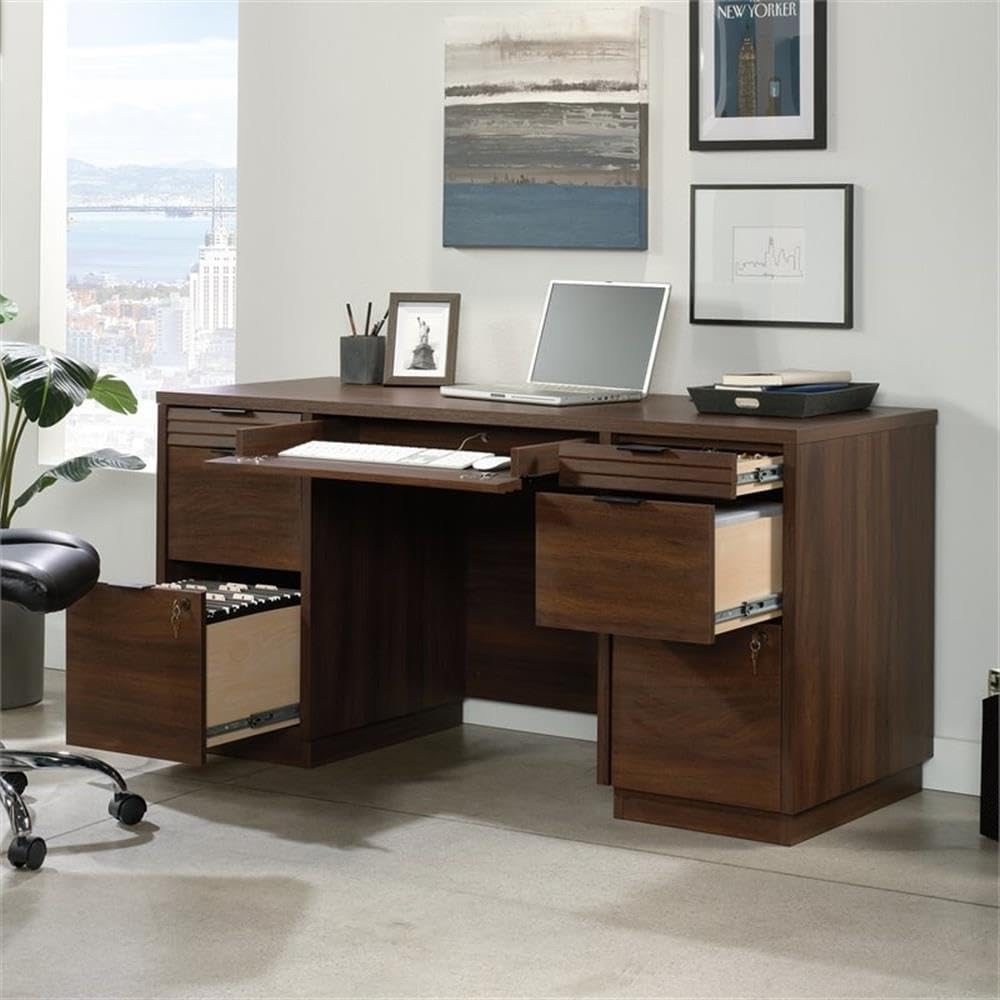
Image 3.1: Credenza showing the pull-out keyboard tray and an open file ഡ്രോയർ.

Image 3.2: Detail of an open drawer, illustrating storage capacity for small office items.
3.2 Cord Management
The credenza includes a built-in cord management system with two desktop grommet holes. These are designed to help organize and route power cables and data cords, maintaining a tidy and functional workspace.
4. പരിപാലനം
Proper care will help maintain the appearance and extend the life of your credenza.
4.1 വൃത്തിയാക്കൽ
- For general cleaning, wipe the surfaces with a damp തുണി.
- കഠിനമായ രാസവസ്തുക്കൾ, അബ്രാസീവ് ക്ലീനറുകൾ, അല്ലെങ്കിൽ ഫിനിഷിന് കേടുവരുത്തുന്ന പോളിഷുകൾ എന്നിവ ഉപയോഗിക്കുന്നത് ഒഴിവാക്കുക.
- The melamine top surface is designed to be heat, stain, and scratch resistant, but it is still advisable to use coasters for beverages and protective pads under hot items.

Image 4.1: Detail of the durable Spiced Mahogany finish.
4.2 പൊതു പരിചരണം
- Periodically check and tighten any loose hardware.
- Avoid exposing the credenza to direct sunlight or extreme temperature changes, which can cause fading or warping.
- Do not overload drawers to ensure smooth operation of the full extension slides.
5. പ്രശ്നപരിഹാരം
This section addresses common issues you might encounter with your credenza.
5.1 ഡ്രോയർ പ്രവർത്തനം
- ഇഷ്യൂ: ഡ്രോയറുകൾ സുഗമമായി സ്ലൈഡ് ചെയ്യുന്നില്ല.
പരിഹാരം: Check for obstructions within the drawer slides. Ensure drawers are not overloaded. Verify that the credenza is on a level surface. - ഇഷ്യൂ: Drawer locks are stiff or not engaging.
പരിഹാരം: Apply a small amount of graphite lubricant to the key and lock mechanism. Ensure the drawer is fully closed before attempting to lock.
5.2 സ്ഥിരത പ്രശ്നങ്ങൾ
- ഇഷ്യൂ: Credenza wobbles or feels unstable.
പരിഹാരം: Ensure all assembly hardware is securely tightened. Verify that the credenza is placed on a flat, level floor. Adjust any leveling feet if present.
6 സ്പെസിഫിക്കേഷനുകൾ
Detailed specifications for the Sauder Worksense Palo Alto 60" Commercial Credenza.
- ബ്രാൻഡ്: Sauder
- മോഡൽ നമ്പർ: 427791
- ഉൽപ്പന്ന അളവുകൾ (D x W x H): 23.31" x 59.13" x 29.25" (59.2 സെ.മീ x 150.2 സെ.മീ x 74.3 സെ.മീ)
- ഇനത്തിൻ്റെ ഭാരം: 84.8 പൗണ്ട് (38.46 കി.ഗ്രാം)
- നിറം: Spiced Mahogany
- ശൈലി: ആധുനികം
- അടിസ്ഥാന മെറ്റീരിയൽ: ലോഹം
- ഫിനിഷ് തരം: Mahogany Finish
- പ്രത്യേക സവിശേഷതകൾ: Durable, Resistant (Heat, Stain, Scratch)
- മുറിയുടെ തരം: ഓഫീസ്
- ശുപാർശ ചെയ്യുന്ന ഉപയോഗങ്ങൾ: ഓഫീസ്
- ഉൽപ്പന്ന പരിപാലന നിർദ്ദേശങ്ങൾ: ഡി ഉപയോഗിച്ച് തുടയ്ക്കുകamp തുണി
- പ്രായ പരിധി വിവരണം: മുതിർന്നവർ
- ഉൾപ്പെടുത്തിയ ഘടകങ്ങൾ: അലമാരകൾ
- മികച്ച മെറ്റീരിയൽ തരം: മെലാമൈൻ
- ഡ്രോയർ ഗ്ലൈഡ് മെറ്റീരിയൽ: ലോഹം
- ആവശ്യമായ അസംബ്ലി: അതെ (ഭാഗികം)
- അസംബ്ലിക്കായി ശുപാർശ ചെയ്യുന്ന ആളുകളുടെ എണ്ണം: 1
- രൂപം: ദീർഘചതുരം
- ഡെസ്ക് ഡിസൈൻ: Credenza Desk
- ഡ്രോയറുകളുടെ എണ്ണം: 6
- Number Of Shelves: 2
- ടേബിൾടോപ്പ് കനം: 1 ഇഞ്ച്
- Number Of Cabinets: 2
- മൗണ്ടിംഗ് തരം: ഫ്ലോർ മൗണ്ട്
- ഡ്രോയർ തരം: File ഡ്രോയർ
- അടിസ്ഥാന തരം: പീഠം
- തിരികെ പൂർത്തിയാക്കി: അതെ
- ഡ്രോയർ ഗ്ലൈഡ് മെക്കാനിസം: പൂർണ്ണ വിപുലീകരണ സ്ലൈഡുകൾ
- സംഭരണ ഓപ്ഷനുകൾ: Drawers (6), Shelf (1)
- ഡ്രോയർ പെഡസ്റ്റൽ എണ്ണം: 2
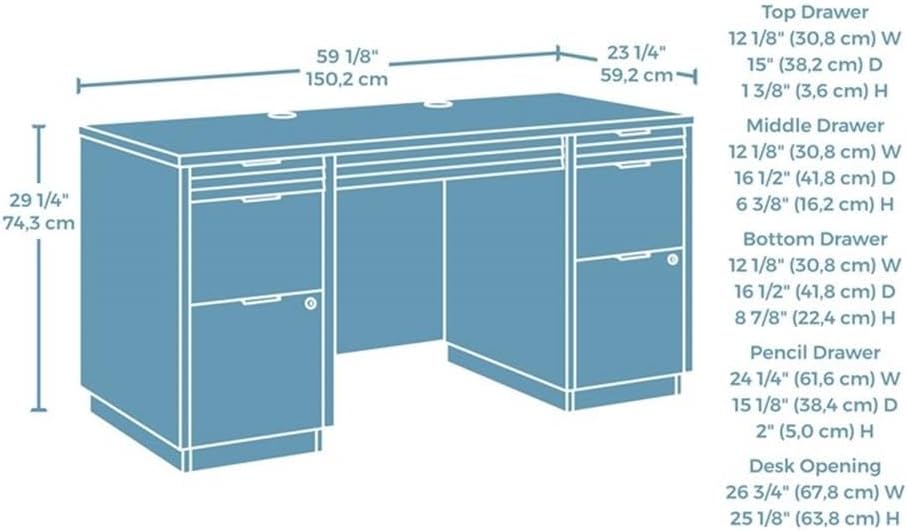
Image 6.1: Dimensional diagram of the credenza, including drawer and desk opening measurements.
7. വാറൻ്റി വിവരങ്ങൾ
The Sauder Worksense Palo Alto 60" Commercial Credenza comes with a 5 വർഷത്തെ പരിമിത വാറൻ്റി നിർമ്മാതാവിൽ നിന്ന്. സാധാരണ ഉപയോഗത്തിൽ മെറ്റീരിയലുകളിലും വർക്ക്മാൻഷിപ്പിലുമുള്ള വൈകല്യങ്ങൾ ഈ വാറന്റി ഉൾക്കൊള്ളുന്നു. വാറന്റി ക്ലെയിമുകൾക്കായി നിങ്ങളുടെ വാങ്ങലിന്റെ തെളിവ് സൂക്ഷിക്കുക.
For specific details regarding warranty coverage and to initiate a claim, refer to the warranty documentation included with your product or contact Sauder customer support.
8. പിന്തുണ
Should you require assistance with your Sauder Worksense Palo Alto Credenza, please utilize the following resources:
- നിർമ്മാതാവിന്റെ Webസൈറ്റ്: Visit the official Sauder website for product information, FAQs, and support contact details.
- അസംബ്ലി നിർദ്ദേശങ്ങൾ: Always refer to the detailed assembly manual provided in your product packaging for specific step-by-step instructions.
- കസ്റ്റമർ സർവീസ്: For direct support, contact Sauder customer service using the information found on their official webസൈറ്റ് അല്ലെങ്കിൽ നിങ്ങളുടെ ഉൽപ്പന്ന ഡോക്യുമെന്റേഷനിൽ.
നിങ്ങൾക്ക് സന്ദർശിക്കാനും കഴിയും Sauder Store on Amazon കൂടുതൽ ഉൽപ്പന്ന വിവരങ്ങൾക്കും ഉറവിടങ്ങൾക്കും.