
ഐഇഗീക്ക് എസ്2
ieGeek 2K Magnetic Base WiFi Security Camera S2 User Manual
മോഡൽ: S2 | ബ്രാൻഡ്: ieGeek
ആമുഖം
Thank you for choosing the ieGeek 2K Magnetic Base WiFi Security Camera S2. This camera offers advanced features such as 2K resolution, color night vision, 300° pan, Wi-Fi 6 connectivity, AI/PIR motion detection, and two-way audio. This manual will guide you through the installation, operation, and maintenance to ensure optimal performance and security for your home or property.
ബോക്സിൽ എന്താണുള്ളത്
എല്ലാ ഇനങ്ങളും ഉണ്ടെന്ന് ഉറപ്പാക്കാൻ നിങ്ങളുടെ പാക്കേജിന്റെ ഉള്ളടക്കങ്ങൾ പരിശോധിക്കുക:
- ieGeek Camera S2
- ഉപയോക്തൃ മാനുവൽ
- മാഗ്നെറ്റിക് ക്യാമറ മ .ണ്ട്
- മാഗ്നെറ്റിക് ബേസ്
- USB-C ചാർജിംഗ് കേബിൾ
- Screw Bag (3 x Screws & Nuts)
- 3 എം പശ

Image: All components included in the ieGeek S2 camera package.
ഉൽപ്പന്നം കഴിഞ്ഞുview
ക്യാമറ ഘടകങ്ങൾ

ഫ്രണ്ട് view: Ultra HD lens, spotlight, PIR sensor.

തിരികെ view: Speaker grille, QR code for setup.
പ്രധാന സവിശേഷതകൾ
- 2K അൾട്രാ എച്ച്ഡി വീഡിയോ: വ്യക്തവും വിശദവുമായ foo പകർത്തുന്നുtage.
- 300° Pan Field of View: പനോരമിക് വാഗ്ദാനം ചെയ്യുന്നു views, covering a wide area.
- വൈ-ഫൈ 6 കണക്റ്റിവിറ്റി: Provides faster and more reliable image transfer, reduced interference, and enhanced security.
- കളർ നൈറ്റ് വിഷൻ: See in full color even in low-light conditions up to 10 meters.
- AI/PIR Motion Detection: Advanced detection system recognizes individuals and sends real-time alerts (0.2s to 3s).
- അലാറം സൈറൺ: Automatically or manually trigger a siren to deter intruders.
- ടു-വേ ഓഡിയോ: Built-in microphone and speaker for real-time conversations.
- 100% Wire-Free & Rechargeable Battery: Easy installation without cables, suitable for both indoor and outdoor use.
- IP65 കാലാവസ്ഥാ പ്രതിരോധം: വിവിധ കാലാവസ്ഥകളെ നേരിടാൻ രൂപകൽപ്പന ചെയ്തിരിക്കുന്നത്.
സജ്ജീകരണവും ഇൻസ്റ്റാളേഷനും
പ്രാരംഭ ചാർജിംഗ്
Before first use, ensure the camera is fully charged using the provided USB-C cable. A standard 5V USB power adapter (not included) is required.
ആപ്പ് ഇൻസ്റ്റാളേഷനും കണക്ഷനും
- Step 1: Download the ieGeek Cam App. ഇതിനായി തിരയുക "ieGeek Cam" on your smartphone's app store (Android 5.0+ or iOS 8.0+).
- Step 2: Connect to 2.4GHz Wi-Fi. Ensure your camera is within range of a 2.4GHz Wi-Fi network for initial setup.
- Step 3: Start Recording. Follow the in-app instructions to pair your camera and begin monitoring.
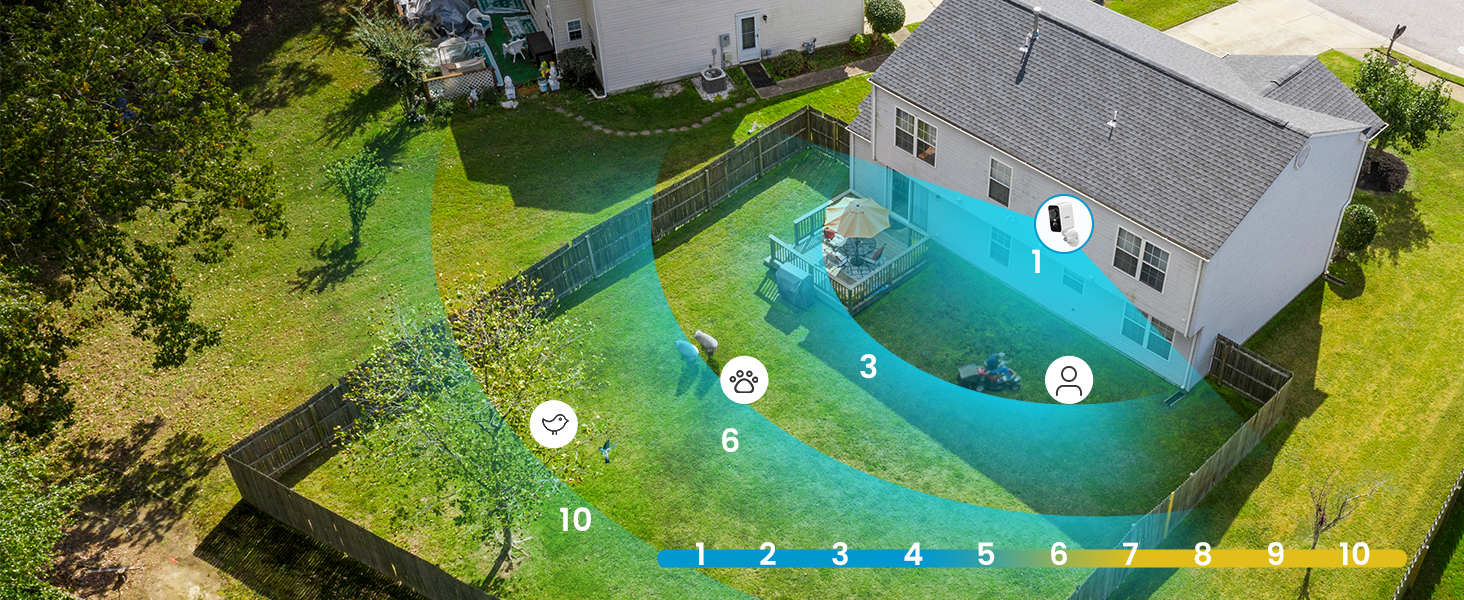
Image: Simplified setup process using the ieGeek Cam app.
മൗണ്ടിംഗ് ഓപ്ഷനുകൾ
The ieGeek S2 camera offers flexible installation with its magnetic base. You can choose between adhesive mounting or screw mounting:
- Method 1: Adhesive Mounting (Tool-free).
- Install the 3M adhesive on a clean, flat wall surface.
- Allow the adhesive to rest for 8 hours to achieve optimal adhesion before attaching the magnetic base.
- Fix the magnetic base to the adhesive.
- കാന്തിക അടിത്തറയിലേക്ക് ക്യാമറ അറ്റാച്ചുചെയ്യുക.
- Method 2: Screw Mounting.
- Drill three holes in the desired location.
- Fix the magnetic camera mount to the wall using the provided screws and nuts.
- കാന്തിക മൗണ്ടിലേക്ക് ക്യാമറ അറ്റാച്ചുചെയ്യുക.
The magnetic base allows for easy removal of the camera for recharging or repositioning.

Image: Magnetic base for easy, tool-free installation.

Image: Two installation methods for the ieGeek S2 camera.
പ്രവർത്തന നിർദ്ദേശങ്ങൾ
തത്സമയം View ഒപ്പം പ്ലേബാക്ക്
Access live video streams and recorded footage through the ieGeek Cam app. The app supports simultaneous viewing of up to 4 cameras and allows sharing access with family members.
300° Pan Control
Utilize the in-app controls to remotely adjust the camera's horizontal viewing angle up to 300°, ensuring comprehensive coverage without blind spots.

Image: The camera's 300° pan capability provides wide area surveillance.
2K Ultra HD and Color Night Vision
The camera records in 2K resolution, providing sharp images. With its color night vision feature, you can see clear, full-color images even at night, up to 10 meters. Infrared night vision is also available.

Image: 2K 3MP HD image quality for clear details.

Image: Color night vision provides clear, vibrant images in low light.
AI/PIR Motion Detection and Alarm
The camera's advanced AI/PIR detection system identifies human shapes, reducing false alarms. Upon detection, you receive real-time alerts (0.2s to 3s) on your phone. You can also configure the camera to automatically trigger a siren or a strong light alarm to deter intruders.

Image: AI recognition minimizes false alarms by focusing on human shapes.

Image: PIR motion detection with siren and light alarm for immediate deterrence.
ടു-വേ ഓഡിയോ
Communicate directly with visitors or deter unwanted guests using the camera's integrated microphone and speaker. This feature allows for real-time, two-way conversations through the app.

Image: Two-way audio for real-time communication.
സ്റ്റോറേജ് ഓപ്ഷനുകൾ
The camera supports local storage via a Micro SD card (up to 128GB, not included). Additionally, a free 6-second loop cloud storage is available through the ieGeek Cam app.

Image: Storage options including Micro SD card and cloud storage.
മെയിൻ്റനൻസ്
- ബാറ്ററി ചാർജിംഗ്: Recharge the camera battery as needed. The magnetic base allows for easy removal for charging.
- വൃത്തിയാക്കൽ: ഇടയ്ക്കിടെ ക്യാമറ ലെൻസും ബോഡിയും മൃദുവായ, ഡി ക്ലീനർ ഉപയോഗിച്ച് തുടയ്ക്കുക.amp പൊടിയും അവശിഷ്ടങ്ങളും നീക്കം ചെയ്യാൻ തുണി ഉപയോഗിക്കുക. കഠിനമായ രാസവസ്തുക്കൾ ഒഴിവാക്കുക.
- കാലാവസ്ഥ സംരക്ഷണം: While the camera is IP65 weatherproof, ensure it is installed in a location that minimizes direct exposure to extreme weather conditions for prolonged durability.
ട്രബിൾഷൂട്ടിംഗ്
- ക്യാമറ വൈഫൈയിലേക്ക് കണക്റ്റ് ചെയ്യുന്നില്ല:
- നിങ്ങളുടെ വൈഫൈ നെറ്റ്വർക്ക് 2.4GHz ആണെന്ന് ഉറപ്പാക്കുക. ക്യാമറ 5GHz വൈഫൈ പിന്തുണയ്ക്കുന്നില്ല.
- Check the Wi-Fi signal strength at the camera's installation location.
- Verify that the Wi-Fi password entered in the app is correct.
- നിങ്ങളുടെ റൂട്ടറും ക്യാമറയും പുനരാരംഭിക്കുക.
- അമിതമായ ബാറ്ററി ഡ്രെയിൻ:
- Frequent motion detection events, especially in high-traffic areas, can increase battery consumption. Adjust motion detection sensitivity and detection zones in the app.
- തത്സമയം viewing for extended periods also consumes more battery.
- ക്യാമറ വിന്യസിക്കുന്നതിന് മുമ്പ് പൂർണ്ണമായും ചാർജ് ചെയ്തിട്ടുണ്ടെന്ന് ഉറപ്പാക്കുക.
- തെറ്റായ അലാറങ്ങൾ:
- Adjust the AI/PIR detection sensitivity in the app.
- Define specific detection zones to exclude areas with irrelevant movement (e.g., trees swaying, distant traffic).
- ക്യാമറ ലെൻസ് വൃത്തിയുള്ളതാണെന്നും തടസ്സങ്ങളില്ലെന്നും ഉറപ്പാക്കുക.
- മോശം ചിത്രത്തിന്റെ ഗുണനിലവാരം:
- നിങ്ങളുടെ ഇന്റർനെറ്റ് കണക്ഷൻ വേഗത പരിശോധിക്കുക.
- ക്യാമറ ലെൻസ് വൃത്തിയുള്ളതാണെന്ന് ഉറപ്പാക്കുക.
- Verify that the camera is set to 2K resolution in the app settings.
For further assistance, please refer to the ieGeek Cam app's help section or contact ieGeek customer support.
സ്പെസിഫിക്കേഷനുകൾ
| ഫീച്ചർ | സ്പെസിഫിക്കേഷൻ |
|---|---|
| വീഡിയോ റെക്കോർഡിംഗ് റെസല്യൂഷൻ | 2K |
| ഫലപ്രദമായ വീഡിയോ റെസല്യൂഷൻ | 1296p |
| നിറം | വെള്ള |
| വയർലെസ് കമ്മ്യൂണിക്കേഷൻ ടെക്നോളജി | വൈഫൈ (2.4GHz) |
| Viewing ആംഗിൾ | 300° (Pan) |
| നൈറ്റ് വിഷൻ റേഞ്ച് | 10 മീറ്റർ |
| ജല പ്രതിരോധ നില | IP65 (ജലപ്രൂഫ്) |
| മെറ്റീരിയൽ | Extra resistant ABS+PC material (heat and rust resistant) |
| പവർ ഉറവിടം | ബാറ്ററി പവർ (ലിഥിയം-അയൺ) |
| മെമ്മറി പിന്തുണ | 32-128GB (Micro SD card) |
| ഓപ്പറേറ്റിംഗ് സിസ്റ്റം അനുയോജ്യത | Android 5.0+, iOS 8.0+ |
| ഇനത്തിന്റെ അളവുകൾ (L x W x H) | 17.5 x 6.6 x 5.5 സെ.മീ |
വാറൻ്റിയും പിന്തുണയും
The ieGeek 2K Magnetic Base WiFi Security Camera S2 comes with a 2 വർഷത്തെ നിർമ്മാതാവിന്റെ വാറന്റി.
For any questions, technical support, or warranty claims, please contact ieGeek customer service. Their team is available to assist you within 24 hours on business days.
You can find contact information and additional resources within the ieGeek Cam app or on the official ieGeek webസൈറ്റ്.
Ask a question about this manual
Ask about setup, troubleshooting, compatibility, parts, safety, or missing instructions. Manuals+ will review the question and use this page’s manual context to help answer it.