
1. ആമുഖം
Thank you for choosing the Beetel X73N Cordless 2.4Ghz Landline Phone. This manual provides essential information for setting up, operating, and maintaining your new phone. Please read these instructions carefully before use to ensure optimal performance and longevity of your device.
2. ബോക്സിൽ എന്താണുള്ളത്?
Upon opening your Beetel X73N package, you should find the following items:
- Product (Handset and Base Unit)
- ഉപയോക്തൃ മാനുവൽ
- പവർ അഡാപ്റ്റർ
- ടെലിഫോൺ ലൈൻ കോർഡ്
- 2 AAA റീചാർജ് ചെയ്യാവുന്ന ബാറ്ററികൾ
3. ഉൽപ്പന്നം കഴിഞ്ഞുview
The Beetel X73N is designed for ease of use and reliable communication. It features a sleek handset with an illuminated keypad and an LCD display, paired with a compact base unit.
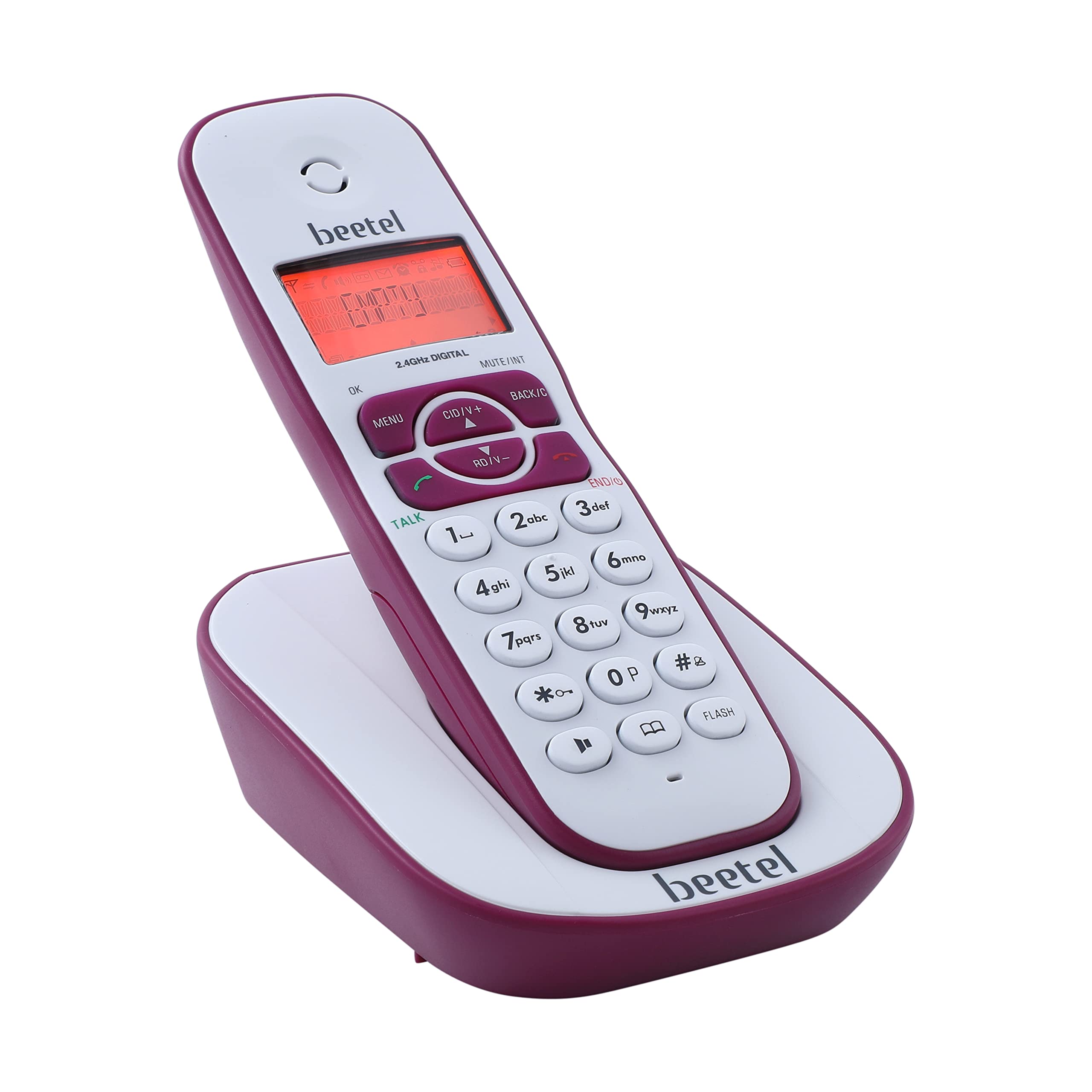
Image: Beetel X73N Cordless Phone Handset and Base Unit.

Image: The LCD display with backlight shows calling party information, battery capacity, and signal strength.

Image: The alphanumeric illuminated keypad ensures easy visibility of buttons for operation in various lighting conditions.
4. സജ്ജീകരണ നിർദ്ദേശങ്ങൾ
Follow these steps to set up your Beetel X73N cordless phone:
- അടിസ്ഥാന യൂണിറ്റ് ബന്ധിപ്പിക്കുക: Plug the power adapter into the base unit and then into a wall outlet. Connect the telephone line cord from the base unit to your telephone wall jack.
- ബാറ്ററികൾ ഇൻസ്റ്റാൾ ചെയ്യുക: Open the battery compartment on the back of the handset. Insert the two AAA rechargeable batteries, ensuring correct polarity. Close the compartment.
- ഹാൻഡ്സെറ്റ് ചാർജ് ചെയ്യുക: Place the handset on the base unit. The charging indicator on the handset should illuminate, indicating that it is charging. For first-time use, charge the handset for at least 12-15 hours to ensure full battery capacity.
Video: This video demonstrates the unboxing and initial setup process of the Beetel X73N Cordless Landline Phone, including connecting the base unit and installing/charging the handset batteries.

Image: The phone uses rechargeable batteries, ensuring convenience and portability.
5. പ്രവർത്തന നിർദ്ദേശങ്ങൾ
5.1 കോളുകൾ ചെയ്യലും സ്വീകരിക്കലും
- ഒരു കോൾ ചെയ്യാൻ: അമർത്തുക സംസാരിക്കുക ബട്ടൺ അമർത്തി, തുടർന്ന് ആവശ്യമുള്ള ഫോൺ നമ്പർ ഡയൽ ചെയ്യുക.
- ഒരു കോൾ സ്വീകരിക്കുന്നതിന്: ഫോൺ റിംഗ് ചെയ്യുമ്പോൾ, അമർത്തുക സംസാരിക്കുക ബട്ടൺ.
- ഒരു കോൾ അവസാനിപ്പിക്കാൻ: അമർത്തുക END/C ബട്ടൺ അമർത്തുക അല്ലെങ്കിൽ ഹാൻഡ്സെറ്റ് ബേസ് യൂണിറ്റിൽ തിരികെ വയ്ക്കുക.
5.2 Using the 2-Way Speaker Phone
The Beetel X73N features a 2-way speakerphone for hands-free communication.
- ഒരു കോൾ സമയത്ത്, അമർത്തുക സ്പീക്കർ സ്പീക്കർഫോൺ സജീവമാക്കുന്നതിനുള്ള ബട്ടൺ.
- അമർത്തുക സ്പീക്കർ button again to switch back to handset mode.

Image: Enjoy hands-free conversations with the 2-way speaker phone, featuring adjustable receive volume.
5.3 Volume Controls
Adjust the call volume during a conversation using the CID/V+ ഒപ്പം RD/V- ഹാൻഡ്സെറ്റിലെ ബട്ടണുകൾ.
5.4 ഫോൺബുക്ക്
പെട്ടെന്ന് ഡയൽ ചെയ്യുന്നതിനായി പതിവായി വിളിക്കുന്ന നമ്പറുകൾ ഫോൺബുക്കിൽ സൂക്ഷിക്കുക.
- സമർപ്പിച്ചിരിക്കുന്നത് അമർത്തുക ഫോൺബുക്ക് button to access your saved contacts.
- Use the navigation buttons to scroll through entries.
- Follow on-screen prompts to add, edit, or delete contacts.

Image: The phone offers storage capacity for up to 50 numbers with names in its phonebook.
5.5 കോളർ ഐഡിയും കോൾ വെയ്റ്റിംഗും
The phone displays the caller's number and name (if available in your phonebook or service provider's database) for incoming calls. Call waiting alerts you to a second incoming call while you are already on a call.
5.6 അലാറം പ്രവർത്തനം
Set an alarm to remind you of important events. Refer to the on-screen menu for setting up the alarm.
6 പ്രധാന സവിശേഷതകൾ
The Beetel X73N is equipped with several features to enhance your calling experience:
- Caller ID, Call Waiting, and Call Forwarding: Manage your calls efficiently with these essential functions.
- Alphanumeric Illuminated Keypad: Ensures clear visibility and easy dialing in any light condition.
- 2-Way Speaker Phone with Volume Controls: Enjoy hands-free conversations with adjustable audio levels.
- Dedicated Phonebook Button: Provides quick and immediate access to your saved contacts.
- ബാക്ക്ലൈറ്റുള്ള LCD ഡിസ്പ്ലേ: Clearly displays calling party phone number/name, battery capacity, and signal strength.
- Out of Range Warning Tone: Alerts you when the handset is too far from the base unit.
- Low Battery Warning Tone: Notifies you when the battery level is low, prompting you to charge the handset.
- Battery Charging Level Indicator: Visible on the handset display.
- ഹാൻഡ്സെറ്റ് ലൊക്കേറ്റർ: Helps you find a misplaced handset by paging it from the base unit.
- Key Tone ON/OFF: Customize keypad sound preferences.
- Polyphonic Ring Tones: Choose from a variety of ringtones.
Video: This video highlights various features of the Beetel X73N, including its illuminated keypad, phonebook capacity, LCD display, 2-way speakerphone, out-of-range warning, and manufacturer warranty.

Image: A diagram illustrating key features such as battery charging indicator, caller line identification, alarm, handset locator, polyphonic ring tones, key tone ON/OFF, and adjustable ringer volume.
7. പരിപാലനം
To ensure the longevity and proper functioning of your Beetel X73N phone, follow these maintenance guidelines:
- വൃത്തിയാക്കൽ: ഒരു സോഫ്റ്റ്, ഡി ക്ലീനർ ഉപയോഗിച്ച് ഹാൻഡ്സെറ്റും ബേസ് യൂണിറ്റും തുടയ്ക്കുക.amp തുണി. ഉരച്ചിലുകളുള്ള ക്ലീനറുകളോ ലായകങ്ങളോ ഉപയോഗിക്കരുത്.
- ബാറ്ററി കെയർ: Use only the specified rechargeable batteries. If the phone will not be used for an extended period, remove the batteries to prevent leakage.
- പ്ലേസ്മെൻ്റ്: Keep the phone away from direct sunlight, heat sources, and moisture. Avoid placing it near other electronic devices that may cause interference.
8. പ്രശ്നപരിഹാരം
If you encounter any issues with your Beetel X73N, refer to the following common troubleshooting steps:
| പ്രശ്നം | സാധ്യമായ പരിഹാരം |
|---|---|
| ഡയൽ ടോൺ ഇല്ല | ടെലിഫോൺ ലൈൻ കോർഡ് ബേസ് യൂണിറ്റിലേക്കും വാൾ ജാക്കിലേക്കും സുരക്ഷിതമായി ബന്ധിപ്പിച്ചിട്ടുണ്ടെന്ന് ഉറപ്പാക്കുക. പവർ അഡാപ്റ്റർ ശരിയായി ബന്ധിപ്പിച്ചിട്ടുണ്ടോയെന്ന് പരിശോധിക്കുക. |
| ഹാൻഡ്സെറ്റ് ചാർജ് ചെയ്യുന്നില്ല | Verify the handset is correctly placed on the base unit. Clean the charging contacts on both the handset and base. Ensure batteries are inserted correctly. |
| മോശം ശബ്ദ നിലവാരം | Move closer to the base unit to improve signal strength. Check for interference from other electronic devices. |
| കോളർ ഐഡി പ്രദർശിപ്പിച്ചിട്ടില്ല. | നിങ്ങളുടെ ടെലിഫോൺ സേവന ദാതാവിൽ നിന്നുള്ള കോളർ ഐഡി സേവനത്തിൽ നിങ്ങൾ സബ്സ്ക്രൈബ് ചെയ്തിട്ടുണ്ടെന്ന് ഉറപ്പാക്കുക. |
| Handset out of range warning | Move the handset closer to the base unit. The operating range may vary depending on environmental factors. |
9 സ്പെസിഫിക്കേഷനുകൾ
Key technical specifications for the Beetel X73N Cordless Phone:
- റാം: 25 MB
- ഉൽപ്പന്ന അളവുകൾ: 8 x 12 x 16 സെ.മീ
- ബാറ്ററികൾ: 2 AAA ബാറ്ററികൾ (ഉൾപ്പെട്ടിരിക്കുന്നു)
- കോൾ കോൺഫറൻസ്: 2-വഴി
- മറ്റ് ഡിസ്പ്ലേ സവിശേഷതകൾ: വയർലെസ്
- നിറം: ചുവപ്പ്
- ഫോൺ സ്റ്റാൻഡ്ബൈ സമയം: 180 മിനിറ്റ്
- ഇനത്തിൻ്റെ ഭാരം: 350 ഗ്രാം
- മാതൃരാജ്യം: ചൈന
- മെറ്റീരിയൽ: പ്ലാസ്റ്റിക്
- ടെലിഫോൺ തരം: കോർഡ്ലെസ്സ്
10. വാറൻ്റിയും പിന്തുണയും
Your Beetel X73N Cordless Phone comes with a 1 വർഷത്തെ നിർമ്മാതാവിൻ്റെ വാറൻ്റി വാങ്ങിയ തീയതി മുതൽ. വാറന്റി തെളിവായി നിങ്ങളുടെ വാങ്ങൽ രസീത് സൂക്ഷിക്കുക.
For technical support, service, or warranty claims, please contact Beetel customer service. Refer to the contact information provided in your product packaging or visit the official Beetel webഏറ്റവും കാലികമായ പിന്തുണാ വിശദാംശങ്ങൾക്കായി സൈറ്റ്.