
1. ആമുഖം
Thank you for choosing the KRUPS Essential EA8105 Automatic Espresso Machine. This appliance is designed to deliver a perfectly balanced coffee experience, from bean to cup. Equipped with advanced KRUPS Thermoblock technology, it ensures optimal temperature control for exceptional coffee flavor. This manual provides essential information for the safe and efficient use, setup, operation, and maintenance of your machine.
2. സുരക്ഷാ നിർദ്ദേശങ്ങൾ
- ഉപകരണം ഉപയോഗിക്കുന്നതിന് മുമ്പ് എല്ലാ നിർദ്ദേശങ്ങളും ശ്രദ്ധാപൂർവ്വം വായിക്കുക.
- ഉപകരണമോ പവർ കോർഡോ വെള്ളത്തിലോ മറ്റേതെങ്കിലും ദ്രാവകത്തിലോ മുക്കരുത്.
- വോളിയം ഉറപ്പാക്കുകtagഉപകരണത്തിൽ സൂചിപ്പിച്ചിരിക്കുന്ന e നിങ്ങളുടെ മെയിൻ വോള്യവുമായി യോജിക്കുന്നുtage.
- ഉപകരണം കുട്ടികൾക്ക് ലഭ്യമാകാതെ സൂക്ഷിക്കുക.
- ഉപയോഗിക്കാത്ത സമയത്തും വൃത്തിയാക്കുന്നതിന് മുമ്പും പവർ ഔട്ട്ലെറ്റിൽ നിന്ന് ഉപകരണം അൺപ്ലഗ് ചെയ്യുക.
- കേടായ കോർഡോ പ്ലഗോ ഉപയോഗിച്ച് ഒരു ഉപകരണവും പ്രവർത്തിപ്പിക്കരുത്, അല്ലെങ്കിൽ ഉപകരണത്തിൻ്റെ തകരാറുകൾ അല്ലെങ്കിൽ ഏതെങ്കിലും വിധത്തിൽ കേടുപാടുകൾ സംഭവിച്ചതിന് ശേഷം.
- Use only original KRUPS accessories and spare parts.
- ഈ ഉപകരണം ഗാർഹിക ഉപയോഗത്തിന് മാത്രമുള്ളതാണ്.
3. ഉൽപ്പന്ന ഘടകങ്ങൾ

ചിത്രം 3.1: ഫ്രണ്ട് view of the KRUPS Essential EA8105 Automatic Espresso Machine, showing the bean hopper, control panel, coffee spouts, and steam nozzle.
- ബീൻ ഹോപ്പർ: മുഴുവൻ കാപ്പിക്കുരുവിനും.
- നിയന്ത്രണ പാനൽ: Buttons and dial for various functions (on/off, coffee volume, steam).
- വാട്ടർ ടാങ്ക്: വെള്ളം ശേഖരിക്കുന്നതിനായി നീക്കം ചെയ്യാവുന്ന ടാങ്ക്.
- കാപ്പി തുള്ളികൾ: ഉണ്ടാക്കിയ കാപ്പി വിതരണം ചെയ്യുന്നു.
- സ്റ്റീം നോസൽ: നുരയുന്ന പാലിന്.
- ഡ്രിപ്പ് ട്രേ: അധിക ദ്രാവകം ശേഖരിക്കുന്നു.
- കോഫി ഗ്രൗണ്ട് കണ്ടെയ്നർ: ഉപയോഗിച്ച കാപ്പിപ്പൊടികൾ ശേഖരിക്കുന്നു.
- Aqua Filter Claris Cartridge: Water filter for improved water quality.

ചിത്രം 3.2: ക്ലോസ് അപ്പ് view of the coffee spouts and steam nozzle, highlighting the dispensing area.
4. സജ്ജീകരണം
4.1 അൺപാക്കിംഗ്
- പാക്കേജിംഗിൽ നിന്ന് മെഷീനും എല്ലാ അനുബന്ധ ഉപകരണങ്ങളും ശ്രദ്ധാപൂർവ്വം നീക്കം ചെയ്യുക.
- എല്ലാ സംരക്ഷണ ഫിലിമുകളും പാക്കേജിംഗ് വസ്തുക്കളും നീക്കം ചെയ്യുക.
- Place the machine on a stable, flat, heat-resistant surface, away from water splashes.
4.2 Water Tank and Aqua Filter Claris
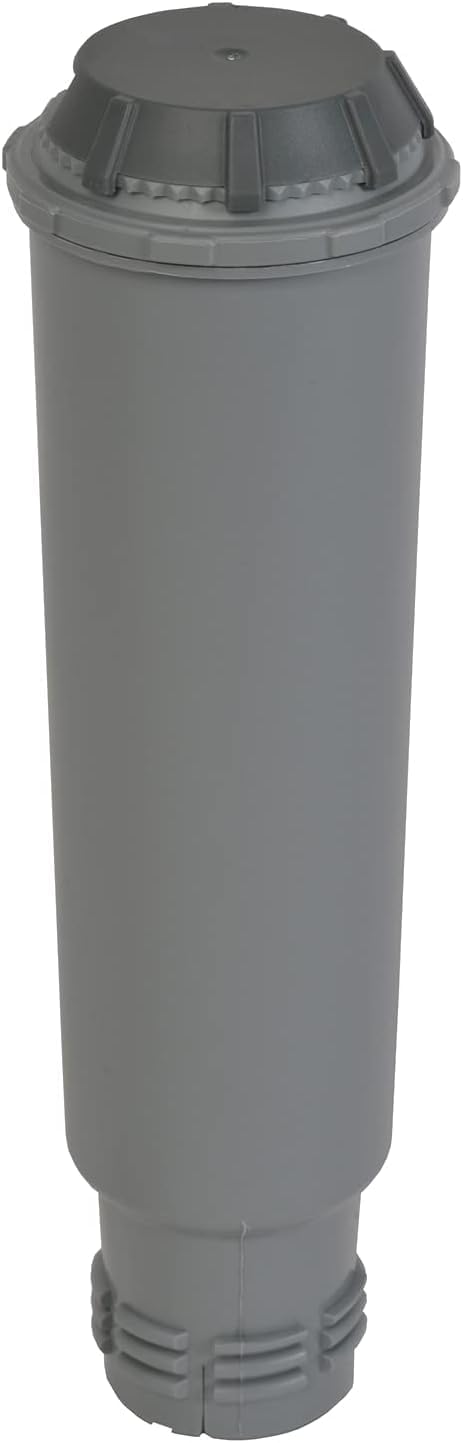
ചിത്രം 4.1: The Aqua Filter Claris water filter cartridge, designed to reduce chlorine and limescale.
- യന്ത്രത്തിന്റെ പിൻഭാഗത്ത് നിന്ന് വാട്ടർ ടാങ്ക് നീക്കം ചെയ്യുക.
- If using the Aqua Filter Claris cartridge (included), prepare it according to its separate instructions (usually involves rinsing).
- Insert the prepared filter into the water tank.
- വാട്ടർ ടാങ്കിൽ പരമാവധി ലെവൽ വരെ ശുദ്ധവും തണുത്തതുമായ വെള്ളം നിറയ്ക്കുക.
- വാട്ടർ ടാങ്ക് മെഷീനിൽ തിരികെ വയ്ക്കുക, അത് സുരക്ഷിതമായി സ്ഥാപിച്ചിട്ടുണ്ടെന്ന് ഉറപ്പാക്കുക.
4.3 ബീൻ ഹോപ്പർ
- മെഷീനിന്റെ മുകളിൽ സ്ഥിതിചെയ്യുന്ന ബീൻ ഹോപ്പറിന്റെ മൂടി തുറക്കുക.
- Fill the hopper with whole coffee beans. Do not use ground coffee, instant coffee, or caramelized beans, as this can damage the grinder.
- ലിഡ് സുരക്ഷിതമായി അടയ്ക്കുക.
4.4 ആദ്യ ഉപയോഗം / പ്രൈമിംഗ്
- ഗ്രൗണ്ടഡ് പവർ ഔട്ട്ലെറ്റിലേക്ക് മെഷീൻ പ്ലഗ് ചെയ്യുക.
- പവർ ബട്ടൺ ഉപയോഗിച്ച് മെഷീൻ ഓണാക്കുക.
- The machine will perform an initial rinse cycle. Follow any on-screen prompts or indicator lights.
- വെള്ളം ശേഖരിക്കാൻ കാപ്പിയുടെ സ്പൗട്ടുകൾക്ക് കീഴിൽ ഒരു പാത്രം വയ്ക്കുക.
- Once the rinse cycle is complete, the machine is ready for use.
5. പ്രവർത്തന നിർദ്ദേശങ്ങൾ
5.1 എസ്പ്രെസോ/കാപ്പി ഉണ്ടാക്കൽ
- വാട്ടർ ടാങ്ക് നിറഞ്ഞിട്ടുണ്ടെന്നും ബീൻ ഹോപ്പറിൽ കാപ്പിക്കുരു ഉണ്ടെന്നും ഉറപ്പാക്കുക.
- ഒന്നോ രണ്ടോ കപ്പ് കാപ്പി സ്പൗട്ടുകൾക്ക് കീഴിൽ വയ്ക്കുക.
- Use the central dial to select your desired coffee volume (e.g., 20ml to 220ml).
- Press the coffee button (single or double cup, depending on model) to start brewing.
- The machine will grind the beans, tamp, and extract the coffee. Brewing will stop automatically.
5.2 കാപ്പിയുടെ ശക്തി ക്രമീകരിക്കൽ
The coffee strength can typically be adjusted by changing the grinding fineness (if available on your model) or by selecting a smaller coffee volume for a more concentrated shot.
5.3 Steam Nozzle / Milk Frothing
- ഒരു കുടത്തിൽ തണുത്ത പാൽ (ക്ഷീരമോ അല്ലാത്തതോ) നിറയ്ക്കുക.
- Position the steam nozzle into the milk, just below the surface.
- Activate the steam function (refer to your machine's specific button/dial for steam).
- Move the pitcher up and down to create foam.
- Once desired texture is achieved, turn off the steam function.
- പ്രധാനപ്പെട്ടത്: Immediately clean the steam nozzle after each use to prevent milk residue buildup.
6. പരിപാലനം
6.1 പ്രതിദിന ശുചീകരണം
- Empty and rinse the drip tray and coffee grounds container.
- പരസ്യം ഉപയോഗിച്ച് മെഷീൻ്റെ പുറംഭാഗം തുടയ്ക്കുകamp തുണി.
- Clean the steam nozzle thoroughly after each use.
6.2 ഡെസ്കലിംഗ്
The machine features an automatic cleaning and descaling program. The 'CALC' indicator light will illuminate when descaling is required. Follow the instructions provided by the machine's display or indicator lights for the descaling process. Use only KRUPS descaling solution.
6.3 Aqua Filter Claris Replacement
The Aqua Filter Claris cartridge should be replaced approximately every 2-3 months, or as indicated by the machine. Regular filter replacement helps maintain water quality and reduces limescale buildup.
7. പ്രശ്നപരിഹാരം
- കാപ്പി വിതരണം ചെയ്യുന്നില്ല: Check water tank level, ensure beans are in the hopper, check for blockages in coffee spouts.
- ദുർബലമായ കാപ്പി: Adjust coffee volume to a smaller setting, check bean freshness, ensure grinder is not clogged.
- മെഷീൻ ഓണാക്കുന്നില്ല: Check power connection, ensure plug is fully inserted into the outlet.
- ചോർച്ച: Ensure water tank is correctly seated, check drip tray for overflow.
- പിശക് സന്ദേശങ്ങൾ: Refer to the machine's display or indicator lights for specific error codes and consult the full manual or KRUPS support.
8 സ്പെസിഫിക്കേഷനുകൾ
| ബ്രാൻഡ് | കെ.ആർ.യു.പി.എസ് |
| മോഡൽ നമ്പർ | EA8105 |
| നിറം | വെള്ള |
| കോഫി മേക്കർ തരം | എസ്പ്രെസോ മെഷീൻ (ബീൻ-ടു-കപ്പ്) |
| പ്രത്യേക ഫീച്ചർ | Water Filter (Aqua Filter Claris) |
| മെറ്റീരിയൽ | ചെമ്പ് (ആന്തരിക ഘടകങ്ങൾ) |
| ഓപ്പറേറ്റിംഗ് മോഡ് | പൂർണ്ണമായും ഓട്ടോമാറ്റിക് |
| കാപ്പി തരം | മുഴുവൻ ബീൻ |
| ഉൾപ്പെടുത്തിയ ഘടകങ്ങൾ | ഫിൽട്ടർ കാട്രിഡ്ജ് |
| ഡിഷ്വാഷർ സുരക്ഷിതം | ഇല്ല |
9. വാറൻ്റിയും പിന്തുണയും
For warranty information, please refer to the warranty card included with your product or visit the official KRUPS website. For technical support, spare parts, or service, please contact KRUPS customer service in your region. Keep your proof of purchase for warranty claims.


