
ATTOP ATTOP Drone
ATTOP Drone User Manual
Model: ATTOP Drone
ബ്രാൻഡ്: ATTOP
1. ആമുഖം
This manual provides comprehensive instructions for the safe operation and maintenance of your ATTOP Drone. Designed for both adults and children aged 8-12, this drone features a 1080P 120° wide-angle camera for live video, multiple control methods including APP, remote, voice, gesture, and gravity control, and various flight functions for an engaging experience.

Image: The ATTOP Drone, its remote controller with phone mount, spare propellers, charging cable, screwdriver, two batteries, and a compact carrying case.

Image: The ATTOP Drone in its folded state, demonstrating its compact design, alongside its dedicated carrying case for portability.
2. ബോക്സിൽ എന്താണുള്ളത്?
Your ATTOP Drone package includes the following components:
- ATTOP Drone (with integrated camera)
- റിമോട്ട് കൺട്രോളർ
- 2 x 3.7V / 1100mAh റീചാർജ് ചെയ്യാവുന്ന ബാറ്ററികൾ
- യുഎസ്ബി ചാർജിംഗ് കേബിൾ
- സ്പെയർ പ്രൊപ്പല്ലറുകൾ
- സ്ക്രൂഡ്രൈവർ
- ചുമക്കുന്ന കേസ്

Image: A visual representation of the drone and its accessories, including the remote, batteries, charging cable, and carrying case.
3. സജ്ജീകരണ ഗൈഡ്
3.1 ബാറ്ററി ഇൻസ്റ്റാളേഷനും ചാർജിംഗും
- ഡ്റോൺ ബാറ്ററി: Insert the modular battery into the drone until it clicks securely into place. Ensure the battery is fully charged before first use. Connect the USB charging cable to the battery and a suitable USB power source. The charging indicator will show progress.
- റിമോട്ട് കൺട്രോളർ ബാറ്ററികൾ: Open the battery compartment on the remote controller and insert the required batteries (not specified in input, assuming standard AA/AAA, but will omit for accuracy).

Image: Two modular drone batteries, highlighting the extended flight time of up to 20 minutes when both are used.
3.2 ആപ്പ് ഡൗൺലോഡും കണക്ഷനും
Download the "ATTOP CLUB" APP from your device's app store. Once installed, power on the drone and connect your smartphone/tablet to the drone's Wi-Fi network. Open the app to establish a connection and access live FPV feed and advanced controls.
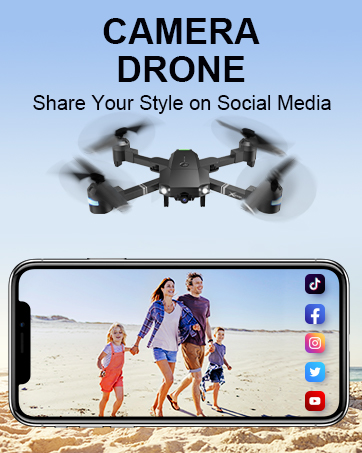
Image: The remote controller with a smartphone attached, displaying the drone's camera view through the ATTOP CLUB app.
4. പ്രവർത്തന നിർദ്ദേശങ്ങൾ
4.1 അടിസ്ഥാന ഫ്ലൈറ്റ് നിയന്ത്രണങ്ങൾ
- One Key Take Off/Land: Press the designated button on the remote or in the app for automatic take-off or landing.
- ആൾട്ടിറ്റ്യൂഡ് ഹോൾഡ്: ഡ്രോൺ സ്ഥിരമായ ഉയരം നിലനിർത്തുന്നു, ഇത് എളുപ്പത്തിലുള്ള നിയന്ത്രണത്തിനും വ്യക്തമായ ആകാശ ഫോട്ടോഗ്രാഫിക്കും അനുവദിക്കുന്നു.
- തലയില്ലാത്ത മോഡ്: ഈ മോഡിൽ, ഡ്രോണിന്റെ ഓറിയന്റേഷൻ പൈലറ്റിനെ ആശ്രയിച്ചിരിക്കുന്നു, പറക്കുന്നതിന് മുമ്പ് അതിന്റെ സ്ഥാനം ക്രമീകരിക്കേണ്ടതിന്റെ ആവശ്യകത ഇല്ലാതാക്കുന്നു.
- 3-Speed Mode: Adjust the drone's speed to suit your skill level, from beginner-friendly slow speeds to advanced fast modes.

Image: Demonstrations of key user-friendly features: One Key Start/Landing/Return, Altitude Hold for stable flight, and Headless Mode for simplified control.
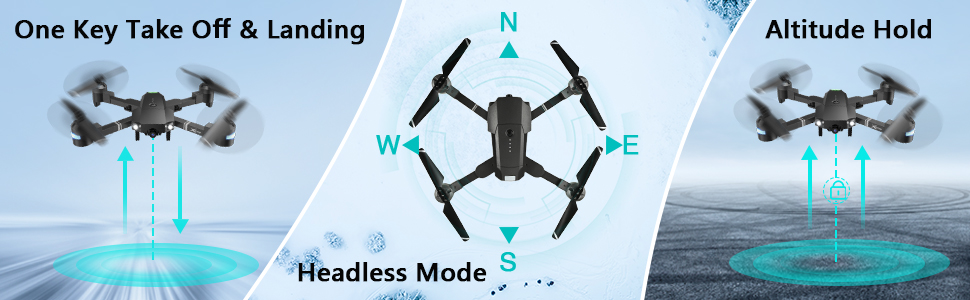
Image: Visual guide to One Key Take Off & Landing, Headless Mode, and Altitude Hold functions for simplified drone operation.

Image: A graphic illustrating the drone's three adjustable speed settings: 30%, 60%, and 100% for varied flight experiences.
4.2 Camera and FPV Features
The drone is equipped with a 1080P 120° wide-angle FPV (First Person View) camera, providing real-time video transmission to your connected smartphone via the "ATTOP CLUB" APP. This allows you to capture high-definition photos and videos from an aerial perspective.

Image: A close-up of the drone's 120-degree wide-angle 1080P FPV camera, emphasizing its real-time transmission capability for vivid aerial views.
You can easily share your captured moments directly to social media platforms with a single click from the app.

Image: A user holding the remote controller with a smartphone attached, displaying social media icons, illustrating the one-click sharing feature for photos and videos.
4.3 Advanced Control Functions (APP-Controlled)
- ഫ്ലൈറ്റ് പാത്ത് മോഡ്: നിങ്ങളുടെ സ്മാർട്ട്ഫോൺ സ്ക്രീനിൽ ആവശ്യമുള്ള ഒരു ഫ്ലൈറ്റ് പാത്ത് വരയ്ക്കുക, ഡ്രോൺ യാന്ത്രികമായി അതിനെ പിന്തുടരും.
- ആംഗ്യ നിയന്ത്രണം: Perform specific hand gestures (e.g., "V" gesture) to command the drone to take photos or videos.
- ശബ്ദ നിയന്ത്രണം: Use simple voice commands (e.g., "Take off," "Forward," "Landing") to control the drone's flight.
- ഗുരുത്വാകർഷണ നിയന്ത്രണം: Utilize your phone's built-in G-sensor to control the drone's movement by tilting your device.
- വിആർ മോഡ്: Compatible with VR glasses (not included), offering an immersive 3D flight experience.
- 360° ഫ്ലിപ്പ്: Execute impressive aerial stunts with a single button press, performing a full 360-degree flip.

Image: Visuals depicting advanced flight functions: drawing a Flight Route on a map, performing a 360° Flip, and switching between 3 Speed modes.

ചിത്രം: ഉദാamples of intuitive control methods: Gesture Control, where hand signals command the drone, and Voice Control, responding to spoken commands.

ചിത്രം: ഒരു സംയുക്ത ചിത്ര പ്രദർശനംasing multiple advanced drone features: APP Gravity Control, Flight Route Mode, VR Mode, 360° 3D Flip, Voice Control, and Gesture Control.
4.4 സുരക്ഷാ സവിശേഷതകൾ
- ഒരു കീ റിട്ടേൺ: The drone can automatically find its way back to the take-off point.
- അടിയന്തരമായി നിർത്തുക: Immediately stops the drone and initiates landing in critical situations.
- കുറഞ്ഞ ബാറ്ററി മുന്നറിയിപ്പ്: Alerts the user when the battery is low, preventing unexpected crashes.
4.5 ഔദ്യോഗിക ഉൽപ്പന്ന വീഡിയോകൾ
APP ഓപ്പറേഷൻ ഗൈഡ്
Video: A detailed guide on how to operate the ATTOP Drone using the dedicated mobile application, covering various control features and settings.
Just 1 Button or 1 Key to Enjoy Flying
Video: This video demonstrates the simplicity of drone operation with one-button take-off and landing features, making it accessible for beginners.
Best Christmas Gifts Drone, X-Pack 18!!!
Video: A demonstration of the X-Pack 18 drone's features and capabilities, showcasing അതിന്റെ പ്രകടനവും ഉപയോഗ എളുപ്പവും.
5. പരിപാലനം
- വൃത്തിയാക്കൽ: Regularly wipe the drone's body with a soft, dry cloth. Avoid using harsh chemicals or solvents.
- പ്രൊപ്പല്ലറുകൾ: Inspect propellers for any damage (cracks, bends) before each flight. Replace damaged propellers immediately using the provided spares and screwdriver.
- ബാറ്ററി കെയർ: Store batteries in a cool, dry place. Do not overcharge or over-discharge. If storing for extended periods, charge to approximately 50%.
- സംഭരണം: When not in use, store the drone and its components in the carrying case to protect them from dust and physical damage.
6. പ്രശ്നപരിഹാരം
| പ്രശ്നം | സാധ്യമായ കാരണം | പരിഹാരം |
|---|---|---|
| ഡ്രോൺ റിമോട്ടിനോട് പ്രതികരിക്കുന്നില്ല. | Low battery in drone or remote; not properly paired. | Charge batteries; re-pair drone and remote according to pairing instructions in the full manual. |
| Poor camera feed/connection. | Weak Wi-Fi signal; interference; app issue. | Ensure drone and phone are close; restart app and drone; check for app updates. |
| പറക്കലിനിടെ ഡ്രോൺ തെന്നിമാറി. | Needs calibration; uneven surface for take-off. | Perform gyroscope calibration (refer to full manual); take off from a flat, level surface. |
| ചെറിയ ഫ്ലൈറ്റ് സമയം. | ബാറ്ററി പൂർണ്ണമായും ചാർജ് ചെയ്തിട്ടില്ല; പഴയ ബാറ്ററി. | Ensure battery is fully charged; consider replacing old batteries. |
7 സ്പെസിഫിക്കേഷനുകൾ
| ഫീച്ചർ | വിശദാംശങ്ങൾ |
|---|---|
| ബ്രാൻഡ് | ATTOP |
| മോഡലിൻ്റെ പേര് | ATTOP Drone |
| പ്രത്യേക സവിശേഷതകൾ | 360 Degree Flip, Speed Adjustment, Foldable, Auto-Landing, Rechargeable |
| പ്രായപരിധി | Adult, Kid (8-12) |
| നിറം | കറുപ്പ് |
| വീഡിയോ ക്യാപ്ചർ റെസല്യൂഷൻ | 1080p |
| ഫലപ്രദമായ സ്റ്റിൽ റെസല്യൂഷൻ | 2 എം.പി |
| കണക്റ്റിവിറ്റി ടെക്നോളജി | വൈഫൈ |
| ഉൾപ്പെടുത്തിയ ഘടകങ്ങൾ | Drone, Remote Controller, 2 x Batteries, Carrying Case, Camera, USB Charging Cable, Spare Propellers, Screwdriver |
| നൈപുണ്യ നില | തുടക്കക്കാരൻ |
| ബാറ്ററി ശേഷി | 1100 മില്ലിamp മണിക്കൂർ (ഓരോ ബാറ്ററിക്കും) |
| പരമാവധി പരിധി | 292 അടി |
| ഉൽപ്പന്ന അളവുകൾ | 13.8"L x 12.6"W x 2.76"H |
| ഇനത്തിൻ്റെ ഭാരം | 1.81 പൗണ്ട് |
8. വാറൻ്റിയും പിന്തുണയും
For detailed warranty information and customer support, please refer to the official ATTOP website or contact their customer service directly. You can also find additional resources and FAQs on the product's Amazon listing page.
ഔദ്യോഗിക ഉപയോക്തൃ ഗൈഡ് (PDF): ഇവിടെ ഡൗൺലോഡ് ചെയ്യുക
ഔദ്യോഗിക ഉപയോക്തൃ മാനുവൽ (PDF): ഇവിടെ ഡൗൺലോഡ് ചെയ്യുക
Ask a question about this manual
Ask about setup, troubleshooting, compatibility, parts, safety, or missing instructions. Manuals+ will review the question and use this page’s manual context to help answer it.